A2A

A2A: how agents talk to agents

Start with one example. Then learn Google's open protocol. Then see how Meta runs A2A inside the company.

Example first

The problem: two agents, two teams

Example first

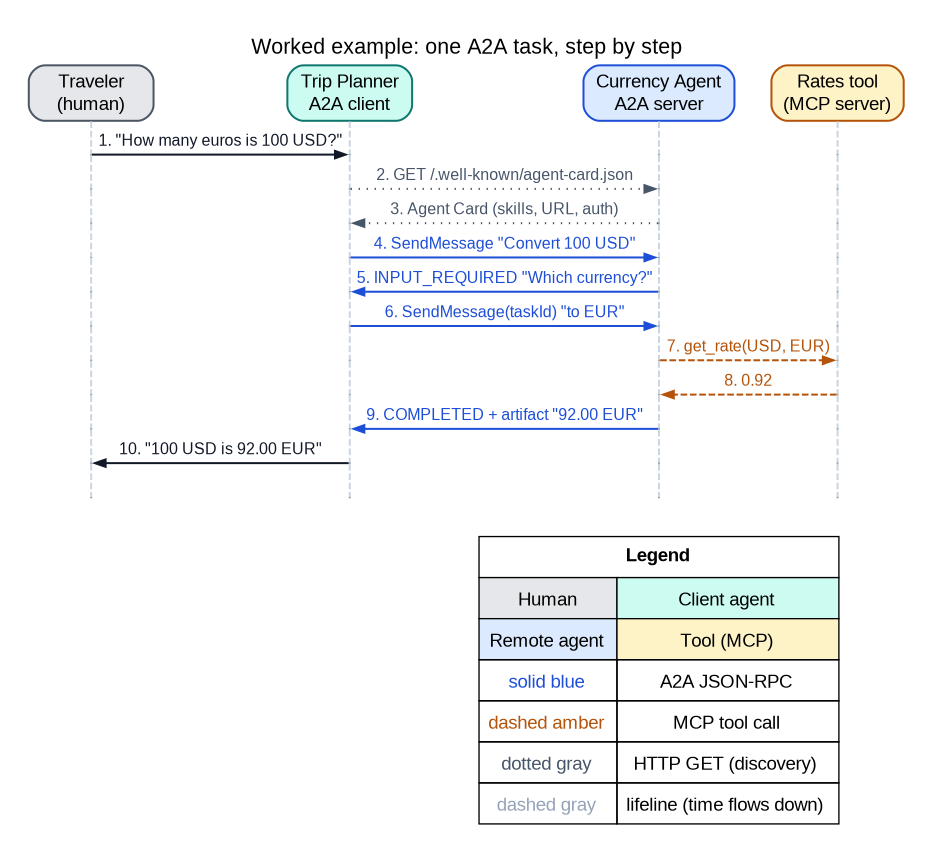
The whole example in one picture

Sequence diagram of the worked example

Steps 2 and 3 are discovery. Steps 4 to 6 are a multi-turn task. Step 7 shows the remote agent using MCP for its own tools.

Example first

Run it: real output from this lab

$ python src/a2a_lab/raw_server.py --port 9999 &
$ python src/a2a_lab/raw_client.py --url http://localhost:9999
Discovered 'Currency Agent' with skills: convert_currency
Trip Planner: Convert 100 USD
Currency Agent asks: Which currency should I convert to?
Trip Planner: to EUR
Final state: TASK_STATE_COMPLETED
Answer: 100 USD = 92.00 EUR

Trip Planner (streaming): How much is 50 GBP in INR?
  task created: TASK_STATE_SUBMITTED
  status: TASK_STATE_WORKING
  artifact: 50 GBP = 5265.82 INR
  status: TASK_STATE_COMPLETED

No API keys. The agent's brain is a small rule file, so results are exact.

Example first

Six words to learn

Google A2A

Where A2A came from

Google A2A

Design ideas behind the spec

Google A2A

Step 1: discovery with the Agent Card

GET /.well-known/agent-card.json
{
  "name": "Currency Agent",
  "description": "Converts money between USD, EUR, GBP, INR, and JPY.",
  "version": "1.0.0",
  "supportedInterfaces": [
    {"url": "http://localhost:9999/a2a/v1",
     "protocolBinding": "JSONRPC", "protocolVersion": "1.0"}
  ],
  "capabilities": {"streaming": true, "pushNotifications": false},
  "defaultInputModes": ["text/plain"],
  "defaultOutputModes": ["text/plain", "application/json"],
  "skills": [{
    "id": "convert_currency", "name": "Convert currency",
    "description": "Convert an amount... Asks a follow-up when details are missing.",
    "tags": ["finance", "currency"],
    "examples": ["Convert 100 USD to EUR"]
  }]
}

Served at the well-known path. A client reads skills to pick an agent and supportedInterfaces to pick a transport. Cards can be signed with JWS.
Discovery

How does an agent find other agents?

Discovery flow: three strategies, then choose

The spec names three ways to find cards. The client then picks one card, one transport, and one auth scheme. Files: discovery/.

Discovery

Way 1: the well-known URL

# --- First fetch ---------------------------------------------------------
GET /.well-known/agent-card.json HTTP/1.1
Host: currency.example.com
Accept: application/json

HTTP/1.1 200 OK
Content-Type: application/json
Cache-Control: public, max-age=3600        # card changes rarely: cache for 1 hour
ETag: "card-v1.0.0"                        # derived from the card's "version"

{ ...the agent-card.json in currency.example.com/.well-known/... }

# --- One hour later: card expired in the client's cache ------------------
GET /.well-known/agent-card.json HTTP/1.1
Host: currency.example.com
If-None-Match: "card-v1.0.0"               # "only send it if it changed"

HTTP/1.1 304 Not Modified                  # nothing changed, reuse the cached card

Best for public agents. You must already know the domain. Caching with ETag keeps it cheap.

Discovery

Way 2: a curated registry

# --- Filter search --------------------------------------------------------
GET /registry/v1/agents?tag=currency&capability=streaming&binding=JSONRPC HTTP/1.1
Host: agents.example-corp.com
Authorization: Bearer <client token>        # the registry hides cards you may not see

# --- Semantic search ------------------------------------------------------
POST /registry/v1/agents:search HTTP/1.1
Host: agents.example-corp.com
Authorization: Bearer <client token>
Content-Type: application/json

{"query": "turn US dollars into euros", "topK": 3}
"results": [
    {
      "agentId": "fx.currency",
      "score": 0.91,
      "matchedSkill": "convert_currency",
      "cardUrl": "https://currency.example.com/.well-known/agent-card.json",
      "card": {"name": "Currency Agent", "version": "1.0.0", "...": "full Agent Card inline, so no second fetch"}
    },
    {
      "agentId": "wx.weather",

Agents publish cards. Clients search by tag or by meaning. The spec has no standard registry API, so each company builds its own.

Discovery

Way 3: direct configuration

# Strategy 3: Direct configuration. The client is told where agents live.
# Simple and private. Best for dev, tests, and tightly coupled systems.
# Change an agent's URL and you must redeploy the client.

agents:
  currency:
    card_url: https://currency.example.com/.well-known/agent-card.json
    auth:
      type: bearer
      token_env: CURRENCY_AGENT_TOKEN       # secret comes from env, never from the card
  weather:
    card_file: ./cards/weather.json         # the whole card can be shipped as a file
    auth:
      type: api_key
      key_env: WEATHER_API_KEY
  local_dev:
    card_url: http://localhost:9999/.well-known/agent-card.json   # this lab's raw_server.py

Simple and private. Good for dev, tests, and fixed partners. Secrets come from the environment, never from the card.

Discovery

Choosing one agent from many cards

def discover(job: str) -> Choice:
    """Run steps 1 to 4 for one job."""
    cards = from_registry() or from_direct_config()
    card, skill_id = best_skill(cards, set(job.lower().split()))
    interface = pick_interface(card)
    return Choice(card["name"], skill_id, interface["url"],
                  interface["protocolBinding"], pick_auth(card))

def pick_interface(card: Card) -> dict[str, str]:
    """Spec 8.3.2: take the FIRST interface in the agent's list that we support."""
    for interface in card["supportedInterfaces"]:
        if interface["protocolBinding"] in MY_BINDINGS:
            return interface
    raise LookupError(f"{card['name']}: no shared transport")

Run python discovery/discover.py. The Weather Agent lists gRPC first, but this client picks JSON-RPC, the first transport both sides speak.

Google A2A

Step 2: send a message

POST /a2a/v1   Content-Type: application/json   A2A-Version: 1.0
{
  "jsonrpc": "2.0", "id": "1", "method": "SendMessage",
  "params": {
    "message": {
      "messageId": "5bbe40f8",
      "role": "ROLE_USER",
      "parts": [{"text": "Convert 100 USD"}]
    }
  }
}
{
  "jsonrpc": "2.0", "id": "1",
  "result": {
    "task": {
      "id": "5fabb749", "contextId": "2dc5920d",
      "status": {
        "state": "TASK_STATE_INPUT_REQUIRED",
        "message": {"role": "ROLE_AGENT",
                    "parts": [{"text": "Which currency should I convert to?"}]}
      },
      "history": [ ...the user message... ]
    }
  }
}

The server makes the task ID. The reply is a Task, or a plain Message for quick answers. IDs are shortened here.

Google A2A

Step 3: answer the agent's question

{
  "jsonrpc": "2.0", "id": "2", "method": "SendMessage",
  "params": {
    "message": {
      "messageId": "9f0d5b63", "role": "ROLE_USER",
      "taskId": "5fabb749", "contextId": "2dc5920d",
      "parts": [{"text": "to EUR"}]
    }
  }
}

Google A2A

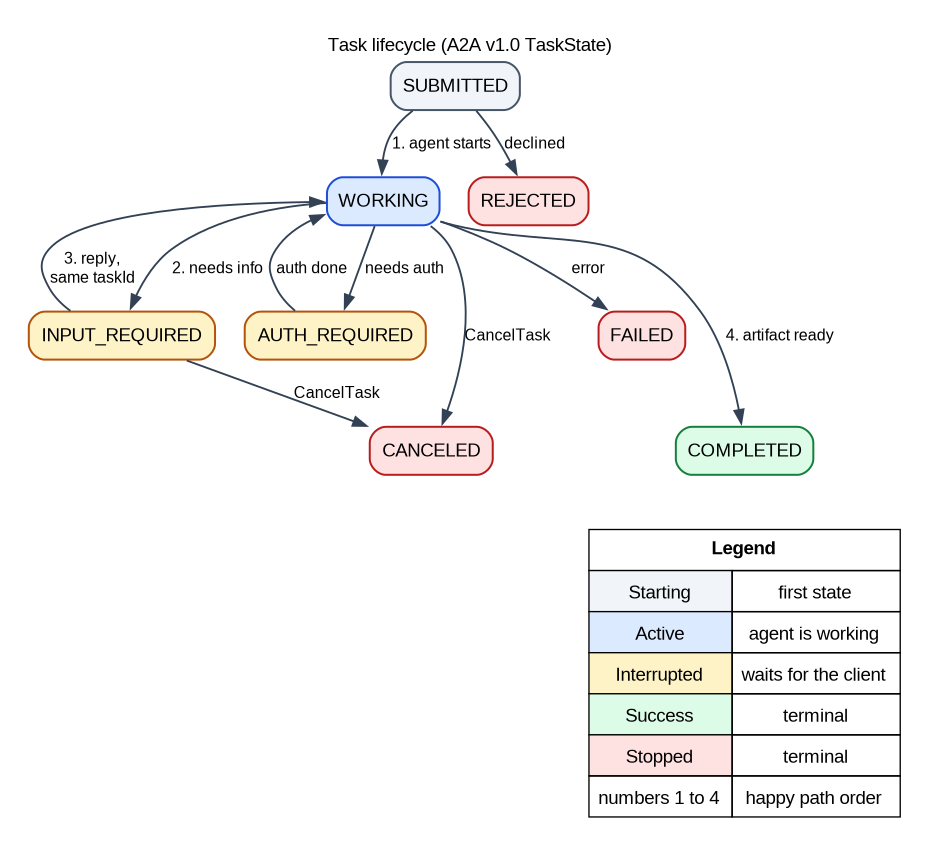
The task lifecycle

Task state machine

Google A2A

Step 4: streaming with SSE

HTTP/1.1 200 OK
Content-Type: text/event-stream

data: {"jsonrpc":"2.0","id":"3","result":{"task":{"id":"96f3...","status":{"state":"TASK_STATE_SUBMITTED"}}}}

data: {"jsonrpc":"2.0","id":"3","result":{"statusUpdate":{"taskId":"96f3...","status":{"state":"TASK_STATE_WORKING"}}}}

data: {"jsonrpc":"2.0","id":"3","result":{"artifactUpdate":{"taskId":"96f3...","artifact":{"parts":[{"text":"50 GBP = 5265.82 INR"}]},"lastChunk":true}}}

data: {"jsonrpc":"2.0","id":"3","result":{"statusUpdate":{"taskId":"96f3...","status":{"state":"TASK_STATE_COMPLETED"}}}}

SendStreamingMessage keeps the HTTP response open. Each data: line is one event: a Task, a statusUpdate, or an artifactUpdate. Big artifacts can arrive in chunks with append.

Google A2A

Three ways to get updates

Google A2A

All 11 operations, three transports

Google A2A

Security

How it works

Inside an A2A server

What happens inside an A2A server for one request

How it works

What the SDK hides: the raw version

def _run(self, task: Json, message: Json) -> Iterator[Json]:
    """The agent logic. A generator, so streaming can send each step live."""
    yield self._set_state(task, "TASK_STATE_WORKING")
    text = " ".join(p.get("text", "") for p in message["parts"])
    with self._lock:
        request = self._understood[task["id"]].merge(rules.parse(text))
        self._understood[task["id"]] = request
    question = request.missing_question()
    if question is not None:
        reply = text_message("ROLE_AGENT", question, task=task)
        yield self._set_state(task, "TASK_STATE_INPUT_REQUIRED", reply)
        return
    yield self._add_artifact(task, request)
    yield self._set_state(task, "TASK_STATE_COMPLETED")

From raw_server.py. The agent is a generator. SendMessage drains it. SendStreamingMessage sends each yielded event as one SSE frame.

Setup

What you need

Setup

Folder structure

a2a/
├── index.html              # this deck
├── build_deck.py           # rebuilds the deck from src/
├── requirements.txt        # a2a-sdk[http-server]==1.3.0, uvicorn, httpx
├── src/a2a_lab/
│   ├── currency_rules.py   # the agent's "brain" (no LLM, no network)
│   ├── raw_server.py       # A2A server, standard library only
│   ├── raw_client.py       # A2A client, standard library only
│   ├── sdk_server.py       # same agent on the official SDK
│   └── sdk_client.py       # orchestrator that calls both servers
├── tests/test_a2a_lab.py   # 13 tests, includes raw <-> SDK interop
├── discovery/              # how agents find agents (sample files)
│   ├── 1_well_known/  2_registry/  3_direct_config/  4_meta/
│   └── discover.py         # pick skill, transport, and auth
└── diagrams/               # Graphviz .dot sources + rendered .svg

Setup

Run the lab

cd a2a
python3 -m venv .venv && source .venv/bin/activate
python -m pip install -r requirements.txt     # a2a-sdk[http-server]==1.3.0

# Terminal 1 and 2: start two agents
python src/a2a_lab/raw_server.py --port 9999
python src/a2a_lab/sdk_server.py --port 10000

# Terminal 3: talk to them
python src/a2a_lab/raw_client.py --url http://localhost:9999 --wire
python src/a2a_lab/sdk_client.py http://localhost:9999 http://localhost:10000
python -m unittest discover -s tests -v

Code

Server, part 1: your AgentExecutor

class CurrencyAgentExecutor(AgentExecutor):
    """All agent logic lives here. The SDK calls execute() once per message."""

    async def execute(self, context: RequestContext, event_queue: EventQueue) -> None:
        """Publish a Task, then status and artifact events to the queue."""
        assert context.message is not None and context.task_id and context.context_id
        task = context.current_task
        if task is None:
            task = new_task(context.task_id, context.context_id,
                            TaskState.TASK_STATE_SUBMITTED, history=[context.message])
            await event_queue.enqueue_event(task)
        updater = TaskUpdater(event_queue, context.task_id, context.context_id)
        await updater.start_work()
        request = understood_so_far(list(task.history), context.message)
        question = request.missing_question()
        if question is not None:
            await updater.requires_input(updater.new_agent_message([new_text_part(question)]))
            return
        await updater.add_artifact(
            [new_text_part(rules.answer(request)),
             new_data_part({"result": str(rules.convert(request)), "to": request.target})],
            name="conversion")
        await updater.complete()

    async def cancel(self, context: RequestContext, event_queue: EventQueue) -> None:
        """Mark the task canceled. This agent has no background work to stop."""
        assert context.task_id and context.context_id
        await TaskUpdater(event_queue, context.task_id, context.context_id).cancel()

This is the only class with agent logic. Swap the rules for an LLM call and nothing else changes.

Code

Server, part 2: wire it up

def build_app(base_url: str) -> Starlette:
    """Wire the executor, task store, and routes into one ASGI app."""
    card = build_card(base_url)
    handler = DefaultRequestHandler(
        agent_executor=CurrencyAgentExecutor(),
        task_store=InMemoryTaskStore(),
        agent_card=card,
    )
    routes = [*create_agent_card_routes(card), *create_jsonrpc_routes(handler, RPC_PATH)]
    return Starlette(routes=routes)

InMemoryTaskStore loses tasks on restart. Use DatabaseTaskStore in production.

Code

Client: discover, ask, follow up

async def ask_agent(url: str, first: str, follow_up: str) -> str:
    """Discover the agent, run a multi-turn task, and return the answer text."""
    client = await create_client(url, client_config=ClientConfig(streaming=False))
    async with client:
        message = new_text_message(first, role=Role.ROLE_USER)
        task = await send(client, message)
        while task.status.state == TaskState.TASK_STATE_INPUT_REQUIRED:
            print(f"  [{url}] agent asks: {get_message_text(task.status.message)}")
            reply = new_text_message(follow_up, role=Role.ROLE_USER,
                                     task_id=task.id, context_id=task.context_id)
            task = await send(client, reply)
        return get_artifact_text(task.artifacts[0])

create_client(url) fetches the Agent Card and picks a transport.

Code

Proof: one protocol, two implementations

$ python src/a2a_lab/sdk_client.py http://localhost:9999 http://localhost:10000
  [http://localhost:9999] agent asks: Which currency should I convert to?
  [http://localhost:10000] agent asks: Which currency should I convert to?
http://localhost:9999 -> 250 EUR = 41168.48 JPY
http://localhost:10000 -> 250 EUR = 41168.48 JPY

The SDK client talks to the from-scratch server. The raw client talks to the SDK server. A test checks both directions.

Meta A2A

A2A at Meta: three implementations

Meta A2A

How the Meta platform fits together

Meta A2A platform architecture

Meta A2A

Build an agent on the A2A Platform

// Hack, www. Names from the A2A Platform wiki (draft, Nov 2026).
<<A2AAgent>>
final class FBA2AMyTeamAgentSchema extends A2AAgentBase {
  // 1. Describe the agent: card fields and skills.
  // 2. configureAuthorization(): capability, permission, ...
  // 3. Optional: mcpServer() binds an existing Stefi MCP server.
}

$ a2a gencode --full-build      # add --dry-run to preview
$ t flib/a2a_platform/          # run the platform tests

Meta A2A

Thrift A2A path (Hack, Mobius)

Meta A2A

Identity, registry, and discovery

Meta A2A

Discovery at Meta: finding an agent

# List registered agents. The field name a2a_registry_agents is from the A2A Platform docs.
# Arguments and selection are illustrative.
query FindCurrencyAgents {
  a2a_registry_agents(skill_tag: "currency") {
    agent_id
    version
    party
    status
    agent_card {
      name
      description
      skills { id name tags }
    }
  }
}
# The Gateway's own public card (standard well-known path, under /a2a)
GET /a2a/.well-known/agent-card.json

# Extended card for the platform, signed-in callers only
GET /a2a/v1/extendedAgentCard

# Extended card for one registered agent
GET /a2a/agents/fb.currency/v1/extendedAgentCard
Authorization: Bearer <OAuth token>

Field layouts are sketches. Names come from the A2A Platform wiki.

Meta A2A

Gaps to know before you build

Compare

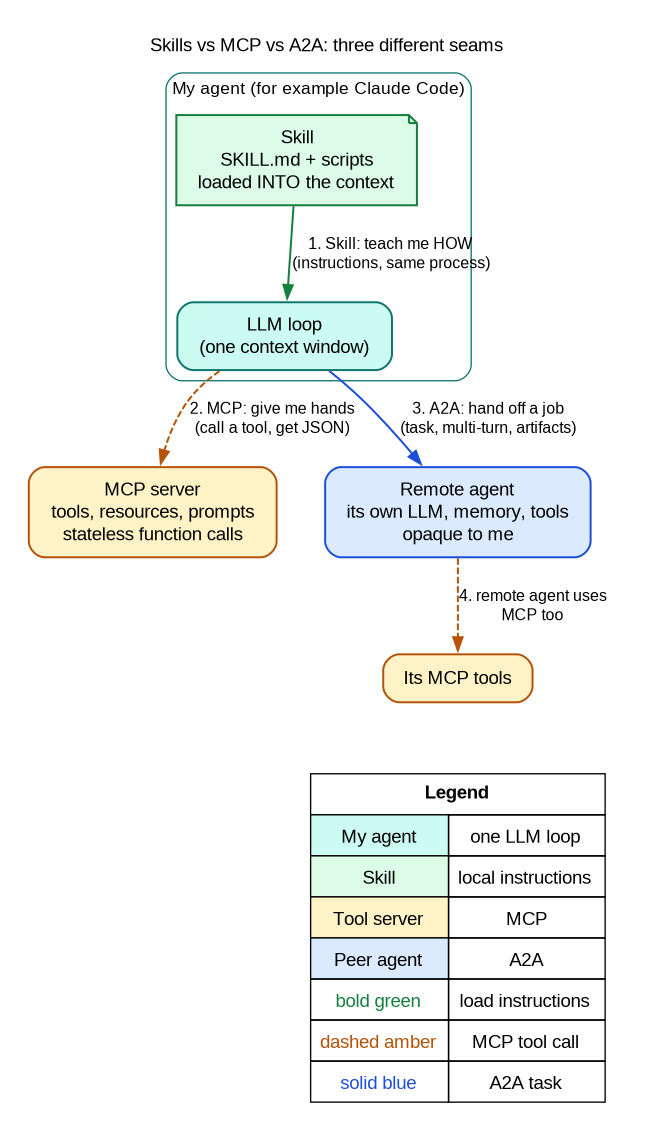
Skills, MCP, and A2A sit at different seams

Skills vs MCP vs A2A

Compare

Skill

Compare

MCP

Compare

A2A

Compare

One line to remember

Skills teach me how.
MCP gives me hands.
A2A gives me a coworker.

They stack. An A2A agent often uses MCP tools inside, and may load skills too.

When to use it

Use A2A when

When to use it

Do not use A2A when

Checklist

Build checklist

Lab

Downloads and sources