A system design interview guide to the component that quietly powers search engines, archives, and monitoring systems: a program that starts from a handful of links and walks the web one page at a time, discovering new pages as it goes — without drowning in duplicates, looping forever, or hammering any single server.
Student edition · start with the guarantee
Schedule a bounded web crawl without overwhelming websites, losing queued URLs, or assuming every duplicate test is exact.
Correctness contract: Durably queued work is recoverable; each origin's rate/concurrency policy is enforced across workers; normalization preserves intended URL semantics.
Basic HTTP, databases, and programming are assumed. Specialized terms are explained below. Named products motivate the problem; this is an educational design, not a claim about their current internals. Capacity numbers are illustrative decimal payload estimates, not benchmarks. Add indexes, protocol overhead, replicas, headroom, and failure capacity before provisioning.
A web crawler (also called a spider or bot) is a program that systematically downloads web pages, extracts the links inside them, and follows those links to discover still more pages. It is the engine behind search indexing, but it shows up wherever you need to traverse the web at scale. The hard part is almost never downloading a single page — it is doing so for billions of pages while staying polite to the servers you visit, avoiding the same content twice, never getting stuck in an infinite loop, and surviving machine failures along the way. This guide walks through the standard component design and the design decisions behind each piece.
Each definition includes a concrete example and the condition under which the mechanism is useful. You can read this guide without opening another guide.
Crawl frontier and politeness
The frontier is the durable set of URLs waiting for fetch, with scheduling state per origin. Politeness limits start rate and/or concurrent fetches to avoid overloading one website.
Example. A slow 5-second request with a 1-second start delay still overlaps the next request unless the scheduler also tracks an in-flight permit.
Limit. Origin means scheme, host, and port. Multi-worker ownership changes need safe permit transfer. Respect robots rules, bound redirects and content size, and distinguish queued, fetched, and recrawl-due URLs.
Bloom filters
A bit array plus several hash functions used for approximate membership. Adding an item sets its hash-selected bits; a query with any unset bit is definitely absent, while all-set means only 'possibly present'.
Example. At a chosen 1% false-positive rate, about 9.6 bits per inserted item are needed near optimal sizing. A new click may be called 'seen' even though it is not a duplicate.
Limit. Never drop exact billable events solely because a Bloom filter says 'present'. Use it to avoid unnecessary exact lookups; overload, deletion, incompatible hashing, or lost state invalidate the usual guarantees.
Deduplication
Recognizing multiple deliveries of one logical event using a stable identity. The same logical event must keep its ID across retries, and claiming the ID must be atomic with the counted or stored effect.
Example. Events e1,e2,e1 should yield a count of 2. An exact seen set plus the increment in one transaction makes the second e1 a no-op.
Limit. A TTL limits the dedup horizon; retries after expiry may count again. Approximate filters may drop new events, and changing the ID or routing a retry to another local seen set defeats dedup.
Transactional outbox
A business transaction writes its state change and an event row to the same database. A relay publishes committed event rows later, retrying until the broker durably accepts them.
Example. An order and its OrderCreated outbox row commit together. A relay crash after publish but before marking sent publishes the same event ID again on restart.
Limit. The relay is at-least-once, not magically exactly-once. Consumers dedup transactionally; preserve per-entity sequence when order matters. CDC is change data capture: reading committed database changes.
Leases
Time-limited permission issued by an authority. Expiry lets new work proceed after a client stops renewing; it does not prove that the previous holder is dead or unable to act.
Example. A 30-second lease expires while A is paused for 45 seconds. B can acquire a new lease, but A can still wake up and send a delayed write.
Limit. Heartbeats improve recovery time, not safety by themselves. Compare-and-renew/delete must verify a unique acquisition token atomically, and protected effects need fencing or equivalent serialization.
Backpressure and load shedding
Backpressure tells an upstream producer that the downstream stage cannot accept more work. Buffering delays that signal; shedding deliberately rejects or drops lower-priority work when a bound is reached.
Example. A sink accepts 100 events/s while input is 150/s. A 1000-event queue fills in 20 seconds. The system must then block, reject, or apply its documented drop policy.
Limit. A finite queue cannot absorb an infinite outage. Prioritized messages still need hard quotas, deadlines, and bounded client queues; otherwise an exemption can exhaust the system.
1. Purpose and Use Cases
Every crawler does the same mechanical thing — fetch a page, find its links, fetch those — but the reason for crawling shapes how aggressive, how fresh, and how selective it needs to be. Three families of use cases cover most designs.
Use case
What the crawler is for
Design pressure
Search indexing
Download pages so a downstream indexer can build an inverted index for query serving. The classic motivation.
Breadth and coverage matter most; you want to reach as much of the web as possible and keep important pages reasonably fresh.
Archiving
Capture and preserve snapshots of pages over time so they can be retrieved later, even after the original is gone.
Completeness and fidelity matter; you store the raw content, often with periodic re-crawls to build a history.
Monitoring
Watch a known set of pages for changes — price changes, copyright or policy violations, broken links, defacement.
Freshness and targeting matter; the URL set is narrow and revisited on a tight schedule.
These goals are not mutually exclusive, but they pull the design in different directions. A search crawler optimizes for reaching new pages; a monitoring crawler optimizes for revisiting a fixed set quickly. The component skeleton below is the same in all cases — what changes is how the frontier prioritizes work and how often pages are re-crawled.
2. Requirements and Clarifying Questions
Ask first: What is the crawler for (search, archive, monitoring)? How many pages per month? HTML only, or images and PDFs too? How long do we keep pages? Must we handle pages that need JavaScript to render?
Kind
Requirement
Functional
Start from seed URLs, download HTML pages, extract links, crawl new URLs, store pages for an indexer.
Functional
Re-crawl pages so the store stays reasonably fresh.
Non-functional: scale
About 1 billion pages a month, running on many machines in parallel.
Non-functional: politeness
Never overload a host; obey robots.txt.
Non-functional: robustness
Survive bad HTML, slow servers, spider traps and machine crashes.
Non-functional: extensibility
Easy to add new content types (for example, images) later.
3. Back-of-the-Envelope Estimation
Quantity
Working
Result
Pages per second
1B ÷ (30 × 86,400 s)
~390 /s (peak ~800)
Download bandwidth
390 × 500 KB
~190 MB/s (~1.5 Gbit/s)
Storage per month
1B × 500 KB
500 TB
“URL seen?” Bloom filter
10B URLs × 9.6 bits (1% false positives)
~12 GB
Same set as 8-byte hashes
10B × 8 B
80 GB
Storage for 5 years
500 TB × 60 months
30 PB
What the numbers tell you
30 PB means content storage is a distributed blob store, not a database. 390 fetches a second is modest, but each fetch can take a second or more. So you need hundreds to thousands of fetches in flight at once, which is why the downloader is built around async I/O.
4. Traversal Strategy: BFS vs DFS
The web is a directed graph: pages are nodes and hyperlinks are edges. Crawling is graph traversal, so the first design choice is how to traverse — breadth-first (BFS) or depth-first (DFS). The answer for almost every crawler is BFS, and the reasons are worth understanding because they explain the shape of the rest of the system.
Strategy
How it explores
Why it does or doesn't fit crawling
BFS (breadth-first)
Visits all links on the current page before going deeper, using a FIFO queue: newly discovered URLs go to the back, the next URL to crawl comes off the front.
The usual choice. It explores the web layer by layer, naturally keeping the crawl near high-value entry points and spreading work across many hosts.
DFS (depth-first)
Follows one link as far as it goes before backtracking, using a stack.
Rarely a good fit. It dives down a single path and can descend extremely deep — link chains on the web can be very long — so it wanders far from your seeds and is easy to trap in a deep, low-value corner of one site.
Plain BFS still needs two fixes before it is usable. Politeness: a naive BFS that just queues links in discovery order tends to pull many URLs from the same host in a row, because pages link heavily within their own site — so the real frontier is a BFS refined with per-host scheduling (covered in the URL Frontier section), not a single global queue. Priority: plain BFS treats every URL as equal, but some pages matter far more. On the plus side, because BFS stays close to your seed pages, which are typically high-importance hubs, it tends to discover and refresh important pages sooner than a depth-first dive into one site's archives. The takeaway: the crawler's core data structure is a queue, and the entire frontier design exists to turn a plain FIFO queue into one that is also polite and prioritized.
A plain global FIFO queue gets the traversal order right but the manners wrong: it would happily send a hundred requests to one server back to back. That single problem — fair, polite scheduling — is the reason the URL Frontier is the most elaborate component in the whole design.
5. Component Architecture
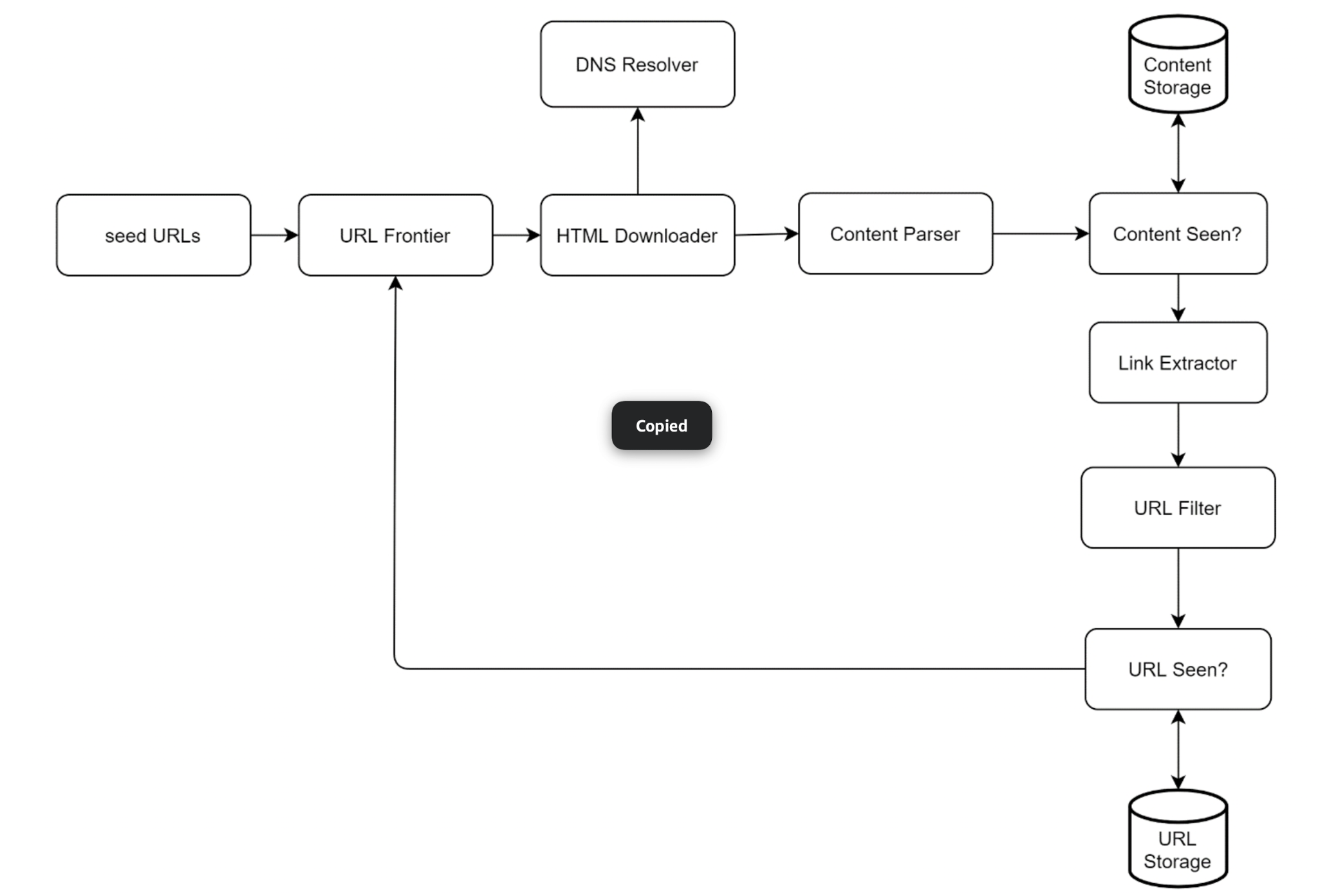
A crawler is best understood as a pipeline. URLs flow in at one end, pages and freshly discovered URLs flow out, and the discovered URLs loop back to the start. Each stage is a separate component so it can be scaled and reasoned about independently.
The crawl loop: seed URLs prime the URL Frontier, the HTML Downloader fetches pages (consulting a DNS Resolver), the Content Parser and a "Content Seen?" check store new content, and the Link Extractor feeds new URLs through filtering and dedup back into the frontier.
Reading the diagram as a loop:
Seed URLs prime the URL Frontier with a starting set of pages to download.
The HTML Downloader pulls a URL off the frontier and fetches the page, asking the DNS Resolver to turn the hostname into an IP address first.
The Content Parser validates and parses the downloaded HTML.
A "Content Seen?" check asks whether this exact page content has been stored before; new content goes to Content Storage, duplicates are dropped.
The Link Extractor pulls hyperlinks out of the parsed page.
Each extracted URL passes through a URL Filter (rejecting unwanted types and blocked sites), then a "URL Seen?" check; URLs that are new are recorded in URL Storage and fed back into the URL Frontier.
The loop continues until the frontier is empty or a stopping condition (page budget, depth limit, time limit) is reached. The two "Seen?" gates are what keep the loop from doing redundant work, and the filter is what keeps it from wandering into places it shouldn't go.
What gets stored
Store
Key
Value
URL store
hash of normalized URL
URL, last crawl time, HTTP status, content hash, next crawl time
Content store (blobs)
content hash
compressed HTML, fetch headers
Host table
host name
cached robots.txt, crawl delay, DNS result and its TTL, error count
6. Walking the Components
Each box in the pipeline has one job. Taken together they turn "follow links" into a controlled, deduplicated, polite traversal.
Seed URLs
The crawl has to start somewhere. Seed URLs are the initial set fed into the frontier. Good seeds maximize coverage for the smallest set — popular, well-connected hub pages, or a partition by topic, by language, or by region. The choice matters: a crawler can only ever reach pages that are reachable by links from its seeds, so poor seeds leave whole regions of the web invisible.
URL Frontier
The URL Frontier is the queue of URLs waiting to be downloaded — the heart of the crawler. Conceptually it is the BFS FIFO queue, but in practice it does much more: it enforces politeness (don't overload any host) and prioritization (fetch important pages first). The URL Frontier section covers it in depth; for now, think of it as a smart queue that decides what to download next and when.
HTML Downloader
The HTML Downloader takes a URL from the frontier and performs the HTTP fetch. This is the I/O-heavy workhorse of the crawler, so it is heavily parallelized — many concurrent fetches in flight at once, since each spends most of its time waiting on the network. It also honors per-host rate limits handed down by the frontier, sets timeouts, and follows (a bounded number of) redirects.
DNS Resolver
Before the downloader can connect, the hostname in the URL must be translated to an IP address. A DNS lookup is a network round trip that can take tens to hundreds of milliseconds — slow enough that, at crawl scale, it becomes a serious bottleneck if done naively. The fix is a caching DNS Resolver: the crawler keeps its own cache of hostname-to-IP mappings (respecting TTLs) so that the many URLs sharing a host resolve instantly after the first lookup.
Content Parser
Downloaded HTML can be malformed, truncated, or not HTML at all. The Content Parser parses and validates the page before anything downstream touches it. Pulling parsing into its own component keeps a slow or buggy parse from blocking the downloader, and gives a clean place to reject garbage early.
"Content Seen?"
A large share of the web is duplicate or near-duplicate content (Xu's book cites a study that puts it near 29% of pages) — the same article republished, mirror sites, pages reachable by several URLs. Storing all of it wastes space and indexing effort. The "Content Seen?" check detects this by computing a hash or checksum of the page content and comparing it against the set of hashes already stored. If the hash has been seen, the page is a content duplicate and is dropped before it reaches storage. Comparing fixed-size hashes is far cheaper than comparing full documents.
Content Storage
Pages that survive the dedup check are written to Content Storage. Because the corpus is enormous, this is usually a hybrid of disk (for the bulk of the data) and memory or a fast cache (for popular and hot content), so that frequently accessed pages stay quick to read while the long tail lives cheaply on disk.
Link Extractor
The Link Extractor walks the parsed page and pulls out every hyperlink. It also resolves relative links (such as /about) into absolute URLs (https://example.com/about) so the rest of the pipeline always deals with complete, unambiguous URLs.
URL Filter
Not every discovered link should be crawled. The URL Filter drops URLs that are out of scope: file types you don't want (large binaries, images, videos if you only want HTML), blocked or blacklisted domains, error-prone or malicious links, and — importantly — anything disallowed by a site's robots.txt. Honoring robots.txt (standardized in 2022 as RFC 9309, the Robots Exclusion Protocol) is baseline politeness: it is the site owner's published statement of which paths a crawler may and may not visit. Fetch it once per host, cache it (RFC 9309 suggests no more than 24 hours), and check every URL for that host against the cached copy.
"URL Seen?"
The same URL is discovered over and over as different pages link to it. The "URL Seen?" check prevents the crawler from re-adding a URL it has already processed or already queued — without this gate, the BFS loop would revisit pages endlessly. It is typically implemented with a Bloom filter (very compact, allows a small false-positive rate) or a hash set of URLs. A Bloom filter is attractive at web scale because it answers "have I seen this?" using a fraction of the memory a full set would need; its only cost is that it may occasionally report a brand-new URL as already seen, which means skipping it.
URL Storage
URL Storage holds the set of URLs already discovered or visited — it is the durable backing for the "URL Seen?" check and the record of the crawl's progress. URLs that pass both the filter and the seen check are recorded here and fed back into the URL Frontier, closing the loop.
7. The URL Frontier in Depth
A frontier separates URL eligibility, per-origin scheduling, in-flight work, and recrawl due time. A FIFO BFS queue explores graph-distance layers for a finite graph; a real crawler usually prioritizes freshness and importance while honoring politeness, so it is not a pure breadth-first walk.
Choose a clear policy: spacing start times is not the same as limiting concurrent requests or delaying after completion. If a request lasts longer than the start interval, another may overlap. Track origin-level in-flight permits and release them on completion/timeout; use bounded fetch deadlines. In multiple workers, safe ownership/permit transfer matters because a suspected-dead old owner may still have requests in flight.
Persist URL states (queued, fetching, fetched, retry due, recrawl due) rather than treating 'seen' as permanently excluded. A durable enqueue and the seen transition must not have a crash gap: use one transaction/outbox or idempotent durable queueing before acknowledgement. Checkpoints must cover both frontier and seen state. Bound per-origin work, crawl depth/budget, redirects, and parser/decompression size.
8. Data and Correctness Issues
URL normalization must not silently change resource semantics. Host case and fragments have standard handling; path case, query ordering, and dropping parameters are not universally safe. Treat canonical-link hints as policy inputs, not proof two pages are interchangeable. Robots rules apply per origin (scheme, host, port), are not access authorization, and require documented handling of cached rules, redirects, and fetch errors (RFC 9309).
Exact URL membership needs full identities or collision verification. At 10 billion distinct uniformly hashed URLs, a 64-bit digest has about 2.71 expected collision pairs and roughly a 93% probability of at least one collision. Eight-byte payloads alone are 80 GB, but a hash set needs substantial additional memory. A Bloom filter at 1% false positives uses about 12 GB of ideal bit storage and can skip unseen URLs if used as the sole exclusion test.
Content hashes detect exact byte duplicates under the chosen hash model; near-duplicate detection is another algorithm. Keep every URL's metadata and extracted links even if duplicate bytes share one stored blob: relative links can resolve differently for different base URLs. Use cryptographic hashes and a clear collision-verification policy for higher-stakes storage.
A crawler fetching arbitrary URLs is exposed to SSRF. Validate allowed schemes, resolved/connect addresses, and every redirect; do not trust a preflight DNS answer forever. Enforce time, response-size, decompression, and parsing budgets. These checks and politeness are part of the fetch contract, not optional capacity optimizations.
9. Scalability and Robustness
A toy crawler runs on one machine with an in-memory queue. A real one must span many machines, run for weeks, and shrug off failures. Two themes dominate: distributing the work and not losing it when something breaks.
Distributed frontier. The frontier and downloaders are sharded across many machines, typically by hashing the host so that each crawler node owns a disjoint set of hosts. This both spreads load and keeps the politeness invariant simple — since one host lives on one node, that node alone enforces the per-host delay without cross-node coordination.
Distributed "Seen?" state. The URL-seen set and content-seen set are themselves huge and must be partitioned (by URL hash, by content hash) across nodes or a shared store. Bloom filters keep each shard's footprint small.
Checkpointing. Because a full crawl can run for a long time, the frontier's state and the seen-sets are periodically snapshotted to durable storage. If a node crashes, it restarts from the last checkpoint rather than re-crawling from the seeds.
Handling failures. Individual fetches fail constantly — timeouts, 5xx errors, DNS failures. The crawler retries transient errors with exponential backoff, gives up after a bounded number of attempts, and isolates failures so one bad host or one dead node does not stall the rest of the crawl. Worker nodes are treated as replaceable: if one dies, its host shards are reassigned to surviving nodes.
The unifying idea is that every piece of crawl state — the frontier, the seen-sets, the stored content — is partitioned and made durable, so the system scales by adding nodes and recovers by restoring from a checkpoint rather than starting over.
10. Failure Modes
What fails
Effect
Mitigation
Crawler node crashes
Its hosts stop being crawled; in-flight work is lost
Reassign host shards; restore frontier from checkpoint; re-fetch in-flight URLs
A host is slow or down
Workers tie up waiting
Short timeouts; back off that host; per-host error budget
DNS resolver overload
Every fetch stalls
Local DNS cache, many resolvers, async lookups
Spider trap
Frontier fills with junk from one site
Per-host URL caps, max depth and URL length
Bloom filter false positive
A new URL is wrongly skipped
Accept at 1%, or size the filter for a lower rate
11. Tradeoffs
Choice
Option A
Option B
URL seen set
Bloom filter: ~12 GB, some false skips
Exact hash set: ~80 GB, no mistakes
Duplicate check
Exact hash: cheap, misses near-duplicates
SimHash: catches near-duplicates, more compute
Rendering
Raw HTML: fast and cheap
Headless browser: sees JS-built links, 10–100× costlier
Deploy
One region: simple
Many regions: crawl hosts from nearby, lower latency
Worked example: a slow site and a retry
Assume one fetch at a time per origin and a one-second delay after completion.
Read top to bottom. The table below explains the state and guarantee at each step.
Step
State, calculation, and reasoning
1. Start fetch A at t=0
Record an in-flight permit. A's network request takes five seconds; a one-second start timer alone would allow an overlapping B at t=1.
2. Finish A at t=5
Release the permit and set the next eligible start to t=6. This policy differs from merely spacing starts by one second.
3. Discover URL B
Persist B's frontier entry before treating it as durably scheduled, or atomically commit a seen record and an enqueue/outbox row. Marking seen first can lose B on a crash.
4. Receive an uncertain acknowledgement
Replaying the same enqueue/event identity is safe. Preserve URL observations and link extraction even if its HTML bytes share a blob with another URL.
Check your understanding: Can a 64-bit URL hash set be an exact dedup set for 10 billion URLs?
Not by itself. There are approximately 2.7 expected collision pairs under uniform hashing, so the chance of at least one collision is about 93%. Verify full identities or use a documented cryptographic collision model.
Run a small, testable model
Download concepts.py. It uses only the Python 3.10+ standard library. From the directory where you saved it, run:
python3 concepts.py frontier
python3 concepts.py test
The injected-clock scheduler model proves no overlapping fetch within an origin and enforces completion-to-start delay without making network calls.
The program contains deterministic assertions and failure traces. It is a learning model, not a production service: it does not implement network consensus, distributed durability, authentication, or third-party delivery. Read its contracts and try changing an input before extending it.
The URL Filter rejects unwanted file types, blocked domains, and paths disallowed by robots.txt.
How does it avoid getting stuck?
Depth limits, per-host URL caps, and pattern detection guard against spider traps and infinite URL spaces.
How is politeness enforced?
One FIFO per host plus a min-heap of next-allowed times; the frontier is sharded by host.
How does it scale and survive?
Frontier and seen-sets sharded by host/hash across nodes, checkpointed to durable storage, with retries and node reassignment on failure.
The recurring theme: the crawl itself is just BFS over a graph, but the engineering is in the guardrails around it — politeness so you stay welcome, dedup so you don't repeat yourself, filtering and trap detection so you don't get lost, and partitioning plus checkpointing so the whole thing keeps running at web scale.
15. Check Yourself
Why is BFS preferred over DFS for crawling, and what two things must you add to plain BFS?
Answer
DFS dives deep into one site and wanders far from good seeds. Plain BFS needs priority (important pages first) and politeness (a delay per host).
A crawler fetches 390 pages/s and each fetch takes 2 seconds on average. How many fetches must be in flight at once?
Answer
By Little's law, in flight = rate × time = 390 × 2 = 780 concurrent fetches.
Why shard the frontier by host rather than by URL hash?
Answer
Then one node owns each host and can enforce the per-host delay alone. Sharding by URL spreads a host's pages over many nodes, which would all hit it at once.
How much memory does a Bloom filter need for 10 billion URLs at a 1% false-positive rate?
Answer
About 9.6 bits per URL, so about 96 billion bits ≈ 12 GB.
A Bloom filter says a URL was seen. It was not. What is the harm?
Answer
That one page is skipped. The filter never says “not seen” for a URL that was seen, so it never causes re-crawls.
What is a spider trap and name two defenses?
Answer
An endless URL space, like a calendar with infinite “next month” links. Defenses: max depth, per-host URL caps, max URL length, pattern detection.
16. Key Terms
URL frontier
The scheduler of URLs waiting to be fetched.
Politeness
The frontier is the durable set of URLs waiting for fetch, with scheduling state per origin. Politeness limits start rate and/or concurrent fetches to avoid overloading one website. Example and limits above.
robots.txt
A file where sites list paths crawlers may not visit.
Bloom filter
A compact set that may give false “yes” but never false “no”.
URL normalization
Rewriting URLs to one standard form before dedup.
SimHash
A fingerprint where similar pages get similar bits.
Spider trap
A site that generates endless new URLs.
Seed URLs
The starting pages of a crawl.
Checkpoint
A saved snapshot of state to restart from after a crash.
17. Further Reading
Alex Xu, System Design Interview, Vol. 1, chapter “Design a Web Crawler”.
Allan Heydon and Marc Najork, “Mercator: A Scalable, Extensible Web Crawler”, World Wide Web (1999).
Christopher Olston and Marc Najork, “Web Crawling”, Foundations and Trends in Information Retrieval (2010).
Gurmeet Singh Manku, Arvind Jain and Anish Das Sarma, “Detecting Near-Duplicates for Web Crawling”, WWW 2007 (SimHash at scale).
RFC 9309, Robots Exclusion Protocol (2022).
Burton H. Bloom, “Space/Time Trade-offs in Hash Coding with Allowable Errors”, Communications of the ACM (1970).