A developer's guide to how NGINX actually works under the hood: the process model, the event-driven core, how a request flows through the processing phases, and how it proxies, load-balances, caches, and reloads without dropping a single connection.
Student edition · understand, apply, verify
Understand event-driven proxying and reloads without assuming idle connections are free or every reload is lossless.
What you should be able to do: Configure proxy state, buffering, resource limits, and graceful drain behavior with explicit trust/cache policies.
Architecture tutorial for a student with basic programming knowledge. Defaults, guarantees, file layouts, and APIs are release/configuration-sensitive. Toy models and pseudocode do not implement the named product.
NGINX is a high-performance web server, reverse proxy, load balancer, and HTTP cache. It was written to solve one specific problem: serving tens of thousands of simultaneous connections on a single machine without the memory and context-switch overhead of the thread-per-connection model that dominated when it was created. Almost every design decision flows from that goal. Instead of one operating-system thread per client, NGINX uses a small fixed number of worker processes, each running a single-threaded event loop that multiplexes thousands of non-blocking connections. Understanding NGINX means understanding that event-driven core and the way work is organized around it.
Read these definitions first, or use the linked terms as you go. The examples and limitations are local to this guide; companion pages are optional.
Event loops and nonblocking I/O
One loop handles ready sockets/callbacks instead of one waiting thread per connection. Blocking or long CPU work delays other clients.
Example. Ten thousand sockets share a loop, but their file descriptors, state, and buffers still consume memory.
Boundary. Readiness is not a whole request. Preserve partial read/write parser state; background threads and defaults depend on release/configuration.
Reverse proxy, buffering, and graceful reload
A proxy relays to upstreams. Buffering can let backends finish ahead of slow clients; graceful reload sends new work to new workers while old work drains.
Example. Listening sockets remain bound, but WebSockets, shutdown deadlines, failed startups, and resource limits need policy.
Boundary. Buffering streams as data arrives, not always whole-response-before-send. Shared upstream state and I/O thread pools require configuration.
Cache-aside and invalidation
A read checks a cache, reads the authoritative store on a miss, then fills the cache. A write commits to the store and invalidates or refreshes the cached value. TTL means time to live, not a freshness proof.
Example. A reader fetches version 1, a writer commits version 2 and invalidates, then the delayed reader caches version 1. DB-first invalidation alone does not prevent this refill race.
Boundary. Use invalidation-aware fill leases or version fences for stronger behavior; a TTL only bounds one entry's residence under additional assumptions. Authorization and revocation need an explicit stale-data policy.
Backpressure and load shedding
Backpressure tells an upstream producer that the downstream stage cannot accept more work. Buffering delays that signal; shedding deliberately rejects or drops lower-priority work when a bound is reached.
Example. A sink accepts 100 events/s while input is 150/s. A 1000-event queue fills in 20 seconds. The system must then block, reject, or apply its documented drop policy.
Boundary. A finite queue cannot absorb an infinite outage. Prioritized messages still need hard quotas, deadlines, and bounded client queues; otherwise an exemption can exhaust the system.
Wall and monotonic clocks
A wall clock maps to civil/epoch time and can jump because of correction. A monotonic clock measures elapsed time locally without wall-clock jumps, but its origin is not a shared global epoch.
Example. Use an epoch timestamp to label an event and a monotonic deadline to bound how long a process waits for the next usable timestamp.
Boundary. Neither establishes causal order across machines. Monotonic readings cannot be compared between hosts or assumed to survive reboot with the same origin.
1. Design Goals and the C10k Problem
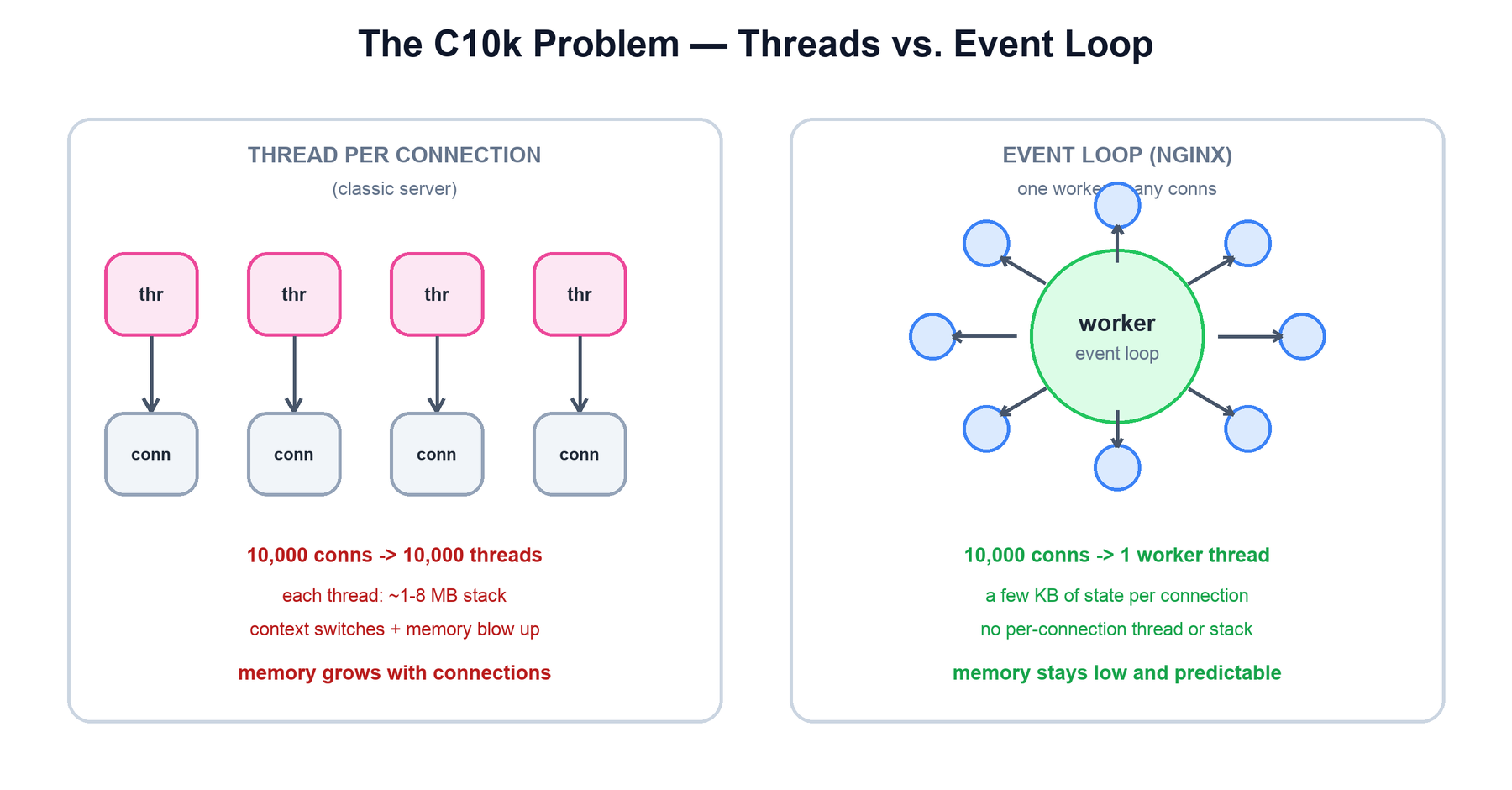
NGINX was created to answer the C10k problem: how does a single server handle ten thousand concurrent connections? The traditional answer — one thread (or process) per connection — does not scale. Each thread carries a stack of one to several megabytes, so ten thousand threads burn gigabytes of memory before doing any work. Worse, the kernel must constantly context-switch between them, and most of those threads are idle, blocked waiting on a slow client or a slow network. The cost grows with the number of connections, not the amount of useful work.
Thread-per-connection memory grows with the number of connections; NGINX's event loop holds a few KB of state per connection, so memory stays low and predictable.
NGINX inverts this. A single worker thread asks the kernel "which of my thousands of sockets is ready to read or write?" and then services exactly those, never blocking on the rest. The result is the property the whole project is built around: throughput scales with hardware while memory use stays flat and predictable as connections climb.
Goal
How NGINX achieves it
High concurrency
One worker multiplexes thousands of connections via a non-blocking event loop, not one thread per connection.
Low, predictable memory
Per-connection state is a small struct (a few KB), not a thread stack. Memory tracks active work, not connection count.
Full use of multiple cores
A handful of worker processes — typically one per CPU core — each run their own event loop in parallel.
Operational stability
Config reloads and even binary upgrades happen with zero dropped connections.
Efficient as a proxy
Buffering, upstream keepalive, and on-disk caching shield slow clients from fast backends and vice versa.
2. Process Architecture
The master manages configuration, workers, and listening sockets; workers serve requests through event loops. Running the master as root is not universal: unprivileged ports/capabilities/container configuration can permit other setups. Worker count is a tuning choice, not a theorem that one per core always maximizes throughput.
Idle connections retain descriptors, state, timers, TLS and buffers. Proxying can require upstream sockets too; budget worker_connections, file limits, memory, CPU/TLS, and active work. I/O pools/AIO and module behavior are configured/version-specific—blocking disk work is not always automatically offloaded.
3. The Event-Driven Model
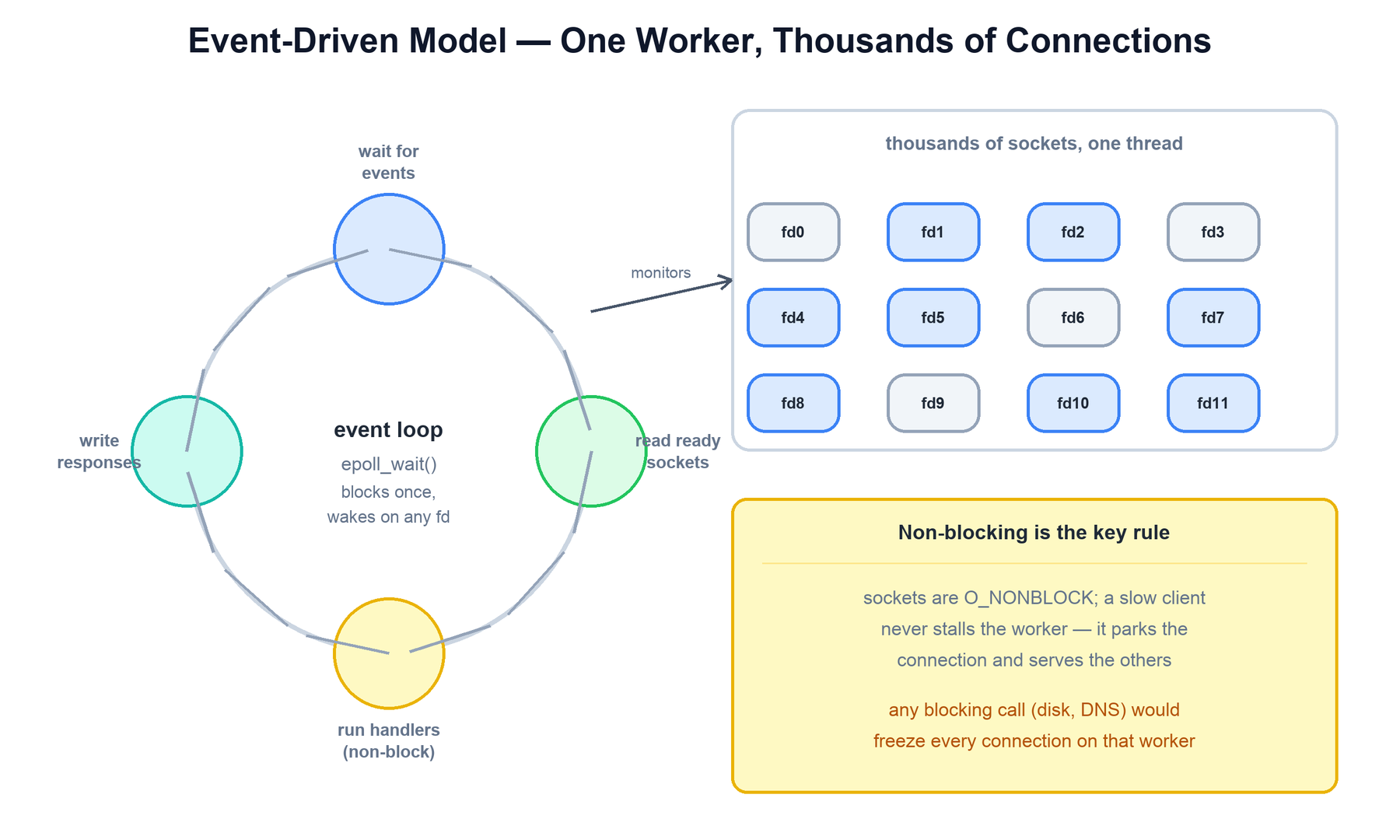
Inside each worker is the heart of NGINX: a single-threaded event loop built on the operating system's scalable I/O readiness API — epoll on Linux, kqueue on BSD/macOS, and others elsewhere. Every socket is set to non-blocking mode. Rather than calling read() and waiting, the worker registers all its sockets with epoll and makes a single call — epoll_wait() — that blocks until any of those thousands of file descriptors is ready. The kernel returns just the ready ones, and the worker handles each, then loops.
One worker thread monitors thousands of sockets; epoll returns only the ready descriptors, and handlers must never block — a single blocking call would freeze every connection on that worker.
This is the opposite of the thread-per-connection model. There, each connection has a dedicated thread that calls a blocking read(); the kernel parks that thread until data arrives. With ten thousand connections you need ten thousand parked threads. With the event loop, one thread asks "who is ready?" and services only those — so the number of threads is tied to the number of cores, not the number of connections.
The cost of this model is a strict discipline: nothing in a handler may block. A blocking disk read, a synchronous DNS lookup, or a slow database call would freeze the entire worker and every connection it is serving, not just the one that issued it. NGINX therefore uses non-blocking I/O everywhere it can, and for the unavoidable blocking operations (notably reading large files from disk) it offloads them to a small thread pool so the event loop stays responsive.
run_event_loop(sockets):
  epoll = epoll_create()
  for s in sockets: epoll.add(s, READABLE)
  while True:
    events = epoll.wait(timeout = next_timer())   # blocks once, on all fds
    for ev in events:
      conn = ev.connection
      handler = conn.current_handler              # read / write / proxy ...
      handler(conn)        # MUST be non-blocking; returns quickly
    run_expired_timers()   # keepalive, proxy timeouts, etc.
A connection is just a small state machine plus a buffer. When it has nothing to do (waiting on a slow client or backend) it costs almost nothing — it sits in epoll until the kernel says it is ready again. That is why idle connections are cheap and why memory tracks active work, not connection count.
4. Request Lifecycle
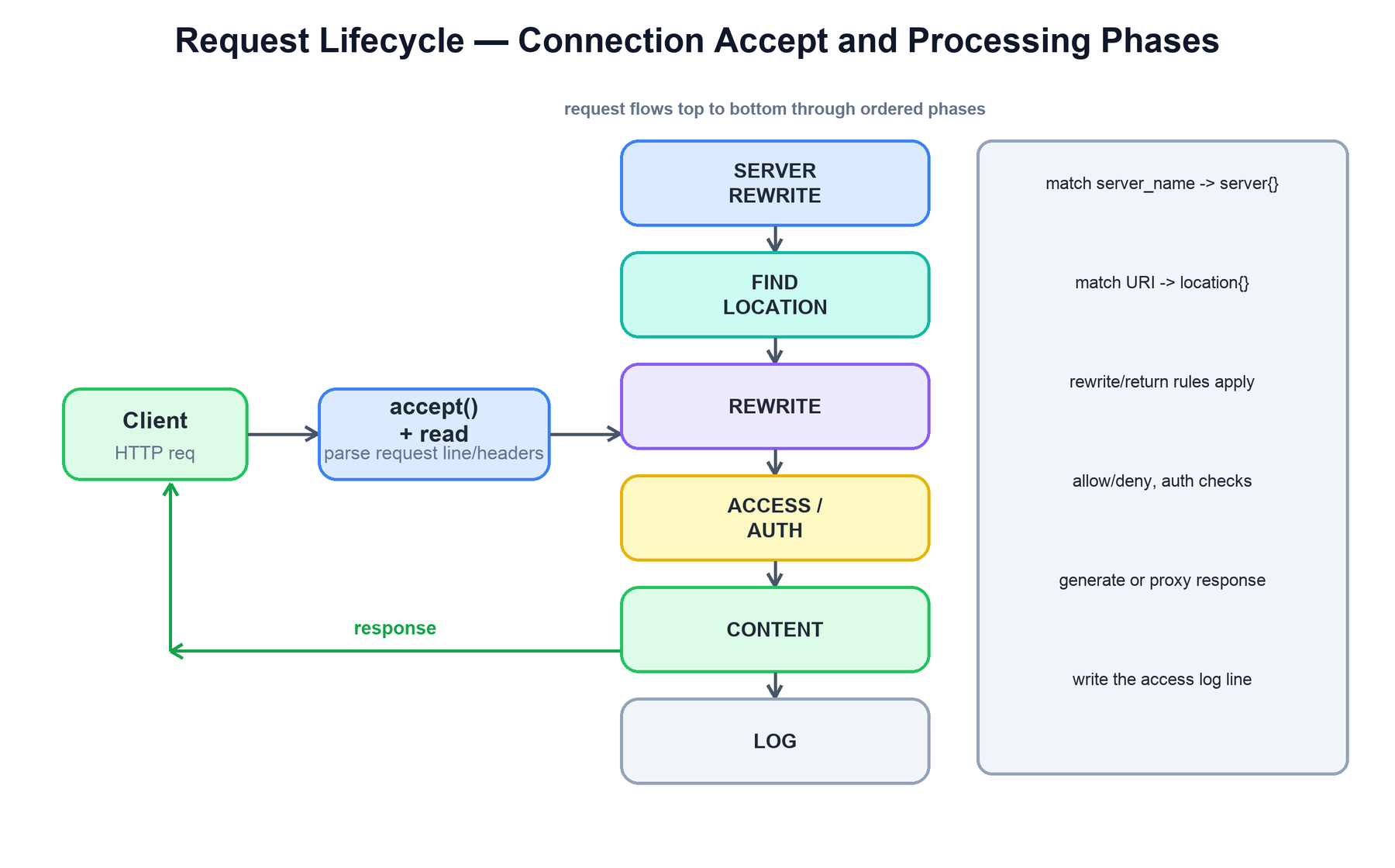
When a connection is accepted, the worker reads and parses the request line and headers, then runs the request through an ordered series of processing phases. NGINX's modular architecture hangs handler modules off these phases; the phase order is what makes configuration directives composable and predictable. A request always flows through the phases in the same sequence.
After accept and header parsing, the request passes through ordered phases: server selection, rewrite, access/auth, content generation, and logging.
The phases, in order, do roughly the following:
Phase
What happens
Accept & read
Accept the connection, read the request line and headers, parse them into a request structure.
Server selection
Match the Host header against server_name to pick the virtual server (server { } block).
Find location
Match the request URI against the location blocks to select the configuration that applies.
Rewrite
Apply rewrite / return rules; URIs may be modified and re-matched.
Access / auth
Enforce allow/deny, authentication (auth_basic, auth_request), and rate limits.
Content
Generate the response: serve a static file, run a handler, or proxy to an upstream backend.
Log
Write the access log line after the response is sent.
For static content the content phase reads a file from disk (or the page cache); for dynamic content it proxies the request to a backend, which is the subject of the next section. The response then travels back out through any configured output filters (gzip, headers, chunked encoding) before being written to the client.
handle_request(conn):
  req = parse_request_line_and_headers(conn)
  server   = match_server_name(req.host)          # server { }
  location = match_location(server, req.uri)       # location { }
  apply_rewrites(req, location)                    # may re-loop
  if not access_allowed(req, location):
    return respond(req, 403)
  resp = run_content_phase(req, location)          # file or proxy_pass
  resp = run_output_filters(resp)                  # gzip, headers ...
  send(conn, resp)
  write_access_log(req, resp)
5. Reverse Proxy and Upstreams
proxy_pass routes to a configured backend. With buffering enabled, NGINX reads ahead into bounded buffers and possibly configured temporary files while serving the client. It need not read the whole response before sending any bytes, and unbounded/streaming responses or storage limits can still tie up an upstream.
Upstream keepalive controls an idle pool per relevant worker/configuration, not a hard total-active-connection cap. Explicit HTTP version/connection behavior makes examples portable across releases. Configure trusted forwarding headers deliberately; do not trust arbitrary client-supplied identity headers as authenticated identity.
The timeouts are examples of operation/inactivity policies, not a global whole-request deadline or retry-safety guarantee.
6. Load Balancing
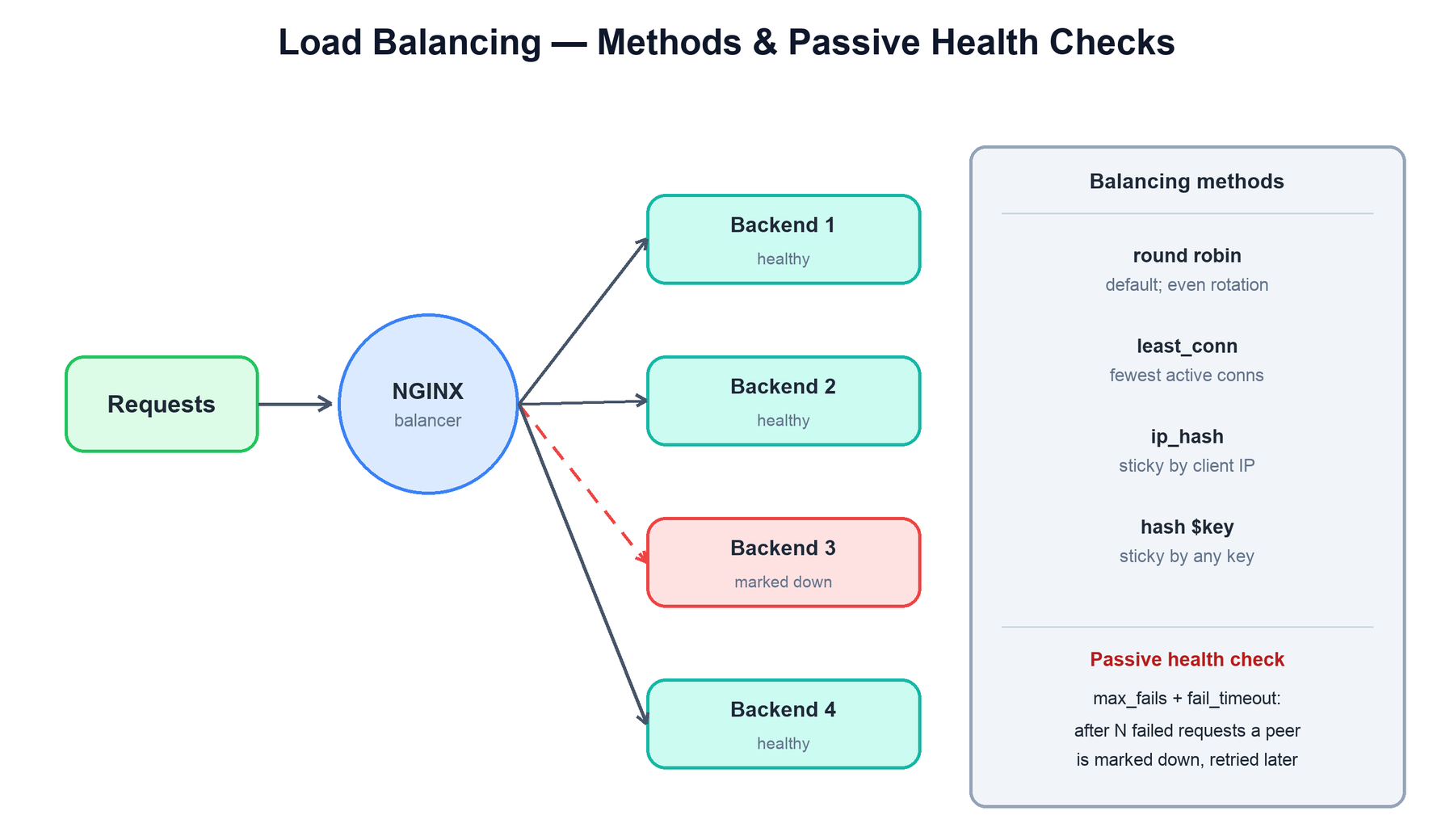
When an upstream block lists several servers, NGINX load-balances requests across them. The balancing method is chosen per upstream, and NGINX also tracks backend health so it can route around failures.
NGINX distributes requests across healthy backends by the configured method, and a passive health check marks a failing peer down after repeated errors.
Method
How it picks a backend
Use when
Round robin (default)
Cycles through servers in order, optionally weighted.
Backends are interchangeable and stateless.
least_conn
Sends each request to the server with the fewest active connections.
Request durations vary, so even rotation would imbalance load.
ip_hash
Hashes the client IP to always map a client to the same backend.
You need session stickiness without shared session storage.
hash $key
Hashes an arbitrary key (URI, header, cookie) to a backend, optionally consistent.
Stickiness by something other than IP, e.g. cache affinity by URL.
Passive health checks come built in: with max_fails and fail_timeout, if a backend produces too many failed responses within the window, NGINX marks it down, stops sending it traffic, and retries it only after the timeout. (NGINX Plus adds active health checks that probe a dedicated health endpoint on a schedule rather than waiting for real requests to fail.)
function pick_backend(upstream, req):
candidates = [s for s in upstream.servers if s.is_up()]
if upstream.method == "least_conn":
return min(candidates, key = lambda s: s.active_conns)
if upstream.method == "ip_hash":
return candidates[hash(req.client_ip) % len(candidates)]
return round_robin_next(candidates) # default, weighted# passive health: on repeated errors, take the peer out of rotation
on_response_error(server):
server.fails += 1
if server.fails >= max_fails:
server.mark_down(for = fail_timeout)
7. Caching and Shared Memory
Proxy caching uses disk objects and a shared metadata zone. Correct cache keys include every dimension that changes authorized representation—host/route/query and relevant tenant/user/content negotiation policy. Avoid caching private authenticated responses across users unless a reviewed policy explicitly permits it.
Freshness uses supported origin headers and cache directives; TTL is not proof the origin never changed. Keys, bypass/no-cache rules, Vary, Set-Cookie/Authorization behavior, stampede locking, and stale-serve policy matter. Shared upstream health/connection state requires its supported shared-zone configuration; it is not automatically global merely because workers share a cache index.
8. Graceful Reload and Binary Upgrade
Validate the configuration before graceful reload. The master keeps required listening sockets and starts replacement workers, while old workers stop accepting/drain under the supported configuration. Failed starts, resource pressure, long-lived protocols, shutdown deadlines, and client reconnects still need policy.
Binary upgrade procedures coordinate old/new masters and sockets, but health validation, compatible modules/configuration, traffic convergence, and safe rollback are operational prerequisites. TERM is fast termination, not graceful rollback. 'No port-unbound gap' is not the same as a universal zero-failed-request guarantee.
Observe errors, connections, latency, and worker generations before retiring the old fleet. Test streaming/WebSocket behavior separately; document a bounded drain and client recovery strategy.
Worked example: a slow response and a graceful reload
Use this example to check which promise each mechanism actually provides.
Sequence for this example. The table explains the evidence and decision at each step.
Step
Evidence, decision, and expected result
Proxy an upstream response
NGINX can forward bytes as they arrive while buffering excess; it does not universally wait to store the whole response first.
Bound buffers and connections
Each client/upstream socket consumes descriptors/state/buffers. worker_connections and OS limits count relevant sockets, not just users.
Load a valid new configuration
New workers accept new traffic while old workers drain according to supported behavior.
Handle a long-lived session
WebSockets/streaming, shutdown deadlines, capacity, and failed starts can disrupt traffic. Measure recovery; do not promise zero drops from a signal alone.
Check your understanding: Does proxy_buffering always release the backend immediately?
No. It can decouple a fast finite response if buffers/storage permit; streaming or resource limits can keep the upstream occupied.
Run and change the example
Download guide_labs.py. Python 3.10+, standard library only. In its directory, run:
python3 guide_labs.py proxy
python3 guide_labs.py test
The model illustrates finite queue growth and a bounded admission policy; the guide also shows a complete local NGINX configuration to adapt.
The program tests its stated finite contracts. It is an educational model, not an implementation of the named production product or a proof of unmodeled distributed faults.
Signals (HUP, USR2, QUIT) reload config or swap the binary while the master holds the sockets.
The recurring theme: a stable master owns the sockets, single-threaded non-blocking workers do the work, and anything shared lives in explicit shared memory. Nothing blocks, nothing is duplicated needlessly, and nothing has to stop to reconfigure.