A good test suite lets a team ship many times a day without fear. This guide shows which frontend tests to write and where each one draws its boundary. It also shows how to keep the suite fast and free of flaky failures.
Frontend system design · patterns
Design a test strategy for a large web app. It must catch real bugs early, run in minutes in CI, and stay trusted by the team.
Correctness contract: A green build means the main user journeys work, the UI is accessible, and it is not slower than budget. A red build always points at a real problem, not at random noise.
You know JavaScript or TypeScript and one component framework, such as React. You have run a test command before. Tool names reflect common choices in 2026: Vitest or Jest, Testing Library, Mock Service Worker, Playwright, and axe-core. The ideas apply to other tools too.
Frontend code is hard to test well. It runs in many browsers, on many screen sizes, with real timing and real networks. It depends on a backend that changes on its own schedule. It has visual and accessibility requirements that a simple assertion cannot express. Teams often respond with one of two bad extremes. Some write thousands of tiny unit tests that check implementation details and break on every refactor. Others write a few huge end-to-end tests that take an hour and fail at random. A good strategy sits between them. It picks the cheapest test that gives real confidence for each risk. This guide walks through each layer, what it is good at, and how the layers fit together in CI.
Every test decides what is real and what is fake. That line is its boundary. A wider boundary gives more confidence but runs slower and fails for more reasons.
Example. A component test renders a real form and real child components, but fakes the network. An end-to-end test uses a real browser, real server, and real database.
Limit. Anything outside the boundary is untested by that test. If every test fakes the API, nothing proves the client and server agree.
Test doubles
A test double replaces a real dependency. A stub returns fixed answers. A mock also records calls so you can assert on them. A fake is a simple working version, such as an in-memory database.
Example. A stubbed fetch always returns a 200 with two items. A fake server in memory stores items you POST and returns them on GET.
Limit. A double can drift from the real thing. Tests stay green while production breaks.
jsdom versus a real browser
jsdom is a JavaScript version of the DOM that runs in Node. It is fast and needs no browser. It does not do layout, paint, or real CSS. Real browsers, run by Playwright, do everything but cost more time.
Example. In jsdom, getBoundingClientRect() returns all zeros. A test that checks whether a tooltip fits on screen must run in a real browser.
Limit. Browser runners in component mode, such as Vitest browser mode or Playwright component tests, close the gap but add setup.
Flaky test
A flaky test passes and fails on the same code without any change. The cause is usually timing, shared state, test order, or an outside service.
Example. A test clicks "Save" and checks for a toast after a fixed 500 ms wait. On a busy CI machine the request takes 700 ms and the test fails.
Limit. Automatic retries hide flakiness. They do not remove it, and real race bugs can hide behind them.
Contract
A contract is the agreed shape of messages between two systems: fields, types, status codes, and error formats. A contract test checks that one side keeps its promise, without running the other side.
Example. The cart API promises { items: [{ id, qty, price }] } and a 409 with { code: 'OUT_OF_STOCK' }. Both client mocks and server tests check against that schema.
Limit. A contract checks shape, not behavior. Correct JSON can still hold wrong prices.
Budget
A budget is a hard limit that CI enforces, such as bundle size, Lighthouse score, or test run time. Passing a budget is a check like any test.
Example. The main route's JavaScript must stay under 170 KB compressed. A pull request that adds a 60 KB date library fails the build.
Limit. Lab budgets run on fixed hardware. They catch regressions but do not prove real users are fast.
1. Pyramid versus trophy
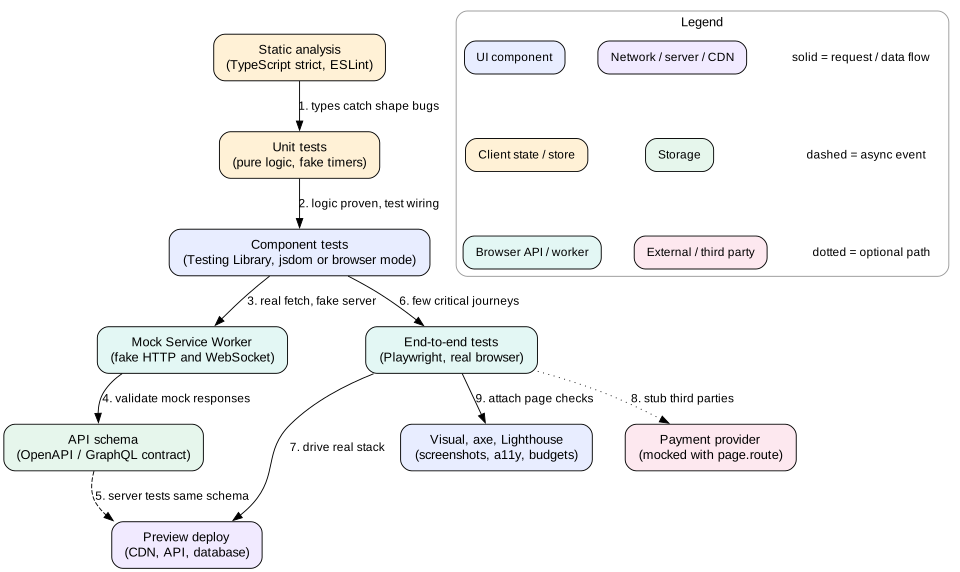
The test pyramid has many unit tests at the bottom and fewer integration tests in the middle. Very few end-to-end tests sit at the top. The logic is cost. Unit tests run in milliseconds and pinpoint failures. End-to-end tests take seconds to minutes and fail for many reasons.
The testing trophy, popularized by Kent C. Dodds, changes the weights for frontend work. It adds static analysis at the base, such as TypeScript and ESLint. It puts the largest share in integration tests, meaning component tests that render several components together. Unit tests and end-to-end tests are smaller slices. The argument is that a frontend's bugs live in how pieces connect: props, state, events, and data loading. Pure unit tests miss those.
Each layer and its boundary. Lower layers fake more and run faster. Higher layers use more real parts and catch wiring bugs.
A practical mix
For a typical product app, a healthy suite might look like this:
Static checks on every save and in CI. TypeScript strict mode and lint rules catch a large class of bugs for almost no run time.
Unit tests for pure logic: formatters, reducers, validation rules, date math. Perhaps 1,000 tests that run in 10 seconds.
Component and integration tests for each screen and complex widget, with the network mocked at the HTTP layer. Perhaps 1,500 tests that run in 2 to 4 minutes when sharded.
Contract tests that check client mocks and server responses against the same schema.
End-to-end tests for 20 to 50 critical journeys in real browsers: sign up, log in, search, checkout, settings. They run in 5 to 10 minutes across shards.
Visual, accessibility, and performance checks on key pages, often attached to the component or end-to-end runs.
Intuition
Ask, "If this test fails, what do I learn, and how fast?" A unit test says "this function is wrong" in 5 ms. An end-to-end test says "something in checkout is broken" after 40 seconds. Use the narrow test where it can catch the bug. Use the wide test only for what narrow tests cannot see.
2. Unit tests
A unit test checks one small piece of logic in isolation. In frontend code the best targets are pure functions with clear inputs and outputs.
Good targets
Price and currency formatting with Intl.NumberFormat, including edge cases such as negative values and zero-decimal currencies like JPY.
Reducers and state machines. Given a state and an event, the next state is fixed.
Validation rules, such as password strength or postal code formats per country.
Data shaping: normalizing API responses into an entity map, or merging a server patch into local state.
Retry and backoff logic, tested with fake timers so no test actually waits.
Rules that keep them useful
Test behavior, not structure. Assert on the return value, not on which private helper was called.
Use table-driven tests for many inputs. test.each in Vitest or Jest keeps each case to one line.
Control time and randomness. Use fake timers, a fixed Date, and a seeded random function. Real time makes tests slow and flaky.
Keep each test independent. No shared mutable state between tests. Reset mocks in afterEach.
Mistake
Mocking everything a module imports. If a test of CartSummary mocks formatPrice, useCart, and every child component, it only proves that your mocks return what you told them to. It breaks on every refactor and catches no real bug.
3. Component tests with Testing Library
Component tests render real UI and interact with it the way a user would. Testing Library is the standard tool. Its guiding idea is: the more your tests resemble the way your software is used, the more confidence they give.
Query by role and name
Find elements the way a user or a screen reader would. Prefer getByRole('button', { name: 'Add to cart' }). Then use getByLabelText for form fields and getByText for content. Use getByTestId only as a last resort. Querying by role has a second benefit. If the test cannot find a button by its accessible name, a screen reader user cannot either. The test becomes a light accessibility check for free.
import { render, screen } from '@testing-library/react'
import userEvent from '@testing-library/user-event'

test('adding an item updates the cart count', async () => {
  const user = userEvent.setup()
  render(<ProductPage productId="p1" />)

  await user.click(await screen.findByRole('button', { name: 'Add to cart' }))

  expect(await screen.findByRole('status')).toHaveTextContent('1 item in cart')
})
Async the right way
Use findBy queries for things that appear after a fetch or a state update. They retry until a timeout, 1 second by default.
Use waitFor for assertions that become true later. Keep only one assertion inside it, and never put side effects inside it.
Use queryBy to assert that something is absent. getBy throws when nothing matches.
Never use fixed sleeps like setTimeout(r, 500). They are slow when the code is fast and flaky when the machine is slow.
userEvent versus fireEvent
fireEvent.click dispatches one DOM event. A real click produces pointerdown, mousedown, focus change, pointerup, mouseup, and click. user-event simulates that full sequence. It also checks that the element is not disabled and not hidden by pointer-events: none. Use it by default. Typing with user.type fires key events per character, which exercises input masks and debounced search.
What to render
Render a whole screen or feature with its real children, real state store, and real router. Provide a test wrapper that sets up providers: theme, i18n, query client, and router at a given URL. Fake only the network and true outside services like payment SDKs. This gives integration-level confidence at near unit-test speed, often 20 to 100 ms per test in jsdom.
Tip
Create a fresh query client and store for each test. A shared cache between tests causes order-dependent failures, which are one of the most common sources of flakiness in component suites.
4. Mocking the network and contract tests
Where you cut the network matters. If you mock your own api.getCart() function, the test skips your fetch wrapper, headers, error parsing, and retry logic. Those are exactly where bugs hide.
Mock Service Worker
Mock Service Worker (MSW) intercepts requests at the network level. In the browser it uses a real service worker. In Node it hooks the request modules that fetch uses. Your app code calls the real fetch with the real URL. MSW returns a response from a handler you define.
Override a handler in one test to simulate failure: server.use(http.post('/api/cart/items', () => new HttpResponse(null, { status: 503 }))). Now you can test the error state, the retry, and the toast. The setting onUnhandledRequest: 'error' makes any unmocked request fail the test, so tests never reach a real server by accident.
The same handlers can run in the browser during local development and in Storybook. One set of mocks then serves three uses, which reduces drift.
Keeping mocks honest
Mocks drift. The backend renames qty to quantity. Every frontend test still passes, and production breaks. Contract tests stop this.
Schema-first. Keep an OpenAPI or GraphQL schema as the source of truth. Generate TypeScript types for the client. Validate MSW responses against the schema in tests. The server validates its real responses against the same schema in its own tests.
Consumer-driven contracts. With a tool like Pact, frontend tests record the requests they make and the responses they expect. The backend CI replays those against the real service. If the backend breaks an expectation, its build fails before deploy.
Recorded fixtures. Capture real responses from a staging server into fixture files, then scrub them. This is cheap, but fixtures age quickly unless refreshed automatically.
Interview
Interviewers often ask, "How do you know your mocks match the API?" Name a concrete mechanism. Examples are types generated from a schema, schema checks on mock responses, or consumer-driven contracts in backend CI.
5. End-to-end tests with Playwright
End-to-end (E2E) tests drive a real browser through a real deployed app. They are the only layer that proves the whole system works together: build, CDN, auth, API, database, and browser.
Why Playwright
Playwright runs Chromium, Firefox, and WebKit with one API. Its locators wait for elements to be visible, enabled, and stable before acting. That auto-waiting removes most manual waits. Each test gets a fresh browser context, which is like a new incognito profile, in a few milliseconds. Tests run in parallel workers and can be split across CI machines with --shard=1/4. On failure it records a trace with DOM snapshots, network calls, and console logs, which you open in the trace viewer.
E2E tests are expensive, so pick journeys by business risk. Ask: if this broke for an hour, how much would it cost? Sign up, log in, search, checkout, and payment usually top the list. Do not test every validation message in E2E. Component tests do that faster.
Test data and isolation
Each test creates its own data through an API or seed endpoint, such as a new user with a random email. Never depend on data from another test.
Log in once per worker and save the session with storageState. Logging in through the UI in every test wastes 3 to 5 seconds each.
Run against an ephemeral environment per pull request when possible. A shared staging server makes tests interfere with each other.
Mock true third parties, such as the payment provider, at the network layer with page.route. Their sandboxes are slow and often down.
Run time math
Suppose 40 journeys average 25 seconds each in one browser. That is about 17 minutes in a single worker. With 4 workers per machine and 4 shards, it drops to about 1 minute plus startup. Running three browser engines triples the cost. A common choice is Chromium on every pull request, and all three engines nightly or before release.
Mistake
Using CSS selectors like .btn-primary > span:nth-child(2). A design change breaks every test. Use role and label locators. Add data-testid only where no accessible name exists.
6. Visual regression
A test can pass while the page looks broken. A CSS change can push a button off screen, overlap text, or swap a color. Assertions on text cannot see that. Visual regression tests compare screenshots.
How it works
Render a component state or page in a real browser at fixed viewport sizes, such as 375, 768, and 1280 pixels wide.
Take a screenshot. Playwright does this with await expect(page).toHaveScreenshot().
Compare it pixel by pixel with an approved baseline image.
If more than a threshold of pixels differ, fail and show a diff image. A human approves the new baseline or fixes the bug.
Making screenshots stable
Run in the same browser version, OS, and fonts every time, usually inside a pinned Docker image. Font rendering differs between macOS and Linux.
Disable animations and transitions. Playwright's animations: 'disabled' option helps.
Freeze time, random data, and avatars. Mask dynamic regions such as timestamps and ads.
Wait for web fonts with document.fonts.ready and for images to load.
Set a small tolerance, such as maxDiffPixelRatio: 0.001, to absorb anti-aliasing noise.
Screenshot each component state in Storybook rather than every full page. A design system with 200 components and 4 states each gives 800 small, focused images. A change to the button style then shows exactly which components moved.
Tip
Treat baseline approval as code review. A reviewer should look at every changed image. Approving 300 diffs in one click because "it is probably the font" is how visual bugs ship.
7. Accessibility testing
Accessibility bugs block real users from your product. Many are easy to detect automatically. The rest need manual checks with a keyboard and a screen reader.
Automated checks with axe
axe-core is a rules engine that scans the DOM for common WCAG failures. It finds missing labels, low contrast, invalid ARIA, missing alt text, and duplicate ids. Run it in two places.
In component tests with jest-axe or vitest-axe. Assert expect(await axe(container)).toHaveNoViolations(). Note that jsdom cannot compute color contrast, so that rule needs a real browser.
In Playwright with @axe-core/playwright. Scan each key page after it loads and after opening dialogs or menus. A real browser covers contrast too.
Automated tools find a meaningful share of issues, often cited as roughly 30 to 50 percent. They cannot judge whether alt text is useful, whether focus order makes sense, or whether a custom widget is usable with a screen reader.
Keyboard and focus tests
Write explicit tests for keyboard behavior. They catch the bugs axe cannot.
Opening a modal moves focus into it. Tab cycles within it. Escape closes it. Focus returns to the button that opened it.
A menu button opens with Enter or Space. Arrow keys move between items.
Every action reachable by mouse is reachable by keyboard.
Live updates such as "Item added" are announced through an element with role="status" or aria-live="polite".
Automated accessibility checks are like a spell checker. They catch typos fast and reliably. They cannot tell you whether the essay makes sense. A short manual screen reader pass on each new feature is the "read it aloud" step.
8. Performance budgets in CI
Performance regressions creep in one small pull request at a time. Nobody notices a 10 KB addition. Twenty of them add 200 KB and a second of load time on a mid-range phone. Budgets stop the creep.
Bundle size budgets
Measure compressed size per route entry, not just the total. Tools such as size-limit or a bundler plugin report sizes and fail when a limit is crossed. A worked number: on a mid-range phone, parsing and compiling JavaScript costs very roughly 1 ms per KB of compressed code, depending on the device. A 170 KB budget for the main route keeps that under about 200 ms. Post the size change as a comment on each pull request so authors see the cost of a new dependency before merge.
Lab metrics with Lighthouse CI
Lighthouse CI runs Lighthouse on key URLs several times and asserts on the results. Assert on metrics, not only the overall score. For example: LCP under 2.5 s and Total Blocking Time under 200 ms with mobile throttling. Run 3 to 5 times and use the median. A single Lighthouse run can vary by 10 to 20 percent.
Custom timing tests
For app-specific flows, measure your own marks in Playwright. Read performance.getEntriesByName('search-results-visible') after a search. Fail if it exceeds the budget. Run on a fixed machine type with CPU throttling through the Chrome DevTools Protocol, such as 4x slowdown. Compare against the main branch's last result, not against an absolute number alone.
Mistake
Setting budgets far above current numbers "to be safe". A budget that never fails is decoration. Set it close to today's value, and lower it after each optimization so gains are locked in.
9. Controlling flaky tests
Flaky tests destroy trust. When a test fails at random, people re-run the build until it passes. Soon they ignore real failures too. At scale the math is harsh. Take 500 E2E tests, each with a 0.2 percent chance of random failure. A full run then fails about 63 percent of the time with no real bug.
Common causes
Timing. Fixed sleeps, missing awaits, and assertions that run before data arrives.
Shared state. A shared database, a global store, a cached query client, or localStorage left by a previous test.
Order dependence. Test B passes only if test A ran first and created data.
Outside services. Real third-party APIs, real clocks, real DNS.
Animation and layout. Clicking a button while it slides in, so the click lands on the wrong element.
Resource limits. Too many parallel workers on a small CI machine, causing timeouts.
A process, not just fixes
Detect. Record every test result with its commit. A test that both passed and failed on the same commit is flaky by definition.
Quarantine. Move it to a non-blocking job at once, with an owner and a ticket. The main build stays trusted.
Reproduce. Run it 100 times in a loop, for example with Playwright's --repeat-each=100, under CPU throttling. Use the trace viewer on the failures.
Fix the cause. Replace sleeps with web-first assertions. Isolate data. Mock outside services.
Return it. Run it many times green before moving it back to the blocking suite.
Retries are a tool, not a fix. One retry in CI can absorb rare infrastructure noise. But mark any test that passed only on retry as flaky in your report. Never set retries to 3 and forget. That hides real race conditions that users will also hit.
Tip
Run the full suite in random order now and then, with a fixed seed you can replay. Order-dependent tests show up within a few runs.
10. Testing real-time and offline behavior
Real-time and offline features are timing-heavy. They are also where tests get flaky fastest. The key is to control time and the network yourself, not to wait for them.
WebSockets and server push
In unit and component tests, inject the socket. Pass a fake object with the same interface: send, and the ability to emit message, close, and error events. The test pushes a message and asserts the UI updates.
MSW supports WebSocket interception with ws.link(url). You can send server messages from a handler and assert on client messages.
In Playwright, page.routeWebSocket() lets a test act as the server, or forward to the real one while inspecting frames.
Test the hard paths: disconnect mid-session, reconnect with backoff, messages that arrive out of order, duplicate messages after reconnect, and a resync after a gap.
Fake timers for reconnect and backoff
A reconnect loop with 1, 2, 4, and 8 second delays would take 15 seconds to test in real time. With fake timers, the test advances the clock instantly. vi.useFakeTimers() in Vitest, or mock.timers in node:test, replaces setTimeout. The test then calls advanceTimersByTime(1000) and checks that one reconnect attempt happened. The code lab shows this pattern.
Offline in the browser
Playwright's context.setOffline(true) makes the browser go offline. Fire it after the app loads, perform edits, and assert the UI shows "Not synced".
Then call setOffline(false) and assert the outbox drains and the server received each write exactly once. Check the server through an API call, not just the UI.
Test service worker updates. Load version 1, deploy version 2 in the test server, reload, and assert the "New version" prompt appears. Playwright supports service workers in Chromium, and you can read context.serviceWorkers().
Simulate slow networks with page.route handlers that delay responses, or with CDP network throttling in Chromium. Test the timeout path, not only the offline path.
Test IndexedDB state across reloads. Write data, reload the page, and assert it is still there and rendered without the network.
Interview
When you describe an offline or real-time design, finish with how you would test it. Mention fake timers for backoff, a scripted fake server for ordering and duplicates, and a browser test that flips offline and online. It shows you have shipped such features, not only drawn them.
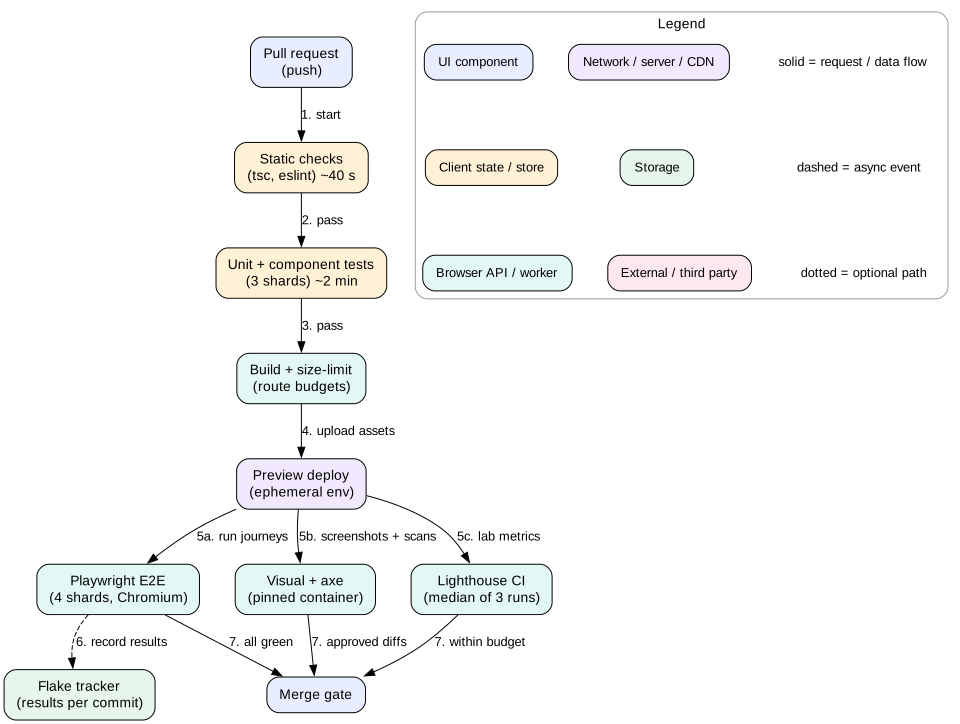
A pull request pipeline. Fast checks run first and fail early. Slower browser checks run in parallel against a preview deploy.
11. Failure modes
Green build, broken production. Every test mocked the API, and the API changed. Fix: contract tests and a few real E2E journeys.
Refactor breaks 400 tests. Tests asserted on implementation details such as state shape or child component props. Fix: test through the UI and public APIs.
Suite takes 45 minutes. Too much E2E, no sharding, real waits. Fix: push checks down to component tests, shard, and use fake timers.
Nobody trusts red. Flaky tests trained the team to re-run. Fix: quarantine and a flake dashboard with owners.
Visual diff noise. Unpinned fonts or browsers. Fix: a pinned container image for screenshots.
Accessibility regressions slip through. Only automated scans ran. Fix: keyboard tests for every interactive widget and manual passes on new features.
Budgets drift up. Each pull request raised the limit a little. Fix: require an owner's approval to change a budget.
12. Trade-offs
Confidence versus speed
Each step outward, from unit to component to E2E, adds real parts and confidence. Each also adds run time and new reasons to fail. Push every check to the lowest layer that can catch the bug.
jsdom versus real browser for components
jsdom is fast and simple, but it cannot test layout, scroll, or real focus behavior in all cases. Browser-mode component tests are more faithful but slower to start. Many teams use jsdom by default and browser mode for layout-heavy widgets.
Mocks versus real backends
Mocks are fast, stable, and let you test rare errors. Real backends catch integration bugs. Use mocks with contract checks for most tests, and a small set of E2E journeys on a real stack.
Coverage numbers versus useful tests
A coverage target, such as 80 percent of lines, finds untested files. It does not prove tests assert anything useful. A test that renders a component and checks nothing gets full coverage. Track coverage as a hint and review test quality in code review.
13. Interview angle
Testing questions appear on their own ("How would you test this?") and at the end of design rounds. Structure the answer by risk.
Minutes 0 to 3. Name the main risks: wiring bugs, API drift, visual breakage, accessibility, performance, and timing in real-time features.
Minutes 3 to 8. Static checks and unit tests for pure logic. Mention fake timers and seeded randomness.
Minutes 8 to 15. Component tests with Testing Library and MSW. Query by role. Explain why you mock at the network layer.
Minutes 15 to 20. Contract testing to keep mocks honest.
Minutes 20 to 28. E2E with Playwright for critical journeys. Data isolation, sharding, and run time math.
Minutes 28 to 35. Visual, accessibility, and performance budgets as CI gates.
Minutes 35 to 45. Flake process and how you would test the feature's real-time or offline paths.
Interview
Use numbers. Say "1,500 component tests in 3 minutes" and "40 journeys in 6 minutes on 4 shards". Numbers show you have run a real suite.
14. Summary
Choose the cheapest test that gives real confidence for each risk. The trophy shape fits most frontends.
Unit test pure logic. Control time and randomness.
Component tests render real UI with Testing Library, query by role, and use user-event.
Mock the network with MSW, not your own functions. Keep mocks honest with schemas or contracts.
Use Playwright E2E for a few critical journeys with isolated data and sharding.
Add visual, accessibility, and performance gates with stable environments and tight budgets.
Treat flakiness as a process: detect, quarantine, reproduce, fix, and return.
Test real-time and offline paths with fake timers, scripted servers, and offline toggles.
15. Common mistakes
Testing implementation details instead of user-visible behavior.
Mocking your own API module, so the fetch layer is never tested.
Using fixed sleeps instead of findBy or web-first assertions.
Sharing state such as a query cache or database rows between tests.
Covering every edge case with E2E instead of component tests.
Letting mocks drift from the real API with no contract check.
Running visual tests on unpinned browsers and fonts.
Treating an axe pass as full accessibility coverage.
Hiding flaky tests behind automatic retries.
Worked example: a broken checkout caught in CI
A developer opens a pull request that renames the cart field qty to quantity in the frontend to match a new API version. Follow the pipeline.
Static checks run first, in 40 seconds. The generated API types come from the new OpenAPI schema. TypeScript passes, because the frontend now uses quantity.
Unit and component tests run in 3 shards, about 2 minutes. MSW handlers still return qty. A schema check in the test setup validates every mock response against the OpenAPI file. It fails: "response for GET /api/cart is missing required property quantity".
The developer updates the MSW fixtures. Component tests now pass. One test, "cart shows total for 3 items", also failed. The total still used the old field in one place.
The build step runs size-limit. The checkout route is 168 KB against a 170 KB budget. It passes, and the bot comments "+0.3 KB".
A preview deploy starts. Playwright runs 40 journeys on 4 shards in Chromium against the preview, which talks to a staging API.
The "guest can buy one item" journey fails. The trace viewer shows POST /api/cart/items returned 400 with "unknown field quantity". Staging still runs the old API version.
The team learns the backend change is not deployed yet. The frontend must handle both shapes during rollout. The developer adds a mapping layer that accepts either field and sends the field the server version expects.
The pipeline re-runs. E2E passes. axe scans of the cart and checkout pages show no violations. Visual snapshots of the cart line item show no diff.
Lighthouse CI on /checkout reports median LCP 2.1 s and TBT 140 ms over 3 runs, within budget.
The pull request merges. Without the schema check and the real-stack E2E, the rename would have shipped and broken checkout for every user until the backend caught up.
Code lab: retry logic with a mocked network and fake timers
This test file checks a fetchWithRetry helper. It injects a mock fetch that returns two 503 responses and then a 200. It uses node:test fake timers, so the 200 ms and 400 ms backoff delays pass instantly. A second test proves that a 404 is not retried. Save it as retry.test.mjs and run node --test retry.test.mjs with Node 20 or newer. No packages are needed.
// A unit test with a mocked network and fake timers. No real waiting.
// Run with: node --test retry.test.mjs (Node 20 or newer)
import { test, mock } from 'node:test'
import assert from 'node:assert/strict'

export async function fetchWithRetry(url, { fetchImpl, retries = 3, baseMs = 200 }) {
  for (let attempt = 0; ; attempt++) {
    const res = await fetchImpl(url)
    if (res.status < 500 || attempt === retries) return res
    const delay = baseMs * 2 ** attempt
    await new Promise((resolve) => setTimeout(resolve, delay))
  }
}

test('fetchWithRetry retries 503 and then succeeds', async () => {
  mock.timers.enable({ apis: ['setTimeout'] })
  const replies = [{ status: 503 }, { status: 503 }, { status: 200 }]
  const fetchImpl = mock.fn(async () => replies.shift())

  const pending = fetchWithRetry('/api/items', { fetchImpl })
  for (const ms of [200, 400]) {
    await new Promise(setImmediate)   // let the failed attempt settle
    mock.timers.tick(ms)              // jump the clock, do not sleep
  }
  const res = await pending

  assert.equal(res.status, 200)
  assert.equal(fetchImpl.mock.callCount(), 3)
  mock.timers.reset()
})

test('fetchWithRetry does not retry a 404', async () => {
  const fetchImpl = mock.fn(async () => ({ status: 404 }))
  const res = await fetchWithRetry('/api/missing', { fetchImpl })
  assert.equal(res.status, 404)
  assert.equal(fetchImpl.mock.callCount(), 1)
})
Both tests pass in a few milliseconds even though the code "waits" 600 ms in total. Try changing the replies to three 503 responses and a 200, and see the first test fail because the default retries limit is 3. The same pattern works in Vitest with vi.useFakeTimers() and vi.advanceTimersByTimeAsync().
Check yourself
Why does the testing trophy put the most weight on integration tests for frontends?Answer
Most frontend bugs live in how pieces connect: props, state, events, and data loading. Component-level integration tests exercise that wiring at near unit-test speed, while pure unit tests miss it and E2E tests are slow.
Why prefer getByRole('button', { name: 'Save' }) over getByTestId('save-btn')?Answer
It finds the element the way users and assistive technology do. It survives markup refactors, and it fails if the button loses its accessible name, which is a real accessibility bug.
What is wrong with mocking api.getCart() directly in component tests?Answer
It skips the real fetch wrapper, headers, error parsing, and retries, which is where many bugs live. Mocking at the HTTP layer with MSW keeps that code under test.
All frontend tests pass, but production breaks after a backend rename. Which test type was missing?Answer
A contract test. Validating mock responses against a shared schema, or running consumer-driven contracts in the backend pipeline, would have caught the drift.
500 E2E tests each have a 0.2 percent random failure rate. How often does the full run fail with no real bug?Answer
The chance all pass is 0.998 to the power 500, about 0.37. So about 63 percent of runs fail. This is why each test must be nearly perfectly stable.
How do you test a reconnect loop with 1, 2, 4, and 8 second backoff without waiting 15 seconds?Answer
Inject a fake socket and use fake timers. Advance the clock by each delay and assert that one reconnect attempt happened after each step.
Why should screenshot tests run inside a pinned container image?Answer
Fonts, anti-aliasing, and browser versions differ across machines. A pinned image makes rendering identical, so diffs reflect real UI changes, not environment noise.
Key terms
Test pyramid
A model with many unit tests, fewer integration tests, and few end-to-end tests.
Testing trophy
A model that adds static analysis and puts most weight on integration tests.
Testing Library
A family of tools that query and interact with UI the way a user would.
user-event
A Testing Library package that simulates full user interaction sequences.
MSW
Mock Service Worker, which intercepts network requests and returns mock responses.
Contract test
A test that checks one side of an API keeps the agreed request and response shape.
Playwright
A browser automation framework for Chromium, Firefox, and WebKit with auto-waiting locators.
Browser context
An isolated browser profile in Playwright with its own cookies and storage.
Visual regression
Comparing screenshots against approved baselines to catch unintended visual changes.
axe-core
An automated engine that checks the DOM against accessibility rules.
Performance budget
A hard limit on size or timing that fails the build when exceeded.
Flaky test
A test that passes and fails on the same code without changes.
Quarantine
Moving a flaky test to a non-blocking job until it is fixed.
Fake timers
Test doubles for setTimeout and clocks that let tests advance time instantly.