An offline-first app treats the network as an optional upgrade, not a requirement. This guide explains the browser machinery that makes that possible, and the hard parts: updates, sync, conflicts, and storage limits.
Frontend system design · patterns
Design a web app that opens with no network and accepts writes offline. It then syncs them safely when the connection returns.
Correctness contract: A write the user saw as saved is never silently lost. The shell and its code always come from one version. The UI always shows when data is stale or not yet synced.
You know basic JavaScript, Promises, and the fetch API. You know what HTTP caching headers are. Browser support notes reflect stable Chrome, Firefox, and Safari in 2026. Numbers are typical values for planning, not guarantees.
Most web apps assume the network is always there. Then a user opens the app on a train or on weak hotel Wi-Fi. They see a blank page or an endless spinner. Native apps ship their code with the install and keep data in a local database. The web now has the same tools. A service worker sits between the page and the network and can answer requests from a local cache. IndexedDB stores structured data on the device. Background sync retries writes after the page closes. A web app manifest lets the user install the app to the home screen. Together these features are called a Progressive Web App, or PWA. The tools are simple one by one. The hard part is how they interact. Old and new code can mix. Writes can conflict with other devices. The browser may delete your storage when the disk fills up. This guide covers each piece and the design around them.
A service worker is a JavaScript file that runs in its own thread, separate from any page. It has no DOM access. It receives a fetch event for every request from pages in its scope. It can answer from a cache, from the network, or with a response it builds.
Example. The user opens /inbox offline. The service worker catches the navigation request and returns the cached /index.html. The page then loads its scripts from the cache too.
Limit. It only works over HTTPS, or on localhost. It does not run on the first visit until it is installed. The browser can stop it at any idle moment, so it must not keep state in global variables.
Cache Storage
The Cache Storage API (caches.open, cache.put, cache.match) stores pairs of Request and Response objects. It is separate from the browser HTTP cache. Your code decides what goes in and when it leaves.
Example. At install time the worker puts app.3f9a.js and styles.81c2.css into a cache named shell-v42.
Limit. Entries never expire by themselves. If you never delete old caches, they grow until the browser evicts your whole origin.
IndexedDB
IndexedDB is a transactional key-value database in the browser. It stores structured objects, Blob values, and binary data. It supports indexes, so you can query by fields other than the primary key. It is asynchronous and works in pages and in workers.
Example. A notes app keeps a notes store keyed by id, with an index on updatedAt to list recent notes.
Limit. The raw API is verbose. Transactions auto-commit when the event loop has no pending requests for them, so awaiting a fetch inside a transaction closes it.
Outbox pattern
An outbox is a durable queue of user writes that have not reached the server yet. The UI applies each write locally at once. A sync loop sends queued writes in order and removes each one only after the server confirms it.
Example. The user stars three emails offline. Three entries go into the outbox store. When the network returns, the loop sends them and the stars stay.
Limit. Retries mean the server may see the same write twice. Each entry needs a unique idempotency key so the server can drop duplicates.
Conflict
A conflict happens when two clients change the same data without seeing each other's change first. Offline work makes conflicts normal, not rare, because a device can be away for hours.
Example. On the phone you rename a task offline. On the laptop a teammate edits its due date. Both changes started from version 7.
Limit. No rule fixes every conflict. Some fields merge cleanly, some need a policy like last writer wins, and some need a human to choose.
Progressive Web App
A PWA is a normal website that adds a manifest, a service worker, and HTTPS. Browsers then offer to install it. It opens in its own window, gets an icon, and can receive push messages.
Example. A user on Android taps "Install app". The PWA appears in the launcher and opens full screen with display: standalone.
Limit. Install prompts and push support differ by browser. On iOS, web push works only for apps added to the home screen.
1. Service worker lifecycle
The lifecycle is the part most teams get wrong. A bug here can pin users to old code for weeks. So learn the states first.
Registration
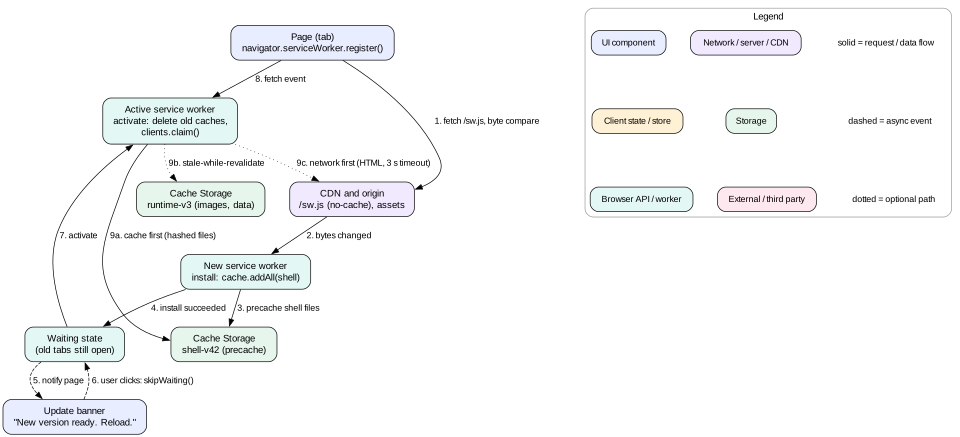
The page calls navigator.serviceWorker.register('/sw.js', { scope: '/' }). The browser downloads the script and compares it byte by byte with any installed version. If the bytes differ, a new worker starts installing. Scope matters. A worker at /app/sw.js can by default only control URLs under /app/. Serve the worker from the root if it must control the whole site.
Register inside a load event handler. Install downloads many files. During first load, that competes with the page and slows Largest Contentful Paint.
Install
The new worker gets an install event. This is where you precache the app shell. You wrap the work in event.waitUntil(promise). If the promise rejects, the install fails and the browser throws the new worker away. The old one keeps running. This is a safety net. A partial cache never goes live.
cache.addAll is atomic. If one file fails, nothing is stored. That is what you want for the shell.
Waiting
If an old worker still controls open tabs, the new worker enters the waiting state. It waits until every such tab is closed. A simple reload is not enough, because the old page lives during the navigation. The rule protects old pages. They were built against old caches. If the new worker deleted those caches, old pages would request missing files.
Activate
When the new worker becomes active it gets an activate event. This is the place to delete old caches and run IndexedDB schema migrations.
self.addEventListener('activate', (event) => {
  event.waitUntil((async () => {
    const keep = new Set([SHELL, 'runtime-v3'])
    for (const name of await caches.keys()) {
      if (!keep.has(name)) await caches.delete(name)
    }
    await self.clients.claim()
  })())
})
clients.claim() makes the new worker control pages that are already open and were loaded without a worker. Without it, the very first page load is not controlled until the next navigation.
Update flow and skipWaiting
The browser checks for a new sw.js on each navigation, and at least once every 24 hours. The check bypasses the HTTP cache by default (updateViaCache: 'imports'). Still, serve sw.js with Cache-Control: no-cache and never give it a hashed name. The URL must stay stable, or the browser will never see the new version.
You can call self.skipWaiting() to skip the waiting state. The new worker activates while old tabs are still open. This is fast but risky. An old tab may now ask the new worker for app.3f9a.js, which the new worker already deleted. The tab breaks on its next lazy chunk load.
Tip
Use the "prompt to reload" pattern. When a new worker reaches waiting, the page shows a small banner: "A new version is ready. Reload." On click, the page posts a message to the waiting worker. The worker calls skipWaiting(). The page listens for controllerchange and reloads once. Now the switch happens at a moment the user chose, and the page and worker match.
The worker lifecycle and the fetch path. A new version waits until old tabs close, unless the user agrees to reload.
Intuition
Think of the worker as a gate guard. Only one guard is on duty. A new guard can get ready, but takes over only when everyone who entered under the old guard has left.
Navigation preload
Booting a stopped worker can cost 50 to 250 ms on a mid-range phone. For network-first pages, that delay sits in front of the request. Call self.registration.navigationPreload.enable() in activate. The browser then starts the request while the worker boots. Read it with await event.preloadResponse.
2. Caching strategies
A caching strategy is a rule for one class of request. It says where to look first and what to do on failure. Use different strategies for different resources. One strategy for everything is a design smell.
Cache first
Look in the cache. If there is a match, return it. If not, fetch from the network, store a copy, and return it. This is the fastest strategy. A cache hit returns in 1 to 10 ms with no network at all.
Use it for content-hashed static files such as app.3f9a.js, fonts, and icons. The name changes when the content changes, so a cached copy is never wrong. Do not use it for HTML or API data. The user would see old content forever.
Network first
Try the network. If it succeeds, update the cache and return the fresh response. If it fails or times out, return the cached copy. Add a timeout. Without one, a phone on a bad connection ("lie-fi") may wait 30 seconds or more before the request fails. A 3 second timeout with AbortController is a common choice.
Use it for HTML navigations of server-rendered pages and for data that must be fresh when possible, such as an account balance. The cost is that every load pays a round trip when online.
Stale-while-revalidate
Return the cached copy at once if there is one. At the same time, fetch from the network and update the cache for next time. The user gets speed now and freshness on the next visit.
Use it for data where a few minutes of staleness is fine: avatars, a product catalog, a user's settings. Tell the page when fresh data arrives, for example with postMessage or a BroadcastChannel. The UI can then re-render. The HTTP header Cache-Control: max-age=60, stale-while-revalidate=600 gives the same idea inside the HTTP cache without any worker code.
async function staleWhileRevalidate(event, cacheName) {
  const cache = await caches.open(cacheName)
  const cached = await cache.match(event.request)
  const network = fetch(event.request).then((res) => {
    if (res.ok) cache.put(event.request, res.clone())
    return res
  })
  event.waitUntil(network.catch(() => {}))   // keep the worker alive for the update
  return cached || network
}
Network only and cache only
Network only fits requests that must never be cached: payments, login, analytics beacons. Cache only fits precached shell files. List both in your routing table so the choice is visible in review.
Mistake
Caching opaque responses with cache first. A cross-origin request in no-cors mode gives an opaque response. Your code cannot read its status. A 500 error looks the same as a 200. Chrome also pads each opaque response in quota accounting, often by about 7 MB. Ten opaque images can eat 70 MB of quota. Request third-party assets with CORS, or do not cache them.
Choosing a strategy
Hashed JS, CSS, fonts: cache first, precached.
App shell HTML for a single page app: cache first from the precache, updated by the worker lifecycle.
Server-rendered HTML: network first with a 3 second timeout, then cache, then /offline.html.
Read-mostly API data: stale-while-revalidate, or better, read from IndexedDB and refresh in the background.
Mutations (POST, PUT, DELETE): never cached. Route them through the outbox.
Images from user content: cache first in a runtime cache with a size limit, such as 200 entries with oldest-first deletion.
Libraries such as Workbox wrap these patterns and add expiration and precache tooling. Still, explain each strategy without the library in an interview.
3. Precaching the app shell
The app shell is the minimum HTML, CSS, and JavaScript that draws the UI frame. That means the header, navigation, and empty states. Data fills it later. If the shell is precached, the app paints in well under a second on repeat visits, with or without a network.
Build a precache manifest
Your bundler emits files with content hashes. A build step lists them with their hashes in a manifest that is embedded in sw.js. Any change to any shell file changes sw.js bytes. That change triggers the update flow. This is how the worker version and the code version stay linked.
// generated at build time
self.__PRECACHE = [
  { url: '/index.html', revision: 'b1e7' },
  { url: '/assets/app.3f9a.js', revision: null },     // hash is in the name
  { url: '/assets/vendor.c0d2.js', revision: null },
  { url: '/assets/styles.81c2.css', revision: null },
  { url: '/offline.html', revision: '77aa' }
]
Budget the shell
Do the math. 180 KB of compressed JavaScript, 30 KB of CSS, 60 KB of fonts, and 20 KB of icons is about 290 KB. On 1.6 Mbps slow 4G that takes about 1.5 seconds, paid once in the background. Precache the shell and the top two or three routes. Cache other route chunks at runtime on first visit.
Precaching 5 MB of chunks "just in case" hurts. It uses the data plan, and one failed file aborts the whole install.
Navigation fallback
In a single page app, navigations such as /inbox/123 return the cached /index.html. The client router reads the URL. Exclude real server routes like /api/ and /auth/callback, or login breaks.
Interview
When asked "How does your app work offline?", start with the shell. Say what is precached, how big it is, and how it updates. Then move to data. Interviewers look for the link between the build hash and the worker version. That link is what prevents mixed old and new code.
4. IndexedDB as the local source of truth
Cached API responses work for simple reads. But you cannot query them, update one field, or mix in local unsynced edits. For that you need a database, which in the browser is IndexedDB.
Local-first read path
In an offline-first design the UI reads from IndexedDB, not from the network. A sync layer keeps IndexedDB up to date with the server. The flow is:
The component asks the local store for notes, sorted by updatedAt.
The store reads from IndexedDB and renders at once, often within 20 ms.
In the background, the sync layer asks the server for changes since the last cursor.
The sync layer writes those changes into IndexedDB in one transaction.
The store notifies subscribers, and the UI re-renders with fresh data.
The UI no longer waits on the network. Online and offline share one code path, so the offline path is not a rare, untested branch.
Each entity keeps a server-set version. The client also keeps a sync cursor, an opaque server token. It sends the cursor and gets only newer changes. This delta sync turns a 2 MB reload into a few KB.
Schema migrations
Opening with a higher version fires upgradeneeded, the only place to create stores and indexes. If an old tab holds version 2 open, the upgrade is blocked. Handle versionchange in every tab by closing the connection. Otherwise the upgrade hangs.
Transactions and performance
Batch writes. Writing 1,000 records in one readwrite transaction can take about 50 ms. Writing them in 1,000 transactions can take several seconds.
Do not await network calls inside a transaction. It will auto-commit and the next request throws TransactionInactiveError.
Run heavy sync work in a Web Worker. IndexedDB works there, and parsing a large JSON delta will not block input.
Store large files as Blob values. They are kept outside the main record and do not need base64 encoding, which costs 33 percent more space.
Tip
Small wrappers like idb turn the event API into Promises. Dexie adds live queries. Pick one wrapper and keep raw IndexedDB code out of components.
5. Writes, the outbox, and background sync
Reads are the easy half. Writes are where data gets lost. The goal is simple to state. Once the UI shows a change as saved, that change must reach the server eventually, exactly once in effect.
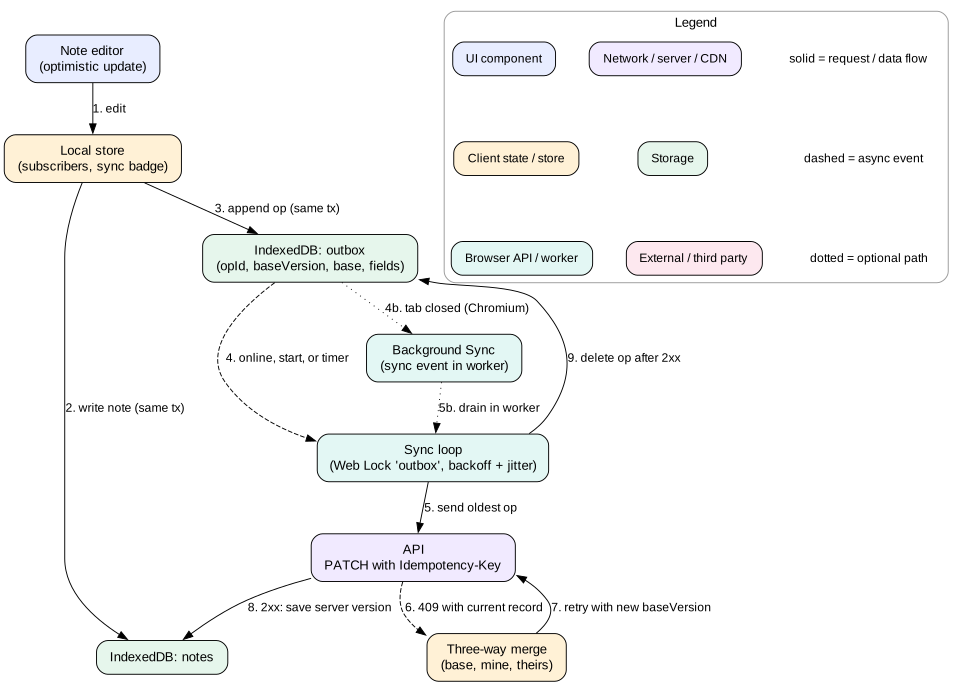
The write path. The UI updates local data and the outbox in one transaction. The sync loop drains the outbox when a connection exists.
Optimistic local write
When the user edits a note, do two things in one IndexedDB transaction across both stores. Update the note in notes. Append an operation to outbox. Because it is one transaction, you never get a local change without a queued operation, or the reverse. Then update the UI. Show a small "Saved on this device" or "Syncing" state, not "Saved" with no qualifier.
The sync loop
A sync loop reads the oldest outbox entry and sends it. On a 2xx reply it deletes the entry and writes the server's version into the note. On a network error it stops and waits. On a 409 conflict it runs the merge logic. On a 4xx validation error it moves the entry to a "failed" list and tells the user. Never retry a 400 forever. It will block every write behind it.
Send in order per entity. A rename followed by a delete must not arrive reversed.
Give every operation an opId made with crypto.randomUUID(). Send it as an Idempotency-Key header. The server stores seen keys for at least 24 hours and replays the old result for a duplicate.
Use exponential backoff with jitter: 1 s, 2 s, 4 s, up to about 5 minutes. Add a random 0 to 30 percent. Without jitter, a million phones that regain signal after an outage all retry at the same second.
Coalesce. Ten edits to the same note title can become one operation with the final value, if the server does not need each step.
When does the loop run?
Run it on app start, on the online event, after each local write, and on a timer while visible. Do not trust navigator.onLine. It only means some network interface exists. An airport captive portal reports online. The real test is a request that succeeds.
Background Sync API
The page may close before the outbox drains. The Background Sync API covers this. The page calls registration.sync.register('outbox'). The browser fires a sync event in the service worker when it thinks there is a connection, even if the tab is closed. The worker drains the outbox from IndexedDB. If the handler's promise rejects, the browser retries later with its own backoff.
self.addEventListener('sync', (event) => {
  if (event.tag === 'outbox') event.waitUntil(drainOutbox())
})
Know the limits. Only Chromium supports Background Sync. Firefox and Safari do not in 2026. So it is an enhancement, and the in-page loop is the base. The browser also caps handler run time and gives up after a few failures.
Mistake
Keeping the outbox in memory or in localStorage. Memory is lost on reload. localStorage is synchronous, blocks the main thread, holds only strings, and is not available in service workers. Put the outbox in IndexedDB so both the page and the worker can drain it.
Multiple tabs
Two tabs may both drain the outbox and send an entry twice. Idempotency keys make that safe, but it wastes requests. Use the Web Locks API: navigator.locks.request('outbox', fn). Only one tab or worker holds the lock at a time. Use a BroadcastChannel to tell other tabs that data changed so they re-read IndexedDB.
6. Conflict resolution
Conflicts are a product decision as much as a technical one. Ask what the user expects when two edits collide. Then pick the simplest mechanism that meets it.
Detecting a conflict
Each outbox operation carries the baseVersion it was made from. The server compares it with the current version. If they match, the write applies and the version increments. If not, the server returns 409 Conflict with the current record. HTTP has a standard way to do the same: send If-Match: "etag", and the server returns 412 Precondition Failed on mismatch.
Strategy 1: last writer wins
The later write replaces the earlier one. It is simple and never blocks. But device clocks drift, so use server receive order, not client timestamps. Even then, a phone offline for three hours "wins" with a stale edit. Use it for settings, not shared documents.
Strategy 2: field-level three-way merge
Keep the base values of the fields you changed. On conflict, compare three things for each field: base, mine, and theirs. If only one side changed a field, take that side. If both changed it to the same value, there is no conflict. If both changed it to different values, that field is a true conflict. Apply a policy for it, or ask the user. This resolves most real conflicts with no prompt at all. The code lab shows this approach.
Strategy 3: operations that commute
Some operations give the same result in any order. "Add tag X" and "add tag Y" commute. So does "increment by 1". Send intent, not final state. A server applying addTag('urgent') does not care what other tags arrived meanwhile.
Strategy 4: CRDTs
A Conflict-free Replicated Data Type is a data structure that always merges to the same result, whatever order updates arrive in. Libraries such as Yjs and Automerge provide CRDT text, lists, and maps. Two users can edit one paragraph offline and merge without loss. The costs are real. Metadata can make a document two to ten times larger than its text. The merge is consistent but may not match what either user meant. Use CRDTs for collaborative text and canvases, not for a to-do app.
Deletes
Never hard-delete a record that other devices might still edit. Mark it with deleted: true and a version. This mark is called a tombstone. Otherwise, a device that edits the note offline will recreate it on sync, and the deleted note comes back. Purge tombstones after every device has synced past them, or after a fixed time such as 30 days.
Intuition
Three-way merge is what Git does. Git does not compare your file with theirs. It compares both with the common ancestor. That extra point of reference is what lets it tell "you changed this" apart from "they changed this".
7. Manifest, installability, and push
Web app manifest
The manifest is a JSON file linked with <link rel="manifest" href="/manifest.webmanifest">. It tells the browser how the installed app should look and start.
The id field gives the app a stable identity, so a new start_url does not create a new app. The ?source=pwa query lets analytics count installed launches.
Installability
Chromium offers install when the site uses HTTPS and has a full manifest. That means a name, 192 and 512 pixel icons, a start_url, and a display mode. The browser fires beforeinstallprompt. You can save the event and call prompt() later from a button click, at a moment that makes sense. Safari on iOS has no install event. Users must pick "Add to Home Screen" from the share menu, so show short instructions there.
Push notifications
Push has two parts. The Push API delivers a message from your server to the service worker, even when no tab is open. The Notifications API shows it to the user.
The page asks for permission with Notification.requestPermission(), only after a user action and a clear reason.
The page calls registration.pushManager.subscribe({ userVisibleOnly: true, applicationServerKey }). The key is your VAPID public key.
The browser returns a subscription with an endpoint URL on the browser vendor's push service. You send it to your server.
To notify, your server sends an encrypted request to that endpoint, signed with your VAPID private key.
The push service wakes the service worker with a push event. The worker must call showNotification. Silent push is not allowed.
Payloads are small, about 4 KB. Use them as a signal like "new messages exist". The worker then fetches data into IndexedDB, so the app opens fresh. Delete a subscription when the push service replies 410 Gone. Never ask for permission on first page load.
8. Storage quotas and eviction
Browser storage is not a disk you own. It is a shared space the browser can take back. Plan for that from the start.
How much space?
Call navigator.storage.estimate(). It returns usage and quota in bytes. Chromium allows an origin up to about 60 percent of total disk size. Firefox allows up to about 10 percent of disk or 10 GB per group, for best-effort storage. Safari allows about 60 percent of disk for browser apps, with lower limits for embedded web views. These numbers change between versions, so always check at run time. Writes past quota fail with QuotaExceededError. Catch it and degrade: drop old runtime cache entries first, never the outbox.
Eviction
By default storage is "best effort". Under disk pressure the browser deletes whole origins, least recently used first. It deletes all of an origin's data at once: Cache Storage, IndexedDB, and the rest. You will never see half a database. Safari adds another rule. Its tracking prevention can delete a site's storage after 7 days without a visit. Home screen apps are exempt.
Persistent storage
Call navigator.storage.persist(). If granted, the browser will not evict your origin under pressure without asking the user. Chromium grants it based on engagement, such as being installed or bookmarked. Firefox shows a prompt. Check the result with navigator.storage.persisted().
Mistake
Treating the device as the only copy of user data. Even with persistent storage, the user can clear site data, switch phones, or uninstall the browser. Unsynced writes are the only data at real risk. So show the count of unsynced changes, and warn before sign-out if the outbox is not empty.
Budget the local data
Work it out. 5,000 notes at 2 KB each is 10 MB, plus about 20 percent for indexes. Images are the danger. 500 photos at 300 KB is 150 MB. Cache thumbnails and fetch full images on demand. Test on a cheap phone with a nearly full disk, where eviction happens first.
9. Failure modes
Stuck on an old version.sw.js was served with a long max-age from a CDN, or its URL changed. Users never get updates. Fix: stable URL, Cache-Control: no-cache, and a kill switch worker ready to deploy.
Broken worker in production. A bug in the fetch handler returns errors for every request. The fix is to deploy a new sw.js that has no fetch handler and calls self.registration.unregister(). Keep this "no-op worker" in your runbook. Server headers such as Clear-Site-Data: "storage" can also wipe a broken state, but they also delete the outbox.
Mixed versions.skipWaiting() activated a new worker under old tabs. Old pages request deleted chunks and fail with ChunkLoadError. Fix: prompt to reload, or keep the previous version's chunks in the cache for one release.
Lost writes. The outbox entry was deleted before the server confirmed. Or a 400 error was dropped silently. Fix: delete only after 2xx, and show failed writes to the user.
Resurrected deletes. A stale device re-sent an edit to a deleted record. Fix: tombstones and version checks.
Eviction. The browser wiped the origin. The app must handle an empty database on start, re-sync from the server, and not crash on a missing cursor.
Auth expiry offline. The token expired during a long offline period. Outbox requests return 401. Fix: pause the queue, refresh the session, then resume. Never drop entries on 401.
10. Trade-offs
Cache Storage only versus IndexedDB with sync
Caching API responses is 50 lines of code. It gives offline reads of pages already seen. A local database with sync and an outbox costs weeks of work. It gives instant reads, offline writes, and multi-tab consistency. A news site needs the first. A notes app needs the second.
Fast updates versus safe updates
skipWaiting() gets fixes to users within one navigation. Waiting for all tabs to close can take days for users who keep a tab open. Prompting gives control but some users ignore the banner. Many teams use the prompt, plus a forced update when the server reports that the client version is below a minimum.
Merge quality versus complexity
Last writer wins is cheap and loses data. Field merge is cheap and loses data only when both sides edit the same field. CRDTs lose nothing but cost size, CPU, and a library. Pick the cheapest one your users will accept.
11. Interview angle
Offline support is a common deep dive in notes, chat, and field-tool designs. Use a short, ordered plan.
Minutes 0 to 3. Ask what "offline" means here. Read only, or also write? How long offline: minutes or days? Shared data or private data?
Minutes 3 to 8. Describe the shell. Precache hashed assets, network-first or shell-first navigation, and the update flow with a reload prompt.
Minutes 8 to 15. Describe local data. IndexedDB schema, UI reads from local store, delta sync with a cursor, and a Web Worker for heavy parsing.
Minutes 15 to 25. Describe writes. Single transaction for data plus outbox, ordered drain, idempotency keys, backoff with jitter, Background Sync as an enhancement, and Web Locks for tabs.
Minutes 25 to 32. Describe conflicts. Version checks, three-way field merge, tombstones, and when a CRDT is worth it.
Minutes 32 to 38. Cover quota, eviction, and persist(). Give the storage budget in MB.
Minutes 38 to 45. Cover failure modes and the kill switch worker. End with how you would test offline flows.
Interview
Strong candidates say what the user sees in each state: online, offline, syncing, conflict, and failed. Weak candidates talk only about caches. The UI states show that you care about the correctness contract, not only the mechanism.
12. Summary
A service worker intercepts requests. Its lifecycle (install, waiting, activate) prevents old pages from running against new caches.
Pick a caching strategy per resource type. Cache first for hashed files, network first with a timeout for fresh HTML, stale-while-revalidate for tolerant data.
Precache a small app shell. Link the build hash to the worker bytes so every deploy triggers an update.
For real offline apps, the UI reads from IndexedDB. A sync layer keeps it current with delta sync.
Writes go to an outbox in the same transaction as the local change. A loop drains it in order with idempotency keys and backoff.
Detect conflicts with versions. Resolve with field merge, commutative operations, or CRDTs. Use tombstones for deletes.
Storage can be evicted. Check quota, request persistence, and protect unsynced writes first.
13. Common mistakes
Serving sw.js with a long cache lifetime or a hashed file name.
Calling skipWaiting() by default and breaking open tabs on deploy.
Using cache first for HTML or API data, so users never see updates.
Trusting navigator.onLine as proof that the server is reachable.
Keeping the outbox in memory or localStorage.
Removing outbox entries before the server confirms them.
Hard-deleting records, so offline edits bring them back.
Relying on Background Sync as the only sync path, when Safari and Firefox lack it.
Not having a no-op worker ready to recover from a broken release.
Worked example: editing a note on a plane
Maya uses a notes PWA on her phone. Her laptop also has the app open. Follow one edit from offline to synced.
Before the flight, the worker serves the shell from cache shell-v42 in about 400 ms. A delta sync pulls 12 notes and stores cursor c_18823.
On the plane there is no signal. The worker serves the shell from cache. The UI reads notes from IndexedDB. Nothing touches the network.
Maya edits note n1. She changes the title from "Plan" to "Plan B" and rewrites the body. The page opens one readwrite transaction on notes and outbox. It updates the note and appends an operation with baseVersion: 1, base values, new values, and an opId.
The UI shows "1 change not synced". The page calls registration.sync.register('outbox'). The browser records the request.
Meanwhile, at home, her laptop edits the body of n1. The server moves n1 to version 2.
The plane lands. The phone joins the network. Chrome fires the sync event in the worker, even though the tab is closed. The worker takes the Web Lock named outbox.
The worker sends PATCH /notes/n1 with Idempotency-Key set to the opId and baseVersion: 1. The server replies 409 with the current record at version 2.
The worker runs a three-way merge. The title changed only on the phone, so it is kept. The body changed on both sides to different values. That is a true conflict.
The app policy for body text is "server wins, keep the local copy as a draft". The worker sends the title change with baseVersion: 2. The server applies it and returns version 3.
The worker saves version 3 into notes and keeps the phone's body as a draft. It deletes the outbox entry and posts on a BroadcastChannel.
Maya opens the app and sees "Plan B". A banner says her offline body edit was kept as a draft. No edit was lost.
Code lab: outbox with three-way merge
This program models the core of the sync loop in plain JavaScript. A fake server accepts a patch only when baseVersion matches. The client queues an offline edit with base values. Another device changes the server copy. When the client comes online, it gets a 409, merges field by field, and retries. Save it as offline.mjs and run node offline.mjs with Node 18 or newer. Try editing only the title to see a clean merge with no conflict.
// Offline outbox with retry and field-level three-way merge.
// Run with: node offline.mjs (Node 18 or newer)
const server = { doc: { id: 'n1', title: 'Plan', body: 'v1', version: 1 } }

function serverPatch(op) {
  // The server accepts a patch only if baseVersion matches its version.
  if (op.baseVersion !== server.doc.version) {
    return { status: 409, current: { ...server.doc } }
  }
  server.doc = { ...server.doc, ...op.fields, version: server.doc.version + 1 }
  return { status: 200, current: { ...server.doc } }
}

const outbox = []   // in a real app this queue lives in IndexedDB
let online = false

function edit(local, fields) {
  const base = {}
  for (const key of Object.keys(fields)) base[key] = local[key]
  outbox.push({ id: crypto.randomUUID(), baseVersion: local.version, base, fields })
  return { ...local, ...fields }
}

function threeWayMerge(op, current) {
  const fields = {}
  const conflicts = []
  for (const [key, mine] of Object.entries(op.fields)) {
    const theirsChanged = current[key] !== op.base[key]
    if (theirsChanged && current[key] !== mine) conflicts.push(key)
    else fields[key] = mine
  }
  return { op: { ...op, baseVersion: current.version, fields }, conflicts }
}

function flush() {
  if (!online) return
  while (outbox.length > 0) {
    let op = outbox[0]
    let res = serverPatch(op)
    if (res.status === 409) {
      const merged = threeWayMerge(op, res.current)
      if (merged.conflicts.length) console.log('needs user choice:', merged.conflicts)
      op = merged.op
      res = serverPatch(op)
    }
    console.log('applied', op.id.slice(0, 8), res.current)
    outbox.shift()
  }
}

let local = { ...server.doc }
local = edit(local, { title: 'Plan B', body: 'offline body' })  // offline edit
server.doc = { ...server.doc, body: 'laptop body', version: 2 }  // another device
online = true   // the browser fires the 'online' event
flush()
console.log('final', server.doc)
Expected output: the merge reports body as needing a user choice. The title change applies and the server moves to version 3. In a real app the outbox would live in IndexedDB, and serverPatch would be a fetch with an Idempotency-Key header.
Check yourself
Why does a new service worker wait instead of taking control at once?Answer
Open tabs were built against the old worker and its caches. If the new worker activated and deleted old caches, those tabs could request files that no longer exist. Waiting until the old tabs close keeps each page and its worker on the same version.
Which caching strategy fits app.3f9a.js, and which fits a server-rendered product page?Answer
Cache first for the hashed script, because its name changes when its content changes. Network first with a timeout for the product page, falling back to the cached copy and then an offline page.
Why should the local data update and the outbox append happen in one IndexedDB transaction?Answer
A crash must never leave a local change without a queued operation, or the reverse. Either both are stored or neither is.
Your app relies on Background Sync to send offline writes. What breaks?Answer
Safari and Firefox do not support it, so their users never sync. The in-page sync loop on start, on the online event, and on a timer must be the base. Background Sync only helps when the tab is closed in Chromium.
A user deletes a note on the laptop. The phone edits it offline and then syncs. What prevents the note from coming back?Answer
A tombstone. The server keeps the record with deleted: true and a new version. The phone's edit fails the version check, and the merge logic sees the delete and does not recreate the note.
A bad worker release returns 500 for every request. How do you recover?Answer
Deploy a new sw.js at the same URL with no fetch handler that calls self.registration.unregister(), or that passes all requests to the network. Because sw.js is served with no-cache, browsers pick it up on the next navigation.
Key terms
Service worker
A script that runs in its own thread and intercepts network requests for pages in its scope.
Waiting state
The state of an installed worker that cannot activate while an older worker still controls open tabs.
skipWaiting()
A call that makes a waiting worker activate at once, even with old tabs open.
App shell
The minimal HTML, CSS, and JavaScript needed to draw the UI frame before data arrives.
Precache
Files stored during the install event, listed by a build-time manifest.
Stale-while-revalidate
A strategy that returns the cached copy at once and refreshes it in the background.
IndexedDB
A transactional, asynchronous key-value database in the browser with index support.
Outbox
A durable queue of local writes waiting to be sent to the server.
Idempotency key
A unique id per operation that lets the server ignore duplicate deliveries.
Background Sync
A browser API that fires a sync event in the worker when connectivity returns.
Tombstone
A record kept with a deleted flag so that other replicas learn about the delete.
CRDT
A data type whose replicas always converge to the same state, whatever order updates arrive in.