Micro-frontends let many teams build and deploy parts of one web app on their own. This guide explains when that is worth the cost and how to build it so users still get one fast, consistent app.
Frontend system design · Pattern
Be able to decide whether a frontend should be split and pick a composition method. Then design shared dependencies, routing, communication, and deployment for a multi-team app.
Correctness contract: One app failing to load never breaks the rest of the page. Shared singletons such as React exist once per page. Every cross-app message follows a versioned contract, so one team's deploy cannot silently break another team's app.
You know JavaScript modules, bundlers such as webpack or Vite at a basic level, and React routing. Module Federation, import maps, and app shells are explained below. Numbers are teaching estimates.
A small team can ship one frontend from one repo with one pipeline. That stops working at a certain size. Picture 15 teams in one codebase. A build takes 25 minutes. A release needs sign-off from every team. One broken test blocks everyone's deploy. Micro-frontends answer this by splitting the app along team lines. Each team owns a slice, such as search, checkout, or account, and ships it on its own schedule. The cost is real, though. You pay in bundle size, network waterfalls, version conflicts, and harder debugging. Many teams adopt micro-frontends too early and regret it. This guide shows how to make the decision, and how to build it well if you do.
A micro-frontend is a part of a web app that one team owns from code to production. It has its own repo or folder, its own build, and its own deploy. A shell puts the parts together in the browser or on the server.
Example. An online store has a search app, a product app, a checkout app, and an account app. The checkout team deploys three times a day without asking the search team.
Limit. The user still sees one product. Splitting the code does not split the user experience. Design, performance, and accessibility must still feel like one app.
Build-time vs run-time composition
Build-time composition joins parts when the shell is built, usually as npm packages. Run-time composition joins them in the browser or at the edge, when the page loads.
Example. Build-time: the shell depends on @shop/checkout@3.1.0 and must rebuild to get 3.2.0. Run-time: the shell reads a manifest and loads /checkout/3.2.0/remoteEntry.js with no shell rebuild.
Limit. Only run-time composition gives truly independent deploys. It also brings run-time failures that a build would have caught.
Module Federation
Module Federation is a bundler feature, first in webpack 5, now also in Rspack and through Vite plugins. One build can expose modules. Another build can load them at run time, and both can share libraries like React.
Example. The search app exposes ./App in a small remoteEntry.js file. The shell calls import("search/App"). The runtime fetches the file and the chunks it needs.
Limit. Types, versions, and contracts are not checked across builds by default. You must add contract tests and version rules.
Shared singleton
Some libraries must exist once per page. React keeps hook state in one module instance. A router or design system keeps context in one provider. Two copies break these silently.
Example. The shell provides React 18.2. A remote built with React 18.3 asks for ^18.2.0, so it accepts the shell's copy. One React, about 45 KB gzipped, loads once.
Limit. If one remote needs React 19 and the shell has 18, they cannot share. Major upgrades of singletons must be coordinated across all teams.
App shell (host)
The shell is the thin app that loads first. It owns the page layout, sign-in, top-level routing, error boundaries, and loading of the other apps. It should hold almost no business logic.
Example. The shell draws the header and side nav, checks the session, and mounts the checkout app into <main> when the URL starts with /checkout.
Limit. A shell that grows features becomes a new monolith that everyone must change. Keep it small and stable.
1. What problem this solves
Micro-frontends are an organizational tool first. They solve problems of team scale, not user problems. Be honest about this in design reviews and interviews.
Goals
Independent deploys. A team ships its part without a shared release train.
Clear ownership. Every route and every error maps to one team and one on-call.
Faster builds. Each team builds only its own app, in minutes instead of half an hour.
Incremental migration. Old pages, for example in AngularJS, can live next to new React pages while teams rewrite one route at a time.
Fault isolation. A crash in the recommendations widget does not take down checkout.
Requirements that do not change
One consistent look, one header, one sign-in.
Fast pages: Largest Contentful Paint under 2.5 seconds and Interaction to Next Paint under 200 ms, same as a monolith.
Seamless navigation between apps with the back button working.
Accessibility across app boundaries, such as focus moving to the new page heading after navigation.
Intuition
Micro-frontends move complexity from the people process into the runtime. You trade "15 teams coordinating every release" for "one platform team managing loading, versions, and contracts". That trade is good only when the people cost is the bigger one.
2. When to split, and when not to
Signals that splitting helps
More than about 5 to 8 teams work in the same frontend. Merge conflicts and release coordination slow everyone.
Parts of the app have very different release rhythms. Checkout ships daily, settings ships monthly.
The app has clear product areas with little shared state, such as search, checkout, and account.
You must migrate a large legacy app without a big-bang rewrite.
Different parts need different risk levels. Payments needs strict review, marketing pages need speed.
Signals that splitting hurts
One or two teams. The coordination cost you remove is tiny, and the runtime cost is large.
Parts share a lot of state. A spreadsheet's grid, toolbar, and formula bar change together on every key press. Splitting them adds messaging for no gain.
No platform team. Someone must own the shell, shared versions, and tooling. Without an owner, the system decays.
The real problem is slow builds. A monorepo with cached, affected-only builds may fix that alone.
Split by business domain, not by technical layer
Good cuts follow user journeys: search, product page, cart, checkout, account. Each team then owns a vertical slice, from UI to its backend for frontend. Bad cuts follow layers, such as a "header team" and a "forms team". Every feature then needs several teams, which is the problem you wanted to remove.
Try a modular monolith first
A modular monolith is one deployable app with strict internal boundaries. Each domain lives in its own package with an owner, a public API, and lint rules that block deep imports. You get clear ownership and enforced boundaries. Later, if deploy independence is really needed, each package is already shaped like a micro-frontend.
Interview
If an interviewer asks "should we use micro-frontends?", do not say yes at once. Ask about team count, release pain, and shared state. Offer the modular monolith as a step. Recommending against micro-frontends with good reasons is a strong senior signal.
3. Scope and budgets
Example setup
A store with 12 teams and 5 micro-frontends: search, product, cart and checkout, account, and help. Plus a shell.
Each team deploys 1 to 5 times per day. The shell deploys about once a week.
Bytes
React plus ReactDOM: about 45 KB gzipped. If two apps each bundle their own copy, the page pays 90 KB, and hooks can break.
Design system core: about 30 KB. Router: about 15 KB. These must be shared, not duplicated.
Budget per page: shell 50 KB plus shared libraries 90 KB plus the active app at most 150 KB. Total under 300 KB of JavaScript, gzipped.
Without sharing, 5 apps that each include React, router, and the design system would add about 360 KB of duplicate code across a session.
Requests and latency
Run-time loading adds steps in a chain. On a 4G link with 100 ms round trip time:
HTML: 100 ms.
Shell JavaScript: another 100 ms plus download.
Manifest to find the app's URL: another 100 ms.
remoteEntry.js: another 100 ms.
The app's chunks: another 100 ms plus download.
That is 500 ms of round trips before the app's code even runs. A monolith needs about 200 ms. Section 12 shows how to cut this back with inlining and preload hints.
Memory
Each app that mounts and unmounts must clean up listeners, timers, and subscriptions. A leak of 5 MB per mount, across 20 navigations in a long session, adds 100 MB. Single-page app sessions can last hours, so cleanup is part of the contract.
4. Build-time vs run-time composition
Build-time: npm packages
Each team publishes its app as a package. The shell imports them and builds one bundle.
Pros: one optimized bundle, shared dependencies resolved once, type checks across apps, no run-time loading failures.
Cons: every release needs a shell rebuild and deploy. Teams are back on a shared release train. This is code ownership, not deploy independence.
Server-side or edge composition
The server or a CDN edge worker stitches HTML fragments from each app into one page. Older forms use Server Side Includes or Edge Side Includes. Newer forms stream fragments from each team's server.
Pros: fast first paint, works with JavaScript off, good for content-heavy pages and SEO.
Cons: interactivity still needs client code, so you often combine it with client composition. Fragment timeouts need careful handling.
Run-time in the browser
Module Federation. Bundler-level sharing of modules and dependencies. The most common choice today. Details in section 5.
Native ES modules with import maps. An <script type="importmap"> maps bare names such as "react" to URLs. Every app imports react and gets the same file. Simple and standard, but you must build each app as ESM with shared libraries marked external.
Web Components. Each app registers a custom element, such as <checkout-app>. Framework neutral, so a Vue app and a React app can coexist. Shadow DOM can isolate CSS. Passing rich data needs properties, not attributes, and server rendering is harder.
Iframes. Strongest isolation of script, CSS, and crashes. But each iframe loads its own copy of everything, has its own history, and needs postMessage for every interaction. Accessibility and responsive sizing are hard. Use only for untrusted or truly separate content.
Tip
Mixing is normal. Many large sites render the shell and the main content on the server. They load interactive widgets with Module Federation, and keep iframes only for third-party payment forms.
5. Module Federation in depth
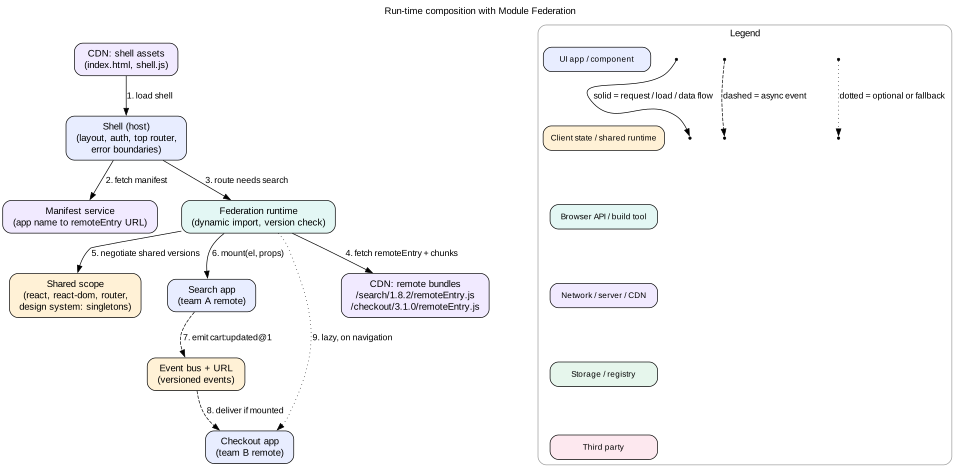
Figure 1. The shell only knows app names. The manifest maps names to URLs, so teams can deploy new versions without a shell release.
The shell's own bundle starts behind an async boundary. Its entry file only does import("./bootstrap"). This gives the runtime a moment to set up the shared scope before any shared module is used.
The shell registers what it can provide in the shared scope: React 18.2.0, router 6.22, design system 5.3.
On navigation to /search, the shell asks for search/App. The runtime fetches remoteEntry.js from the URL in the manifest. This file is small, often under 10 KB. It lists exposed modules and shared needs.
The remote says "I need React ^18.2.0 as a singleton". The runtime finds 18.2.0 in the shared scope and uses it. No second React is downloaded.
The runtime fetches only the chunks for ./App. The shell calls the exposed mount function.
Expose a mount function, not a component
Exposing a raw React component ties the shell to the remote's React version and internals. A framework-neutral contract is safer:
// src/mount.tsx in the search app
export function mount(el: HTMLElement, ctx: { basePath: string; bus: EventBus; user: User | null }) {
  const root = createRoot(el);
  root.render(<SearchApp basePath={ctx.basePath} bus={ctx.bus} user={ctx.user} />);
  return () => root.unmount();   // the shell calls this on navigation away
}
The contract is small: mount(el, ctx) returns an unmount function. The shell does not care which framework runs inside. A team could move from React to another framework without changing the shell.
Dynamic remotes from a manifest
Do not hard-code remote URLs in the shell build. Fetch a manifest at start-up, such as { "search": "https://cdn.shop.com/search/1.8.2/remoteEntry.js" }. The manifest is the deploy switch. Changing one URL releases or rolls back an app in seconds. Give the manifest a short cache, such as max-age=60. Give versioned app files max-age=31536000, immutable.
Mistake
Serving remoteEntry.js from a fixed URL with long caching. Users keep the old entry file, which points to chunk names that no longer exist. Put the version in the path, and keep old versions on the CDN for days so open tabs still work.
6. Shared dependencies
Which libraries to share
Must be singletons: React and ReactDOM, the router, the design system's theme provider, and any state library whose context crosses apps.
Good to share: large libraries most apps use, such as a date library or a charting library. Sharing saves bytes.
Do not share: small utilities and fast-moving internal code. Sharing them creates version coupling for a tiny byte saving.
Version rules
singleton: true means one copy only. If versions do not match, the runtime warns and uses the highest available.
requiredVersion states what the app accepts, such as ^18.2.0.
strictVersion: true throws an error instead of warning on mismatch. Use it for libraries where a mismatch is truly unsafe. Catch it in CI rather than in production.
Govern versions centrally
Keep one file, owned by the platform team, that lists the allowed range for each shared singleton. Every app's CI checks its package.json against this file. A team that bumps React to 19 alone fails CI, not production.
Upgrading a singleton across all apps
The platform team announces the target, such as React 19, with a date.
Each team makes its app compatible with both versions and widens its range, such as "^18.2.0 || ^19.0.0".
When all apps accept both, the shell switches to provide React 19.
Later, teams drop the old range.
This is slow. It is the main ongoing tax of micro-frontends. Plan for one or two such upgrades per year.
7. Routing across apps
Two levels of routing
The shell owns the first URL segment. /search/* goes to search, /checkout/* goes to checkout. It owns the 404 page too.
Each app owns everything under its prefix. Checkout decides what /checkout/payment and /checkout/review show. It receives basePath="/checkout" and uses it as its router's base.
One history
All apps must share the browser's one history stack. Use a single router instance from the shared scope, or have each app's router listen to the same history object. Two routers that each call pushState without knowing about each other break the back button.
Links between apps
Search links to a product page owned by another team. If it uses a plain <a href>, the browser reloads the whole page. Instead, give apps a shell-provided navigate(url) function or a shared Link component. The shell intercepts the navigation, unmounts search, and mounts the product app with no reload.
Navigation and accessibility
After each navigation, the shell moves focus to the new page's main heading or to <main>. It updates document.title and announces the new page in a polite live region. A screen reader user then knows the page changed, as with a full reload.
Race conditions
A user clicks "Search" then "Account" quickly. The search app is still loading when account is requested. The shell must track a navigation id and ignore results from older navigations. Otherwise search could mount after account and win. The code lab shows this guard.
8. Design consistency and CSS isolation
One design system
Users must not see five button styles. Every app uses the same design system package. Load its tokens and theme CSS once from the shell. Share its JavaScript as a singleton, so all apps see one theme provider. A design system major version is upgraded like React: coordinated, with a window where both versions work.
CSS collisions
Two apps can both define .card or .button. When both are on the page, or when one app's styles stay loaded after it unmounts, they fight. Defenses:
Ban global selectors in apps. Use CSS Modules or a zero-runtime CSS-in-JS tool that generates unique class names.
Prefix any remaining global classes with the app name, such as .chk-.
Put the design system in a cascade layer, such as @layer ds, and app styles in their own layers. The order is then explicit, not based on load order.
Shadow DOM gives full isolation for Web Component apps. But global theme variables must pass through, which CSS custom properties do by design.
Remove an app's style tags on unmount, or scope them so they cannot match outside the app's root.
Shared layout pieces
The header, footer, and nav belong to the shell. Apps never draw their own header. If an app needs to change the header, such as showing a cart count, it sends an event or calls a shell API. It never reaches into the shell's DOM.
9. Communication between apps
Every channel between apps is a contract between teams. Fewer, simpler channels are better. In order of preference:
1. The URL
The URL is the best shared state. It is visible, shareable, and survives reload. Search passes a product to the product app through /product/123, not through a message.
2. Props from the shell
The shell passes stable facts to mount: the user, the locale, feature flags, and the base path. These change rarely. When they do, the shell calls an update(ctx) function or remounts.
3. Events with versioned contracts
For "something happened" messages, use a small event bus. It can be built on CustomEvent dispatched on window, or as a tiny library from the shell.
Name events with a domain and a version: cart:updated@1.
Define payload types in a shared contracts package: { count: number; totalCents: number }.
Adding an optional field is fine. Removing or renaming a field needs @2. The producer emits both versions until all consumers move.
Events are fire and forget. A consumer that is not mounted misses them. If a newly mounted app needs the current value, it asks the owner through a query API, or reads it from the URL or server.
4. Shared state store, rarely
A global store that all apps read and write couples them tightly. A change to its shape breaks everyone. Avoid it. If two apps need deep shared state, they may belong in one app.
Across tabs
Signing out in one tab should sign out all tabs. The shell owns this. It uses BroadcastChannel or the storage event, and tells each mounted app through the bus.
Mistake
Letting apps import each other's internal modules through federation, such as checkout/utils/formatPrice. Now checkout cannot refactor without breaking search. Only expose public entry points such as mount. Put shared helpers in a versioned package.
10. Monorepo vs polyrepo
Monorepo
All apps live in one repository, with tools such as Nx or Turborepo, and still deploy separately.
Pros: one place to change a contract and all its users in one commit. Shared lint, test, and version policy. Easy code search. Tools build and test only affected projects, with remote caching.
Cons: needs strong tooling and repo hygiene. Permission boundaries rely on code owner rules rather than repo access.
Polyrepo
Each app has its own repository and pipeline.
Pros: maximum team independence. Simple per-repo tooling. Clear access control.
Cons: shared changes need many pull requests across repos. Versions drift. Finding all users of an event needs extra tooling.
A common choice
Use a monorepo with separate deploy pipelines per app. Enforce boundaries with code owner files and import lint rules. Independence comes from deploys and ownership, not from separate repos.
11. Ownership, deploys, and rollback
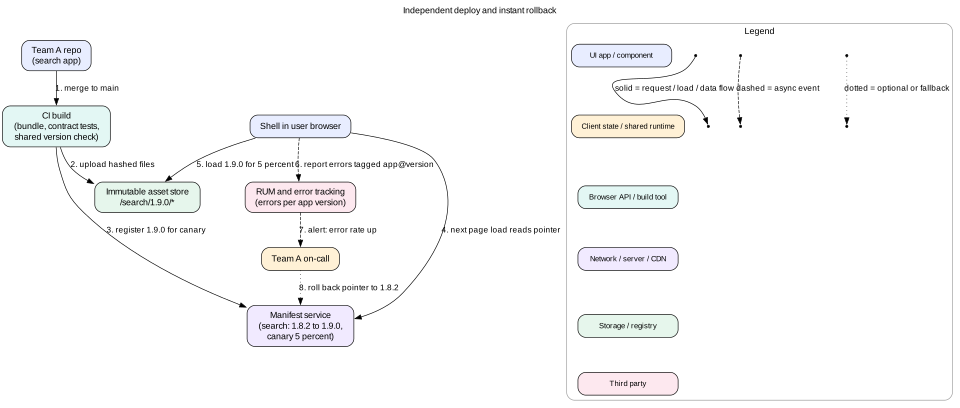
Figure 2. A deploy uploads new files and moves a pointer. A rollback moves the pointer back. No file is ever overwritten.
Ownership rules
Every route prefix and every exposed module has one owning team in a registry file.
Every error is tagged with app name and version. The shell's error boundary around each app adds this context before reporting.
Alerts route to the owning team's on-call. The platform team owns the shell, the manifest service, and shared versions.
Safe deploys
Upload files to paths with the version or content hash. Never overwrite.
Run contract tests in CI: does the app still export mount with the expected signature? Does it emit events that match the contract types?
Canary: the manifest service serves the new version to a small share of users, such as 5 percent, keyed by a stable user id hash.
Watch error rate and Web Vitals per app version from real user monitoring. Promote to 100 percent after a quiet period.
Rollback is a manifest change. It takes effect on the next page load or route change, within about a minute.
Integration testing
Each team tests its own app with the shell and a mocked bus. A shared end-to-end suite runs the main user journeys, such as "search, add to cart, check out". It uses the current production manifest with one app swapped for the candidate. This catches cross-app breaks before users do.
Tip
Show app versions in a hidden debug panel, such as when the URL has ?debug=1. Support engineers can then see which versions a user had when a bug happened.
12. Performance costs
Where the cost comes from
Waterfalls. Shell, then manifest, then remote entry, then chunks. Each step waits on the one before.
Duplicate code. Libraries that are not shared, or that fail version negotiation, load twice.
Lost optimization. A bundler cannot tree-shake or deduplicate across separate builds.
More JavaScript to parse. Each app brings its own runtime glue, state library, and helpers.
Hydration complexity. With server rendering, every app must hydrate with matching markup, or the page re-renders.
Fixes
Inline the manifest in the HTML, so there is no manifest round trip on first load.
Add <link rel="modulepreload"> or <link rel="preload"> for the current route's remote entry and main chunk in the HTML. The browser then fetches them in parallel with the shell.
Use <link rel="preconnect"> to the CDN host if apps are on a different origin.
Prefetch the likely next app when the user hovers a link or when the browser is idle.
Serve all apps from one origin, such as paths on one CDN host. This reuses one HTTP/2 or HTTP/3 connection.
Set per-app JavaScript budgets in CI and track Web Vitals per app version in production.
A worked number
Before fixes: 5 round trips at 100 ms, plus 300 KB of JavaScript with 60 KB duplicated. LCP was 3.4 seconds on mid-range phones. After inlining the manifest, preloading the route's remote, and fixing a router version mismatch that duplicated 60 KB: 3 round trips and 240 KB. LCP fell to 2.3 seconds.
Intuition
Users do not care how many teams built the page. Every millisecond of micro-frontend overhead is a cost your org chart puts on the user. Measure it, budget it, and remove as much as you can.
13. Failure modes
A remote fails to load (network error, 404, 503). The shell's error boundary shows a fallback for that slot: "Checkout is unavailable, try again". Header, nav, and other apps keep working. Retry on next navigation.
A remote throws during render. The per-app error boundary catches it, reports it with app and version, and shows a fallback. Without a boundary, one bug blanks the whole page.
Two copies of React. Hooks throw "invalid hook call", or context values go missing. Caused by a version mismatch or a missing singleton flag. Catch it with the central version check in CI.
Stale remoteEntry.js after deploy. Old entry points to deleted chunks, causing a chunk load error. Use versioned paths and keep old files for days. On a chunk load error, reload the manifest once.
Event contract break. Producer renames a field, consumer reads undefined. Prevent with versioned event names, shared types, and contract tests.
CSS leak. One app's global style changes another app's layout. Ban global selectors and use layers.
Memory leaks on unmount. Apps leave listeners and timers behind. Make cleanup part of the contract and test mount and unmount 50 times in CI while watching heap size.
Shell becomes a bottleneck. Teams push features into the shell. Keep strict rules on what the shell may contain.
14. Trade-offs
Micro-frontends vs modular monolith
Micro-frontends: independent deploys, isolated failures, mixed tech during migrations. Costs: runtime complexity, more bytes, version governance, harder debugging.
Modular monolith: one build, best performance, simple debugging. Shared release, and boundaries enforced only by lint rules.
Module Federation vs import maps
Federation: rich version negotiation, works with existing webpack or Rspack setups. Ties you to bundler-specific runtime behavior.
Import maps: a web standard, simple to reason about. Version negotiation is manual: one URL per name for the whole page.
Web Components vs framework mount functions
Web Components: framework neutral, optional Shadow DOM isolation. Server rendering and rich data passing are harder.
Mount functions: simple and flexible, easy to pass objects. Isolation depends on discipline.
Client composition vs server composition
Client: simple hosting, app-like navigation. Slower first paint.
Server or edge: fast first paint and better SEO. Each team needs server infrastructure, and fragment timeouts need careful design.
15. Interview angle
Common prompts: "Our frontend has 20 teams and releases are slow. What do you do?" or "Design the architecture for a large e-commerce frontend." A strong answer goes in this order:
Diagnose. Ask for team count, release pain, build time, shared state, and legacy code. Decide if the problem is organizational or technical.
Consider the cheaper option. Modular monolith with affected-only builds and code owners.
If splitting, cut by domain. Name the apps and their owners.
Pick composition. Server rendering for the shell and main content, Module Federation for apps, iframes only for third-party content.
Contracts.mount and unmount, shell props, versioned events, the URL as shared state.
Shared dependencies. Singleton list, central version policy, coordinated upgrades.
Costs. Show the waterfall numbers and how to cut them.
Interview
Draw the request waterfall on the board with times. Then show which arrows disappear with an inlined manifest and preload hints. Concrete numbers make the trade-off real and set you apart.
16. Summary
Micro-frontends solve team-scale problems: independent deploys, ownership, and incremental migration. They add runtime cost.
Split by business domain, and only when team count and release pain justify it. Consider a modular monolith first.
Run-time composition, often with Module Federation, gives true deploy independence. Apps expose a small mount contract.
React, the router, and the design system must be shared singletons, governed by one central version policy.
The shell owns top-level routing, layout, auth, error boundaries, and focus after navigation.
Communicate through the URL first, shell props second, and versioned events third. Avoid shared global stores.
Deploys upload immutable files and move a manifest pointer. Rollback moves it back.
Measure and cut the waterfall and duplicate code. Users should never feel the org chart.
17. Common mistakes
Adopting micro-frontends with two or three teams.
Splitting by technical layer instead of by domain.
Letting each app bundle its own React.
Hard-coding remote URLs in the shell, so every app deploy needs a shell deploy.
No error boundary per app, so one crash blanks the page.
A shared global store that couples every app to one data shape.
Global CSS selectors in apps.
Forgetting focus management and page titles on cross-app navigation.
Never measuring the extra round trips and bytes.
Worked example: a bad checkout deploy at noon
The checkout team merges a change at 12:00. It has a bug: the payment step throws when a saved card has no expiry date. Here is how the system limits the damage.
CI builds checkout 3.2.0. The central version check passes: React ^18.2.0, router ^6.20.0, design system ^5.0.0. Contract tests pass: mount exists and events match types.
CI uploads hashed files to /checkout/3.2.0/. Version 3.1.0 stays on the CDN untouched.
CI tells the manifest service to serve 3.2.0 to 5 percent of users, chosen by a hash of their user id.
At 12:04 a user in the canary loads the store. The HTML has the manifest inlined, with checkout: /checkout/3.2.0/remoteEntry.js. The shell preloads it only when the user enters the cart.
The user clicks "Pay". The payment step throws. The shell's error boundary around the checkout slot catches it. The header, the cart count, and the nav still work. The slot shows "Something went wrong in checkout. Try again."
The boundary reports the error with tags app=checkout, version=3.2.0, and the route.
By 12:09, real user monitoring shows the checkout error rate for 3.2.0 at 4 percent against 0.1 percent for 3.1.0. The alert goes to the checkout on-call, not to the search or platform teams.
The on-call engineer moves the manifest pointer back to 3.1.0 at 12:11. No build is needed.
Within a minute, new page loads get 3.1.0. Users who retry in an open tab trigger a route change, which re-reads the manifest and loads 3.1.0.
About 5 percent of users who reached payment in 11 minutes saw the error. With a monolith and no canary, every user would have seen it until a full redeploy, which takes about 30 minutes.
The team adds a test for cards with no expiry, ships 3.2.1 through the same canary, and promotes it to 100 percent at 15:00.
Code lab: a tiny shell with isolated apps
This script models a shell. It routes by prefix, loads each app once, mounts and unmounts it, isolates load failures, guards against navigation races, and passes a versioned event bus. Remotes are fake async functions, so it runs in Node. Save it as shell.mjs and run node shell.mjs with Node 18 or later.
// Fake remotes. In a browser these would be dynamic import() of remoteEntry files.
const remotes = {
  search: async () => ({ mount: (el) => { el.html = "Search UI"; return () => { el.html = ""; }; } }),
  checkout: async () => { throw new Error("remoteEntry.js 503"); },
  account: async () => ({ mount: (el, { bus }) => {
    el.html = "Account UI";
    const off = bus.on("cart:updated@1", (e) => console.log("  account sees cart count", e.count));
    return () => { off(); el.html = ""; };
  } }),
};
const routes = [["/search", "search"], ["/checkout", "checkout"], ["/account", "account"]];

function createBus() {
  const subs = new Map();
  return {
    on(type, fn) { (subs.get(type) ?? subs.set(type, new Set()).get(type)).add(fn); return () => subs.get(type).delete(fn); },
    emit(type, payload) { for (const fn of subs.get(type) ?? []) fn(payload); },
  };
}

function createShell(el) {
  const bus = createBus();
  const cache = new Map(); // app name -> promise of module, loaded once
  let unmount = null, navId = 0;
  async function navigate(path) {
    const id = ++navId;
    const match = routes.find(([prefix]) => path.startsWith(prefix));
    if (unmount) { unmount(); unmount = null; }
    if (!match) { el.html = "Not found"; return; }
    const name = match[1];
    el.html = `Loading ${name}...`;
    try {
      if (!cache.has(name)) cache.set(name, remotes[name]());
      const mod = await cache.get(name);
      if (id !== navId) return; // user navigated again while loading
      unmount = mod.mount(el, { bus, basePath: match[0] });
    } catch (err) {
      cache.delete(name); // allow a retry on the next visit
      if (id === navId) el.html = `${name} is unavailable (${err.message}). Other pages still work.`;
    }
  }
  return { navigate, bus };
}

const el = { html: "" };
const shell = createShell(el);
for (const path of ["/search?q=shoes", "/checkout", "/account"]) {
  await shell.navigate(path);
  console.log(path.padEnd(16), "->", el.html);
}
shell.bus.emit("cart:updated@1", { count: 3 });
shell.navigate("/search"); shell.navigate("/account"); // fast double click
await new Promise((r) => setTimeout(r, 0));
console.log("after race      ->", el.html);
Expected output: search mounts, checkout shows a fallback message while the shell keeps working, and account mounts. Account then logs account sees cart count 3. After the fast double click, the result is Account UI, because the stale search load is ignored. Try removing the if (id !== navId) return line. Then make the search loader slower with a setTimeout, and watch search win the race by mistake.
Check yourself
A company has 3 frontend teams and slow builds. Should they adopt micro-frontends?Answer
Probably not. The coordination cost among 3 teams is small, and micro-frontends add runtime cost and governance. Fix builds first with a modular monolith, affected-only builds, and remote caching.
Why is build-time composition with npm packages not "independent deploy"?Answer
Every app release must be pulled into the shell, rebuilt, and redeployed. Teams depend on the shell's release, which recreates the shared release train.
What breaks if two micro-frontends each load their own copy of React?Answer
The page downloads about 45 KB extra. Worse, hooks and context break when a component from one copy renders inside a tree owned by the other. Mark React as a shared singleton with a compatible range.
Why should a remote expose mount(el, ctx) instead of a React component?Answer
A mount function is a framework-neutral contract. The shell does not depend on the remote's framework or its internals. The returned unmount function makes cleanup explicit.
The checkout team wants to rename the count field in cart:updated@1. What is the safe process?Answer
Create cart:updated@2 with the new field. Emit both versions until all consumers have moved to version 2, checked by contract tests and a usage search. Then stop emitting version 1.
Name two ways to cut the run-time loading waterfall.Answer
Inline the manifest in the HTML to remove one round trip. Add modulepreload or preload links for the current route's remote entry and main chunk, so they download in parallel with the shell. Serving from one origin and prefetching on hover also help.
How do you roll back one micro-frontend in under a minute?Answer
Point the manifest entry for that app back to the previous version's immutable URL. The old files are still on the CDN, so no build is needed. New loads and route changes pick it up.
Key terms
Micro-frontend
A part of a web app owned, built, and deployed by one team on its own.
Shell (host)
The thin app that loads first and owns layout, auth, top routing, and loading other apps.
Remote
In Module Federation, a build that exposes modules for other builds to load at run time.
remoteEntry.js
The small file a remote publishes that lists its exposed modules and shared needs.
Shared scope
The run-time registry where builds offer and request shared libraries and their versions.
Singleton
A shared library that must have exactly one instance per page, such as React.
Import map
A standard JSON script that maps bare module names to URLs for native ES modules.
Manifest
A file or service that maps each app name to the URL of its current version.
Modular monolith
One deployable app with strict internal module boundaries and owners.
Contract test
A test that checks an app still meets its agreed interface, such as exports and event shapes.
Canary release
Serving a new version to a small share of users first, then widening it if healthy.
Error boundary
A component that catches render errors in its subtree and shows a fallback.