Feature Flags, Experiments, and Safe Frontend Releases
Shipping code and releasing a feature are two different acts. This guide shows how flags, experiments, versioned static assets, and canary deploys let a frontend team ship often and undo mistakes in seconds.
Frontend system design · patterns
Design a release system where code deploys dark and features turn on gradually. Experiments must give trustworthy results. Any bad change must turn off fast.
Correctness contract: A user sees one consistent variant per flag for the whole session, with no flicker. Every loaded page can still fetch all of its own assets. A kill switch takes effect for all users within minutes, with no deploy.
You know HTTP caching headers, how a bundler emits hashed files, and basic React or a similar framework. Statistical details of experiments are kept light. Numbers are planning estimates.
Backend services can deploy and roll back on servers the team controls. A frontend release is different. Once a user loads your JavaScript, that code runs on their device until they reload. It may run for days in a tab that never closes. Meanwhile, the CDN may serve a mix of old and new files, and the API may move ahead of the client. Feature flags add another layer. They decide at run time which code path a user sees. Done well, these tools turn a risky "big bang" launch into a calm series of small steps. Done badly, they cause flicker, broken pages after deploys, biased experiments, and a codebase full of dead branches. This guide covers each tool and how they combine into a safe release process.
A feature flag is a named switch read at run time. The code contains both paths. A remote config service decides which path each user gets, based on rules.
Example.if (flags.newCheckout) render(<CheckoutV2 />) else render(<CheckoutV1 />). The flag is on for employees and 5 percent of users in Canada.
Limit. Every flag doubles the paths through that code. Ten active flags in one area give 1,024 combinations, and nobody tests them all.
Kinds of flags
Flags differ by purpose and lifetime. Release flags hide unfinished work for days or weeks. Experiment flags split users for a test. Ops flags, or kill switches, turn off a risky dependency. Permission flags gate features by plan or role and may live for years.
Example.search_v2_release is removed after launch. disable_recommendations stays as a permanent kill switch.
Limit. Treating all flags the same leads to release flags that live forever. Tag each flag with its kind and an expiry date.
Deterministic bucketing
Bucketing assigns a user to a group with a hash of a stable id and a salt, such as the flag key. The same input always gives the same bucket. No database lookup is needed.
Example.hash('newCheckout:user123') % 10000 gives 1834. With a 20 percent rollout (threshold 2000), the user is in.
Limit. Logged-out users have no stable id. Use a first-party anonymous id cookie, and accept that clearing cookies moves the user.
Exposure
An exposure is the moment a user actually sees a variant. Experiment analysis should count only exposed users. Users assigned but never shown the feature add noise.
Example. A test changes the checkout button. Only users who reach checkout are exposed. Counting every visitor would dilute the effect twenty times.
Limit. Logging exposure at the wrong time, such as at page load for all flags, biases results and inflates event volume.
Content-hashed assets
The bundler puts a hash of each file's content into its name, such as app.3f9a.js. A changed file gets a new name. So the CDN and browser can cache each file forever.
Example.Cache-Control: public, max-age=31536000, immutable on hashed files. Cache-Control: no-cache on index.html, which points to them.
Limit. Deleting old hashed files on deploy breaks tabs that still run the old version and lazy-load a chunk.
Version skew
Skew is when two parts of a system run different versions at the same time. In frontend work it means an old client talking to a new API, or a page loading chunks from two builds.
Example. A tab opened yesterday still runs build 41. The API now runs build 42 and removed a field that build 41 needs.
Limit. You cannot force every tab to reload at once. The system must tolerate skew for hours or days.
1. Flag evaluation on client versus server
A flag decision needs three inputs: the flag rules, the user context, and a hash function. Where you run that evaluation shapes speed, privacy, and consistency.
Server-side evaluation
The server, edge worker, or backend-for-frontend evaluates flags for the request. It sends only the results to the client, often as a small JSON object in the HTML. For example, {"newCheckout": "treatment", "darkMode": true}.
Rules stay private. Competitors cannot read your targeting rules or unreleased flag names from the bundle.
The first render already knows the answer, so there is no flicker.
Server-rendered HTML can include only the chosen variant.
The cost: a page cached at the CDN can no longer be shared by all users if its HTML depends on flags. You must vary the cache by variant or move evaluation to the edge.
Client-side evaluation
The client SDK downloads the full rule set and evaluates locally. Changes can stream in over Server-Sent Events or polling, and the UI updates without a reload.
Fast flag changes. A kill switch can reach open tabs in seconds through a streaming connection.
Works offline once rules are cached.
The cost: rules are public. Anyone can open DevTools and read them. Never put secrets or sensitive targeting, such as a list of customer emails, in client rules.
The cost: the client must fetch rules before it knows the answer. That is where flicker comes from.
The common hybrid
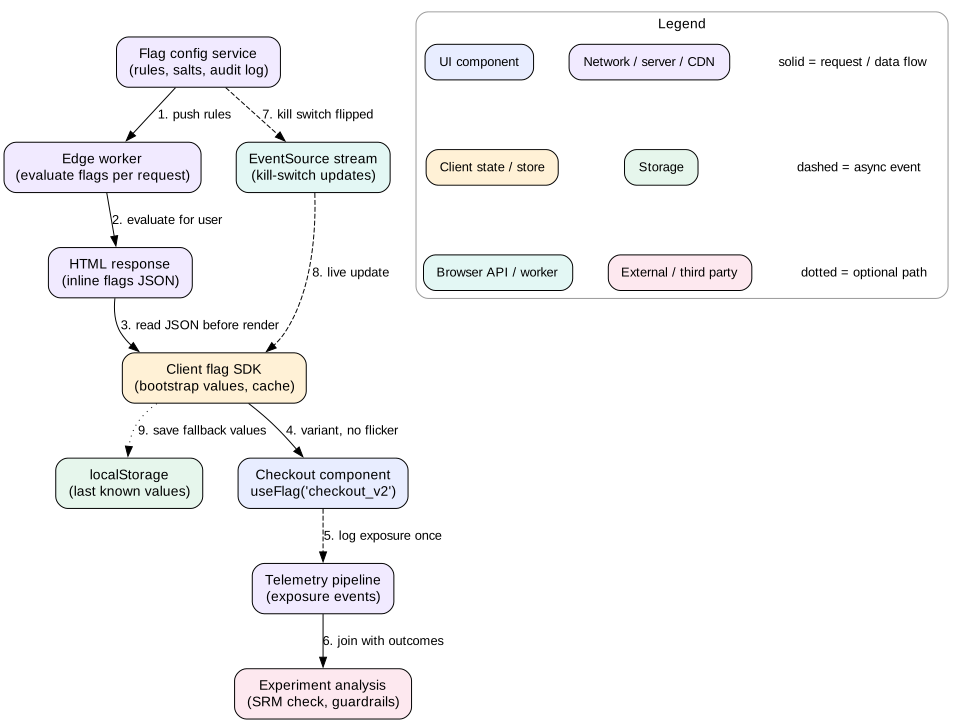
Most large apps evaluate on the server for the first render and bootstrap the results into the page. The client SDK starts with those values. It then opens a stream for live updates, mainly for kill switches. The client never needs the full rule set. It only receives updated values for its own user.
Hybrid evaluation. The edge evaluates flags and inlines the results. The client renders with them at once, logs exposure on first use, and listens for live kill-switch updates.
Interview
Say where flags are evaluated and why. Try "edge evaluation with bootstrapped values, and client streaming only for kill switches". That answers three follow-ups at once. They are flicker, privacy of rules, and speed of turning things off.
2. Avoiding flicker
Flicker is when a user briefly sees the control variant, then the page swaps to the treatment. It looks broken. It also corrupts experiments, because treatment users saw both versions. Some even click the old button in the gap.
Why it happens
The page renders with default flag values.
The SDK fetches flags from the network, which takes 100 to 500 ms on mobile.
The values arrive and the component re-renders with the treatment.
Fixes, best first
Bootstrap. Inline evaluated flags into the HTML, for example <script id="flags" type="application/json">{...}</script>. The SDK reads it synchronously before the first render. No network wait.
Server-render the variant. With SSR, the HTML already contains the right UI. Make sure the client hydrates with the same flag values, or React reports a hydration mismatch and re-renders.
Edge evaluation with caching. An edge worker evaluates flags and rewrites the HTML or sets a cookie. Use a variant cookie as part of the cache key, so each variant is cached separately. Keep the number of variants small, because each one splits the cache.
Cache last known values. Store the previous session's flags in localStorage. Use them at start, then refresh. This works for repeat visitors but can still flip if values changed.
Block render briefly. Hide the affected area until flags load, with a short timeout such as 300 ms and a fallback to control. This trades flicker for a delay. Use it only when the other options are impossible.
Keep it stable for the session
Do not change a user's variant mid-session because a rule changed. A checkout that switches design between steps confuses users. Freeze experiment variants for the page life. Allow live changes only for kill switches, where turning something off is worth a visible change.
Mistake
Client-side A/B tools that hide the whole page with opacity: 0 until their script loads. A slow third-party script then delays Largest Contentful Paint for every user, including those not in any test. If you must use one, give it a strict timeout.
3. A/B testing and exposure logging
An A/B test randomly splits users into variants and compares a metric between them. Random assignment is what lets you say the change caused the difference.
Assignment
Use deterministic bucketing. Hash a stable unit id with an experiment salt. Map the hash to 10,000 buckets. Assign bucket ranges to variants. The salt must differ per experiment. If two experiments use the same salt, the same users land in treatment for both, and the effects mix together.
Pick the unit with care. Bucketing by user id keeps a person's experience the same across devices once logged in. Bucketing by device or anonymous id is needed before login, but one person on two devices may see both variants. For logged-out to logged-in flows, decide which id wins and keep it consistent.
Exposure logging
Log an exposure event the first time the code actually branches on the flag for that user. Put the logging inside the flag evaluation call that the component uses. Do not log at page load for every flag. Log once per user per experiment per session, and dedupe on the server too.
Send exposures through the same reliable batching pipeline as other telemetry. Flush on visibilitychange to hidden. A lost exposure means that user's conversions are dropped from analysis.
Trustworthy results
Sample ratio mismatch. If you planned 50/50 and see 50.8/49.2 with a million users, something is wrong. Maybe one variant crashes before logging exposure, or bots favor one path. A chi-squared test on counts flags this. Do not trust the result until you find the cause.
Sample size. To detect a 2 percent relative lift on a 5 percent conversion rate, you need hundreds of thousands of users per arm. Decide the size before starting. Stopping the test the moment it looks good, called peeking, inflates false positives.
Guardrail metrics. Track metrics that must not get worse: error rate, LCP, INP, and unsubscribe rate. A variant that lifts clicks but adds 400 ms of INP is not a win.
Novelty effects. Users click new things because they are new. Run tests at least one or two full weeks to cover weekly cycles.
Intuition
An experiment is only as good as its random split and its exposure log. If either is biased, the statistics will confidently give you the wrong answer.
4. Gradual rollout and kill switches
A gradual rollout turns a feature on for a growing share of users while you watch the metrics. It limits the blast radius of a bug.
A typical ramp
Internal. Employees only, for a day or more. Catch obvious bugs where the cost is low.
1 percent. Real traffic, small blast radius. Watch error rate, Web Vitals, and key journey success.
5 percent, then 25 percent. Enough traffic to see smaller regressions. Hold each step for hours, or a full day for traffic patterns.
50 percent. Often run as a proper A/B test against the other half.
100 percent. Then schedule flag removal.
Ramp with the same hash every step. A user in the 1 percent group stays in at 5 percent, because bucket 37 is below both thresholds. If the hash changed between steps, users would flip back and forth.
Targeting rules
Rules evaluate in order: specific overrides first, then segments, then the percentage. For example: user is in the QA list, then country is Canada, then 10 percent of everyone else. Keep rules simple. Complex rule trees are hard to reason about during an incident.
Kill switches
A kill switch is a flag whose only job is to turn something off fast. Wrap risky dependencies in one: a new recommendation widget, a third-party chat script, an expensive animation, or a new API call. When it misbehaves, flip the switch. No build, no deploy, no cache purge.
Propagation time. Polling every 60 seconds means up to a minute plus fetch time. Streaming updates over SSE reach open clients in a second or two. Server-evaluated flags take effect on the next request.
Safe default. If the flag service is down, the SDK must fall back to a safe default. For a kill switch, safe usually means "feature on as normal" unless the switch is currently active. So cache the last known values.
Test the off path. A kill switch that has never been flipped may throw when flipped. Exercise the off path in tests and in a game day.
Tip
Tie rollout steps to automated checks. The flag system can read the error rate and Web Vitals for the treatment group. If they cross a threshold, it holds the ramp or turns the flag off on its own.
5. CDN, caching, and cache busting
A frontend deploy is mostly static files on a CDN. Caching rules decide whether users get new code quickly and whether old code keeps working.
Two classes of files
Entry HTML (index.html or server-rendered pages). It must be fresh, because it points to the current build. Serve it with Cache-Control: no-cache, which allows caching but requires revalidation with an ETag each time. A revalidation that returns 304 Not Modified costs a round trip but almost no bytes. Alternatively, use a short CDN TTL with s-maxage=60 and purge on deploy.
Hashed assets (app.3f9a.js, vendor.c0d2.js, logo.77aa.svg). Their content never changes under the same name. Serve them with Cache-Control: public, max-age=31536000, immutable. immutable tells the browser not to revalidate even on reload.
This split is what makes deploys safe. A new deploy uploads new hashed files next to the old ones. Then it switches the entry HTML. New page loads get the new HTML and new files. Old pages keep using old files that still exist.
Cache busting done right
Cache busting means forcing clients to fetch a new version. With content hashes you rarely need to bust anything. The new file has a new URL. Avoid query-string versions like app.js?v=42. Some proxies ignore query strings for caching, and all files change version together even if only one changed.
Split bundles for good cache hit rates. Put rarely changing vendor code into its own chunk. A typical deploy then changes only the app chunk, perhaps 80 KB, while the 150 KB vendor chunk stays cached. Over many deploys a week, this saves real bandwidth for repeat users.
Keep old assets
Never delete the previous build's assets on deploy. Keep at least the last several builds, or a fixed time window such as 7 to 30 days. A user may open a tab on Monday and click a lazy route on Wednesday. That route's chunk must still exist. Object storage behind the CDN makes this cheap. A 2 MB build kept for 30 deploys is only 60 MB.
Mistake
Setting a long max-age on index.html. Users then get stale HTML that points at old builds for hours. Worse, if old assets were deleted, they get a blank page. Entry HTML must always revalidate.
6. Versioned deploys and client-API skew
At any moment, users run many client versions. Some tabs are minutes old, some are days old. Mobile web views and installed PWAs can be even older. Your API and your static assets must handle all of them.
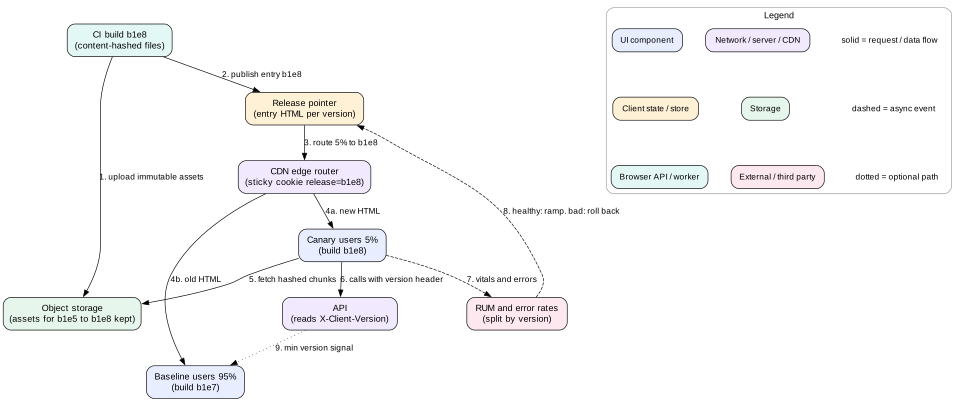
A versioned release. Assets for every recent build stay on the CDN. The entry HTML pointer moves through canary to full release, and rollback moves it back.
Chunk load errors
The most common skew bug is a ChunkLoadError. An old page tries to load route-settings.a1b2.js, and the file is gone. Two defenses:
Keep old assets, as above. This prevents most cases.
Catch the error in your dynamic import wrapper. If a chunk fails to load, reload the page once to pick up the current build. Store a flag in sessionStorage so you never reload in a loop.
Version-aware API calls
Send the client build id on every API request, for example X-Client-Version: b1e8. The server can then:
Log errors by client version, which shows when old clients break.
Return a "please reload" signal when the client is below a minimum supported version. The UI shows a gentle banner, or forces a reload if the old client is unsafe.
Choose response shapes per version during a migration.
Expand and contract
The safest way to change an API used by clients you cannot update instantly is expand and contract. It has three steps.
Expand. The server adds the new field or endpoint and keeps the old one. Both work.
Migrate. Ship the client that uses the new field. Wait until old client versions drop below a threshold in your version logs, for example under 0.1 percent of traffic.
Contract. Remove the old field from the server.
Never ship a breaking API change at the same moment as the client that needs it. The deploys will not land at the same instant, and old tabs will hit the new API for days.
Deploy order
Deploy the backend first when adding capability. Deploy the frontend first when removing usage. Feature flags make this easier. Ship the client code dark, turn the flag on after the API is ready, and turn it off if the API has problems.
Intuition
Treat every deployed client version as a separate app that you still support. Your API is a public contract with all of them, not just with the newest one.
7. Canary releases and rollback
A flag protects one feature. A canary protects the whole build. Even with every feature behind a flag, a new build can break things: a bundler upgrade, a polyfill change, or a CSS regression.
How a frontend canary works
Upload the new build's hashed assets to the CDN. Nothing points at them yet.
Publish a new entry HTML, or a manifest that maps to it, as version b1e8.
At the CDN edge, route a small share of users, such as 5 percent, to the new entry. Use a sticky cookie such as release=b1e8 so a user stays on one version across page loads.
Compare canary and baseline on error rate, Web Vitals, API error rate by client version, and journey success.
If healthy after a set time, raise to 25, 50, then 100 percent. If not, route everyone back to the previous entry.
Stickiness matters. Without it, a user might get the new HTML on one page and the old HTML on the next. Their cached state and local storage formats could clash between versions.
Rollback
Because all assets are versioned and old ones are kept, rollback is just moving a pointer. The entry HTML points back to the previous build. Purge the CDN cache for the entry HTML only. No rebuild needed. This takes seconds to a minute, not the 10 to 20 minutes of a full build and deploy.
Plan for the users who already loaded the bad build. They run it until they navigate or reload. One option is a minimum version signal from the API. Another is a forced reload through the service worker update flow. A third is a kill switch for the broken feature that works inside the bad build.
Tip
Make rollback boring. Practice it in normal weeks. A rollback button that nobody has pressed in six months may not work when you need it.
Data and storage compatibility
A rollback is only safe if the old build can read data the new build wrote. If the new build changed the shape of data in localStorage or IndexedDB, the old build may crash on it. Version your stored data and make old code ignore unknown versions safely. The same rule applies to server data. Avoid one-way migrations in the same release as a risky client change.
8. Cleaning up stale flags
Flags are cheap to add and expensive to keep. Each one adds a branch to test, a rule to understand, and a chance of surprise. A codebase with 800 flags, most at 100 percent for a year, is a common sight. It is also a common source of outages, when someone flips an old flag and wakes up dead code.
Make cleanup part of the lifecycle
Owner and expiry on creation. The flag system requires an owner and an expected removal date for release and experiment flags.
Staleness detection. Mark a flag stale when it serves one value to all traffic for 30 days. Also mark it stale when nothing has evaluated it for 30 days.
Automated reminders. File a ticket to the owner when a flag goes stale. Show stale counts per team on a dashboard.
Automated removal. Tools can open a pull request that deletes the dead branch. Uber's open-source tool Piranha is one example of this approach.
Limits. Some teams cap active flags per team, which forces cleanup before new flags.
Removal steps
Confirm the flag serves one value everywhere, in every environment.
Remove the losing branch and the flag check from the code. Delete tests for the dead path.
Deploy and let it run for a full release cycle.
Only then archive the flag in the config service. If you delete the config first, old clients that still check the flag fall back to the SDK default, which may be the old path.
Mistake
Reusing an old flag name for a new feature. Old clients still running in tabs will read the new value and turn on code you thought was gone. Always use a new name.
9. Failure modes
Flicker. Flags loaded after first render. Users see control, then treatment.
Flag service outage. SDK has no cached values or safe defaults. Features flip off or the app blocks on start. Fix: bootstrap, cache last values, default safely, and never block render on the flag service for more than a short timeout.
Biased experiments. Exposure logged at the wrong time, shared salts, or a crash in one variant. Fix: log on use, unique salts, and sample ratio mismatch checks.
Blank page after deploy.index.html cached too long, or old assets deleted. Fix: no-cache on entry HTML and keep old builds.
Chunk load errors. Old tabs load deleted chunks. Fix: keep assets and reload once on failure.
Old client breaks on new API. Breaking change shipped without expand and contract. Fix: version header, minimum version signal, and staged changes.
Rollback that breaks data. New build wrote storage the old build cannot read. Fix: versioned stored data and forward-compatible readers.
Zombie flag flipped. Someone toggles a flag that has been at 100 percent for a year. Untested old code wakes up. Fix: cleanup process and audit logs on every flag change.
Leaked plans. Client rules expose unreleased feature names or customer lists. Fix: server-side evaluation for sensitive targeting.
10. Trade-offs
Server versus client evaluation
Server evaluation gives no flicker and private rules, but it complicates CDN caching of HTML. Client evaluation gives live updates and offline use, but it exposes rules and needs bootstrap to avoid flicker. The hybrid costs more to build and gives the best of both.
Flags versus branches
Long-lived feature branches avoid flags but cause painful merges. Trunk-based development with flags keeps merges small but adds run-time branches. Most fast-moving teams choose flags, with strict cleanup.
Speed of rollout versus confidence
A fast ramp gets value to users sooner. A slow ramp catches smaller regressions and covers daily and weekly traffic patterns. Match the ramp to the risk. A copy change can ramp in an hour. A new payment flow deserves days.
Asset retention versus storage cost
Keeping every build forever is safe and cheap per build, but it grows without bound. A fixed window of 30 days or 50 builds covers nearly every open tab.
Forced reload versus user flow
Forcing old clients to reload removes skew fast, but it can wipe unsaved form input. Prefer a banner, and force a reload only when the old client is unsafe.
11. Interview angle
This topic often comes up as "How would you launch this safely?" at the end of a design round. It can also be the main question: "Design a feature flag system" or "Design the frontend deploy pipeline". Use this plan.
Minutes 0 to 4. Ask about scale, number of flags, need for experiments, SSR or SPA, and how fast kill switches must work.
Minutes 4 to 12. Flag model and evaluation. Flag kinds, rules, deterministic bucketing, and the hybrid evaluation with bootstrap.
Minutes 12 to 18. Flicker and consistency. Bootstrap, hydration match, and session stability.
Minutes 18 to 25. Experiments. Exposure logging on use, unique salts, sample ratio checks, and guardrail metrics.
Minutes 25 to 33. Static assets. Hashed files with immutable, no-cache entry HTML, and keeping old builds.
Minutes 33 to 40. Skew and canary. Version header, expand and contract, sticky canary at the edge, and pointer rollback.
Minutes 40 to 45. Failure modes and flag cleanup.
Interview
Separate deploy from release out loud. "Deploy puts code on the CDN. Release turns it on for users. Rollback of a release is a flag flip. Rollback of a deploy is a pointer move." This framing shows senior-level thinking.
12. Summary
Deploy and release are separate. Flags control release. Versioned assets and pointers control deploy.
Evaluate flags on the server or edge for first render, bootstrap the values, and stream only kill-switch updates.
Avoid flicker with bootstrap or server rendering. Keep variants stable for the session.
Bucket with a salted hash of a stable id. Log exposure on first real use. Check for sample ratio mismatch.
Ramp gradually with the same hash, and keep kill switches on risky dependencies.
Serve hashed assets as immutable and entry HTML as no-cache. Keep old builds.
Tolerate skew with version headers, expand and contract, and reload-once on chunk errors.
Canary at the edge with sticky routing. Roll back by moving the entry pointer.
Give every flag an owner and expiry, and remove stale ones in a safe order.
13. Common mistakes
Fetching flags after first render and causing flicker.
Logging exposure for every flag at page load.
Using the same hash salt for several experiments.
Putting sensitive targeting rules in client-side flag config.
Long cache lifetimes on index.html.
Deleting old hashed assets on each deploy.
Shipping a breaking API change together with the client that needs it.
Non-sticky canary routing that mixes versions for one user.
Kill switches whose off path was never tested.
Flags that live forever, or reused flag names.
Worked example: launching a new checkout
A store rebuilds its checkout page. The team wants to launch it safely and measure whether it improves conversion.
Developers merge the new checkout to the main branch behind the flag checkout_v2. Kind: experiment. Owner: the payments team. Expiry: 8 weeks. The default is off.
Build b1e8 uploads hashed assets to object storage behind the CDN. The old build b1e7 stays. The entry HTML pointer moves through a 5 percent sticky canary. Error rate and Web Vitals match baseline, so it goes to 100 percent within two hours. Nobody sees the new checkout yet.
The edge worker evaluates flags for each request. It inlines {"checkout_v2": "control"} into the HTML as JSON. The client SDK reads it before the first render. No flicker.
The team turns the flag on for employees. They find a layout bug on small screens and fix it in build b1e9, still dark for customers.
The flag ramps to 1 percent of users. Bucketing uses hash('checkout_v2:' + userId) % 10000. Users in buckets 0 to 99 get treatment. Errors and INP stay flat.
The team starts the real experiment: 50 percent control, 50 percent treatment, by bucket range. Exposure events fire only when the checkout page mounts and calls useFlag('checkout_v2').
After one day, the analysis job reports a sample ratio of 50.9 to 49.1 across 400,000 exposures. That is a mismatch. Investigation shows the treatment page throws on an old Safari version before the exposure is logged. The team fixes the bug and restarts the experiment with a new salt.
After two full weeks, treatment shows a 3.1 percent relative lift in completed orders. The guardrail metrics are fine: error rate flat and INP p75 at 160 ms in both arms.
During the ramp to 100 percent, the payment API has an incident that only affects a new endpoint the treatment uses. On-call flips the checkout_v2 kill rule. Streaming updates reach open tabs in seconds. New page loads get control from the edge.
After the API recovers, the flag returns to 100 percent. Thirty days later, a cleanup pull request removes CheckoutV1 and the flag check. One release cycle later, the flag is archived in the config service.
Code lab: deterministic bucketing and exposure logging
This program implements the core of a flag SDK. It hashes the flag key and user id with FNV-1a into 10,000 buckets. It applies a 20 percent rollout, splits the rollout into treatment and an in-test control, and logs exposure once per user. Then it flips the kill switch. Save it as flags.mjs and run node flags.mjs.
// Deterministic percentage rollout with exposure logging.
// Run with: node flags.mjs (Node 18 or newer)
function hash32(text) {            // FNV-1a hash, same result on every device
  let h = 0x811c9dc5
  for (let i = 0; i < text.length; i++) {
    h ^= text.charCodeAt(i)
    h = Math.imul(h, 0x01000193) >>> 0
  }
  return h
}

function bucket(flagKey, userId) {  // 0 to 9999, salted by flag key
  return hash32(flagKey + ':' + userId) % 10000
}

function createFlags(config, logExposure) {
  const seen = new Set()
  return function evaluate(flagKey, userId) {
    const flag = config[flagKey]
    if (!flag || flag.killed) return 'control'      // kill switch wins
    const b = bucket(flagKey, userId)
    if (b >= flag.rolloutBasisPoints) return 'control'
    const variant = b % 2 === 0 ? 'treatment' : 'control_in_test'
    const key = flagKey + ':' + userId
    if (!seen.has(key)) {                           // log once per user
      seen.add(key)
      logExposure({ flagKey, userId, variant, t: Date.now() })
    }
    return variant
  }
}

const exposures = []
const config = { newCheckout: { rolloutBasisPoints: 2000, killed: false } }
const evaluate = createFlags(config, (e) => exposures.push(e))

const counts = { control: 0, control_in_test: 0, treatment: 0 }
for (let i = 0; i < 100000; i++) counts[evaluate('newCheckout', 'user' + i)]++
evaluate('newCheckout', 'user7')                    // repeat call, no new log
console.log('variant counts', counts)
console.log('exposures logged', exposures.length)
console.log('user7 stable:', evaluate('newCheckout', 'user7'))

config.newCheckout.killed = true                    // flip the kill switch
console.log('after kill, user7 gets', evaluate('newCheckout', 'user7'))
Expected output: about 80,000 users in plain control and about 10,000 in each test arm. About 20,000 exposures are logged, one per user in the test, and the repeat call adds none. The kill switch sends every user to control. Try raising rolloutBasisPoints to 5000. Users who were in the test at 2000 stay in it, because their bucket does not change.
Check yourself
What causes flag flicker, and what is the best fix?Answer
The page renders with default values before flags arrive from the network, then re-renders. The best fix is to evaluate on the server or edge and bootstrap the values into the HTML, so the first render already has them.
Why must each experiment use its own hash salt?Answer
With a shared salt, the same users fall into treatment for every experiment. Their effects mix, and you cannot tell which change caused a difference.
Why log exposure on first use instead of at page load?Answer
Only users who actually saw the variant can be affected. Counting everyone assigned dilutes the effect and wastes events, which makes real differences harder to detect.
What cache headers should index.html and app.3f9a.js have?Answer
index.html gets Cache-Control: no-cache so it always revalidates and points at the current build. The hashed file gets public, max-age=31536000, immutable, because its content never changes under that name.
A user's tab throws ChunkLoadError after a deploy. What happened and how do you prevent it?Answer
The tab runs an old build and tried to load a chunk that was deleted. Keep old builds on the CDN for a retention window, and on chunk failure reload the page once to get the current build.
How do you remove a field from an API that old clients still use?Answer
Expand and contract. Add the new field while keeping the old one. Ship clients that use the new field. Wait until version logs show old clients are nearly gone. Then remove the old field.
Why should canary routing be sticky?Answer
Without stickiness, a user can move between versions on each page load. Their stored state and cached data may clash between builds, and canary metrics mix both versions.
Key terms
Feature flag
A run-time switch that chooses a code path per user based on remote rules.
Kill switch
A flag that turns off a feature or dependency fast without a deploy.
Bootstrap
Inlining evaluated flag values into the page so the first render has them.
Flicker
A visible switch from one variant to another after the page first renders.
Bucketing
Mapping a hashed user id to a fixed range of buckets to assign variants.
Salt
A per-flag string mixed into the hash so assignments are independent between flags.
Exposure
The logged moment a user actually encounters an experiment variant.
Sample ratio mismatch
A gap between planned and observed variant sizes that signals a biased experiment.
Guardrail metric
A metric that must not get worse, even if the main metric improves.
immutable
A Cache-Control directive that tells browsers not to revalidate a cached file.
Version skew
Different versions of the client, assets, or API running at the same time.
Expand and contract
Changing an API by adding the new form first and removing the old form later.
Canary release
Sending a small share of traffic to a new build and comparing it to the baseline.