Most frontend bugs are state bugs: the wrong copy, the stale copy, or a copy written by a late response. This guide shows how to classify state, cache server data with clear keys, and fetch it without races.
Frontend system design · foundations
Place every piece of state in exactly one owner, and design a data layer that caches, dedupes, paginates, cancels, and rolls back correctly.
Correctness contract: The UI never shows data from an older request after a newer one has been shown. Every optimistic change is either confirmed by the server or rolled back with a visible message. Anything in the URL survives reload and back navigation.
You know JavaScript promises, fetch, and a component framework such as React. You have seen a global store like Redux or Zustand. Library names are examples of patterns, not requirements.
Early single-page apps put almost everything into one global store. Server data, form drafts, open menus, and the current page all lived side by side. Teams then wrote thousands of lines to keep that store in sync with the server. The modern view is simpler and more precise. Different kinds of state have different lifetimes, owners, and failure modes. Server data is not really "state" the client owns. It is a cache of something the server owns, and caches need keys, freshness rules, and invalidation. Once you separate the kinds, most of the hard problems become small and well known.
The source of truth is the one place whose value wins when copies disagree. For server data it is the server. For a text input draft it is the input's state.
Example. A like count shows 41 in the feed and 42 in the detail view. If both are copies of one cache entry, this cannot happen.
Limit. Derived values, such as a filtered list, are not new truth. Compute them from the source with a selector instead of storing them.
Stale-while-revalidate
Stale-while-revalidate means you show cached data at once, even if it may be old. In the background you fetch fresh data and swap it in when it arrives.
Example. Going back to an inbox shows the last list instantly. A refetch runs, and two new emails appear 300 ms later.
Limit. Stale data can mislead for money, stock, or permissions. For those, show a loading state or block the action until fresh data confirms.
Query key
A query key is a stable, serializable ID for one cached request. It includes every input that changes the result, such as the resource, filters, and page.
Example.['todos', { status: 'open', page: 2 }] and ['todos', { status: 'done', page: 2 }] are two separate cache entries.
Limit. If a key misses an input, two different requests share one entry. The UI then shows the wrong data for one of them.
Normalized store
A normalized store keeps each entity once in a map by ID. Lists hold IDs, not copies of objects.
Example.users['u7'] holds Alice. Posts, comments, and the sidebar all hold 'u7'. Renaming Alice updates one object.
Limit. Normalizing costs code and CPU. If data is read-only and shown in one place, a plain nested response is simpler.
AbortController
AbortController creates a signal you pass to fetch. Calling abort() cancels the request, and the promise rejects with an AbortError.
Example. A user types "sho" then "shoe". The client aborts the "sho" request, so its late response can never overwrite "shoe" results.
Limit. Aborting stops the client from waiting. It does not undo work the server already did. Writes may still have happened.
Cursor pagination
Cursor pagination asks for "items after this marker" instead of "items 40 to 60". The marker is an opaque string the server returns with each page.
Example.GET /feed?after=eyJ0IjoxNzAw returns 20 posts and nextCursor. New posts at the top do not shift the next page.
Limit. You cannot jump to page 37 directly. Cursors also expire if the server changes sort rules.
1. The kinds of state
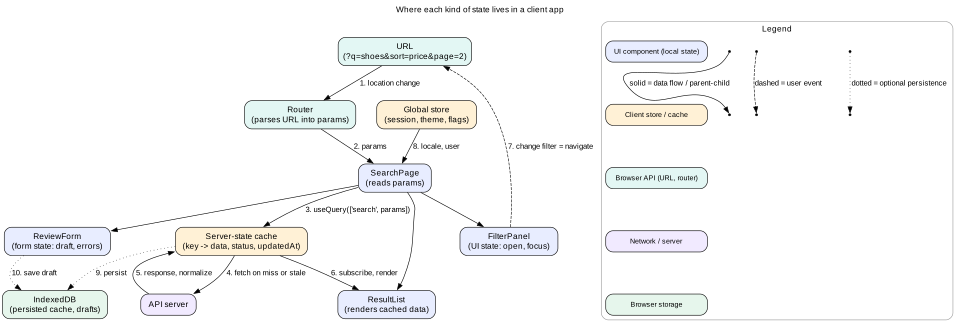
Before you choose a library, classify the state. Each kind has its own owner, lifetime, and tools. Mixing them causes most state bugs.
UI state
UI state is about how the screen looks right now. Examples are whether a dropdown is open, which tab is active, hover, focus, and scroll position. It is local and short-lived. It usually belongs in the component that uses it, with useState or similar. It rarely needs to persist.
Form state
Form state is user input not yet submitted. It includes field values, touched flags, validation errors, and submit status. It is local to the form. Large forms may need a form library to avoid re-rendering the whole form on each key press. Drafts that must survive a reload go to sessionStorage or IndexedDB.
Server-cache state
Server-cache state is a copy of data the server owns. Examples are posts, users, orders, and search results. The client does not own it. It can go stale at any time, because other users and other tabs change it. It needs fetching, caching, refetching, invalidation, and error handling. This is the biggest and hardest kind of state in most apps.
URL state
URL state lives in the path, query string, and hash. Examples are the current route, search query, filters, sort order, page, and selected item ID. It must survive reload, sharing, and the back button. The URL is the source of truth, and components read from it.
Global client state
Global client state is true app-wide state that the client owns. Examples are the current session, theme, locale, feature flags, and a shopping cart before checkout. It is often small. A context provider or a small store is enough.
Figure 1. Each kind of state has one home. Filters write to the URL, and the cache reads from it.
Intuition
Think of a library. The books are server data. You borrow copies, and someone may update the original. Your bookmark is UI state. Your notes in the margin are form state. The shelf number you tell a friend is URL state. Your library card is global state.
2. Placing state: colocate, lift, or share
A simple rule decides where state lives. Keep it as close as possible to where it is used. Move it up only when you must.
Colocate. If one component uses the state, keep it there. This limits re-renders to that component.
Lift. If two siblings need it, move it to their closest common parent and pass it down as props.
Context. If many distant components need rarely-changing values, such as theme or locale, use a context provider.
Store. If many components read and write it often, use a store with selectors. Components subscribe only to the slice they read.
Server cache. If it comes from the server, put it in the server-state cache, not in your own store.
Why re-renders matter
When state changes, every component that reads it re-renders. If a context value changes on every key press, every consumer re-renders on every key press. A list of 500 rows at 0.2 ms each costs 100 ms per key press. That breaks the 50 ms long-task limit and hurts INP. Selectors that return only the needed slice, plus stable references, avoid this.
Mistake
Putting a fast-changing value, such as a text input or mouse position, in a context at the top of the app. Every consumer re-renders on every change. Keep fast values local, or use a store with fine-grained subscriptions.
3. Normalization
Server APIs often return nested data. A post contains its author, and each comment contains its author too. If the same user appears in 30 places, there are 30 copies. Updating the user's avatar means finding all 30.
Lists are small arrays of IDs, so reordering and inserting are cheap.
Memoized selectors can tell exactly when one entity changed.
Costs
You must write code to flatten responses and to join them back for rendering.
Deleting an entity means removing its ID from every list that references it.
Garbage collection is manual. Entities no list references stay in memory unless you prune them.
Normalized store or document cache?
Two main cache styles exist. A normalized cache, as in Apollo Client or Relay for GraphQL, stores entities by type and ID. A mutation response that returns { id, name } updates every query showing that entity. A document cache, as in TanStack Query or SWR, stores each response by query key as-is. It is simpler. After a mutation you either update specific keys by hand or invalidate and refetch them.
Tip
In an interview, say which style you pick and why. "The same user and post objects appear in the feed, detail, and notifications, and they change often. So I normalize them. Search results are read-only and short-lived, so I keep them as documents by key."
4. Server-state caches
A server-state cache is a client-side map from query key to a cache entry. Libraries such as TanStack Query, SWR, RTK Query, and Apollo all follow the same ideas. You should be able to describe them without naming a library.
What a cache entry holds
data: the last successful result.
error: the last error, if any.
status: pending, success, or error. A separate isFetching flag says a background refetch is running.
updatedAt: when data was last fetched. Used to decide staleness.
promise: the in-flight request, used for dedupe.
observers: the components subscribed to this key. When none remain, a timer starts for garbage collection.
Two timers: staleTime and gcTime
staleTime says how long data counts as fresh. While fresh, the cache never refetches. After that, data is stale. Stale data is still shown, but the cache refetches on triggers. gcTime says how long an entry with no observers stays in memory before deletion.
Choose staleTime by how fast the data changes and how much staleness hurts. A country list can be fresh for a day. A feed might be fresh for 30 seconds. A stock price might be 0, so it always refetches on mount.
Refetch triggers
A new component mounts and subscribes to a stale key.
The window regains focus, detected with the visibilitychange event.
The network comes back, detected with the online event.
A polling interval fires.
Code invalidates the key after a mutation.
Stale-while-revalidate in practice
The user opens the inbox. The cache has no entry, so it shows a skeleton and fetches.
The response arrives. The cache stores data with updatedAt = now.
The user opens an email, then presses back 2 minutes later. The inbox entry is stale but present.
The inbox renders at once from the cache. A background refetch starts.
The refetch returns two new emails. The list updates. The user never saw a spinner.
Intuition
A server-state cache is a smart notebook of answers. When you ask a question you asked before, it reads the old answer aloud right away. Then it quietly calls the expert to check if the answer changed.
Why not just use a global store for server data?
You can, but then you must build all of this yourself. You need loading and error flags per request, dedupe, refetch on focus, staleness, retry with backoff, garbage collection, and pagination merging. Teams that do this often write thousands of lines of reducers. A dedicated cache gives these for free and keeps your global store small.
5. Query keys and invalidation
Cache invalidation is famous for being hard. Query keys make it manageable by turning it into a matching problem.
Designing keys
Make keys arrays that go from general to specific. For example, ['projects', projectId, 'tasks', { status }].
Include every input that changes the response, such as user ID, filters, sort, page size, and locale.
Keep keys serializable. The cache hashes them, often with stable JSON that sorts object keys.
Use a key factory module so every part of the app builds keys the same way.
Invalidating by prefix
Because keys are hierarchical, you can invalidate a whole branch. After adding a task to project 12, invalidate ['projects', 12, 'tasks']. Every filtered and paginated task list for project 12 becomes stale. Active ones refetch now. Inactive ones refetch when next used.
Three ways to update the cache after a write
Invalidate and refetch. Simple and always correct. It costs one extra request and a short delay before the new data shows.
Write the response into the cache. If the server returns the updated entity, write it into the detail key and patch it into lists. No extra request. You must know which keys hold that entity.
Optimistic update. Write the expected result before the server answers. Fastest feel, but needs rollback. Covered in the next section.
Tip
A safe default is to write the server's response into the cache for the detail view, then invalidate list keys. You get instant detail updates and correct lists, at the cost of one background refetch.
6. Optimistic updates and rollback
An optimistic update shows the result of a write before the server confirms it. On a 300 ms mobile round trip, this changes a like button from "laggy" to "instant". It also adds a new failure mode: the server can say no.
The full sequence
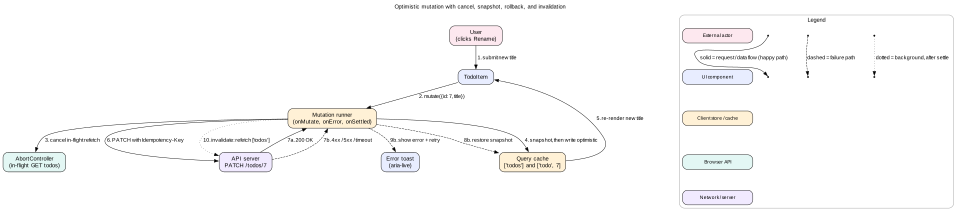
Cancel in-flight refetches for the affected keys. Otherwise a refetch started before the write may return old data and overwrite your optimistic value.
Snapshot the current cache values for those keys.
Write optimistic values into the cache. The UI re-renders at once.
Send the request with an idempotency key, so a retry does not apply twice.
On success, write the server's response into the cache. It may differ from your guess, for example with a server timestamp.
On failure, restore the snapshot. Show an error in an aria-live region with a retry action. Keep the user's input so they do not retype it.
On settle, either way, invalidate the affected list keys to sync with the server.
Figure 2. An optimistic mutation. The happy path is solid, the failure path is dashed, and the background sync is dotted.
Overlapping mutations
Problems start when two mutations on the same entity overlap. Suppose the user likes, then unlikes, quickly. Mutation A snapshots "not liked" and writes "liked". Mutation B snapshots "liked" and writes "not liked". If A fails after B started, restoring A's snapshot sets "not liked". That happens to be right. But if B fails, restoring B's snapshot sets "liked", even though A's server state may be different.
Three safe patterns exist:
Serialize per entity. Queue mutations for the same entity. Run one at a time. Simple and correct, but slower.
Last write wins with a final refetch. Allow overlap. On settle of the last mutation, refetch the entity and trust the server.
Pending operation log. Keep the confirmed server value plus a list of pending operations. The displayed value is the server value with pending operations applied. When one fails, remove only that operation and recompute. This is how collaborative apps and offline outboxes work.
Interview
Say when you would not use optimistic updates. "For likes and renames, yes. For placing an order or changing a permission, no. The failure cost is high, so I show a pending state and wait for the server."
7. Pagination: offset versus cursor
Offset pagination
The client asks for ?offset=40&limit=20 or ?page=3. The server runs a query with OFFSET 40 LIMIT 20.
You can jump to any page and show "page 3 of 50".
It is simple to build and to cache by page number.
If a new item is inserted at the top while the user reads page 1, page 2 now starts one item earlier. The user sees a duplicate.
If an item is deleted, the user skips one item.
Large offsets are slow in databases. OFFSET 100000 often scans and throws away 100,000 rows.
Cursor pagination
The client asks for ?after=<cursor>&limit=20. The cursor encodes the position of the last item seen, such as its sort value and ID. The server runs WHERE (created_at, id) < (:t, :id) ORDER BY created_at DESC, id DESC LIMIT 20.
Stable under inserts and deletes. Each page starts exactly after the last item seen.
Fast at any depth with the right index.
Fits infinite scroll and real-time feeds.
No random access to page N, and no exact total count without a separate query.
The cursor must include a tie-breaker, usually the ID, because many items can share a timestamp.
Client side of infinite scroll
Store pages as an array: { pages: [{ items, nextCursor }], pageParams: [...] } under one key.
Place a sentinel element after the last item. Watch it with IntersectionObserver and a rootMargin of about 800 px, so the next page loads before the user reaches the end.
Do not request the next page if one is already in flight, or if nextCursor is null.
Dedupe items by ID when merging pages. A cursor bug or a race should not show the same post twice.
For new items at the top, show a "5 new posts" pill instead of inserting them. Inserting shifts content under the user's finger and causes layout shift.
Virtualize the list once it passes a few hundred items. Keep scroll position in the URL or in history state for back navigation.
Mistake
Using offset pagination for a live feed. New posts shift every offset, so users see repeats and miss items. Use cursors for anything that changes while the user scrolls.
8. Request dedupe and batching
Dedupe
Ten components on a page may all need the current user. Without dedupe, the page makes ten identical requests. A cache dedupes by keeping the in-flight promise in the entry. The first caller starts the request. Later callers with the same key get the same promise.
Dedupe also covers a short window after success. If data is still fresh by staleTime, new subscribers read the cache with no request. SWR calls this the dedupe interval, with a default of 2 seconds.
Batching
Batching combines different requests into one. A comment list may need 20 different user profiles. Instead of 20 requests, a loader collects IDs during one tick, then sends GET /users?ids=1,2,...,20. This is the DataLoader pattern. It uses queueMicrotask or a short setTimeout to wait for the tick to end.
Prefetching
Prefetching fills the cache before the user asks. Common triggers are hovering a link for 100 ms, a link entering the viewport, or the router knowing the next likely route. On a link hover, start the route's code chunk and its first query. The click then feels instant.
Tip
Avoid request waterfalls. A parent fetches, renders a child, and the child fetches again. Each step adds a full round trip. Hoist data needs to the route level and fetch in parallel with Promise.all. Or let the server return everything the route needs in one response.
9. Race conditions and AbortController
Network responses do not arrive in the order you sent them. A request for "sh" can take 900 ms while a request for "shoe" takes 200 ms. If you simply set state when each response arrives, the screen ends up showing results for "sh" under a box that says "shoe". This is the classic out-of-order response race.
Fix 1: cancel the old request
Create a new AbortController for each request. Before starting a new one, abort the previous one. The old fetch rejects with AbortError, so it never sets state. This also frees the network connection, which matters on HTTP/1.1 with a limit of six connections per origin.
Fix 2: ignore stale responses
Keep a counter or the latest query in a ref. When a response arrives, compare its request ID to the latest. Drop it if it is older. This works even when you cannot cancel, such as with a library that does not take a signal.
Fix 3: key the cache by input
With a query cache, each input has its own key. A late "sh" response writes to the ['search', 'sh'] entry, not to the "shoe" entry. The screen reads the "shoe" key, so it stays correct. The late response even becomes useful cache for the next time the user types "sh".
Cleanup in effects
In React, an effect's cleanup runs before the next effect and on unmount. That is the right place to abort.
Refetch versus mutation. A refetch that started before a write returns old data after the optimistic write. Cancel refetches before writing.
Unmounted component. A response arrives after the user left the page. Abort on unmount so nothing writes to a dead component.
Two tabs. Tab A updates a record. Tab B still shows the old one. Use BroadcastChannel to tell other tabs to invalidate, or refetch on focus.
Token refresh. Five requests get 401 at once. All five try to refresh the token. Share one refresh promise and queue the retries behind it.
Also use AbortSignal.timeout(8000) to give each request a deadline. Combine it with a user abort through AbortSignal.any([userSignal, AbortSignal.timeout(8000)]) in browsers that support it.
10. URL as state
The URL is the most underused state container. Anything a user might want to share, bookmark, or return to with the back button belongs there.
What belongs in the URL
The route and the selected entity, such as /projects/12/tasks/88.
Search query, filters, sort, and view mode, such as ?q=shoes&size=42&sort=price_asc&view=grid.
Pagination for numbered pages, such as ?page=3.
Open modal or tab, if it should survive reload, such as ?tab=reviews.
What does not belong in the URL
Secrets and tokens. URLs end up in logs, history, and the Referer header.
Large blobs of state. Browsers and servers limit URL length, and long URLs are hard to share.
Fast, transient UI state such as hover or a half-typed draft.
Push or replace
Use history.pushState for changes the user would want to go back to, such as applying a filter. Use history.replaceState for changes that would clutter history, such as each key press in a search box. A good pattern is to replace while typing and push when the user pauses or presses Enter.
Read from the URL, do not copy it
Components should read filters from the URL on every render. Do not copy the URL into local state at mount. If you copy it, the back button changes the URL but your state stays old. Use URLSearchParams to parse and build query strings, and validate values, since anyone can edit a URL.
Intuition
If a user would be annoyed that a refresh lost it, it belongs in the URL. If they would be confused that a shared link showed it, it does not.
11. Keeping caches fresh with real-time updates
Real-time channels push changes into the same cache that queries fill. Do not build a second store for live data.
Patch on event. A WebSocket message says "post 7 like count is 43". Write it into the post 7 entity. Every view updates.
Invalidate on event. A message says "project 12 tasks changed". Invalidate the key and refetch. Simpler and safe when events lack full data.
Order by version. Each entity carries a version or updatedAt. Ignore events and responses older than what the cache holds. This blocks a late HTTP response from undoing a newer pushed update.
Gap fill on reconnect. After a disconnect, ask the server for changes since the last event ID, or invalidate all active keys.
12. Failure modes
Stale overwrite. An older response replaces newer data. Prevent with cancellation, request IDs, per-input keys, and entity versions.
Duplicate writes. A retry after a timeout applies the write twice. Send an idempotency key the server stores for a time window.
Rollback to the wrong state. Overlapping optimistic updates restore an outdated snapshot. Serialize per entity or use a pending operation log.
Cache stampede. Fifty components mount and each fetches the same key. Dedupe by in-flight promise.
Memory growth. Unused cache entries and normalized entities pile up in long sessions. Use gcTime and prune unreferenced entities.
Lost drafts. A crash or reload loses typed text. Save drafts to sessionStorage or IndexedDB on a debounce.
Infinite refetch loop. A key built from a new object each render never matches. Build keys from primitive values or stable serialization.
Leaked private data. A cache persisted to IndexedDB survives logout. Clear persisted caches and memory caches on logout and on user switch.
13. Trade-offs
Normalized versus document cache
Normalized caches update every view from one write. They cost flattening code and are harder to debug. Document caches are simple, but updates need manual patching or refetches.
Invalidate versus write-through
Invalidating is always correct but costs a request and a short delay. Writing the response into the cache is instant, but you must know every key that holds the entity.
Long staleTime versus short staleTime
A long staleTime saves requests and battery. It risks showing old data. A short one keeps data fresh but increases server load, perhaps by thousands of requests per second at scale.
Optimistic versus pessimistic
Optimistic feels instant and needs rollback. Pessimistic is simpler and honest, but adds a round trip of waiting to every action.
Offset versus cursor
Offset gives page numbers and random access. Cursor gives stability and speed in live, deep lists.
Global store versus colocated state
A global store centralizes logic and devtools. It risks wide re-renders and coupling. Colocated state is fast and simple, but sharing needs lifting or context.
14. Interview angle
State and data questions come up in the Data model and Interface steps of RADIO. Interviewers listen for a clear classification, correct ownership, and awareness of races.
List the state kinds for the product and name the owner of each.
Write the cache or store shape. Say which entities you normalize.
Define query keys and say what invalidates them.
Pick a pagination style and explain why with the data's change rate.
Walk one race end to end and show how cancellation or keys fix it.
Say which actions are optimistic and how rollback works.
Interview
A staff-level touch is to talk about the data layer as a platform. "Every team uses one key factory and one API client. The client adds auth, tracing headers, retries with backoff, and timeouts in one place. Then cache rules are consistent across 40 features."
15. Summary
Classify state first: UI, form, server cache, URL, and global. Each has one owner.
Colocate state by default. Lift, use context, or use a store only when needed.
Normalize entities that appear in many places and change often.
Treat server data as a cache with keys, staleTime, gcTime, refetch triggers, and invalidation.
Optimistic updates need cancel, snapshot, write, send, and then confirm or roll back, and finally invalidate.
Use cursor pagination for live or deep lists, and offset for numbered, stable lists.
Dedupe by in-flight promise. Batch by ID. Prefetch on intent.
Stop races with AbortController, request IDs, and per-input keys. Put shareable state in the URL.
16. Common mistakes
Copying server data into local state. Two owners drift apart and show different values.
Storing derived data. Keeping both items and filteredItems. Compute the filtered list instead.
Query keys missing inputs. Two filters share one entry and show each other's results.
No cancellation. Late responses overwrite newer ones in search and tab switches.
Optimistic without rollback. The UI shows a change the server rejected, with no message.
Offset pagination in feeds. Users see duplicates and miss items.
Filters only in component state. Reload and back lose the user's place, and links cannot be shared.
Not clearing caches on logout. The next user on a shared device sees private data.
Worked example: typing fast in a search box
Scenario: a product search page. The user types "shoe" quickly, then picks a size filter, then presses back. The network is a slow mobile link. Watch every piece of state.
The user types "s". The input's own state updates at once, so typing never lags. The URL is updated with replaceState to ?q=s, so no history entry is added.
A 250 ms debounce timer starts. The user types "h" after 80 ms, so the timer resets. Then "o" and "e" follow. No request has been sent yet.
250 ms after "e", the debounced query becomes "shoe". The page reads q=shoe and asks the cache for ['search', { q: 'shoe' }].
The cache has no entry. It creates one with status pending, starts fetch with a new AbortController, and stores the promise.
Two components read the same key, the result list and a result count badge. The second one gets the stored promise. Only one request goes out.
The user picks size 42 before the response arrives. The filter panel calls pushState with ?q=shoe&size=42. This is a real step the user may want to undo.
The new key ['search', { q: 'shoe', size: 42 }] starts its own request. The screen now subscribes to that key. The old request is aborted because no observer is left.
The size 42 response arrives after 600 ms. The cache stores it with updatedAt. The list renders 18 results.
The user presses back. The URL returns to ?q=shoe. The page reads the URL and asks for ['search', { q: 'shoe' }]. That entry has no data, because its request was aborted, so a fetch starts with a skeleton.
The user presses forward. The size 42 entry is still in the cache and still fresh within its 30 second staleTime. It renders at once with no request.
The user leaves the page. After gcTime of 5 minutes with no observers, both entries are deleted to free memory.
Code lab: a tiny query cache
This small cache shows dedupe, stale-while-revalidate, latest-wins, and prefix invalidation. It uses a fake fetcher, so it runs in plain Node 18 or newer. Save it as query-cache.mjs and run node query-cache.mjs.
const hash = (key) => JSON.stringify(key)

function createQueryCache({ staleTime = 1000 } = {}) {
  const entries = new Map() // hash -> { key, data, updatedAt, promise }

  function fetchQuery(key, fetcher) {
    const h = hash(key)
    let e = entries.get(h)
    if (!e) entries.set(h, (e = { key, data: undefined, updatedAt: 0, promise: null }))
    const fresh = Date.now() - e.updatedAt < staleTime
    if (e.data !== undefined && fresh) return Promise.resolve(e.data)
    if (!e.promise) {
      e.promise = fetcher(key)
        .then((data) => { e.data = data; e.updatedAt = Date.now(); return data })
        .finally(() => { e.promise = null })
    }
    // stale-while-revalidate: return old data now, refresh in background
    return e.data !== undefined ? Promise.resolve(e.data) : e.promise
  }

  function invalidate(prefix) {
    const p = hash(prefix).slice(0, -1) // '["projects",12' without the closing bracket
    for (const [h, e] of entries) {
      if (h === p + ']' || h.startsWith(p + ',')) e.updatedAt = 0 // not 123
    }
  }
  return { fetchQuery, invalidate, peek: (key) => entries.get(hash(key))?.data }
}

let calls = 0
const fakeFetch = (key) => new Promise((resolve) => {
  calls += 1
  setTimeout(() => resolve(`${key.join('/')} v${calls}`), 50)
})

const cache = createQueryCache({ staleTime: 1000 })
const key = ['projects', 12, 'tasks']

const [a, b] = await Promise.all([cache.fetchQuery(key, fakeFetch), cache.fetchQuery(key, fakeFetch)])
console.log('dedupe:', a, b, 'calls =', calls) // one call

console.log('fresh hit:', await cache.fetchQuery(key, fakeFetch), 'calls =', calls)

cache.invalidate(['projects', 12])
console.log('stale served:', await cache.fetchQuery(key, fakeFetch)) // old data at once
await new Promise((r) => setTimeout(r, 100))
console.log('after revalidate:', cache.peek(key), 'calls =', calls)
Expected output: the first two calls share one request. The fresh hit makes no request. After invalidation, the stale value returns at once while a background request runs. The final line shows version 2 and two total calls. As an exercise, add an AbortController per entry and abort it in invalidate.
Check yourself
Why is server data better described as a cache than as client state?Answer
The server owns it and other users or tabs can change it at any time. The client holds a copy that can go stale. So it needs keys, freshness rules, refetching, and invalidation, which are cache concerns.
What is the difference between staleTime and gcTime?Answer
staleTime controls how long data counts as fresh, so no refetch happens. gcTime controls how long an entry with no subscribers stays in memory before it is deleted.
Why should you cancel in-flight refetches before an optimistic update?Answer
A refetch started before the write may return the old value after the optimistic write. It would overwrite the optimistic value and make the UI flicker back, even though the write may succeed.
A feed uses ?page=2. Five new posts arrive at the top while the user reads page 1. What goes wrong, and what is the fix?Answer
Page 2 now starts five items earlier, so the user sees five posts again. Cursor pagination fixes it by asking for items after the last seen item's sort key and ID.
Give three ways to prevent a late search response from showing under a newer query.Answer
Abort the old request with AbortController. Compare a request ID to the latest and drop older responses. Key the cache by query, so each response writes only to its own entry.
When should you use replaceState instead of pushState for URL state?Answer
Use replaceState for rapid changes the user would not want as separate back steps, such as each key press. Use pushState for meaningful steps, such as applying a filter or opening an item.
How does a pending operation log make overlapping optimistic updates safe?Answer
It keeps the last confirmed server value and a list of pending operations. The UI shows the server value with all pending operations applied. When one fails, only that operation is removed, and the view is recomputed, so other pending changes are kept.
Key terms
UI state
Short-lived state about how the screen looks, such as an open menu.
Server-cache state
A client copy of data the server owns.
Source of truth
The one place whose value wins when copies disagree.
Normalization
Storing each entity once by ID and referencing it by ID.
Query key
A serializable ID for a cached request that includes all its inputs.
staleTime
How long cached data counts as fresh before it may be refetched.
gcTime
How long an unused cache entry stays in memory.
Stale-while-revalidate
Serve cached data now and refresh it in the background.
Invalidation
Marking cache entries stale so they refetch.
Optimistic update
Showing a write's result before the server confirms, with rollback on failure.
Cursor
An opaque marker for "the position after the last item seen" in a list.
Dedupe
Sharing one in-flight request among callers that ask for the same key.
AbortController
A browser API that cancels a fetch through a signal.
Idempotency key
A unique ID on a write so the server applies repeats only once.