Rendering Strategies: CSR, SSR, SSG, ISR, Streaming, Islands, Server Components
Where and when HTML is produced decides how fast users see a page and how soon they can use it. This guide walks through the browser rendering path, then compares every major strategy by its effect on TTFB, FCP, LCP, INP, caching, and cost.
Frontend system design · foundations
Pick a rendering strategy per page type and defend it with metrics, hydration cost, and a caching plan.
Correctness contract: The HTML a user sees must match what the client renders after hydration. Personalized or private data must never be cached and served to another user. Content that looks interactive must respond, or clearly show that it is still loading.
You know HTML, CSS, JavaScript, and the basics of React or a similar framework. You know what a CDN and HTTP caching are. Timings are illustrative for a mid-range phone on a 4G link, not benchmarks.
Every page must turn data into pixels. The question is where that work happens. It can happen in the user's browser or on your server at request time. It can also happen on a build machine ahead of time, or at a CDN edge close to the user. Each choice moves cost between the server, the network, and the device. Modern frameworks also let you mix strategies inside one page. A product page can be static at the top, streamed in the middle, and interactive only in the "Add to cart" button. To choose well, you must first understand what the browser does with the bytes it receives.
Hydration is the step where client JavaScript takes over server-rendered HTML. The framework re-runs components, builds its internal tree, and attaches event handlers to the existing DOM.
Example. A server sends a full product page. It is visible at 1.2 s. The 300 KB bundle finishes hydration at 3.5 s. Clicks before that do nothing.
Limit. Hydration cost grows with the number of components, not with how interactive they are. Static text still costs CPU if it is part of a hydrated tree.
Render-blocking resources
The browser will not paint until it has the CSS in <head>. A classic <script> without defer or async also stops the HTML parser until it downloads and runs.
Example. A 90 KB stylesheet on a 300 ms round trip link delays first paint by at least one extra round trip plus download time.
Limit. Inlining all CSS removes the round trip but makes HTML larger and not cacheable separately. Inline only the critical part.
TTFB
Time to First Byte is the time from navigation start until the first byte of the HTML response arrives. It includes redirects, DNS, connection setup, and server think time.
Example. A CDN cache hit can give 50 ms TTFB. A server that waits on three database queries before sending anything may give 900 ms.
Limit. A low TTFB alone means little. A server can flush an empty shell quickly and still deliver the main content late.
Suspense boundary
A Suspense boundary marks a part of the tree that may not be ready yet. The framework shows a fallback there and fills it in later, without blocking the rest.
Example.<Suspense fallback={<Spinner/>}><Reviews/></Suspense> lets the product details render while reviews still load.
Limit. Too many small boundaries cause visual popcorn. Group content that belongs together under one boundary.
Island
An island is an interactive component inside a mostly static HTML page. Each island loads and hydrates on its own. The rest of the page ships no JavaScript.
Example. A blog post is static HTML. Only the comment form and the share button are islands, each about 8 KB.
Limit. Sharing state between islands is harder. They do not live in one component tree, so you need a small shared store or events.
Revalidation
Revalidation means checking whether cached content is still fresh, and replacing it if not. It can be time based or triggered on demand by a content change.
Example. A product page is cached for 60 s. When an editor changes the price, a webhook purges that one URL at once.
Limit. Time-based revalidation always allows some stale views. If staleness is unacceptable, such as stock counts at checkout, fetch fresh data on the client.
1. The browser critical rendering path
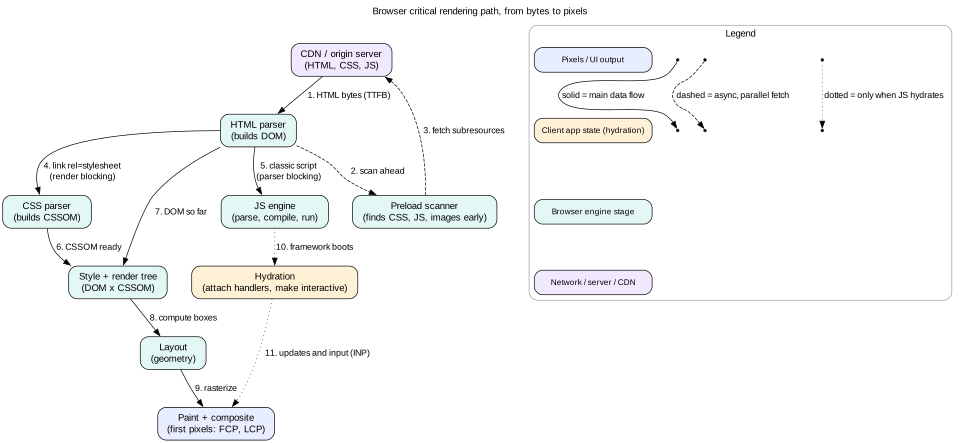
The critical rendering path is the chain of steps from HTML bytes to pixels. Every strategy in this guide changes one or more of these steps. So learn them first.
Request and response. The browser resolves DNS, opens a TCP or QUIC connection, does a TLS handshake, and sends the request. On a 150 ms round trip link, a cold HTTPS connection costs two to three round trips before the first byte.
HTML parsing. The parser reads bytes as they arrive and builds the DOM. It does not wait for the whole document. This is why streaming HTML helps.
Preload scanner. A second, lightweight parser scans ahead for <link>, <script>, and <img> tags. It starts fetching them early, even while the main parser is blocked.
CSSOM. CSS is parsed into the CSS Object Model. CSS is render blocking. The browser will not paint content until the stylesheets in the head are ready, so users do not see unstyled content.
Scripts. A classic script stops the parser, because it might call document.write. Scripts with defer run in order after parsing. Scripts with async run as soon as they arrive. Module scripts are deferred by default.
Style and layout. The browser matches CSS rules to DOM nodes, then computes the size and position of every box. Layout cost grows with DOM size and with how much of the page changes.
Paint and composite. The browser rasterizes layers into pixels and the compositor puts them on screen. The first paint with content is FCP. The paint of the largest image or text block is LCP.
Interactivity. For server-rendered pages, the page looks done but may not respond until the framework hydrates. For client-rendered pages, nothing useful shows until the script runs.
Figure 1. The critical rendering path. Rendering strategies decide which of these boxes run on the server and which run on the device.
Intuition
Think of the page as a meal. SSG is a frozen meal you only heat. SSR is cooked to order in the kitchen. CSR sends raw ingredients and a recipe to the table. Hydration is the guest checking every dish before eating, even the ones already plated.
Why main-thread time matters most on phones
The parser, style, layout, and your JavaScript all share one main thread. A mid-range Android phone parses and runs JavaScript three to five times slower than a recent laptop. A 1 MB uncompressed bundle may take 2 to 4 seconds of main-thread time there. During that time the page cannot respond to taps. This is the core reason the industry moved from heavy CSR toward server rendering and less hydration.
2. The metrics each strategy moves
Four metrics matter for this comparison. Know what each one measures and what usually hurts it.
TTFB (Time to First Byte). Hurt by server think time, cold connections, and long distance to the origin. Good is under about 800 ms at the 75th percentile.
FCP (First Contentful Paint). The first text or image on screen. Hurt by TTFB, render-blocking CSS, and empty HTML shells. Good is 1.8 s or less.
LCP (Largest Contentful Paint). When the main content appears. Hurt by late discovery of the hero image, client-side data fetching, and slow servers. Good is 2.5 s or less.
INP (Interaction to Next Paint). How fast the page responds to taps, clicks, and keys over the whole visit. Hurt by long tasks, large hydration, and heavy event handlers. Good is 200 ms or less.
There is also a useful non-standard idea, the "uncanny valley". It is the time between when a page looks ready and when it actually responds. Server rendering with full hydration creates this gap. Users tap, nothing happens, and they tap again. That shows up as poor INP and rage clicks.
3. Client-side rendering (CSR)
In CSR, the server sends a nearly empty HTML file with a root <div> and a script tag. The browser downloads the JavaScript, runs it, fetches data from an API, and then builds the DOM.
Timeline on a mid-range phone
0 to 300 ms: HTML arrives from a CDN. It is tiny and cached, so TTFB is excellent.
300 to 1,300 ms: the browser downloads 250 KB of compressed JavaScript.
1,300 to 2,800 ms: parse, compile, and run the bundle. The screen is blank or shows a spinner.
2,800 to 3,300 ms: the app fetches data from the API. This is a second network waterfall.
About 3,400 ms: the app renders. FCP, LCP, and interactivity happen almost together.
Strengths
Simple, static hosting. The whole app is files on a CDN.
Fast in-app navigation after the first load. Routes change without full page reloads.
No hydration mismatch problems, since there is no server HTML.
Weaknesses
Poor FCP and LCP on weak devices. The user waits for download, execution, and then data.
SEO risk. Crawlers that run JavaScript do so later and with limits. Social link previews usually do not run it at all.
Request waterfalls. Code loads, then data loads, then nested components load more data.
Tip
CSR is still a fine answer for logged-in tools, admin panels, and apps behind auth where SEO does not matter. Say this explicitly. Then cut the waterfall by starting the data fetch in parallel with the bundle. One way is <link rel="preload" as="fetch" crossorigin> for the first API call.
4. Server-side rendering (SSR) and hydration
In SSR, the server runs the components for each request, fetches data, and sends full HTML. The browser paints that HTML right away. Then it downloads the same component code and hydrates it.
What hydration actually does
The client downloads the JavaScript for every component on the page.
It reads serialized data that the server embedded, often in a <script type="application/json"> tag.
It runs every component again to build the virtual tree.
It walks the existing DOM and matches each node to the tree. It attaches event listeners.
If the client output differs from the server HTML, it reports a hydration mismatch and may re-render that part.
So the user pays for rendering twice. The server renders to HTML. The client renders again to attach behavior. The data is also sent twice, once as HTML and once as JSON. For a large page this can double the bytes.
Effect on metrics
TTFB gets worse, because the server waits for data before sending HTML. A 400 ms database query adds 400 ms to TTFB.
FCP and LCP get much better, because content is in the first HTML response. The hero image is found by the preload scanner early.
INP can get worse during load. Hydration is one long task, often 500 ms to 2 s on phones. Taps during that task wait.
Hydration mismatches
A mismatch happens when the server and client render different markup. Common causes are Date.now(), random IDs, window checks, locale differences, and browser extensions that edit the DOM. Render time-dependent parts only after mount. Use stable ID helpers like React's useId. Pass the server's locale and time zone to the client.
Mistake
Reading localStorage or window.innerWidth during the first render to pick a layout. The server cannot know these values, so the HTML and the client tree differ. Use CSS media queries for layout, and read client-only values in an effect after hydration.
5. Static generation (SSG) and incremental regeneration (ISR)
SSG renders pages to HTML at build time. The output is plain files served from a CDN. There is no server work per request.
SSG strengths and limits
Best possible TTFB, often 20 to 80 ms from a nearby edge.
Very cheap to serve and very hard to take down.
Build time grows with page count. 100,000 product pages at 50 ms each is about 83 minutes of build.
Content is only as fresh as the last build. Personal data cannot be in the HTML.
Incremental Static Regeneration
ISR fixes the build-time and freshness problems. Pages are generated on first request or at build time, then cached. Each page has a revalidation window, such as 60 seconds. After the window, the next request still gets the stale page instantly. The server then rebuilds the page in the background. Later requests get the new version.
This is the same idea as the HTTP directive stale-while-revalidate. Many platforms also support on-demand revalidation. A CMS webhook tells the platform to rebuild one path when an editor publishes. This gives freshness in seconds without short time windows.
6. Streaming SSR
Classic SSR waits for all data, renders the full page to a string, then sends it. Streaming SSR sends HTML in chunks as each part becomes ready. The browser parses and paints each chunk as it arrives.
How it works
The server renders the shell, such as the header, navigation, and layout. It flushes that chunk at once.
Where a component is still waiting on data, the server writes the Suspense fallback, such as a skeleton.
When the data arrives, the server writes the real HTML at the end of the stream, in a hidden element.
It also writes a tiny inline script that moves the real HTML into the place of the fallback.
The response stays open until every boundary resolves. Then the server closes it.
In React this uses renderToPipeableStream in Node or renderToReadableStream in edge runtimes. HTTP/1.1 uses chunked transfer encoding. HTTP/2 and HTTP/3 stream frames natively.
Effect on metrics
TTFB becomes fast again, often under 200 ms, because the shell does not wait on data.
FCP improves, since the shell paints early.
LCP depends on whether the LCP element is in the shell or behind a boundary. Keep the hero image and main heading out of slow boundaries.
Slow, non-critical parts like reviews or recommendations no longer delay the whole page.
Tip
Start the browser on critical subresources before data is ready. Put <link rel="preload"> for fonts and the hero image in the shell. Send a 103 Early Hints response from the CDN so the browser starts these fetches even before the shell arrives.
Caveats
Once headers are sent, you cannot change the status code. If a product is not found after streaming starts, you must render an error in the page or redirect with a script. Fetch data that decides the status code before the first flush.
Some proxies and compression layers buffer responses. Check that your CDN passes chunks through.
Out-of-order inline scripts need a Content Security Policy nonce if you use strict CSP.
7. Partial, progressive, and selective hydration
Full hydration treats the whole page as one app. The ideas below reduce or reorder that work.
Progressive hydration
Hydrate parts of the page over time instead of all at once. A common rule is to hydrate when a component scrolls into view, using IntersectionObserver, or when the browser is idle, using requestIdleCallback. The footer and comments hydrate only if the user reaches them.
Selective hydration
React 18 hydrates each Suspense boundary as a separate unit. It can hydrate boundaries in any order. If the user clicks inside a boundary that has not hydrated yet, React raises its priority and hydrates it next. React then replays the click event after hydration. The main thread also yields between boundaries, so one big task becomes many small ones. This cuts the INP penalty of hydration.
Partial hydration
Partial hydration means some components never hydrate at all. Static parts ship as HTML with no JavaScript. Only interactive parts hydrate. Islands and Server Components are two ways to get partial hydration.
Interview
A strong answer quantifies hydration. "The product page has 1,200 components but only 6 are interactive. With full hydration, we ship and run code for all 1,200. With partial hydration we ship code for 6. On a mid-range phone that can cut hydration time from about 1.5 s to under 200 ms."
8. Islands architecture and resumability
Islands architecture starts from static HTML and adds interactive islands. Astro made this popular. Each island declares when it should hydrate. Astro uses directives like client:load, client:idle, and client:visible. Everything else is plain HTML with zero JavaScript.
When islands fit
Content-heavy sites such as blogs, documentation, marketing pages, and news articles.
Pages where most content is static and a few widgets need behavior.
Teams that want to mix frameworks. Each island can use a different one, though this costs bundle size.
When islands struggle
Highly interactive apps where most of the screen responds to input, such as editors and dashboards.
Pages where many islands share fast-changing state. You need a store outside the islands, or custom events.
Client-side navigation between pages. Islands sites often do full page loads, though the View Transitions API helps smooth them.
Resumability
Resumability, used by the Qwik framework, goes further. The server serializes the app state and the location of every event handler into the HTML. The client does not re-run components at startup. A tiny loader listens for events globally. When the user clicks, it downloads only that handler's code and runs it. Startup JavaScript is close to zero. The cost is that the first interaction may wait for a small code download, so prefetching matters.
9. React Server Components
React Server Components (RSC) split components into two kinds. Server Components run only on the server. Client Components run on the server for the first HTML and then on the client. You mark a Client Component boundary with the 'use client' directive at the top of the file.
What changes
Server Components ship zero JavaScript. Their code, and libraries they import, never reach the browser. A Markdown parser of 60 KB used only in a Server Component costs the client nothing.
They can read data directly. A Server Component can be async and await a database query or an internal service. There is no client API round trip.
Output is a serialized tree, not HTML only. The server sends an RSC payload that describes the rendered tree. Client Components appear in it as references to their code chunks, plus the props to pass.
Client Components still hydrate. Only the client part of the tree hydrates. Server-rendered parts are not re-run on the client.
Navigation can fetch RSC payloads. On client-side navigation, the router requests the new route's payload and merges it into the current tree. Client state in shared layouts is kept.
Rules that trip people up
Props passed from a Server Component to a Client Component must be serializable. Functions cannot be passed, except Server Actions.
A Client Component cannot import a Server Component. It can receive one as children or another prop.
Server Components cannot use state, effects, or browser APIs.
Putting 'use client' high in the tree pulls the whole subtree into the client bundle. Push the directive down to the leaves that need interactivity.
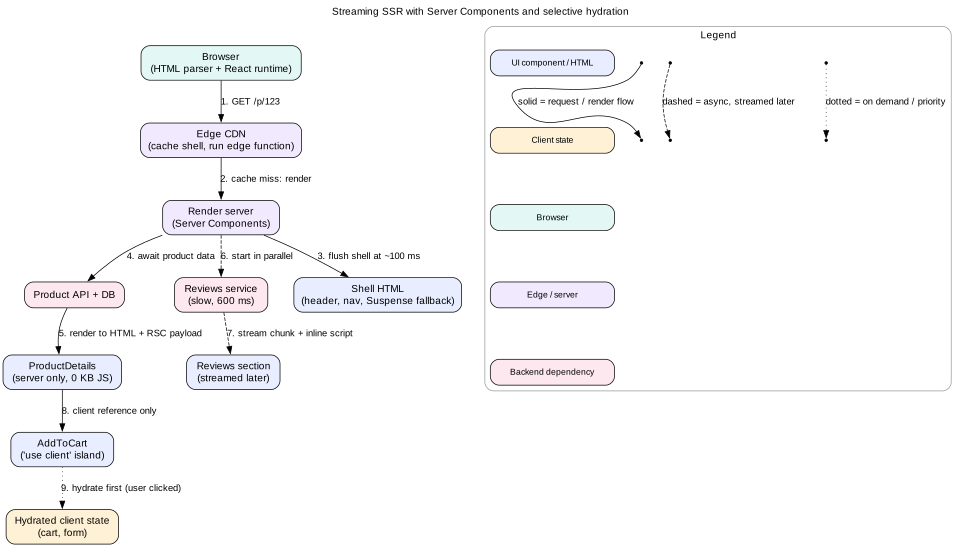
Figure 2. A product page using streaming SSR, Server Components, and selective hydration together.
Mistake
Thinking RSC replaces SSR. They solve different problems. SSR turns components into HTML for fast first paint. RSC decides which components ship code to the client. Frameworks such as Next.js App Router use both together.
10. Edge rendering
Edge rendering runs your server code in many CDN locations close to users. A user in Mumbai hits a node in Mumbai, not an origin in Virginia. Round trip time can drop from 250 ms to 20 ms.
What runs well at the edge
Static shells with small personalization, such as country, language, or A/B bucket.
Auth checks and redirects before the page renders.
Rewriting cached HTML, such as inserting a user name into a cached page.
Streaming the shell quickly while data loads from elsewhere.
The data gravity problem
Edge code is close to the user but often far from the database. If an edge function makes three sequential queries to a database in one region, each query pays the long round trip. Three queries at 200 ms each cost 600 ms. Rendering at the origin, next to the database, might cost 3 ms for those queries plus one 200 ms trip to the user.
So use edge rendering when data is also at the edge, such as in an edge key-value store or a replicated read database. Otherwise, render near the data and cache the result at the edge.
Tip
Edge runtimes are restricted. They use Web APIs like fetch and Request, not full Node. Many Node libraries do not work. CPU time per request is often capped at tens of milliseconds. Plan for these limits before you choose the edge.
11. Caching per strategy
Caching is where rendering strategies become cheap or expensive. Each strategy caches different things in different places.
CSR
The HTML shell: short cache, such as Cache-Control: no-cache, so new deploys are seen at once. The browser still revalidates with an ETag.
JavaScript and CSS with content hashes in file names: Cache-Control: public, max-age=31536000, immutable.
API responses: cached on the client in a server-state cache, and on the CDN only if they are public.
SSG and ISR
HTML at the CDN, for example Cache-Control: public, s-maxage=60, stale-while-revalidate=86400.
s-maxage applies only to shared caches like CDNs. The browser can use a shorter max-age.
Purge by path or by tag when content changes.
SSR and streaming
Public, non-personalized pages can be cached at the CDN like ISR pages.
Personalized pages must use Cache-Control: private, no-store or at least private. A CDN must never cache them.
Split the page. Cache the public shell at the edge and fetch the personal parts on the client or in a separate streamed part.
Use the Vary header carefully. Vary: Cookie almost destroys the CDN hit rate, because every user has a different cookie.
Cache data fetches on the server, such as product data for 30 seconds, even when the HTML is per user.
Server Components
RSC payloads for public routes can be cached at the CDN like HTML.
Frameworks often cache data fetches per request and across requests with tags for revalidation.
The client router keeps visited route payloads in memory, so back navigation is instant.
Mistake
Caching an SSR page at the CDN after it rendered a logged-in user's name. The next visitor sees someone else's name and cart. Always decide cache rules from what data the page contains, and test with two accounts.
12. Choosing per page type
Real products mix strategies. Choose per route, based on how public, how fresh, and how interactive the page is.
Marketing and landing pages
Use SSG with on-demand revalidation. They are public, change rarely, and need the best LCP for ads and SEO. Use islands for forms and carousels.
Blog, docs, and news articles
Use SSG or ISR. News uses short windows, such as 30 to 60 seconds, plus on-demand purge on publish. Comments and likes are client islands that load when visible.
Product detail pages
Use ISR or cached SSR for the public part, with a short window like 60 seconds. Fetch live price and stock on the client or stream them. The cart button is a client island.
Search results and listings with filters
Use SSR, because the query space is too large to prebuild. Cache popular queries at the CDN for a short time. Keep filters in the URL so results are linkable and cacheable.
Logged-in feed or inbox
Use streaming SSR for the first view, or CSR with a cached shell. Data is personal, so never cache the HTML at the CDN. After the first load, navigate on the client and use a server-state cache.
Highly interactive tools
Use CSR for editors, design tools, and spreadsheets. SEO is not needed and almost everything is interactive. Use a cached app shell and a Service Worker for fast repeat loads.
Checkout
Use SSR without CDN caching. Data must be fresh and private. Keep JavaScript small, since third-party payment scripts already cost a lot.
13. Failure modes
Hydration mismatch. Server and client output differ. The framework throws away server HTML and re-renders that subtree, which causes flicker and extra CPU. Find the source with the console warning and make the first render deterministic.
Uncanny valley. Buttons look ready but do not respond until hydration. Mitigate with selective hydration, smaller client trees, and native HTML forms that work before JavaScript.
Slow data blocks the stream. One slow service delays a boundary forever. Set a server-side timeout, render the fallback or an error state, and close the stream.
Cache poisoning or leakage. Personalized HTML lands in a shared cache. Mark responses private, strip cookies on cacheable routes, and test cache keys.
Thundering herd on revalidation. Many edge nodes rebuild the same page at once after expiry. Use request coalescing at the CDN or a single background job.
Edge function far from data. Many sequential queries across regions make TTFB worse than origin rendering. Batch queries or move rendering near the data.
Server render crash. A thrown error in a component fails the whole response. Use error boundaries on the server too, and return a degraded page rather than a 500 where possible.
Stale deploy skew. A cached HTML page references JS chunks from an old deploy that were deleted. Keep old hashed assets for days, and reload on chunk load failure.
14. Trade-offs
Server cost versus device cost
SSR moves CPU from the user's phone to your servers. That improves LCP for slow devices but costs money per request. Caching the result reduces that cost to near zero for public pages.
Freshness versus speed
SSG and ISR are fast because they serve old content. SSR is fresh but slower and costlier. Pick the stalest content the product can accept, and fetch the truly live bits on the client.
Simplicity versus performance
A single CSR app is easy to reason about. Mixing RSC, streaming, and islands gives better metrics but adds new mental models, such as server and client boundaries, serialization rules, and cache layers. Small teams may ship faster with simpler setups.
TTFB versus LCP
Waiting for data before sending HTML hurts TTFB but can help LCP, since the main content arrives in one go. Streaming improves TTFB and FCP. LCP only improves if the LCP element is not behind a slow boundary.
15. Interview angle
Rendering choice usually comes up in the architecture step. Interviewers look for three things. First, you choose per page, not one strategy for the whole product. Second, you connect the choice to metrics and devices. Third, you handle caching and personalization correctly.
A strong five-minute answer
Name the page types and their needs: public or private, fresh or stable, static or interactive.
Pick a strategy per type and give one reason tied to a metric.
Name the hydration plan: which parts are client islands and which are server only.
Give the cache headers for the main HTML and assets.
Name one failure mode, such as cache leakage, and how you prevent it.
Interview
If asked "SSR or CSR?", do not pick one at once. Say, "It depends on the route. For the public product page I want SSR or ISR for LCP and SEO. For the logged-in editor I want CSR with a cached shell, because everything is interactive." This shows judgment.
16. Summary
The critical rendering path goes from bytes to DOM and CSSOM, then layout, paint, and, if needed, hydration.
CSR has a fast TTFB but slow FCP and LCP on weak devices. It fits logged-in, highly interactive apps.
SSR gives early content but pays for hydration. Data waits can hurt TTFB, and the hydration long task can hurt INP.
SSG is the fastest and cheapest. ISR adds freshness with background regeneration and on-demand purge.
Streaming flushes a shell early and fills slow parts later through Suspense boundaries.
Selective, progressive, and partial hydration reduce or reorder client work. Islands and RSC ship no code for static parts.
Edge rendering helps when data is also near the edge. Otherwise render near the data and cache at the edge.
Choose per route. Mark personal pages private, and cache public pages aggressively.
17. Common mistakes
One strategy for everything. Real products mix SSG, SSR, and CSR by route.
Ignoring hydration cost. Claiming SSR makes the page "fast" without noting the delay before it responds.
Putting the LCP element behind a slow boundary. Streaming then helps FCP but not LCP.
'use client' at the root. This throws away most RSC benefits by shipping the whole tree.
Caching personalized HTML. This leaks private data across users.
Edge rendering with origin-only data. Many cross-region queries make TTFB worse, not better.
Non-deterministic first render. Using dates, random values, or window during render, which causes mismatches.
Worked example: rendering an e-commerce product page
Scenario: a product page for a retailer. Most traffic comes from search engines on mobile. Price and stock change several times a day. Reviews come from a slow service, with a 600 ms median. Users must be able to add to cart quickly.
Classify the data. Title, images, description, and specs are public and change rarely. Price and stock are public but change often. Reviews are public but slow. Cart count and "recently viewed" are personal.
Pick the base strategy. Use streaming SSR with RSC, cached at the CDN for public parts. The cache header is public, s-maxage=60, stale-while-revalidate=600. A CMS webhook purges the page on content edits.
Shape the shell. The shell holds the header, product title, hero image, and price placeholder. The hero image has fetchpriority="high". The CDN sends 103 Early Hints for the main CSS and the font.
Server Components.ProductDetails, Specs, and Description are Server Components. The Markdown renderer for descriptions stays on the server, saving about 60 KB of client JavaScript.
Client islands.AddToCart, ImageGallery, and SizePicker are Client Components marked 'use client'. Together they are about 35 KB compressed.
Live price and stock. The cached HTML includes the price from up to 60 seconds ago. The AddToCart island fetches live stock on hydration and on button press. The server re-checks price at checkout, which is the real source of truth.
Reviews. Reviews sit in a Suspense boundary below the fold. The server starts the reviews fetch in parallel and streams the HTML when ready. If it takes over 2 seconds, the server sends a "Reviews unavailable" message and closes the stream.
Personal parts. The cart count in the header is a client island that reads a cookie-authenticated API after load. It is not in the cached HTML, so the CDN can share the page across users.
Selective hydration. If a user taps "Add to cart" before hydration finishes, React hydrates that boundary first and replays the click.
Expected metrics. TTFB about 100 ms on a CDN hit. LCP about 1.5 s, since the hero image is discovered in the first chunk. Hydration of about 35 KB takes about 150 ms on a mid-range phone, which keeps INP well under 200 ms.
Code lab: stream HTML from Node
This plain Node server streams a page in two parts. It sends the shell at once and a slow "reviews" part 1.5 seconds later. A tiny inline script swaps the fallback, which is the same trick streaming SSR frameworks use. Save it as stream.mjs, run node stream.mjs, and open http://localhost:3000. You can also run curl -N http://localhost:3000 to watch the chunks arrive.
import http from 'node:http'
const sleep = (ms) => new Promise((r) => setTimeout(r, ms))
async function fetchReviews() {
await sleep(1500) // pretend this is a slow service
return ['Great fit', 'Runs small', 'Love the color']
}
const shell = `<!doctype html>
<html lang="en"><head><meta charset="utf-8"><title>Shoe</title></head>
<body>
<h1>Trail Runner 2</h1>
<p>Price: $89</p>
<section id="reviews"><p>Loading reviews...</p></section>
`
const escapeHtml = (s) =>
s.replace(/&/g, '&').replace(/</g, '<').replace(/>/g, '>')
http.createServer(async (req, res) => {
if (req.url !== '/') { res.writeHead(404).end(); return }
res.writeHead(200, { 'Content-Type': 'text/html; charset=utf-8' })
res.write(shell) // 1. flush the shell immediately
console.log('shell sent at', Date.now())
let html
try {
const reviews = await fetchReviews()
html = '<ul>' + reviews.map((r) => `<li>${escapeHtml(r)}</li>`).join('') + '</ul>'
} catch {
html = '<p>Reviews unavailable.</p>'
}
// 2. stream the late chunk in a template, then swap it into place
res.write(`<template id="r-data">${html}</template>
<script>
document.getElementById('reviews').replaceChildren(
document.getElementById('r-data').content.cloneNode(true))
</script>`)
res.end('</body></html>') // 3. close the stream
console.log('reviews sent at', Date.now())
}).listen(3000, () => console.log('http://localhost:3000'))
Watch the page. The title and price paint at once. The reviews replace "Loading reviews..." about 1.5 seconds later, without a second request. Try adding a 3-second timeout around fetchReviews to practice the failure path.
Check yourself
Why can SSR improve LCP but hurt INP during page load?Answer
The content arrives in the first HTML, so the largest element paints early. But the client must then download and run code for every component to hydrate. That long main-thread task delays responses to early taps.
What does stale-while-revalidate do in ISR and in HTTP caching?Answer
After the fresh window ends, the cache still serves the stale copy instantly. At the same time it fetches or rebuilds a new copy in the background. The next request gets the new version.
A team puts 'use client' in the root layout. What happens?Answer
Every component imported below that file becomes a Client Component. Their code ships to the browser and hydrates. The team loses the zero-JavaScript benefit of Server Components for almost the whole page.
When is edge rendering slower than origin rendering?Answer
When the edge function makes several sequential requests to a database in a distant region. Each request pays the long round trip, so the total can exceed rendering near the database and making one trip to the user.
Name two causes of hydration mismatch and a fix for each.Answer
Rendering the current time, fixed by rendering it in an effect after mount or passing the server time. Generating random IDs, fixed by using a stable helper like useId. Reading window during render, fixed by using CSS media queries or reading it after mount.
Why can you not change the HTTP status after streaming starts, and how do you design around it?Answer
The status line and headers are sent before the first body chunk. So fetch the data that decides the status, such as whether the product exists, before the first flush. Stream only the parts that cannot change the status.
Which strategy would you choose for a logged-in collaborative editor, and why?Answer
CSR with a cached app shell and a Service Worker. SEO does not matter, nearly every part is interactive, and data is private. Server rendering would add hydration cost with little benefit.
Key terms
Critical rendering path
The steps from HTML bytes to pixels: DOM, CSSOM, render tree, layout, paint, composite.
CSR
Client-side rendering. The browser builds the page with JavaScript from a nearly empty HTML file.
SSR
Server-side rendering. The server builds HTML for each request.
SSG
Static site generation. HTML is built ahead of time and served as files.
ISR
Incremental static regeneration. Static pages are rebuilt in the background after a time window or on demand.
Hydration
Attaching client behavior to server HTML by re-running components on the client.
Streaming SSR
Sending HTML in chunks as parts of the page become ready.
Selective hydration
Hydrating Suspense boundaries separately, with priority for those the user interacts with.
Island
An interactive component that hydrates on its own inside a static page.
Resumability
Starting the client app from serialized server state without re-running components.
Server Component
A React component that runs only on the server and ships no client JavaScript.
RSC payload
The serialized tree a server sends for Server Components, with references to client code.
Edge rendering
Running server render code in CDN locations near the user.
103 Early Hints
An HTTP informational response that lets the browser preload resources before the final response.