How to Approach a Frontend System Design Interview
Frontend system design asks you to design what runs in the browser: components, state, data flow, and the network contract behind them. This guide gives you a repeatable plan called RADIO, a 45-minute time plan, and a fully worked poll widget.
Frontend system design · foundations
Run a structured, time-boxed design conversation that ends with a clear component tree, a store shape, an API contract, and numbered budgets.
Correctness contract: The UI never shows a state the server would reject without telling the user. Every optimistic change has a rollback path, every input is reachable by keyboard, and the page stays responsive within its frame budget.
You know basic HTML, CSS, JavaScript, and one component framework such as React. You know what HTTP and JSON are. Numbers in this guide are illustrative targets, not measurements of any real product.
Many strong engineers fail frontend design rounds for one simple reason. They start coding a component, or they draw a backend with load balancers and shards. Neither is what the interviewer wants. The interviewer wants to see how you turn a vague product idea into a client architecture. That means a tree of components and a home for each piece of state. It also means a clean contract with the server, and a plan for speed, accessibility, and failure. This guide teaches a framework that keeps you on track. It also shows you what senior and staff signals look like, so you can show them on purpose instead of by luck.
RADIO is an ordered checklist for a frontend design answer. It stands for Requirements, Architecture, Data model, Interface, and Optimizations. Each step produces one artifact you can point at on the whiteboard.
Example. For a news feed, R gives "infinite scroll, 50 ms input response", A gives the component tree, D gives the normalized store, I gives the feed API, and O gives virtualization.
Limit. RADIO is a guide, not a script. If the interviewer pulls you into one deep dive early, follow them and return to the checklist later.
Component tree
A component tree shows which UI parts contain which other parts. It also shows where data enters the tree and which components own state.
Example.ChatApp contains ConversationList and ThreadView. ThreadView contains MessageList and Composer. Only ChatApp talks to the store.
Limit. Do not draw every button. Draw the 6 to 12 boxes that carry data, state, or a performance concern.
State ownership
Every piece of state should have exactly one owner. The owner is the only place that writes it. Other parts read it through props, context, or a store selector.
Example. The draft text of a comment belongs to the Composer. The list of comments belongs to the server cache. The open or closed state of a menu belongs to the menu.
Limit. Copying server data into local state creates two owners. They drift apart, and the user sees stale or wrong data.
Budget
A budget is a number the design must stay under. Common budgets are JavaScript size, Largest Contentful Paint, input delay, DOM node count, and memory.
Example. "Our route bundle stays under 170 KB of compressed JavaScript, so a mid-range phone can parse and run it in about one second."
Limit. A budget without a reason sounds like a guess. Always tie the number to a device, a network, or a user goal.
Optimistic update
An optimistic update changes the UI before the server confirms the change. The client keeps a snapshot so it can undo the change if the server says no.
Example. A like button turns blue at once. If the request fails after 3 seconds, it turns grey again and shows a short error.
Limit. Do not use it for actions that are hard to undo or that cost money, such as payments. Show a pending state there instead.
Interview signal
A signal is evidence the interviewer writes down about your level. They score problem framing, technical depth, trade-off reasoning, and communication.
Example. Saying "cursor pagination, because new posts at the top would shift offsets and cause duplicates" is a depth signal. Saying "we paginate" is not.
Limit. Signals come from reasons, not from buzzwords. Naming ten technologies without trade-offs scores lower than explaining two well.
1. How frontend system design differs from backend
Backend system design is about many machines serving many users. You talk about throughput, sharding, replication, and queues. The unit of scale is the cluster. Frontend system design is about one device serving one user very well. The unit of scale is the user's phone, its CPU, its memory, and its network.
This change of view changes what "hard" means. On the backend, 10,000 requests per second is hard. On the frontend, keeping one scroll at 60 frames per second on a four-year-old Android phone is hard. A frame at 60 Hz lasts about 16.7 ms. The browser needs part of that time for style, layout, and paint. So your JavaScript gets roughly 10 ms per frame during animation or scrolling.
What stays the same
You still clarify scope before you design.
You still estimate sizes, such as payload bytes and item counts.
You still name failure modes and say how the system recovers.
You still explain trade-offs, not only choices.
What is different
The main constraint is the device. A low-end phone can run JavaScript three to five times slower than a developer laptop. You design for the slow device, then enjoy the fast one.
The network is hostile. Mobile users see 300 ms round trips, packet loss, and offline periods. Every request can fail or arrive out of order.
State lives in many places. It lives in the URL, in component memory, in a server cache, in localStorage, in IndexedDB, and on the server. You must say which copy is the truth.
Users interact continuously. A backend handles one request and forgets it. A UI must stay correct while the user clicks, types, and scrolls during pending requests.
Accessibility and internationalization are core requirements. Keyboard support, screen readers, right-to-left text, and long translated strings change your component design.
Security threats differ. You worry about cross-site scripting (XSS), unsafe HTML, token storage, and third-party scripts, not only about server auth.
Intuition
A backend designer builds a highway system for millions of cars. A frontend designer builds the dashboard of one car. The dashboard must react instantly, never lie about speed, and work for every driver, including drivers who cannot see it.
Three flavors of frontend design questions
Widget or component. Design an autocomplete, a date picker, a star rating, a poll, or an image carousel. The focus is API design, accessibility, and state.
Application. Design a news feed, a chat app, a photo gallery, or a collaborative editor. The focus is data flow, caching, real-time updates, and rendering at scale.
Platform or infrastructure. Design a design system, a micro-frontend platform, or an analytics SDK. The focus is versioning, bundle cost, and team boundaries.
RADIO works for all three. The weight of each step changes. A widget spends more time on Interface. An application spends more time on Data model and Optimizations.
2. The RADIO framework
RADIO gives you five steps. Each step ends with an artifact the interviewer can see. This matters because interviewers grade what they can see and hear. A clear artifact is proof that you finished the step.
Requirements. Artifact: two short lists, functional and non-functional, plus a list of things out of scope.
Architecture. Artifact: a component tree with layers, such as view, state, data access, and server.
Data model. Artifact: a code block with the client store shape and the entity types.
Interface. Artifact: API endpoints with request and response shapes, plus key component props.
Optimizations. Artifact: two to four deep dives with numbers, such as performance, accessibility, or offline support.
The order follows a dependency chain. You cannot draw a tree before you know the features. You cannot shape the store before you know which components read it. You cannot design the API before you know what the store needs. You cannot optimize before you know what is slow.
Tip
Write the five letters in a corner of the whiteboard at the start. Tick each one when you finish it. The interviewer sees your plan, and you never lose your place when a question pulls you sideways.
3. R: Requirements and clarifying questions
Spend about five minutes here. The goal is to shrink an open problem into a design you can finish in 35 minutes. Every answer should remove a branch of the design.
Questions that change the design
Who are the users and on what devices? Mobile web, desktop, or both. Low-end Android changes your bundle budget a lot.
What are the core user actions? List three to five verbs. For a feed: view, scroll, like, comment, share.
How much data? Ten items or ten thousand items. This decides whether you need virtualization.
How fresh must data be? Real time, a few seconds, or on refresh. This decides between WebSocket, Server-Sent Events, polling, or nothing.
Is SEO needed? Public pages that search engines index need server rendering. A logged-in dashboard usually does not.
Offline? Must the app work on a plane? This brings in a Service Worker and IndexedDB.
Accessibility and locales? Assume WCAG 2.2 AA and right-to-left support unless told otherwise. Say this out loud.
Is it embedded? A widget inside third-party pages needs style isolation, a tiny bundle, and no global side effects.
Functional and non-functional
Functional requirements are what the user can do. Non-functional requirements are how well the system does it. Frontend non-functional requirements are usually about performance, accessibility, reliability on bad networks, security, and internationalization.
Interview
Say your assumptions as statements, not questions, when the interviewer seems neutral. "I will assume mobile web is the main target and we need SEO for public pages. Is that right?" This is faster and shows judgment.
Out of scope
Name what you will not cover. For example, "I will not design the recommendation ranking or the admin tools." This protects your time. It also shows that you can see the full system and still choose a focus.
4. A: Architecture and the component tree
Architecture on the frontend has two views. The first is the component tree. The second is the layer stack, which shows how data moves from the server to the pixels.
The layer stack
View layer. Components that render UI. Most should be pure. They take props and return markup.
Container or controller layer. Components or hooks that connect views to state. They select data and dispatch actions.
State layer. The client store, the server-state cache, and the URL. This is the client's memory.
Data access layer. An API client that handles fetch, retries, auth headers, cancellation with AbortController, and real-time channels.
Platform layer. Browser APIs such as Service Worker, IndexedDB, IntersectionObserver, and Web Workers.
Server and CDN. The API, the rendering server if any, and static asset hosting.
How to draw the component tree
Start from the page or the host. Draw one box at the top.
Split the screen into regions the user can see, such as header, list, and composer.
For each region, draw the component that owns its data. Stop when a box would only hold styling.
Mark the boxes that own state with a small "S". Mark the boxes that fetch with a small "F".
Draw arrows from the store to the components that read it. Keep the number of reading boxes small.
Note repeated children with "x N". This flags where virtualization or memoization may matter.
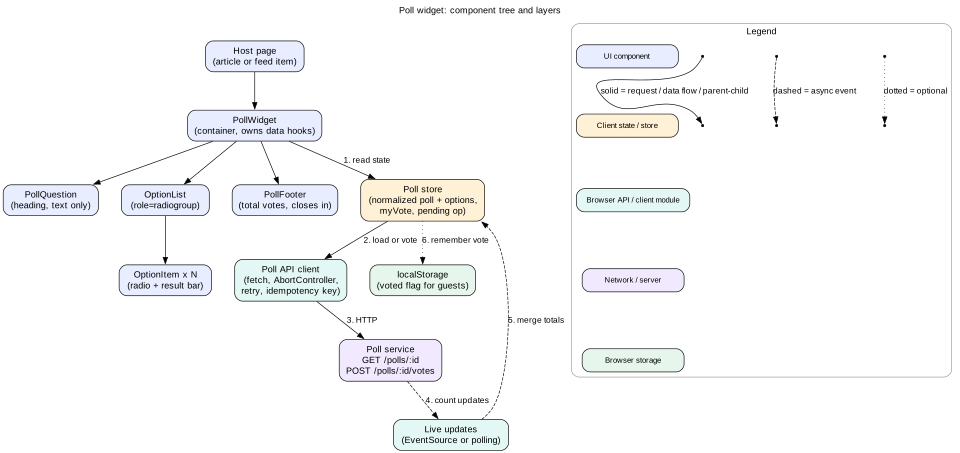
Figure 1. A poll widget drawn as a component tree with its state, data access, and server layers.
Mistake
Drawing a backend diagram with load balancers, databases, and caches. Unless the interviewer asks, the server is a single box called "API". Spend your boxes on the client.
Rendering choice belongs here
State your rendering strategy in the architecture step. Choose between client-side rendering, server-side rendering, static generation, or a mix. One sentence is enough at first. "Public poll pages use server rendering for SEO and fast first paint. The voting part hydrates on the client." The rendering guide in this section covers the details.
5. D: Data model and state ownership
The data model step answers two questions. What does the client store look like? Who owns each piece of state?
Classify every piece of state
Server state. Data the server owns, such as posts, users, and vote counts. The client holds a cache copy.
UI state. Open menus, hover, focus, and selected tabs. It lives in the component that uses it.
Form state. Draft input that the user has not submitted yet.
URL state. Filters, sort order, page, and selected item. It must survive a reload and be shareable.
Session or global state. The current user, theme, locale, and feature flags.
Normalize shared entities
If the same entity appears in many places, store it once by ID. A user's name may appear in a post header, a comment, and a sidebar. If you nest copies, an update must find every copy. If you normalize, one write updates every view.
// Normalized client store for a feed
type Store = {
  users: Record<UserId, User>
  posts: Record<PostId, Post>          // post.authorId points into users
  feed: { ids: PostId[], nextCursor: string | null, status: 'idle' | 'loading' | 'error' }
  pending: Record<OpId, PendingOp>     // optimistic ops waiting for the server
}
Tip
Write the store shape as a TypeScript type. It is compact, precise, and it reads like a contract. Interviewers can spot missing fields fast, which gives you useful feedback early.
6. I: Interface, API, and component props
The interface step covers three contracts. The first is the server API. The second is the real-time channel, if any. The third is the public props of key components.
Server API
For each endpoint, give the method, the path, the request body, and the response body. Mention pagination, error codes, and idempotency for writes. Keep it short. Four lines per endpoint is enough.
Notice that the feed response returns users next to items. This side-loading lets the client normalize without a second request. It also keeps each user object in the payload only once.
Real-time channel
Pick the simplest channel that meets the freshness requirement.
Short polling every 10 to 30 seconds is fine for slow-changing data. It works through every proxy.
Server-Sent Events through EventSource give one-way server push over plain HTTP. The browser reconnects on its own and sends Last-Event-ID.
WebSocket gives two-way, low-latency messages. Use it for chat, presence, and collaboration. You must handle reconnects and heartbeats yourself.
Component props
For a widget question, the props are the main interface. Good props are small, typed, and controlled or uncontrolled on purpose. Show events as callbacks, such as onChange. Show render hooks only if the interviewer asks for custom rendering.
7. O: Optimizations and deep dives
The optimizations step is where senior candidates separate themselves. You pick two to four topics and go deep with numbers. Pick the topics that the problem makes hard. Do not list every trick you know.
A menu of deep dives
Performance. Bundle splitting, image strategy, virtualization, and Core Web Vitals targets.
Network. Caching, request dedupe, prefetch on hover, retries with backoff, and cancellation.
Real-time and consistency. Ordering, reconnect, gap fill, and conflict handling.
Offline. Service Worker caching, an outbox of pending writes in IndexedDB, and sync on reconnect.
Accessibility. Roles, keyboard navigation, focus management, live regions, and reduced motion.
Internationalization. Pluralization, date and number formats, right-to-left layout, and text expansion.
Security. XSS, Content Security Policy, token storage, and safe embedding with iframe sandboxing.
Interview
Ask the interviewer, "Which area would you like me to go deeper on?" Offer two options you are strong in. This turns the deep dive into a collaboration and often reveals what they are scoring.
How to structure one deep dive
State the problem with a number. "A feed of 2,000 items creates about 40,000 DOM nodes."
Explain why it hurts. "Style recalculation and layout scale with node count, so scroll frames exceed 16 ms."
Give the fix. "Virtualize the list. Render only visible rows plus an overscan of five."
Give the cost of the fix. "Find-in-page breaks, and variable row heights need measurement."
Give the check. "Track INP and dropped frames in field data after the change."
8. How to state budgets with numbers
Budgets turn "make it fast" into a design constraint. A good budget has three parts: a metric, a number, and a reason. Here is how to build each common budget from first principles.
Frame budget
At 60 Hz, one frame is 1000 / 60, which is about 16.7 ms. The browser uses some of that for style, layout, paint, and compositing. Plan for 10 ms of script per frame during scrolling. On 120 Hz screens the frame is 8.3 ms, so heavy work during scroll hurts even more.
Input responsiveness budget
Interaction to Next Paint (INP) should be 200 ms or less at the 75th percentile of page loads. Any task over 50 ms is a long task. So break work into chunks under 50 ms and yield to the browser between them.
JavaScript bundle budget
Here is a worked estimate. Suppose the target is a mid-range phone on a 4G link with about 1.6 Mbps of real throughput and 150 ms round trips. You want the page interactive within about 3.5 seconds.
Leave about 1 second for DNS, TLS, and the HTML document.
That leaves about 2.5 seconds for script download, parse, compile, and execution.
1.6 Mbps is about 200 KB per second. Downloading 170 KB of compressed JavaScript takes about 0.85 seconds.
170 KB compressed is about 600 to 700 KB uncompressed. A mid-range phone may need 1 to 1.5 seconds to parse and run it.
So 170 KB compressed fits in the 2.5 second window, with little room to spare. That is your route budget.
Payload and DOM budgets
API payload. A post object with text and metadata is about 1 KB of JSON. Twenty posts per page is about 20 KB, or 5 KB after compression. That is fine on 3G.
DOM size. Aim for under 1,500 nodes for the visible document. Lighthouse warns at about 800 nodes and flags an error at about 1,400. Each feed item may have 20 nodes, so 70 visible items is the ceiling.
Memory. A low-end phone may give a tab 300 to 500 MB before the OS kills it. Decoded images are the usual risk. A 1080 by 1080 image costs about 4.7 MB of memory when decoded, at 4 bytes per pixel.
Intuition
A budget is like a household budget. You do not say "spend less". You say "rent is 1,000, food is 400". When a new feature wants 50 KB, the team must remove 50 KB elsewhere or argue for a bigger budget.
9. The 45-minute time plan
Most loops give you 45 minutes. About 5 minutes go to introductions and 5 to your questions at the end. So you have about 35 minutes of design. Here is a plan that works.
Minutes 0 to 5: Requirements. Ask four to six questions. Write functional, non-functional, and out-of-scope lists.
Minutes 5 to 8: Budgets and scale. State devices, network, data size, and two or three budgets.
Minutes 8 to 15: Architecture. Draw the component tree and the layers. Name the rendering strategy.
Minutes 15 to 20: Data model. Write the store type. Mark the owner of each state kind.
Minutes 20 to 25: Interface. Write two to four endpoints and key props. Name the real-time channel.
Minutes 25 to 38: Optimizations. Do two or three deep dives with numbers and trade-offs.
Minutes 38 to 42: Failure modes and wrap-up. Walk one failure end to end. Summarize the design in four sentences.
Minutes 42 to 45: Questions. Ask the interviewer a real question about their frontend work.
Tip
Glance at the clock at minute 15 and minute 25. If you are behind, say so and skip ahead. "I will keep the data model brief so we have time for performance." Interviewers reward time awareness.
10. Signals interviewers look for at senior and staff level
Interviewers usually score four areas. They are problem exploration, technical design, trade-offs, and communication. The bar rises with level.
Mid level
Builds a working component tree and a reasonable API.
Knows the basic tools, such as pagination, debouncing, and lazy loading.
Needs some hints to find edge cases.
Senior level
Drives the conversation. Asks the questions that matter, sets scope, and keeps time without prompts.
Gives numbers. States budgets and works out payload and DOM sizes.
Handles real failure. Covers race conditions, retries, rollback, and offline cases unprompted.
Treats accessibility as default. Names roles, keyboard flows, and focus management in the design itself.
Explains trade-offs. Every choice comes with what it costs and when you would choose differently.
Staff level
Thinks beyond the widget. Asks how ten teams will reuse it, how it is versioned, and how it is tested.
Connects to business outcomes. Links LCP and INP to conversion or engagement and proposes how to measure impact.
Designs for evolution. Plans migration paths, feature flags, and gradual rollout with field monitoring.
Sees cross-cutting risk. Spots privacy, security, and observability gaps others miss.
Simplifies. Removes layers that do not pay for themselves and explains why less is better here.
Interview
A staff signal often sounds like a question to yourself. "If this widget ships on 500 pages, a 10 KB increase costs every page. So I would ship the results chart as a lazy chunk loaded only after a vote."
11. Failure modes
Name failure modes for the design, not only for the network. Here are the ones that appear in almost every frontend design.
Slow or failed requests. Show skeletons for loading, a retry button for errors, and keep stale data visible when a refresh fails.
Out-of-order responses. A slow old response arrives after a fast new one. Cancel old requests with AbortController or ignore responses whose request ID is not the latest.
Double submit. The user clicks twice or the client retries. Send an idempotency key so the server applies the write once.
Optimistic update rejected. Roll back to the snapshot, tell the user in an aria-live region, and keep their input if possible.
Real-time disconnect. Reconnect with exponential backoff and jitter. After reconnect, fetch the gap since the last known event ID.
Script error in one widget. Wrap regions in error boundaries so one broken widget does not blank the whole page.
Third-party script slows the page. Load it with async or after interaction, and set a budget for it.
Stale cache after deploy. Old HTML points to deleted asset files. Use content-hashed file names and keep old assets for a while.
12. Trade-offs
Optimistic versus pessimistic updates
Optimistic updates feel instant. They cost rollback logic and a moment of wrong UI on failure. Use them when success is above 99 percent and the action is cheap to undo. Use pessimistic updates for payments, deletes without undo, and permission changes.
Server rendering versus client rendering
Server rendering gives faster first paint and SEO. It costs server compute and hydration work on the client. Client rendering is simpler to host and fine for logged-in apps. It costs a slower first view on weak devices.
One global store versus local state
A global store makes cross-component updates easy and debuggable. It costs boilerplate and can cause wide re-renders. Local state is simple and fast. It gets messy when distant components need the same data.
WebSocket versus polling
WebSocket gives low latency and lower overhead per message. It costs connection management, sticky load balancing, and reconnect logic. Polling every 15 seconds is simple and cacheable. It costs freshness and some wasted requests.
Generic component versus specific component
A generic component serves many teams. It costs a larger API surface and more bundle bytes. A specific component is small and clear. It may be copied and diverge across teams.
13. Summary
Frontend design is about one device serving one user well. The device, the network, and the user's input are the constraints.
Use RADIO: Requirements, Architecture, Data model, Interface, Optimizations. Each step leaves a visible artifact.
Draw a component tree with 6 to 12 boxes. Mark state owners and fetchers. Name your rendering strategy.
Write the store as a type. Normalize shared entities. Put each piece of state in exactly one owner.
State budgets with a metric, a number, and a reason. Work out at least one budget on the board.
Go deep on two or three topics with numbers and costs. Cover failure modes unprompted.
Senior means you drive and quantify. Staff means you think about reuse, rollout, and business impact.
14. Common mistakes
Jumping into code. Writing JSX in minute two. The interviewer wanted architecture, so you lose the design signal.
Designing the backend. Spending ten minutes on databases. The server should be one box unless asked.
No numbers. Saying "fast" and "small" without budgets. Numbers are the clearest senior signal.
Two owners for one state. Copying props into local state, then fighting sync bugs.
Ignoring accessibility. Adding it at the end as a footnote. It should shape the markup and the keyboard model.
Only the happy path. No loading, error, empty, or offline states. Real UIs spend most of their code there.
Listing tricks without reasons. Naming "memo, lazy, CDN, SSR" with no trade-offs. Depth beats breadth.
Losing track of time. Spending 25 minutes on requirements and never reaching the deep dives.
Worked example: design a poll widget end to end
The prompt is: "Design a poll widget that can be embedded in articles. Users pick one option and then see live results." Here is a full RADIO pass, timed for a 35-minute design window.
Requirements (minutes 0 to 5)
Questions asked and answers assumed:
Single choice or multiple choice? Answer: single choice, with the option to change your vote before the poll closes.
Who can vote? Answer: logged-in users, one vote each. Guests see results only.
When are results shown? Answer: after you vote, or after the poll closes.
How many options and voters? Answer: 2 to 10 options. A popular poll may get 50,000 votes in an hour.
How fresh must results be? Answer: within about 5 seconds is fine.
Where is it embedded? Answer: inside our own article pages, which use server rendering.
Functional requirements:
Show the question and 2 to 10 options.
Cast one vote, and change it while the poll is open.
After voting, show percentages, bars, and the total count, updated live.
Show a closed state with final results and a "closes in" countdown before that.
Non-functional requirements:
Under 15 KB compressed JavaScript for the widget, since it ships on many article pages.
No layout shift when results appear. CLS contribution must be 0.
Vote feedback within 100 ms of the click.
Full keyboard and screen reader support, WCAG 2.2 AA.
Works with right-to-left languages and long translated option text.
Out of scope: creating polls, moderation, and fraud detection on the server.
Budgets (minutes 5 to 8)
Payload: 10 options at about 80 bytes each, plus the question, is about 1.2 KB of JSON. Compressed it is under 1 KB.
Live updates: polling every 5 seconds from 10,000 open pages is 2,000 requests per second. That is high for a simple widget. Server-Sent Events push only on change, and the server can batch updates to one per second.
DOM: 10 options at about 8 nodes each is 80 nodes. No virtualization needed.
Bundle: no chart library. Bars are CSS widths with transform: scaleX() for cheap animation.
Architecture (minutes 8 to 15)
The article server renders the poll HTML with the question and options. This gives instant paint and no layout shift.
Results space is reserved in the server HTML. Each option row has a fixed minimum height and a bar track already present.
The widget script hydrates only the poll island, not the full article. It loads with type="module" and is deferred.
The component tree is PollWidget, which contains PollQuestion, OptionList, N OptionItem, and PollFooter. See Figure 1.
A small poll store holds state. The widget does not need a global app store.
Data model (minutes 15 to 20)
type PollState = {
  poll: { id: string, question: string, closesAt: string, status: 'open' | 'closed' }
  options: Record<OptionId, { id: OptionId, label: string, votes: number }>
  order: OptionId[]                 // display order from the server
  total: number
  myVote: OptionId | null
  pending: { opId: string, prev: Snapshot } | null
  lastEventId: string | null        // for gap fill after reconnect
}
The server owns vote counts. The client owns pending and the selection during a request. Only one vote request may be in flight at a time. A new selection aborts the old request and restores from the oldest snapshot.
Interface (minutes 20 to 25)
GET  /api/polls/:id
  200 { poll, options, total, myVote, lastEventId }

PUT  /api/polls/:id/vote        Idempotency-Key: <uuid>
  body { optionId }
  200 { options, total, myVote }      // fresh counts
  409 { error: 'POLL_CLOSED' }

GET  /api/polls/:id/stream      (text/event-stream)
  event: counts   id: 1842   data: { options, total }

<PollWidget pollId="p1" initialData={serverJson} onVote={trackFn} />
The vote uses PUT because voting is "set my vote to X". Repeating it has the same effect, so it is naturally idempotent. The idempotency key still helps the server dedupe analytics events.
Optimizations (minutes 25 to 38)
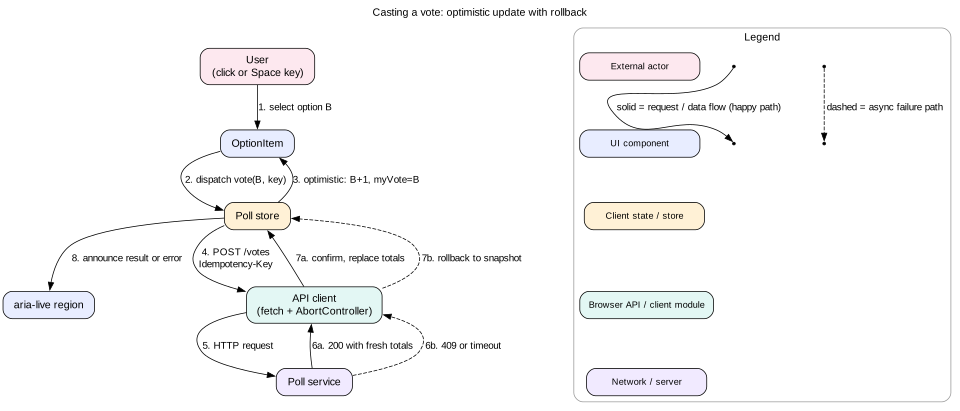
Optimistic vote. On click, add 1 to the chosen option, subtract 1 from the previous choice, and set myVote. Save a snapshot. On a 200, replace counts with the server values. On a 409 or timeout after 8 seconds, restore the snapshot and announce the error. See Figure 2.
Live merge. SSE events carry absolute counts, not deltas. Absolute counts are safe to apply in any order if the client keeps the highest event ID. While a vote is pending, the client re-applies its own optimistic delta on top of incoming counts.
Accessibility. Options use a native fieldset with legend and radio inputs. Native radios give arrow-key navigation for free. Results use aria-live="polite" and announce "Voted for B. B has 42 percent." Percentages are in text, not only in bar width, so color-blind users and screen readers get them.
No layout shift. The server HTML reserves the bar track and the percentage slot. Revealing results only changes transform and opacity, which the compositor handles without layout.
Motion and locales. Bars animate only if prefers-reduced-motion is not set. Percentages use Intl.NumberFormat with style: 'percent'. Logical CSS properties like margin-inline-start flip correctly in right-to-left.
Figure 2. The vote flow with the happy path in solid lines and the rollback path in dashed lines.
Failure modes and wrap-up (minutes 38 to 42)
The user votes B, then quickly changes to C. The client aborts the B request. It keeps the original snapshot from before B, so a later rollback restores the true starting state.
The SSE connection drops. EventSource reconnects and sends Last-Event-ID: 1842. The server replies with the current counts. Since counts are absolute, one event fills any gap.
The poll closes while a vote is in flight. The server returns 409 POLL_CLOSED. The client rolls back, switches to the closed view, and shows final results.
JavaScript fails to load. The server HTML still shows the question and a form that posts to /polls/:id/vote. Voting works with a full page reload. This is progressive enhancement.
Four-sentence summary: The poll is server rendered with reserved space, then hydrated as a small island. A tiny store owns optimistic state with one pending snapshot. Votes use an idempotent PUT, and live counts arrive as absolute values over SSE. Native radios, live regions, and logical CSS give accessibility and right-to-left support at almost no bundle cost.
Tip
A star-rating widget follows the same plan. Swap radio options for five radios in a radiogroup, keep the optimistic set-rating call, and show the average with one decimal. The main new edge case is half-star display versus whole-star input.
Code lab: an optimistic poll store
This plain JavaScript store models the vote flow from Figure 2. It keeps one snapshot, aborts superseded requests, and rolls back on failure. The fake server fails on purpose for option C. Save it as poll-store.mjs and run node poll-store.mjs with Node 18 or newer.
function createPollStore(initial, api) {
  let state = structuredClone(initial)
  let pending = null // { controller, snapshot }
  const listeners = new Set()
  const emit = () => listeners.forEach((fn) => fn(state))

  async function vote(optionId) {
    const snapshot = pending ? pending.snapshot : structuredClone(state)
    if (pending) pending.controller.abort()
    const controller = new AbortController()
    pending = { controller, snapshot }

    const next = structuredClone(snapshot)
    if (next.myVote) next.options[next.myVote] -= 1
    else next.total += 1
    next.options[optionId] += 1
    next.myVote = optionId
    state = next
    emit()

    try {
      const fresh = await api.vote(optionId, controller.signal)
      if (pending?.controller !== controller) return
      state = { ...state, ...fresh }
    } catch (err) {
      if (err.name === 'AbortError') return
      state = snapshot
      console.log('rollback:', err.message)
    }
    pending = null
    emit()
  }
  return { vote, subscribe: (fn) => listeners.add(fn), get: () => state }
}

const server = { options: { A: 10, B: 5, C: 1 }, total: 16, myVote: null }
const api = {
  vote: (id, signal) => new Promise((resolve, reject) => {
    const t = setTimeout(() => {
      if (id === 'C') return reject(new Error('POLL_CLOSED'))
      if (server.myVote) server.options[server.myVote] -= 1
      else server.total += 1
      server.options[id] += 1
      server.myVote = id
      resolve(structuredClone(server))
    }, 100)
    signal.addEventListener('abort', () => {
      clearTimeout(t)
      reject(new DOMException('aborted', 'AbortError'))
    })
  }),
}

const store = createPollStore(server, api)
store.subscribe((s) => console.log(JSON.stringify(s.options), 'mine:', s.myVote))
store.vote('A')
store.vote('B') // aborts A, keeps the original snapshot
setTimeout(() => store.vote('C'), 300) // server rejects, store rolls back
Expected behavior: you see A applied, then B applied, then B confirmed by the server. Then C is applied and rolled back to the B state. Change the 300 ms delay to 50 ms. Then C aborts the pending B request, and the rollback restores the original state from before A.
Check yourself
Why does RADIO put Data model before Interface?Answer
The API should serve what the client store needs. Once you know the store shape, you can design responses that fill it in one request, for example by side-loading users with posts.
Your frame budget at 120 Hz is roughly how many milliseconds, and why does it matter?Answer
About 8.3 ms. The browser still needs time for style, layout, and paint. So any script during scroll or animation must be very short, or it must move off the main thread.
Give one senior and one staff signal for the poll widget.Answer
Senior: handling a vote change during a pending request with abort and one snapshot. Staff: noting that the widget ships on many pages, so its bundle budget is a cost for every article, and proposing a lazy results chunk.
Why do live updates send absolute counts instead of deltas?Answer
Absolute counts are safe to apply after a missed or reordered event. The client keeps the newest event ID and replaces counts. Deltas would need every event in order, or the totals drift.
When should you avoid optimistic updates?Answer
When failure is common, when the action is hard to undo, or when a wrong temporary UI could cause harm. Payments, permanent deletes, and permission changes should show a pending state instead.
How do you work out a JavaScript bundle budget on the whiteboard?Answer
Pick a target device and network, and a time-to-interactive goal. Subtract time for the document and connection setup. Split the rest between download time, from throughput, and parse plus execute time, from device speed. The result gives a compressed size, such as about 170 KB.
Key terms
RADIO
Requirements, Architecture, Data model, Interface, Optimizations. A step order for frontend design answers.
Component tree
A diagram of which UI components contain which, and where state and data enter.
State owner
The single place allowed to write a piece of state.
Normalization
Storing each entity once by ID and referencing it by ID elsewhere.
Optimistic update
Changing the UI before the server confirms, with a saved snapshot for rollback.
Idempotency key
A unique ID sent with a write so the server applies repeats only once.
Frame budget
The time per frame, about 16.7 ms at 60 Hz, that rendering and script must share.
Long task
Any main-thread task longer than 50 ms. It delays input handling.
INP
Interaction to Next Paint. A Core Web Vital for responsiveness. Good is 200 ms or less.
Island
An interactive part of a mostly static page that hydrates on its own.
Progressive enhancement
Building a working baseline in HTML, then adding JavaScript for a richer experience.
Live region
An element with aria-live whose changes screen readers announce.