A product is only as big as the people who can use it. This guide shows how to make a frontend work for users with disabilities and for users in any language. It names the browser APIs and standards behind each choice.
Frontend system design · Foundations · Accessibility and i18n
After this guide you can design components that work with a keyboard and a screen reader. You can explain WCAG 2.2 levels and plan focus, live regions, contrast, and motion. You can also design an i18n pipeline with ICU messages, Intl APIs, RTL layouts, and per-locale bundle loading.
Correctness contract: every action is possible with a keyboard alone. Every control has a correct name, role, and state in the accessibility tree. Every user-facing string, number, and date is shown in the user's locale and direction.
Assumptions: a React-style single-page app, a design system shared across teams, and a target of WCAG 2.2 level AA. The product ships in 20 or more locales, including Arabic and Hebrew.
Accessibility (a11y) and internationalization (i18n) look like separate topics. In practice they share one root idea. The person using your UI is not you. They may not see the screen, use a mouse, read English, or read left to right. Both are cheap when built in early and costly to retrofit. Interviewers at senior and staff level expect you to raise both without being asked, and to name real APIs, not just good intentions.
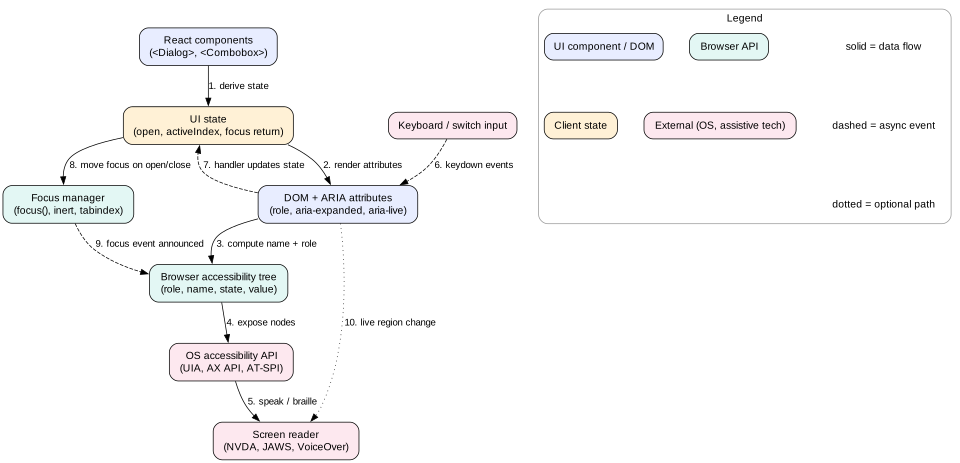
The browser builds an accessibility tree next to the DOM. Each node has a role, an accessible name, states, and a value. Screen readers read this tree through the operating system's accessibility API. They never see your CSS classes.
Example.<button>Save</button> becomes a node with role "button" and name "Save". A <div class="btn">Save</div> becomes plain text with no role.
Limit. The tree only reflects what you express in markup. Visual meaning, such as red for error, is lost unless you add text or ARIA.
Accessible name
The accessible name is what a screen reader says for a control. The browser computes it in a fixed order. It tries aria-labelledby, then aria-label, then native labels like <label for> or alt, then text content.
Example. An icon button with only an SVG has no name. Screen readers say "button". Adding aria-label="Close" fixes it.
Limit.aria-label is often not translated by browser translation tools. Prefer visible text or aria-labelledby pointing at visible text.
Focus and tab order
Focus marks the element that receives keyboard input. Tab order follows DOM order for focusable elements. tabindex="0" adds an element to that order. tabindex="-1" makes it focusable by script only.
Example. After a route change in an SPA, focus stays on the old link, which no longer exists. Moving focus to the new page's <h1> tells keyboard and screen reader users where they are.
Limit. Positive tabindex values such as tabindex="5" break the natural order. Avoid them.
Locale
A locale is a language plus region and options, written as a BCP 47 tag like pt-BR or ar-EG-u-nu-latn. It controls words, plural rules, number and date formats, sorting, and text direction.
Example. One million is 1,000,000 in en-US, 1.000.000 in de-DE, and 10,00,000 in en-IN.
Limit. Language and region are separate choices. A user in Germany may want English text with euro prices and German dates.
Plural categories
Languages group numbers into plural categories. Unicode CLDR defines six: zero, one, two, few, many, other. English uses two. Arabic uses all six. Japanese uses one.
Example. In Polish, 2 files is "2 pliki" (few) and 5 files is "5 plików" (many). Code like count === 1 ? 'file' : 'files' is wrong for Polish.
Limit. Plural rules cover numbers only. Gender and grammatical case need select messages too.
1. Semantic HTML first
The first rule of ARIA is "do not use ARIA if a native element does the job". Native elements come with roles, names, states, focus, and keyboard behavior for free. They also work in every screen reader, which custom widgets often do not.
What native elements give you
<button> is focusable, fires click on Enter and Space, and has the button role. A div with onClick has none of this. Rebuilding it takes role="button", tabindex="0", and key handlers, and you will still miss details.
<a href> is a link. It supports middle-click, "open in new tab", and the link list in screen readers. Use links for navigation and buttons for actions.
<label for> names an input and makes the label clickable, which grows the touch target.
<fieldset> and <legend> group radio buttons and name the group.
Landmarks such as <header>, <nav>, <main>, and <footer> let screen reader users jump between regions. Use one <main> per page.
Headings <h1> to <h6> form an outline. About two thirds of screen reader users navigate by headings first, according to WebAIM surveys.
<dialog> with showModal() gives a modal with focus handling, Escape to close, and an inert background.
Images and icons
Informative images need alt text that says what the image means, not what it looks like. "Chart: sales grew 40 percent in Q3" beats "bar chart".
Decorative images need alt="", so screen readers skip them. A missing alt makes some readers speak the file name.
Icon-only buttons need a name. Use visually hidden text or aria-label. Hide the SVG itself with aria-hidden="true".
Intuition
Semantic HTML is a contract with the browser. You say "this is a button", and the browser handles focus, keys, and announcements. A styled div breaks the contract, and you must write all of that by hand.
2. ARIA roles, states, and properties
WAI-ARIA adds attributes that change the accessibility tree. It never changes behavior. Adding role="button" does not make an element focusable or clickable by keyboard. ARIA is a promise to assistive technology. Your code must keep that promise.
The three kinds of ARIA attribute
Roles say what a thing is: tablist, tab, tabpanel, combobox, listbox, option, menu, menuitem, dialog, alertdialog, grid.
States change often with interaction: aria-expanded, aria-selected, aria-checked, aria-pressed, aria-disabled, aria-invalid, aria-busy.
Focus stays in the input, so the user can keep typing.
Arrow keys change aria-activedescendant to point at the active option. The screen reader announces "Bern, 2 of 2" without moving real focus.
Enter picks the option. Escape closes the list and sets aria-expanded="false".
The result count can also go to a polite live region, for example "5 results".
Rules that prevent most ARIA bugs
Every role has required states and keyboard behavior. Read the pattern before you build. A menu role promises arrow key navigation. Do not use it for a site nav list.
Keep states in sync with the UI. A stale aria-expanded="false" on an open panel is worse than no attribute.
Never put aria-hidden="true" on a focusable element. Keyboard users then land on something screen readers cannot see.
Mistake
"More ARIA means more accessible." WebAIM scans the top one million home pages each year. Pages with ARIA have more detected errors on average than pages without it. Wrong ARIA is worse than none.
3. Keyboard navigation and focus management
Many users rely on a keyboard: blind users with screen readers, users with tremors, power users, and users of switch devices that emulate keys. WCAG requires that every function works from a keyboard, with no keyboard traps.
Standard key expectations
Tab and Shift+Tab move between interactive widgets.
Arrow keys move inside a composite widget, such as tabs, menus, listboxes, grids, and radio groups.
Enter activates links and buttons. Space activates buttons and toggles checkboxes.
Escape closes popups, menus, and dialogs.
Home and End jump to the first and last item in a list.
Roving tabindex
A toolbar with 12 buttons should be one tab stop, not twelve. The roving tabindex pattern gives the active item tabindex="0" and all others tabindex="-1". Arrow keys move the zero and call focus() on the new item. Tab leaves the whole widget in one step. The alternative is aria-activedescendant, where focus stays on the container. Use roving tabindex when items are real buttons. Use aria-activedescendant when focus must stay in an input, as in a combobox.
Focus management in SPAs
Route changes. A full page load resets focus to the top and announces the title. An SPA route change does neither. Move focus to the new <h1> with tabindex="-1", and update document.title.
Deleting an item. When the focused row is removed, move focus to the next row or the list heading. Otherwise focus falls to <body> and the user must start over.
Opening and closing popups. Save the trigger element. On close, return focus to it.
Skip link. Put a "Skip to main content" link first in the page. It lets keyboard users jump past a 40-link header.
Visible focus
Never remove focus outlines with outline: none without a replacement. Use :focus-visible. It shows the ring for keyboard users but not after a mouse click. WCAG 2.2 adds 2.4.11 Focus Not Obscured, which says sticky headers and cookie banners must not fully cover the focused element.
Tip
Test every new screen by unplugging the mouse for five minutes. Can you reach every control? Can you see where focus is? Does Escape close what you opened? Most keyboard bugs show up in that short test.
4. Focus traps for dialogs
A modal dialog must keep focus inside itself until it closes. Otherwise Tab moves into the page behind, which sighted users cannot see and screen reader users find confusing.
From component to screen reader. State drives ARIA attributes and focus. The browser turns both into the accessibility tree.
The native way
The <dialog> element with dialog.showModal() does most of the work. The browser makes everything outside the dialog inert, so it cannot be focused or clicked. It moves focus into the dialog, closes on Escape with a cancel event, and renders in the top layer above all z-index stacks. It does not return focus to the trigger in every browser. Do that yourself on close.
The checklist for any modal
Give it role="dialog" (or alertdialog for urgent confirms) and aria-modal="true". A native modal <dialog> has these already.
Name it with aria-labelledby pointing at its heading. Describe it with aria-describedby if there is a short message.
On open, move focus to the first useful control. For a destructive confirm, focus the safe choice, such as "Cancel".
Keep Tab and Shift+Tab inside. Use the inert attribute on the rest of the page, or loop focus from the last to the first focusable element.
Close on Escape. Return focus to the element that opened the dialog.
Stop background scroll, but do not hide the background from screen readers with aria-hidden if you already use inert.
The inert attribute is now in all major browsers. Setting inert on the page wrapper removes it from focus order and from the accessibility tree in one step. It replaces fragile focus-loop scripts and aria-hidden toggling.
Mistake
Trapping focus in something that is not modal. A non-modal side panel or toast must not trap focus. Users must be able to Tab out. Traps are only for modal dialogs that block the page.
5. Live regions
Screen readers announce focus changes. They do not announce changes elsewhere on the page. A toast, a form error, or "3 new messages" is silent unless it is in a live region.
aria-live="polite" waits until the screen reader finishes speaking, then announces. Use it for most updates: search result counts, "Saved", and new chat messages.
aria-live="assertive" interrupts at once. Use it only for urgent issues, such as "Session expires in 1 minute". Overuse makes the app exhausting.
role="status" is polite by default. role="alert" is assertive by default. role="log" fits chat and activity feeds.
aria-atomic="true" reads the whole region on change, not only the changed part. Use it for "Page 3 of 10".
Rules that make live regions work
The region must exist in the DOM before the change. Many screen readers ignore a region that is inserted along with its text. Render an empty region at app start, then set its text later.
Keep messages short and meaningful. "3 results" beats re-reading the whole list.
Debounce rapid changes. A search box that announces on every key press floods the user. Announce 500 ms after typing stops.
Use one shared announcer service for the app. Components call announce('Saved', 'polite'). This prevents ten regions fighting.
6. Color contrast, reduced motion, and zoom
Contrast
WCAG AA needs a contrast ratio of at least 4.5:1 for normal text and 3:1 for large text (24 px, or 18.66 px bold).
Non-text elements such as input borders, focus rings, and icons that carry meaning need 3:1 against neighbors.
AAA raises text to 7:1. Few products target full AAA, but body text can often meet it.
Never use color alone to carry meaning. Pair a red border with an error icon and text. About 1 in 12 men has some color vision deficiency.
Build contrast into design tokens. If the token --text-muted passes on --surface in both light and dark themes, every team inherits a passing pair.
Reduced motion
Large motion such as parallax, zooming transitions, and auto-playing carousels can cause nausea for people with vestibular disorders. Respect the OS setting with the prefers-reduced-motion media query.
In JavaScript, check matchMedia('(prefers-reduced-motion: reduce)').matches before running animation libraries.
WCAG 2.2.2 requires a pause control for any motion that lasts more than 5 seconds.
Zoom, reflow, and target size
Text must scale to 200 percent without loss of content. Use rem for font sizes so user font settings apply.
Content must reflow at 320 CSS px width with no horizontal scroll (WCAG 1.4.10). That equals 400 percent zoom on a 1280 px screen.
Never set maximum-scale=1 or user-scalable=no in the viewport meta tag.
WCAG 2.2 adds 2.5.8 Target Size (Minimum): pointer targets at least 24 by 24 CSS px, or enough spacing around smaller ones.
7. WCAG 2.2 levels and testing
Structure and levels
WCAG is organized under four principles, often remembered as POUR: Perceivable, Operable, Understandable, Robust. Each success criterion has a level.
Level A is the floor. Failing it blocks some users entirely. Examples: text alternatives (1.1.1), keyboard access (2.1.1), no keyboard trap (2.1.2).
Level AA is the usual legal and contract target. It includes contrast (1.4.3), reflow (1.4.10), visible focus (2.4.7), and consistent help.
Level AAA is the highest. It is not required as a whole for any site, because some criteria cannot be met for all content.
WCAG 2.2 became a W3C Recommendation in October 2023. It added nine criteria. Key ones for frontend engineers are Focus Not Obscured (2.4.11, AA) and Dragging Movements (2.5.7, AA), which needs a non-drag alternative. Others are Target Size Minimum (2.5.8, AA) and Redundant Entry (3.3.7, A). Accessible Authentication (3.3.8, AA) bans puzzles and memory tests unless paste or passkeys work too. It also removed 4.1.1 Parsing as obsolete. Laws such as the European Accessibility Act, in force since June 2025, and the ADA in the US make AA a business requirement.
Testing in layers
Lint.eslint-plugin-jsx-a11y catches missing alt, click handlers on non-interactive elements, and bad ARIA at write time.
Automated scans. axe-core in unit tests (jest-axe) and end-to-end tests (Playwright with @axe-core/playwright). Automated tools find about 30 to 40 percent of issues. They cannot judge whether alt text is useful or focus order makes sense.
Accessible queries in tests. Testing Library's getByRole('button', { name: 'Save' }) fails if the button has no role or name. Your tests then double as accessibility checks.
Manual keyboard pass on every new flow.
Screen reader testing. Test the main pairs. On Windows, use NVDA with Chrome or Firefox, and JAWS with Chrome. Use VoiceOver with Safari on macOS and iOS, and TalkBack with Chrome on Android. Behavior differs between them, especially for live regions and complex widgets.
Tip
Learn five VoiceOver commands: Cmd+F5 to start, VO+Right Arrow to move, VO+U for the rotor, VO+Space to activate, and Ctrl to stop speech. VO is Ctrl+Option. Ten minutes a week is enough to catch most naming and announcement bugs.
8. String externalization and ICU messages
Internationalization (i18n) is the engineering work that makes localization (l10n) possible. Localization is the translation and cultural adaptation itself. Good i18n means a translator can ship a new language without an engineer touching code.
Externalize every string
Move all user-facing text into message catalogs keyed by ID: t('cart.checkout.button'). That includes aria-label, alt, title, placeholder text, and error messages.
Give translators context. A key like button.open could mean "open a file" or "the shop is open". Add a description field: "Verb. Button that opens the selected file."
Never concatenate strings: 'Hello ' + name + ', you have ' + n + ' messages'. Word order changes across languages. Use one message with placeholders.
Never split a sentence across components. Translators need the full sentence. For rich text, use tags in the message: "Read our <link>terms</link>", and map link to a component.
Extract strings automatically at build time, so the catalog never drifts from the code.
ICU MessageFormat
ICU MessageFormat is the standard syntax for messages with variables, plurals, and selection. Libraries like FormatJS (react-intl), i18next with an ICU plugin, and Lingui use it.
{count, plural,
  =0 {Your cart is empty}
  one {You have # item in your cart}
  other {You have # items in your cart}
}

{gender, select,
  female {{name} added you to her team}
  male {{name} added you to his team}
  other {{name} added you to their team}
}
plural picks a branch by the CLDR category from Intl.PluralRules. # inserts the number, formatted for the locale.
=0 is an exact match. It wins over the category. Use it for special text such as "empty".
select picks a branch by a string value, such as gender or user type.
selectordinal handles "1st, 2nd, 3rd" using ordinal rules.
The English source only needs one and other. The Arabic translation adds zero, two, few, and many. The code does not change.
Precompile messages
Parsing ICU strings at runtime costs CPU and needs a parser in the bundle, about 10 to 15 KB gzipped. Tools like @formatjs/cli compile turn messages into an AST or functions at build time. The runtime then only formats. MessageFormat 2.0, a newer Unicode standard, is coming to browsers as Intl.MessageFormat. Watch it, but ship with a library today.
Mistake
Writing count === 1 ? 'item' : 'items'. It is wrong for Russian, Polish, Arabic, Welsh, and many more. Always route counts through plural rules.
9. Intl APIs for dates, numbers, and lists
The browser ships CLDR locale data through the Intl namespace. It costs zero bundle bytes and covers hundreds of locales. Use it instead of Moment.js locale files or hand-written formats.
Intl.NumberFormat formats numbers, currencies, percents, units, and compact forms. new Intl.NumberFormat('de-DE', { style: 'currency', currency: 'EUR' }).format(1234.5) gives 1.234,50 €. With { notation: 'compact' }, 1234 becomes "1.2K" in English, and 12345 becomes "1.2万" in Japanese.
Intl.DateTimeFormat formats dates and times with time zones. Pass options like { dateStyle: 'medium', timeStyle: 'short', timeZone: 'Asia/Tokyo' }. Never build "MM/DD/YYYY" by hand. Americans read 03/04 as March 4. Most of the world reads April 3.
Intl.RelativeTimeFormat gives "3 days ago" or "in 2 hours" in any language.
Intl.PluralRules returns the plural category for a number. It powers ICU plural.
Intl.ListFormat joins lists: "A, B, and C" in English, "A, B y C" in Spanish.
Intl.Collator sorts strings by locale rules. Swedish sorts "ä" after "z". German sorts it with "a". Array.prototype.sort() with no comparator sorts by UTF-16 code units, which is wrong for users.
Intl.Segmenter splits text into graphemes, words, or sentences. Use it for character counters and truncation. An emoji family or a Hindi syllable can be one visible character but several code units.
Practical rules
Create formatters once and reuse them. Building an Intl.DateTimeFormat can take tens of microseconds. In a 10,000-row table that adds up. Cache them by locale and options.
Store and send timestamps in UTC, such as ISO 8601 strings or epoch milliseconds. Format in the user's time zone only at render.
For server rendering, pin the time zone and locale in both server and client. Otherwise the server says "3 PM" and the client says "11 PM", and hydration fails.
10. RTL layouts and logical CSS
Arabic, Hebrew, Persian, and Urdu read right to left. More than 500 million people use these scripts. RTL support is more than flipping text. The whole layout mirrors: navigation moves to the right, back arrows point right, and progress bars fill from the right.
Set direction at the root
Set <html lang="ar" dir="rtl">. The lang attribute also controls screen reader voice, hyphenation, and font choice.
For mixed content, such as an English product name in an Arabic sentence, wrap the inserted text with <bdi> or set dir="auto". This stops the bidi algorithm from scrambling punctuation and numbers.
User-generated text should use dir="auto", so a Hebrew comment in an English UI shows correctly.
Use logical properties
Physical CSS like margin-left and text-align: right is tied to the screen. Logical properties are tied to the reading direction, so one stylesheet works for both.
/* physical, breaks in RTL */
.card { margin-left: 16px }
.card { padding-right: 8px }
.card { text-align: left }

/* logical, works in both */
.card { margin-inline-start: 16px }
.card { padding-inline-end: 8px }
.card { text-align: start }
.card { inset-inline-start: 0 }
inline means the text direction axis. block means the axis lines stack on. In horizontal writing, block is top and bottom.
Flexbox and Grid already follow direction. justify-content: flex-start starts on the right in RTL.
Add a lint rule, such as Stylelint with a logical properties plugin, to block physical properties in new code.
Mirror directional icons like arrows, "reply", and progress chevrons, with transform: scaleX(-1) under [dir="rtl"]. Do not mirror logos, clocks, checkmarks, or media play buttons.
Tip
Add a pseudo-locale to your dev build. It wraps each string in brackets, adds accents, and grows it by 40 percent: [Šåvé çhåñĝéš ~~~~]. Add an RTL pseudo-locale too. You will see hard-coded strings, clipped text, and physical CSS on day one.
11. Fonts and text expansion
Text expansion
Translations are often longer than English. German and Finnish words can be very long, and short UI labels grow the most.
Strings under 10 characters can grow by 200 to 300 percent. "Edit" becomes "Bearbeiten" in German.
Strings of 70 or more characters grow about 30 percent on average.
Chinese, Japanese, and Korean are often shorter in width but taller, and they need larger font sizes to stay readable.
Design for it. Avoid fixed widths on buttons and tabs. Let text wrap. Use min-width, not width. Add overflow-wrap: anywhere or hyphens: auto (which needs a correct lang) for long words. Truncation with text-overflow: ellipsis is a last resort. If you truncate, show the full text in a tooltip and keep it in the accessible name.
Fonts across scripts
A Latin web font has no Arabic, Devanagari, or CJK glyphs. The browser falls back to system fonts per character, which can look mixed. Define a font stack per script.
CJK fonts are large, often 5 to 20 MB. Use system fonts for CJK, or serve subsets split with unicode-range so the browser downloads only the slices a page uses.
Use font-display: swap or optional so text shows while the font loads.
Line height needs room for tall scripts. Thai and Vietnamese stack marks above and below. A tight line-height: 1 clips them.
12. Loading translations per locale
A product with 40 locales and 8,000 strings can have 40 catalogs of 300 KB each. Shipping all of them to every user would cost 12 MB. Load only the user's locale, and only the strings the current route needs.
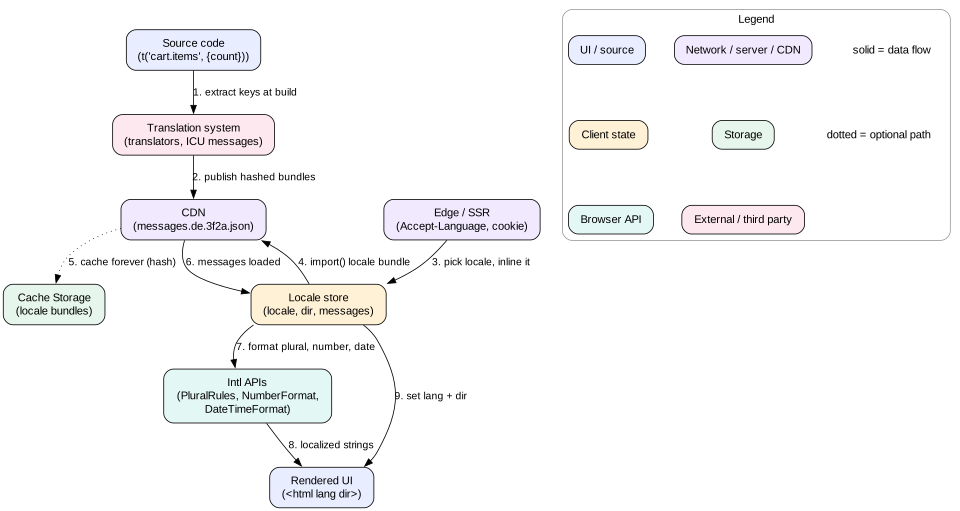
The i18n pipeline. Strings leave the code at build time and come back per locale and per route at runtime.
Choosing the locale
Use an explicit user choice first, saved in the account or a cookie.
Then a locale in the URL, such as /de/ or de.example.com. URL locales are best for SEO and shareable links. Add <link rel="alternate" hreflang="de"> tags.
Then the Accept-Language header on the server, or navigator.languages in the client.
Match against supported locales with fallback: pt-BR to pt to the default. Intl.getCanonicalLocales and the Intl.Locale object help parse tags.
Delivering catalogs
Split by locale and by route. Build messages/de/checkout.[hash].json. Load it with dynamic import() or fetch together with the route chunk. Typical route catalogs are 5 to 30 KB gzipped.
Inline the first catalog. With server rendering, inline the current route's messages in the HTML. That avoids a waterfall where the app waits for JavaScript, then waits again for strings.
Cache hard. Hashed catalog files get Cache-Control: public, max-age=31536000, immutable. A new translation creates a new hash.
Fallback for missing keys. Show the default language string and log the key. Never show a raw key like cart.checkout.button to users.
Switching locale at runtime. Load the new catalog first, then swap in one render. Update lang and dir on <html>. Some apps simply reload, which is simpler and resets all formatters.
Interview
Give numbers. "We have 6,000 strings in 30 locales. Each route needs about 400 strings, or 12 KB gzipped. We inline them with SSR and cache the rest per route. The full catalog never ships." That shows you treat translations as part of the performance budget.
13. Failure modes
Lost focus after an update. A list re-renders with new keys and the focused item is destroyed. Focus drops to <body>. Fix: stable keys and explicit focus return.
Silent dynamic content. Errors and toasts appear only visually. Fix: a shared announcer with a live region that exists from app start.
Stale ARIA state.aria-expanded says closed while the menu is open. Fix: derive ARIA from the same state that drives visuals, never set it by hand.
Focus hidden behind sticky UI. A sticky header covers the focused field. Fix: scroll-padding-top equal to the header height.
Hard-coded strings. A late feature ships English in the German UI. Fix: lint for raw strings in JSX and use pseudo-locales in CI screenshots.
Hydration mismatch from dates. Server and client format a date in different time zones. Fix: pin the time zone, or render dates only on the client after mount.
Broken RTL. Physical CSS leaves icons and padding on the wrong side. Fix: logical properties and an RTL visual test.
Catalog waterfall. The app loads JavaScript, then fetches strings, then renders. Fix: inline the first catalog and preload the rest with the route chunk.
14. Trade-offs
Native elements vs custom widgets. Native elements are accessible by default but harder to style. Custom widgets look exactly as designed but need full ARIA patterns and testing across screen readers. Use native first, and build custom only in the design system.
Roving tabindex vs aria-activedescendant. Roving tabindex moves real focus, which works best across screen readers. aria-activedescendant keeps focus in an input, which a combobox needs.
Polite vs assertive announcements. Assertive is noticed at once but interrupts. Use it for less than 5 percent of announcements.
Runtime vs build-time message parsing. Runtime parsing is simpler but costs bundle size and CPU. Precompiling is faster and smaller but adds a build step.
URL locale vs negotiated locale. URL locales are crawlable and shareable. Negotiated locales keep clean URLs but confuse caches unless you add Vary: Accept-Language, which lowers CDN hit rates.
15. Interview angle
In a design interview, accessibility and i18n usually get 5 to 8 minutes. Use them well.
Minute 0 to 1. State the targets: WCAG 2.2 AA, keyboard and screen reader support, and the locale list including any RTL language.
Minute 1 to 3. Name the hardest widget in the design, such as a combobox, a grid, or a drag-and-drop board. Describe its roles, keys, and focus rules. For drag and drop, give a keyboard alternative, as WCAG 2.5.7 requires.
Minute 3 to 4. Cover dynamic updates: route-change focus, live regions, and focus return after dialogs.
Minute 4 to 6. Cover i18n: ICU messages with plurals, Intl formatters, logical CSS for RTL, and room for 30 to 300 percent text growth.
Minute 6 to 8. Cover delivery and checks: per-route catalogs, axe in CI, role-based test queries, and manual screen reader passes.
Interview
A staff-level answer puts both topics in the design system. "Our Dialog, Menu, and Combobox components own focus and ARIA. Our lint blocks raw strings and physical CSS. Product teams get accessibility and RTL by default."
16. Summary
Start with semantic HTML. Native elements give roles, names, focus, and keys for free.
ARIA changes the accessibility tree, not behavior. Follow the Authoring Practices pattern for each role.
Every action must work by keyboard, with visible focus and managed focus on route changes and dialogs.
Modal dialogs trap focus with <dialog> or inert, close on Escape, and return focus.
Announce dynamic changes with live regions that exist before the change.
Meet WCAG 2.2 AA: 4.5:1 text contrast, reflow at 320 px, 24 px targets, and reduced motion support.
Externalize every string. Use ICU messages for plurals and selects, and Intl APIs for formats.
Use logical CSS properties and dir for RTL. Plan for text expansion and per-script fonts.
Load catalogs per locale and per route, cached by hash.
17. Common mistakes
Using div or span with onClick instead of button.
Removing focus outlines with no replacement.
Adding ARIA roles without the keyboard behavior they promise.
Inserting a live region together with its message, so nothing is announced.
Concatenating translated fragments into sentences.
Using n === 1 logic for plurals.
Formatting dates and numbers by hand instead of with Intl.
Using margin-left and text-align: left in a product that ships RTL.
Shipping all locale catalogs to every user.
Worked example: an accessible, localized delete dialog
A user on a files page selects 3 files and presses Delete. The UI is in Egyptian Arabic, ar-EG. The user uses NVDA with a keyboard.
The page is served as <html lang="ar" dir="rtl">. The Arabic catalog for the files route was inlined in the HTML, about 9 KB gzipped.
Focus is on the "Delete" toolbar button. The toolbar uses roving tabindex, so this button has tabindex="0". The app saves a reference to it as the return target.
The app calls dialog.showModal() on a native <dialog> with role="alertdialog", since this is a destructive confirm. The browser makes the rest of the page inert.
The title is formatted with ICU: {count, plural, one {...} two {...} few {حذف # ملفات؟} ...}. Intl.PluralRules('ar-EG').select(3) returns few. The # becomes "٣", because ar-EG uses Arabic-Indic digits.
The dialog has aria-labelledby on the title and aria-describedby on the message "This cannot be undone" in Arabic.
Focus moves to "Cancel", the safe choice. NVDA reads the dialog role, the title, the description, and then "Cancel, button".
Logical CSS places the buttons. margin-inline-start puts "Cancel" on the right, the start side in RTL. No RTL-specific stylesheet is needed.
The user presses Tab, then Shift+Tab. Focus moves between "Delete" and "Cancel" and never leaves the dialog, because the page behind is inert.
The user presses Enter on "Delete". The app closes the dialog, sends the request, and returns focus. The original button is gone because the toolbar hides it with no selection. So focus moves to the file list heading instead.
When the server confirms, the shared announcer sets the polite live region text to the Arabic for "3 files deleted". NVDA speaks it after it finishes reading the heading.
The deleted-at time in the trash view uses Intl.RelativeTimeFormat('ar-EG', { numeric: 'auto' }), which gives the Arabic word for "now".
Every step used built-in browser features: <dialog>, inert, live regions, logical CSS, and Intl. The custom code was small: save and return focus, and call the announcer.
Code lab: a tiny ICU-style plural formatter with Intl
This lab builds a small formatter for ICU plural messages. It supports =N exact matches, CLDR categories, and # with locale-aware numbers. It caches formatters, as the guide recommends. Save as plural.mjs and run node plural.mjs with Node 18 or newer, which ships full ICU data. It also runs in any browser console.
Look at the output. Polish picks few for 2, 3, and 22, and many for 5. Arabic uses all six categories, and ar-EG prints Arabic-Indic digits. English uses the =0 exact branch for zero. The last two lines print "rojo, verde y azul" and "gestern". Try adding ru with one, few, many, and other branches to see Russian rules.
Check yourself
Why is <div role="button"> not enough to make a working button?Answer
ARIA only changes the accessibility tree. The div is still not focusable and does not respond to Enter or Space. You would need tabindex="0" and key handlers. A native <button> gives all of it for free.
A toast says "Saved" but screen reader users never hear it. What are two likely causes?Answer
The toast is not in a live region, or the live region was inserted into the DOM together with its text. The region must exist before the change. Another cause is an assertive region interrupting it.
When would you use aria-activedescendant instead of roving tabindex?Answer
When real focus must stay on one element while the user moves through options. A combobox is the classic case, because the user keeps typing. Roving tabindex moves real focus, which fits toolbars, tabs, and menus.
Why is count === 1 ? 'file' : 'files' wrong for a global product?Answer
Many languages have more than two plural forms. Polish, Russian, and Arabic pick different forms for 2, 5, or 11. Use ICU plural messages backed by Intl.PluralRules.
Why use margin-inline-start instead of margin-left?Answer
Logical properties follow reading direction. In RTL, margin-inline-start becomes a right margin with no extra CSS. Physical properties need a separate RTL override for every rule.
Name three WCAG 2.2 additions that affect frontend code.Answer
Focus Not Obscured (2.4.11), Dragging Movements alternative (2.5.7), Target Size Minimum of 24 by 24 px (2.5.8), and Accessible Authentication (3.3.8). Any three of these are correct.
How do you avoid shipping 12 MB of translations?Answer
Load only the user's locale, split catalogs by route, precompile messages, cache hashed files forever, and inline the first route's strings with SSR.
Key terms
Accessibility tree
The browser's model of the page for assistive technology, with role, name, state, and value per node.
Accessible name
The text a screen reader says for an element, computed from labels, ARIA, and content.
WAI-ARIA
Attributes that add roles, states, and properties to the accessibility tree.
Roving tabindex
A pattern where one item in a widget has tabindex="0" and arrow keys move it.
Focus trap
Keeping keyboard focus inside a modal dialog until it closes.
inert
An HTML attribute that removes a subtree from focus, clicks, and the accessibility tree.
Live region
An element whose changes screen readers announce, set with aria-live or roles like status.
WCAG
Web Content Accessibility Guidelines. Success criteria at levels A, AA, and AAA.
ICU MessageFormat
A message syntax with placeholders, plural, select, and selectordinal branches.
CLDR
Unicode Common Locale Data Repository. The source of plural rules and formats behind Intl.
Logical properties
CSS properties like margin-inline-start that follow writing direction.
Pseudo-locale
A fake locale that marks, accents, and lengthens strings to find i18n bugs.