A frontend system design guide for a web video player. You will learn how the browser turns small media segments into smooth playback. You will also learn how the player picks quality and how to build controls that everyone can use.
Frontend system design · Media and real-time UI
Design a player that starts fast and rarely stalls. It adapts quality to the network and works with a keyboard and a screen reader.
Correctness contract: The player never shows a frame from the wrong video and never plays protected content without a valid license. The UI state always matches the real media element. The user always has a working way to pause, seek, and read captions.
You know basic HTML, JavaScript, and HTTP. You do not need to know video codecs. Products like YouTube and Netflix are used only to frame the problem. This is a teaching design, not a claim about how those products work inside. All numbers are rough estimates for reasoning, not benchmarks.
A video player looks like one HTML tag. In practice it is a small streaming system that runs inside the browser. It downloads a manifest and picks a quality level. It fetches media segments one by one, feeds them to the decoder, and watches the buffer closely. At the same time it must draw controls, show captions, report metrics, and react to the user within one frame. The interviewer wants to see that you understand both halves. The first half is the media pipeline: Media Source Extensions, adaptive bitrate, and buffer management. The second half is the product layer: controls, accessibility, thumbnails, analytics, and preloading. This guide builds both halves and shows where they meet.
MSE lets JavaScript build the media stream for a <video> element. You create a MediaSource, attach it with URL.createObjectURL, and push bytes into one or more SourceBuffer objects with appendBuffer(). The browser still decodes and renders. Your code only decides which bytes to fetch and when.
Example. The player fetches a 4 second video segment at 720p, appends it, then fetches the next one at 1080p because the network got faster. The viewer sees one smooth video.
Limit. MSE support differs by platform. Older iPhone Safari had no MSE and only played HLS natively. Newer iOS versions offer ManagedMediaSource, which can ask your code to release memory.
Adaptive bitrate (ABR)
The server encodes each video at several quality levels called renditions. Each rendition is cut into short segments with aligned keyframes. The client picks a rendition for every segment, based on measured throughput and how much video is already buffered.
Example. A ladder has 240p at 400 kbps, 480p at 1.2 Mbps, 720p at 3 Mbps, and 1080p at 6 Mbps. On a 4 Mbps link the player settles on 720p.
Limit. Throughput estimates are noisy. A rule that only follows throughput switches too often. A rule that only follows the buffer reacts slowly at startup.
HLS and DASH manifests
A manifest is a text file that lists renditions, codecs, and segment URLs. HLS uses .m3u8 playlists. DASH uses an XML file called an MPD. Both point to the same kind of fragmented MP4 (CMAF) segments in modern setups.
Example. A master .m3u8 lists four variant playlists. Each variant playlist lists 300 segments of 4 seconds for a 20 minute video.
Limit. The manifest is only a promise. A segment can still be missing, slow, or corrupt, so the player must handle per-segment errors.
Forward buffer
The forward buffer is the number of seconds of decoded-ready media ahead of currentTime. If it reaches zero, playback stalls and the element fires waiting. The player reads it from video.buffered, which is a list of time ranges.
Example.currentTime is 62 s and buffered holds the range 40 s to 90 s. The forward buffer is 28 seconds.
Limit. A large buffer costs memory and wasted bytes if the user leaves. Browsers also cap SourceBuffer size and throw QuotaExceededError when you push too much.
Encrypted Media Extensions (EME)
EME is the browser API for DRM. Encrypted segments go into MSE as usual. The browser asks a Content Decryption Module (CDM) to decrypt them. The CDM needs a license, which your code fetches from a license server and passes back with MediaKeySession.update().
Example. Chrome uses Widevine, Safari uses FairPlay, and Edge supports PlayReady. One CMAF file encrypted with CENC can serve several of them.
Limit. DRM stops casual copying, not a determined attacker with a camera. It also adds a network round trip before the first frame.
1. Clarifying questions and requirements
Start by asking questions. Each answer removes a branch from the design. Good questions for a video player are these.
Video on demand or live? Live adds latency targets and a moving window of segments. Assume on demand first and mention live at the end.
Short clips or long films? Short clips favor fast startup. Long films favor stable quality and resume position.
Is the content protected? Paid content needs DRM.
Which devices? Desktop browsers, mobile web, and smart TV browsers differ in MSE, codec, and DRM support.
Do we embed the player on other sites? An embeddable player must be small, sandboxed, and stable across versions.
What does success look like? Usually lower startup time, lower rebuffer ratio, and more watch time.
Functional requirements
Play, pause, seek, change volume, and toggle fullscreen.
Adapt quality automatically, with a manual quality menu.
Show thumbnail previews while the user hovers or drags on the seek bar.
Show captions and subtitles in several languages, with user styling.
Play DRM-protected titles where the license allows it.
Support picture-in-picture and playback speed.
Resume from the last position and autoplay the next video.
Send playback analytics to the server.
Non-functional requirements
Startup time under 1 second at p50 and under 2.5 seconds at p90 on broadband.
Rebuffer ratio under 0.5 percent of watch time.
Controls respond within 100 ms of input, and animations hold 60 frames per second.
Fully usable with keyboard alone, and announced well by screen readers (WCAG 2.2 AA).
Player JavaScript under 120 KB compressed for the first load.
Graceful fallback when MSE, a codec, or DRM is missing.
No memory growth during a 3 hour session.
Interview
Say out loud which parts you treat as server work. Transcoding, packaging, and the CDN are backend topics. Your job here is everything from the manifest URL to the pixels and the analytics beacon.
2. Scope and budgets
Numbers turn vague goals into design choices. Work them out on the board.
Network and bitrate
Assume a ladder of 6 renditions. The low end is 144p at 150 kbps, 240p at 400 kbps, and 480p at 1.2 Mbps. The high end is 720p at 3 Mbps, 1080p at 6 Mbps, and 4K at 16 Mbps.
One 4 second segment at 1080p is 6 Mbps times 4 s, which is 24 Mb or 3 MB.
On a 20 Mbps link that segment downloads in about 1.2 seconds. On a 4 Mbps 4G link it would take 6 seconds, longer than its play time. So 4G viewers must drop to 720p or lower.
Audio is small. A 128 kbps AAC track adds 64 KB per 4 second segment.
Startup budget
A 1 second startup target leaves little room. Split it like this on a 30 ms round trip.
Fetch play info and manifest URL: 1 round trip, about 60 ms with TLS reuse.
Fetch master and variant manifests: 2 round trips, about 60 ms. Inline the variant playlist in the play info to save one.
Fetch the init segment and the first media segment at a low rendition: 400 kbps times 2 s is 100 KB, about 150 ms.
DRM license, if needed: 1 round trip plus server time, about 150 ms.
Decoder setup and first frame: about 100 ms.
The total is about 520 ms without DRM. That fits, but only if the player JavaScript is already parsed. Downloading and parsing a 300 KB player bundle on a mid-range phone can cost 600 ms by itself.
Memory and buffer
Chrome caps a video SourceBuffer at around 150 MB and audio at around 12 MB. Other browsers are lower. Smart TVs can be 30 MB or less.
A 30 second forward buffer at 6 Mbps is 22.5 MB. Add 30 seconds of back buffer for quick rewinds and you hold 45 MB.
At 4K and 16 Mbps, 30 seconds is 60 MB. So the buffer goal must shrink at high bitrates.
Frame and bundle budgets
Each frame has 16 ms at 60 Hz. The decoder runs off the main thread, but your control rendering, ABR logic, and analytics run on it.
Never run ABR math or manifest parsing in a way that blocks for more than 50 ms. Parse large DASH manifests in a Web Worker.
Bundle plan: core playback engine about 60 KB, controls about 25 KB, captions renderer about 10 KB. Load DRM, casting, and the stats overlay lazily.
3. High-level architecture
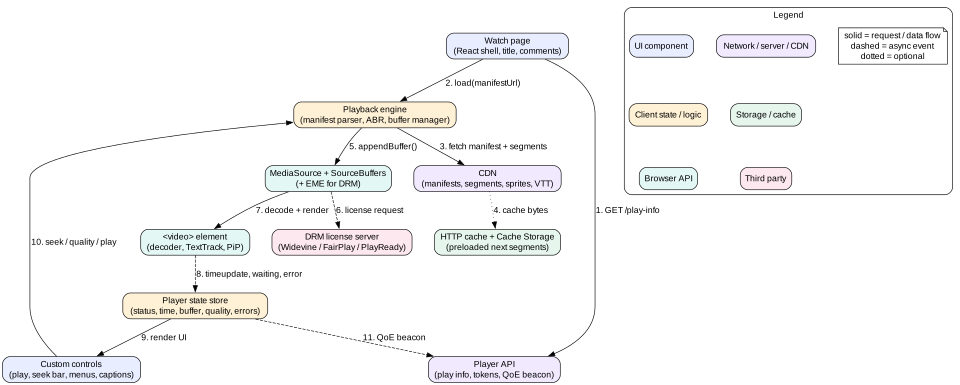
Split the player into layers with one-way data flow. The media element is the source of truth for time and readiness. The engine is the source of truth for what to fetch. The store mirrors both so the UI can render.
Figure 1. Player layers. The engine owns fetching, the video element owns decoding, and the store feeds the UI.
Layers
Watch page. The app shell. It renders the title, comments, and recommendations. It mounts the player and passes a video ID.
Player component. A framework wrapper, for example a React component. It owns the <video> element ref and creates one engine instance per video.
Playback engine. Plain TypeScript, no framework. It parses manifests, runs ABR, schedules segment fetches, manages the SourceBuffers, and handles DRM. Libraries like hls.js, dash.js, and Shaka Player play this role.
Player state store. A small observable store. It holds status, current time, buffered ranges, chosen rendition, caption track, and errors.
Controls. Seek bar, play button, volume, settings menu, caption menu, and fullscreen. They read the store and send commands to the engine.
Analytics. A listener on the store and on media events. It batches QoE events and flushes them with navigator.sendBeacon.
Why keep the engine framework-free
Media events fire often. timeupdate fires about 4 times per second and progress fires on every chunk. If each event triggers a React render of the whole page, you burn the frame budget. The engine updates its own state and the store publishes only the fields that changed. The seek bar can even skip the store and update its position in a requestAnimationFrame loop that reads video.currentTime directly.
Intuition
Think of the engine as a small backend that happens to live in the tab. It has a queue (segments to fetch), a scheduler (when to fetch), a policy (which quality), and a storage limit (the SourceBuffer quota).
4. Data model
Keep three kinds of state apart. Server data describes the video. Engine state describes fetching. UI state describes what the user sees. Normalize renditions and tracks by ID so the quality menu and the engine refer to the same objects.
type PlayInfo = {
  videoId: string
  title: string
  durationSec: number
  manifestUrl: string            // master .m3u8 or .mpd
  drm?: { keySystem: 'com.widevine.alpha' | 'com.apple.fps' | 'com.microsoft.playready'
          licenseUrl: string; token: string }
  thumbnails: { spriteUrlTemplate: string; cols: number; rows: number
                intervalSec: number; width: number; height: number }
  textTracks: TextTrackInfo[]
  resumeAtSec?: number
  nextVideoId?: string
}

type Rendition = { id: string; height: number; bandwidth: number
                   codecs: string; segmentUrls: string[]; segmentSec: number }

type PlayerState = {
  status: 'idle' | 'loading' | 'playing' | 'paused' | 'buffering' | 'ended' | 'error'
  currentTime: number
  duration: number
  buffered: Array<[start: number, end: number]>
  renditions: Record<string, Rendition>
  renditionOrder: string[]        // sorted by bandwidth
  activeRenditionId: string
  qualityMode: 'auto' | { fixed: string }
  estimateKbps: number
  textTrackId: string | null
  volume: number; muted: boolean; rate: number
  pip: boolean; fullscreen: boolean
  error?: { code: 'NETWORK' | 'DECODE' | 'DRM' | 'UNSUPPORTED'; retryable: boolean }
}

type QoeEvent = {
  sessionId: string; videoId: string; t: number
  kind: 'start' | 'stall_begin' | 'stall_end' | 'switch' | 'seek' | 'error' | 'heartbeat'
  data: Record<string, number | string>
}
Two rules matter. First, currentTime in the store is a mirror, never the source of truth. Read the real value from the element when accuracy matters, for example when you compute the seek bar position or a resume point. Second, every async result carries the videoId and a load generation number. When the user switches video, the generation goes up, and late results from the old video are dropped. This is how you keep the contract of never showing a frame from the wrong video.
5. Interface and API
Server endpoints
GET /api/play-info?v=abc123 returns PlayInfo. It is user specific because of resume position and entitlement, so it uses Cache-Control: private, no-store.
GET https://cdn.example.com/v/abc123/master.m3u8 and variant playlists. For on demand video they are immutable, so the CDN serves them with Cache-Control: public, max-age=31536000, immutable under a versioned path.
GET .../720p/seg-00042.m4s returns one media segment. Support Range requests for byte-range addressing in single-file layouts.
POST /api/drm/license takes the CDM challenge bytes and a short-lived token. It returns license bytes.
POST /api/qoe accepts a batch of QoeEvent records. It returns 204 and is safe to retry because each event has a unique ID.
PUT /api/progress stores the resume position every 10 to 15 seconds and on pagehide.
The player exposes a small, stable surface. Everything else stays internal so you can swap the engine later. For embeds, wrap the player in an <iframe> and expose the same commands through postMessage with an origin check.
6. Deep dive: adaptive bitrate on the client
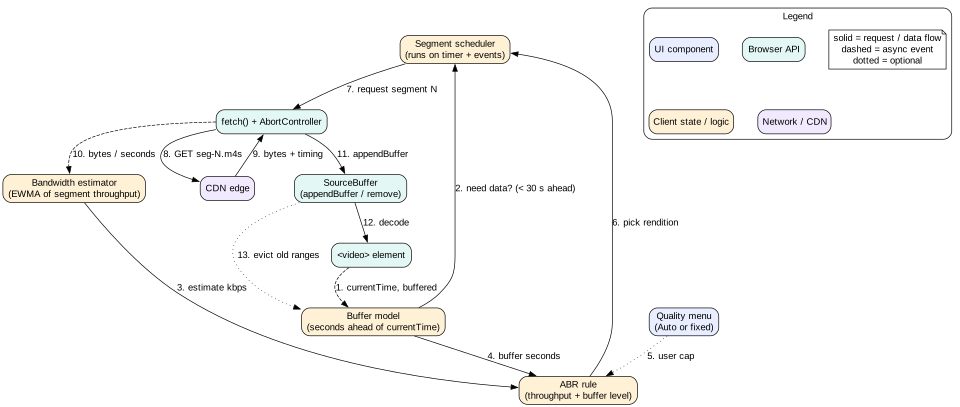
ABR is the heart of the player. It answers one question before each segment: which rendition should I fetch next? A wrong answer either wastes quality or causes a stall. A stall hurts far more.
Figure 2. The ABR control loop runs before every segment request.
Throughput-based rules
Measure how fast each segment downloaded. Divide bytes by seconds. Smooth the samples with an exponentially weighted moving average (EWMA). Weight each sample by its download time, so a long slow download counts more. Keep two averages, a fast one with a half life of 2 seconds and a slow one with 5 seconds. Use the lower of the two. This reacts fast to drops and slowly to gains. Then pick the highest rendition whose bitrate is below about 80 percent of the estimate. The 20 percent margin absorbs noise.
Ignore very small or cached responses. A segment served from the HTTP cache in 2 ms would make the estimate jump to gigabits.
Buffer-based rules
A buffer-based rule like BOLA or BBA maps the buffer level to a quality. With under 10 seconds buffered, use the lowest rendition. Between 10 and 30 seconds, scale up linearly. Above 30 seconds, use the highest. It ignores throughput noise and produces fewer switches. But at startup the buffer is empty, so it always starts at the lowest quality.
Hybrid rule
Most real players combine both. Use throughput at startup and after a seek, when the buffer is empty. Switch to buffer-based logic once the buffer is above a threshold, for example 10 seconds. Add three guards.
Panic down. If the buffer falls below 4 seconds, drop straight to a rendition that downloads in less than half its play time.
Slow up. Step up only one rung at a time. Do it only when the buffer is healthy and the estimate stayed high for 2 segments.
Viewport cap. Never pick a height much larger than the rendered size times devicePixelRatio. A 640 pixel wide inline player on a 2x screen needs 720p, not 4K. This alone can save 40 percent of bytes.
Abandoning a slow request
Sometimes the network drops in the middle of a 1080p segment. Waiting for it would drain the buffer. Each fetch carries an AbortController. A watchdog checks progress every 250 ms. The buffer may run dry before the projected finish time. In that case the engine aborts and refetches the same segment at a lower rung. This is called emergency switching.
Tip
Read the response with response.body.getReader() and count bytes as they arrive. You get a bandwidth sample every chunk, not only at the end of a segment. That makes the abandon decision fast and accurate.
Switching without glitches
Renditions share keyframe positions, so a new segment can start cleanly after the old one. When codecs change, for example from H.264 to AV1, call sourceBuffer.changeType() first. When the user picks a fixed quality from the menu, there are two options. The fast switch clears the buffer ahead and refetches, so the change is visible in 1 to 2 seconds. The smooth switch keeps the buffered segments and lets the new quality take over later. Use the smooth switch for automatic changes and the fast switch for manual ones, because the user expects to see the change.
7. Deep dive: buffer management and startup time
Buffer goals
The engine keeps a forward buffer target of about 30 seconds. It also keeps a back buffer of about 20 seconds. It stops fetching when the forward buffer is full and starts again when it drops below the target minus one segment. This hysteresis avoids fetching on every tick. The goal shrinks with bitrate: at 4K, hold 15 seconds instead of 30 to stay inside the quota.
Appending and evicting
A SourceBuffer accepts one operation at a time. While sourceBuffer.updating is true, a second appendBuffer() throws InvalidStateError. So the engine keeps a small operation queue per buffer and runs the next item on the updateend event. Eviction is just another queue item: remove(0, currentTime - backBufferSec). If an append throws QuotaExceededError, evict more back buffer, lower the forward goal, and retry the same segment once.
Mistake
Calling appendBuffer() from several async callbacks at once. It works on a fast desktop and fails at random on slow devices. Always serialize SourceBuffer operations through one queue.
Making startup fast
Startup time is the time from the play intent to the first rendered frame. Measure it with the playing event, or better, with video.requestVideoFrameCallback(), which fires when a frame is actually presented. Tactics that cut startup time:
Start low. Fetch the first segment at 480p or the last known good rendition from localStorage. Step up after 2 to 3 segments.
Short first segments. Packaging the first segment as 2 seconds instead of 6 cuts its download by two thirds.
Inline the manifest. Put the variant playlist and init segment URL in the play info response. That removes 1 to 2 round trips.
Warm connections. Add <link rel="preconnect" href="https://cdn.example.com"> in the page head so DNS, TCP, and TLS finish before the player asks.
Prioritize. Use fetch(url, { priority: 'high' }) for the first segment and the poster image with fetchpriority="high". Load comments and recommendations later.
Start before full. Call play() as soon as about 2 seconds are buffered. Do not wait for the full goal.
Fetch the license early. Start the DRM license request in parallel with the first segment, not after it.
Autoplay rules
Browsers block autoplay with sound unless the user has interacted with the site or has a high media engagement score. video.play() returns a promise that rejects with NotAllowedError. Handle it. A good pattern is to try unmuted, catch the rejection, then retry muted and show a clear "Tap to unmute" button. Never leave the user staring at a spinner because a promise was ignored.
8. Deep dive: seeking and thumbnail previews
Seeking
When the user seeks to 8:20, the engine must find the segment that contains 500 seconds. With 4 second segments that is segment 125. The steps are as follows.
Abort all in-flight segment fetches with their AbortController.
Check video.buffered. If 500 seconds is already inside a range, just set currentTime. This is an instant seek.
Otherwise, keep the old buffer if quota allows. It helps if the user seeks back.
Reset ABR into startup mode and fetch segment 125 at a safe rendition.
Set video.currentTime = 500. The element fires seeking, then seeked once it can show a frame.
Keyframes matter here. A decoder can only start at a keyframe. If keyframes are 4 seconds apart, a seek to 501 seconds decodes from 500 and drops frames until 501. That costs CPU but is usually invisible. Some players snap the seek to the nearest keyframe for speed.
Scrubbing and the seek bar
While the user drags the thumb, do not seek on every pointer move. That would fire dozens of requests per second. Update only the preview and the time label during the drag. Seek once on pointerup. On a keyboard, arrow keys seek 5 seconds right away. Debounce the network part by 150 ms so a held key does not flood the CDN.
Thumbnail sprite sheets
The preview above the seek bar shows a small image of the frame at the hover position. Fetching one image per second would be thousands of requests. Instead, the server builds sprite sheets. Each sheet is a grid of small frames, for example 10 by 10 thumbnails of 160 by 90 pixels, one every 5 seconds. One sheet covers 100 times 5, which is 500 seconds. A 2 hour film needs 15 sheets of about 60 KB each in WebP.
To show the preview for time t, compute the index i = floor(t / interval). The sheet is floor(i / 100). The cell is i % 100, so the column is cell % 10 and the row is floor(cell / 10). Show the sheet as a CSS background with background-position: -col*160px -row*90px. Prefetch the sheet for the current position and its neighbours when the user first hovers the bar. Some services also describe thumbnails as a special image track in the DASH or HLS manifest.
Intuition
A sprite sheet is the same trick games use for animation frames. One request, many small pictures, and the browser only crops.
9. Deep dive: captions and DRM
WebVTT captions
WebVTT is the text format the web uses for captions. Each cue has a start time, an end time, optional position settings, and text. The simple path is to add <track kind="subtitles" src="en.vtt" srclang="en" label="English"> inside the video element. The browser parses it and renders cues. Change the active track through video.textTracks[i].mode = 'showing'.
Native rendering has limits. Styling options differ by browser, and native cues are hidden in some custom fullscreen layouts. So many players set the track mode to 'hidden', listen for cuechange, and render the active cues in their own overlay. This keeps full control over font size, background, and position. It also lets the overlay move up when the controls are visible, so captions never hide under the seek bar.
For long videos with segmented subtitles in HLS, fetch WebVTT segments alongside media segments, just in time.
Honour user caption preferences. Store size, colour, and background choices, and respect the system setting where the platform exposes it.
Render the overlay with aria-live="off". Screen reader users usually prefer audio, and live-announcing every cue would be noisy.
Sanitize cue text. Cues can contain markup like <b> and <i>. Render text with textContent or a strict allowlist, never innerHTML.
DRM with EME, at a high level
The flow has six steps. You do not need byte-level detail in an interview, but you should know the order.
Call navigator.requestMediaKeySystemAccess(keySystem, configs) to check support and get a MediaKeySystemAccess. Try Widevine, then PlayReady, then FairPlay.
Create MediaKeys and attach them with video.setMediaKeys().
When encrypted data appears, the element fires encrypted with init data. Some players skip this event and read the key ID from the manifest instead.
Create a MediaKeySession and call generateRequest(). The session fires message with a license challenge.
Send the challenge and a short-lived auth token to your license server. It checks entitlement and returns a license.
Call session.update(license). The CDM can now decrypt, and playback continues.
Three design points matter for the frontend. Request the license in parallel with the first segment. Cache the MediaKeySystemAccess across videos. Close sessions in destroy(). Higher security levels, like Widevine L1, decrypt in hardware and may forbid screenshots and some picture-in-picture modes. Some licenses cap resolution at 720p on software-only devices. The ABR rule must respect that cap, or it will fetch 1080p segments that cannot play.
Interview
Do not overclaim DRM. Say that it raises the cost of copying and enforces license rules like resolution caps and rental windows. It does not make leaks impossible. Mention watermarking as a separate server-side tool.
10. Deep dive: custom controls, accessibility, and picture-in-picture
Why custom controls
The native controls attribute is accessible and free, but it looks different in every browser. It also cannot show a quality menu, thumbnails, or chapters. So most products build their own. Once you hide native controls, you own all of their accessibility. That is the most common place where players fail audits.
Semantic structure
Use real <button> elements for play, mute, captions, settings, PiP, and fullscreen. Give each an aria-label that matches its current action, like "Pause" or "Play", or use aria-pressed for toggles like captions.
Build the seek bar as role="slider" with aria-valuemin="0", aria-valuemax set to the duration, aria-valuenow, and aria-valuetext="2 minutes 5 seconds of 10 minutes". A raw number of seconds is useless to a listener. A native <input type="range"> styled with CSS also works and gives you keyboard support for free.
Build the settings menu with the menu button pattern: aria-haspopup="menu", aria-expanded, and arrow key focus movement inside.
Wrap the player in a region with an accessible name, for example aria-label="Video player".
Keyboard model
Follow the shortcuts users already know from large players. Space or K toggles play. J and L seek back and forward 10 seconds. Left and right arrows seek 5 seconds. Up and down arrows change volume. M mutes, C toggles captions, and F toggles fullscreen. Digits 0 to 9 jump to 0 to 90 percent.
Scope the shortcuts. Attach the listener to the player container, not document, so typing in the comment box does not pause the video. Ignore keys when an input or contenteditable is focused. Do not capture Tab. Keep a visible focus ring with :focus-visible. When controls auto-hide after 3 seconds of no movement, never hide them while focus is inside them.
Announcing state changes
Keep one visually hidden aria-live="polite" region. Write short messages to it: "Muted", "Captions on, English", "Quality 720p". Do not announce time updates. They would flood the user.
Picture-in-picture and fullscreen
Call video.requestPictureInPicture() on a user click. Listen for enterpictureinpicture and leavepictureinpicture to update the store.
Check document.pictureInPictureEnabled and the disablePictureInPicture attribute before showing the button.
Use the Media Session API to set title, artwork, and handlers for play, pause, and seek. This powers lock screen and hardware media keys.
For fullscreen, call requestFullscreen() on the player container, not on the video. That way your custom controls and caption overlay stay visible.
Tip
Respect prefers-reduced-motion. Turn off animated progress glows and auto-hiding slide animations for users who ask for less motion.
11. Deep dive: QoE analytics and preloading the next video
What to measure
Video start time. From play intent to the first presented frame.
Video start failure. The user pressed play but never saw a frame. Include sessions where the user left during a long load. Those are the angriest users.
Rebuffer ratio. Total stall time divided by watch time. Exclude stalls caused by seeks and count them separately.
Average bitrate and resolution. Weighted by time played.
Switch count. Frequent switches look bad even if the average is high.
Dropped frames. From video.getVideoPlaybackQuality(). A high rate means the device cannot decode that rendition, so the ABR should cap it.
Playback errors. With code, rendition, and segment URL.
How to send it
Buffer events in memory. Flush a batch every 30 seconds as a heartbeat, and on visibilitychange to hidden. Use navigator.sendBeacon('/api/qoe', blob) or fetch(url, { keepalive: true }) so the request survives page unload. Do not rely on unload. It is unreliable on mobile and breaks the back-forward cache. Give each event an ID so retries do not double count. Sample heavy debug events, like per-segment timing, at 1 to 5 percent of sessions. Always send core QoE events.
Mistake
Starting the startup timer when the player mounts. If the video is below the fold and the user scrolls for 20 seconds, you will report a 20 second startup. Start the timer at the play intent.
Preloading the next video
Autoplay of the next item feels instant only if bytes are ready. The plan is to preload a little, late, and cheaply.
When the current video is about 80 percent done, or 20 seconds before the end, fetch the next video's play info and manifest.
Prefetch its init segment and its first 1 or 2 segments at a modest rendition, about 300 to 500 KB in total.
Store them in an in-memory cache in the engine or in Cache Storage. Plain HTTP caching also works if segment URLs are stable and cacheable.
Skip preloading when navigator.connection.saveData is true, on cellular with low bandwidth, or when the battery is low.
Do not create a second MediaSource early on low-end devices. Some devices have only one hardware decoder.
For feeds of short videos, like a vertical swipe feed, keep a pool of 2 or 3 video elements. Use an IntersectionObserver to pick the visible item. Preload only the next item and release the one that went off screen by calling destroy() and clearing its src. Never keep 20 MediaSources alive.
12. Failure modes
Segment 404 or 5xx. Retry with backoff, for example 0.5, 1, and 2 seconds. Try a different CDN host if the manifest lists one. After 3 failures, try a lower rendition, then show an error with a retry button.
Network goes offline. Listen for offline. Keep playing from the buffer. Show a small "Waiting for network" banner only when the buffer is close to empty. Resume fetching on online.
Decode error.video.error.code is MEDIA_ERR_DECODE. Mark that rendition or codec as bad for this device, rebuild the MediaSource, and resume at the same time.
QuotaExceededError. Evict back buffer, shrink the goal, and retry once.
DRM license failure. Separate entitlement errors (403, show "This title is not available in your plan") from transient errors (5xx, retry). Never loop on license requests.
Stale callbacks after a video switch. Guard all async results with the load generation number. Abort everything in destroy().
Memory leak in long sessions. Revoke object URLs, remove listeners, and evict buffers. Test a 3 hour session with the memory panel open.
13. Trade-offs
Native HLS versus MSE engine
Native: smaller bundle, better battery, works where MSE is missing.
MSE: full control of ABR, buffer, metrics, and errors.
Choice: MSE where available, native as fallback, same store and controls on top.
Large buffer versus small buffer
Large buffer: fewer stalls on shaky networks.
Small buffer: less memory, fewer wasted bytes when users leave early. Most short videos are abandoned before the end.
Choice: 30 seconds for long form, 10 to 15 seconds for short clips.
Short segments versus long segments
2 second segments: faster startup and faster adaptation, but more requests and more manifest size.
6 second segments: better compression and fewer requests, but slower reaction to drops.
Choice: 2 second segments at the start, 4 to 6 seconds after.
Aggressive preloading versus data cost
Preload more: instant next video.
Preload less: lower data bills and CDN cost. Many preloads are never watched.
Choice: preload one next item, small amount, and respect Save-Data.
14. 45-minute interview walkthrough
Minutes 0 to 5. Ask about on demand versus live, devices, DRM, and embeds. Write the functional and non-functional lists.
Minutes 5 to 10. Do the numbers: ladder, segment size, startup budget, buffer memory.
Minutes 10 to 17. Draw the layers: page, player component, engine, MediaSource, video element, store, controls, analytics. Explain native versus MSE.
Minutes 17 to 22. Show the data model and the engine interface. Mention the load generation guard.
Minutes 22 to 30. Deep dive on ABR and buffer management. Cover hybrid rules, abandonment, and the SourceBuffer queue.
Minutes 30 to 36. Seeking, sprite thumbnails, and startup tactics.
Minutes 36 to 41. Accessibility of custom controls, captions, and DRM at a high level.
Minutes 41 to 45. QoE metrics, preloading, failure modes, and what you would build next, such as live low latency.
15. Summary
The player is a small streaming system: manifest, scheduler, ABR policy, and a SourceBuffer with a quota.
Use MSE for control and native HLS as a fallback. Keep the engine framework-free.
Combine throughput and buffer signals for ABR. Cap quality by viewport and abandon slow requests.
Serialize SourceBuffer operations, evict the back buffer, and size the goal by bitrate.
Start low and fast, inline manifests, preconnect, and prioritize the first segment.
Custom controls need real buttons, a proper slider, scoped shortcuts, and a polite live region.
Measure startup time, rebuffer ratio, bitrate, and failures with beacons. Preload only the next item.
16. Common mistakes
Re-rendering the whole React tree on every timeupdate.
Appending to a SourceBuffer while it is still updating.
Using throughput alone for ABR, which causes oscillation.
Ignoring the rejected promise from play() under autoplay rules.
Building the seek bar from div elements with no slider role or keyboard support.
Sending analytics in unload and losing most mobile sessions.
Worked example: a viewer on a train
A viewer opens a 12 minute video on a phone. The network starts at 8 Mbps, drops to 1 Mbps in a tunnel, then recovers.
The page head already has preconnect to the CDN. The user taps play. The player fetches play info in 70 ms. It includes the variant playlist inline and a last known estimate of 5 Mbps from localStorage.
The ABR is in startup mode. 80 percent of 5 Mbps is 4 Mbps, but the player is 360 pixels wide at 3x density, so the cap is about 1080p. It still starts one step lower, at 480p, for safety.
The init segment and a 2 second first segment of 300 KB arrive in 320 ms. The engine appends them through its queue. At 2 seconds buffered it calls play(). The first frame shows at 610 ms. The QoE module logs start time 610 ms.
Segments 2 to 5 download fast. The EWMA estimate settles at 7.5 Mbps. The buffer grows to 14 seconds. ABR steps up one rung at a time to 720p, then 1080p.
At minute 3 the train enters a tunnel. A 1080p segment of 3 MB is half downloaded after 2 seconds. The watchdog projects 10 more seconds. The buffer holds 9 seconds. It aborts the fetch.
The fast EWMA drops to 900 kbps. The panic rule picks 240p at 400 kbps. The same segment is refetched at 240p in 0.9 seconds. The buffer never empties. The viewer sees a softer picture but no spinner.
Out of the tunnel, throughput jumps to 8 Mbps. The slow EWMA lags, so the player steps up over 3 segments instead of one. No oscillation.
At minute 10, the next video's play info, manifest, and first 2 segments are prefetched, about 450 KB.
The video ends. The player calls destroy(), bumps the load generation, and loads the next video from the warm cache. Start time is 180 ms.
Code lab: a buffer-aware ABR rule
This snippet builds a dual EWMA bandwidth estimator. It adds a hybrid ABR rule with a viewport cap and a panic rule. It has no browser dependencies, so you can run it with Node. Save it as abr.mjs and run node abr.mjs. It prints the chosen rendition for a simulated network trace with a tunnel. It also shows one abandoned request.
const LADDER = [{ h: 240, kbps: 400 }, { h: 480, kbps: 1200 }, { h: 720, kbps: 3000 }, { h: 1080, kbps: 6000 }]

// EWMA weighted by download time (at least 1 s), so slow downloads count more
class Ewma {
  constructor(halfLifeSec) { this.half = halfLifeSec; this.v = 0; this.w = 0 }
  add(sec, x) {
    const alpha = 1 - Math.pow(0.5, Math.max(sec, 1) / this.half)
    this.v = alpha * x + (1 - alpha) * this.v
    this.w = alpha + (1 - alpha) * this.w
  }
  get() { return this.v / this.w }
}
class Abr {
  constructor({ maxHeight, lastKnownKbps }) {
    this.fast = new Ewma(2)
    this.slow = new Ewma(5)
    this.allowed = LADDER.map((r, i) => i).filter((i) => LADDER[i].h <= maxHeight)
    this.seed = lastKnownKbps
    this.current = 0
  }
  sample(bytes, ms) {
    if (bytes < 16000 || ms < 20) return       // ignore tiny or cached responses
    this.fast.add(ms / 1000, (bytes * 8) / ms)
    this.slow.add(ms / 1000, (bytes * 8) / ms)
  }
  estimate() { return this.fast.w === 0 ? this.seed : Math.min(this.fast.get(), this.slow.get()) }
  highestUnder(kbps) { return this.allowed.filter((i) => LADDER[i].kbps <= kbps).pop() ?? 0 }
  choose(bufferSec) {
    const est = this.estimate() * 0.8
    let best = this.highestUnder(est)
    if (bufferSec < 4) best = this.highestUnder(est / 2)               // panic: download in half the play time
    else if (best > this.current) best = bufferSec >= 10 ? this.current + 1 : this.current
    this.current = best
    return LADDER[best]
  }
  emergency(measuredKbps) { this.current = this.highestUnder(measuredKbps / 2); return LADDER[this.current] }
}

// Simulate 4 s segments. Each entry is the network speed in kbps.
const trace = [8000, 8000, 8000, 8000, 8000, 900, 900, 900, 900, 8000, 8000, 8000]
const abr = new Abr({ maxHeight: 1080, lastKnownKbps: 5000 })
let buffer = 0, stall = 0
for (const net of trace) {
  let r = abr.choose(buffer)
  let ms = (r.kbps * 4 * 1000) / net
  if (ms / 1000 > buffer && buffer > 0 && r !== LADDER[0]) {
    abr.sample((net * 1000) / 8, 1000)             // watchdog aborts after 1 s of slow bytes
    buffer -= 1
    r = abr.emergency(net)
    ms = (r.kbps * 4 * 1000) / net
    console.log('  abandoned segment, refetching lower')
  }
  abr.sample((r.kbps * 1000 * 4) / 8, ms)
  stall += Math.max(0, ms / 1000 - buffer)
  buffer = Math.max(0, buffer - ms / 1000) + 4
  console.log(`net=${net} pick=${r.h}p buffer=${buffer.toFixed(1)}s est=${abr.estimate().toFixed(0)}`)
}
console.log(`stall time including startup: ${stall.toFixed(1)} s`)
Try changing maxHeight to 480 to see the viewport cap. Try removing the slow EWMA to see how the player oscillates after the tunnel.
Check yourself
Why does a robust player use both throughput and buffer level for ABR?Answer
Throughput is the only signal at startup and after a seek, when the buffer is empty. But throughput is noisy, and following it alone causes many switches. Buffer level is stable and directly tied to stall risk. A hybrid uses throughput early and buffer level once there is a cushion.
What happens if you call appendBuffer() while sourceBuffer.updating is true, and how do you prevent it?Answer
It throws InvalidStateError. Prevent it with a per-buffer operation queue that starts the next append or remove only after the updateend event.
A 2 hour film has a thumbnail every 5 seconds in 10 by 10 sprite sheets. How many sheets do you need, and which sheet and cell show time 1,234 seconds?Answer
7,200 divided by 5 is 1,440 thumbnails, so 15 sheets of 100. Index is floor(1234 / 5), which is 246. Sheet is 2 (counting from 0), cell is 46, so row 4 and column 6.
Why should keyboard shortcuts be attached to the player container instead of document?Answer
Global shortcuts fire while the user types in a search box or comment field, which pauses or seeks the video by accident. Scoping them to the player, and ignoring events from inputs, avoids that.
Name two ways to cut startup time without changing the server encoding ladder.Answer
Any two of these. Preconnect to the CDN. Inline the variant manifest in the play info. Start at a low rendition. Fetch the first segment with high priority. Request the DRM license in parallel. Call play() after about 2 seconds of buffer.
Why is unload a bad place to send QoE data, and what should you use instead?Answer
unload often does not fire on mobile and it blocks the back-forward cache. Flush on visibilitychange to hidden and on pagehide, using navigator.sendBeacon or fetch with keepalive: true.
A DRM license caps resolution at 720p on this device. What must the frontend do?Answer
Feed the cap into the ABR as a hard maximum, hide higher qualities in the menu, and never fetch segments above 720p. Otherwise those segments would fail to decrypt or show a black screen.
Key terms
Rendition
One encoded version of a video at a given resolution and bitrate.
Bitrate ladder
The full list of renditions offered for one video, sorted by bitrate.
Segment
A short chunk of media, often 2 to 6 seconds, fetched as one HTTP request.
CMAF
Common Media Application Format, a fragmented MP4 layout shared by HLS and DASH.
SourceBuffer
The MSE object that receives media bytes for one track type.
Forward buffer
Seconds of media buffered ahead of the playhead.
Rebuffer ratio
Stall time divided by watch time, a core QoE metric.
EWMA
Exponentially weighted moving average, used to smooth bandwidth samples.
CDM
Content Decryption Module, the browser component that decrypts protected media.
WebVTT
The Web Video Text Tracks format for captions and subtitles.