A frontend system design walkthrough for an infinite news feed. You will learn how to load pages with cursors, keep thousands of posts smooth with virtualization, update likes instantly, and log what users really saw.
Frontend system design · Classic design question
After this page you can design the client side of a social feed end to end. You can explain the component tree, the store shape, the API contract, and the four or five deep dives an interviewer expects.
Correctness contract: the feed never shows a post twice and never skips a post between pages. It never jumps while the user reads. It never keeps a rejected like without telling the user.
Assumptions: a web client built with React or a similar library. The backend already ranks the feed. Users range from a high end laptop to a three year old Android phone on 4G.
A news feed looks like a simple list. It is one of the hardest frontend screens to get right. The list has no end. Every item has a different height. Items contain images and videos that load late and change size. Users tap like and expect the heart to turn red at once. New posts arrive while the user reads. The product team wants to know which posts were truly seen, not only rendered. All of this must stay at 60 frames per second on a cheap phone. This page breaks the problem into parts and shows how each part fits.
The server returns a page of items plus an opaque token called a cursor. The client sends that token back to get the next page. The cursor marks a position in the ranked list, not a page number. So new posts at the top do not shift what the next page contains.
Example. The first call returns 10 posts and endCursor: "c_8f2a". The next call is GET /feed?after=c_8f2a&limit=10.
Limit. You cannot jump to page 40 with a cursor. That is fine for a feed. It is wrong for a search result table where users want page numbers.
Virtualization (windowing)
Only the rows near the viewport exist in the DOM. Rows far above or below are removed and replaced by empty space of the same height. The DOM stays small, so layout, style, and memory costs stay flat as the user scrolls.
Example. A user scrolls past 500 posts. The DOM holds about 15 post nodes at any time, not 500.
Limit. Browser find in page (Ctrl+F) cannot see removed rows. Screen readers also lose them. You must design around both.
Normalized cache
Each entity is stored once, keyed by type and id. Lists hold ids, not copies. When one post changes, every place that shows it updates, because they all read the same record.
Example. The same post appears in the home feed and in a profile tab. A like updates posts["p_91"] once. Both views re-render.
Limit. Normalizing costs CPU on every response. For a tiny app with one list, a plain array is simpler.
Optimistic update
The UI applies the expected result of an action before the server confirms it. If the server fails, the UI rolls back and tells the user. This hides network latency for actions that almost always succeed.
Example. Tap like. The heart turns red and the count goes from 41 to 42 in the same frame. The request finishes 300 ms later.
Limit. Do not use it for actions that often fail or that move money. A wrong "Payment sent" message is worse than a spinner.
IntersectionObserver
A browser API that tells you when an element enters or leaves the viewport, or crosses a visibility ratio. It runs off the main scroll path, so it is far cheaper than reading getBoundingClientRect() in a scroll handler.
Example. A sentinel div sits 2 screens below the last post. When it intersects, the client fetches the next page.
Limit. Callbacks are asynchronous and batched. They are not exact to the pixel or the millisecond.
Impression
An event that says a user actually saw a post. A common rule is: at least 50 percent of the post was visible for at least 1 second while the tab was visible. Ranking, ads billing, and "seen" state all depend on it.
Example. A user flings past 30 posts in one second. None of them count as impressions.
Limit. Impressions are best effort. Some events are lost when the tab dies. The server must dedupe and tolerate gaps.
1. Clarifying questions and requirements
Start by asking questions. Each answer removes a branch of the design. Good questions for a feed:
Which post types? Text, photo, multi photo, video, link preview, shared post, ad. Each type has its own component and its own height behavior.
Ranked or chronological? Ranked feeds are built on the server. The client must not reorder them. Chronological feeds can merge live posts by time.
How fresh must it be? Do new posts appear live, or behind a "New posts" banner? This changes the real-time design.
Which actions? Like, comment, share, hide, report. Which must be instant?
Which platforms? Desktop web, mobile web, or both. Is there a native app that shares the API?
Is SEO needed? A logged in feed is usually not indexed. Public profile pages often are.
Functional requirements
Show a ranked feed of mixed post types that loads more as the user scrolls.
Like, unlike, and comment with instant feedback.
Show new posts that arrived since load, without moving what the user is reading.
Play videos inline when visible, muted by default.
Log impressions and clicks for ranking and ads.
Restore the scroll position when the user comes back from a post detail page.
Non-functional requirements
First contentful paint under 1.5 s and Largest Contentful Paint under 2.5 s on 4G at p75.
Smooth scrolling: no long tasks over 50 ms during scroll, Interaction to Next Paint under 200 ms.
Cumulative Layout Shift under 0.1, even while images load.
Memory stays bounded after 30 minutes of scrolling.
Works with keyboard and screen readers.
Degrades well on slow or flaky networks.
Interview
Say out loud which parts you treat as backend concerns. Ranking, fan out, and storage belong to the server. Your job is the client: rendering, data flow, caching, and the API shape the client needs.
2. Scope and budgets
Numbers turn vague goals into design rules. Work them out early.
Devices and network
Target device: a mid range Android phone. Its CPU is about 4 to 6 times slower than a developer laptop.
Target network: 4G with about 100 ms round trip time and 5 to 10 Mbps. Plan for 3G at 400 ms as the slow case.
Frame budget
At 60 Hz the browser has 16.7 ms per frame. The browser itself needs about 6 ms for style, layout, paint, and compositing. So your JavaScript gets roughly 10 ms per frame during scroll. On a 120 Hz screen the whole frame is 8.3 ms. Mounting one complex post card can cost 3 to 8 ms on a slow phone. So you can mount at most one or two new cards per frame without dropping frames. This single number is why virtualization and memoized cards matter.
Data size
One post as JSON: about 1.5 KB with author, text, counts, and media metadata.
One page of 10 posts: about 15 KB raw, 4 KB gzipped. That fits easily in one round trip.
A heavy session: 300 posts. That is 450 KB of JSON in memory, which is fine.
Images are the real cost. 300 posts with one 80 KB image each is 24 MB of compressed bytes. Decoded bitmaps are much larger. A 1080 by 1080 image uses 1080 times 1080 times 4 bytes, about 4.7 MB of decoded memory.
DOM size
One post card has 50 to 150 DOM nodes. Without virtualization, 300 posts means 15,000 to 45,000 nodes. Lighthouse warns above 1,400 nodes. Style recalculation scales with node count. With a window of 15 rendered posts, the DOM stays near 2,000 nodes.
Bundle budget
Initial JavaScript for the feed route: 150 KB compressed or less.
Video player, comment composer, and share sheet load on demand with dynamic import().
Rare post types such as polls or events load their renderer lazily the first time one appears.
Tip
Quote the 16 ms frame and the 4.7 MB decoded image in the interview. They show you know where the real costs live: main thread time and decoded memory, not JSON size.
3. High-level architecture
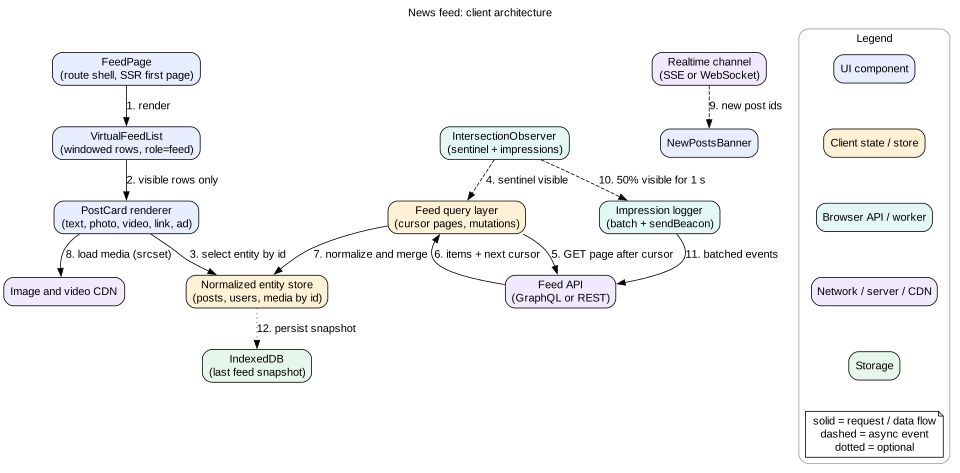
Split the client into four layers. Each layer has one job.
View layer.FeedPage, VirtualFeedList, PostCard and its variants, NewPostsBanner, and Composer. Components read data by id and stay as dumb as possible.
Data layer. A feed query that owns the cursor and the ordered list of ids. A normalized entity store holds posts, users, and media. A mutation queue handles likes and comments.
Platform layer. IntersectionObserver for pagination and impressions. A ResizeObserver for row heights. navigator.sendBeacon for logging. An optional Service Worker for offline shell and image caching.
Network layer. The feed API, a real-time channel for new post signals and live counts, and the media CDN.
Figure 1. Client architecture. Components read from one normalized store. Observers drive paging and impressions.
The key idea is a one way flow. The network writes into the store. The store drives the view. The view never talks to the network directly. It calls actions such as loadMore() or toggleLike(id). This makes caching, rollback, and testing simple, because there is one source of truth.
Intuition
Think of the store as a warehouse and the feed as a shelf label list. The list says "p_91, p_88, ad_3". The warehouse holds the actual boxes. Many shelves can point to the same box.
4. Data model
The client store has three parts: entities, lists, and pending work.
type ID = string

interface User { id: ID; name: string; avatarUrl: string; verified: boolean }

interface Media {
  id: ID
  kind: "image" | "video"
  width: number            // intrinsic size, known before load
  height: number
  blurhash?: string        // tiny placeholder
  srcset: { url: string; w: number }[]
  posterUrl?: string       // video only
}

type PostKind = "text" | "photo" | "video" | "link" | "shared" | "ad"

interface Post {
  id: ID
  kind: PostKind
  authorId: ID
  createdAt: string
  text: string
  mediaIds: ID[]
  likeCount: number
  commentCount: number
  likedByMe: boolean
  sharedPostId?: ID
  trackingToken: string    // opaque, sent back with impressions
}

interface FeedState {
  ids: ID[]                // ordered, deduped
  seen: Set<ID>            // fast dedupe check
  endCursor: string | null
  hasMore: boolean
  status: "idle" | "loading" | "error"
  pendingNewIds: ID[]      // arrived live, not yet shown
}

interface Store {
  users: Record<ID, User>
  posts: Record<ID, Post>
  media: Record<ID, Media>
  feeds: Record<string, FeedState>   // "home", "profile:u_7"
  pendingMutations: Record<ID, { kind: "like"; desired: boolean; attempt: number }>
}
Three details matter here. First, media carries width and height from the server. The client can reserve space before the image loads, so nothing shifts. Second, seen lets the client drop a duplicate post in constant time. Ranked feeds do send duplicates sometimes, for example when the ranking shifts between two page calls. Third, trackingToken lets the server join an impression back to the ranking decision without the client knowing what it means.
5. Interface and API
Server API
GET /api/feed?after=<cursor>&limit=10
200 {
  "items": [ { "id": "p_91", "kind": "photo", ... } ],
  "users": { "u_7": { ... } },          // side loaded, not nested
  "media": { "m_3": { ... } },
  "pageInfo": { "endCursor": "c_8f2a", "hasMore": true }
}

POST /api/posts/:id/like          Idempotency-Key: <uuid>
DELETE /api/posts/:id/like        Idempotency-Key: <uuid>
POST /api/posts/:id/comments      { clientId, text }
POST /api/impressions             [ { postId, trackingToken, visibleMs, ts } ]
Side loading users and media avoids repeating the same author 10 times per page. It also maps directly into the normalized store. GraphQL with Relay style connections gives the same shape: edges, node, and pageInfo.
Real-time channel
Use Server-Sent Events through EventSource for one way signals. A feed only needs server to client messages, so a full WebSocket is not required. Messages are small:
Send counts only for posts the client says are on screen. Otherwise a viral post would push thousands of updates to every client.
Component props
<VirtualFeedList
  feedKey="home"
  estimateHeight={(post) => number}   // first guess before measuring
  overscan={3}                        // extra rows above and below
  onEndReached={loadMore}
  renderItem={(id) => <PostCard id={id} />}
/>

<PostCard id="p_91" />    // reads post, author, media from store
Passing only an id keeps PostCard memoizable. It re-renders only when its own entity changes, not when the list grows.
6. Deep dive: infinite scroll and cursor pagination
Why not offset pagination
With ?page=3&size=10 the server returns items 20 to 29. If 2 new posts arrive at the top between calls, items shift down by 2. The user sees 2 posts again on page 3. If a post is deleted, one post is skipped. A cursor encodes the last item position, such as a ranking session id plus the last score. The server continues from that point, so inserts at the top do not matter.
Triggering the next page
Place a sentinel element after the last rendered row. Observe it with IntersectionObserver and a large rootMargin, for example "0px 0px 1500px 0px". The fetch starts when the user is still about two screens away. With a 300 ms page fetch and a fast fling at 3,000 pixels per second, 1,500 pixels gives about 500 ms of lead time. That is enough on 4G, and the user rarely sees a spinner.
Guarding against double loads
Keep a single in flight promise per feed. If loadMore() is called again while loading, return the same promise.
Ignore responses whose request cursor no longer matches the current cursor. This happens after a pull to refresh resets the feed.
Dedupe ids with the seen set before appending.
Stop observing when hasMore is false, and show an end of feed message.
Restoring position
When the user opens a post and presses back, they expect to land on the same post. Store the feed state in memory, keyed by feed name. Also store the id of the first visible post and its pixel offset. On return, render from cache, then scroll so that post sits at the same offset. Restoring by id is more robust than restoring by scrollY, because row heights may have changed. Set history.scrollRestoration = "manual" so the browser does not fight your logic.
Mistake
Using a scroll event listener that checks scrollTop + clientHeight >= scrollHeight - 200. It runs on every scroll event, forces layout reads, and fires many times near the bottom. IntersectionObserver does the same job off the hot path.
7. Deep dive: virtualization and mixed post types
How a virtual list works
The list keeps an array of row heights and a running sum of offsets. On scroll, it finds the first row whose bottom is below scrollTop, using binary search over the offset array. It renders from that row until rows fill the viewport, plus an overscan of 2 to 4 rows on each side. A spacer above and a spacer below hold the total scroll height, so the scrollbar stays correct.
Variable heights
Feed rows do not have fixed heights. A text post may be 120 pixels. A photo post may be 600 pixels. The list must:
Estimate a height before a row renders. Use the post kind and media aspect ratio. A photo post with a 4:5 image at 500 pixels wide is about 625 pixels of image plus about 140 pixels of header and actions.
Measure the real height after render with ResizeObserver.
Store the measured height by post id, not by index. Then the measurement survives list changes.
When a row above the viewport changes height, adjust scrollTop by the same delta. This is scroll anchoring. Without it, the content jumps.
Modern browsers have native scroll anchoring through the CSS overflow-anchor property. It works well for normal flow content. With a spacer based virtual list you often need to do it yourself, because the browser does not know your spacer is fake.
An alternative: content-visibility
CSS content-visibility: auto tells the browser to skip layout and paint for off screen elements. Pair it with contain-intrinsic-size: auto 600px so the browser reserves a guessed size and then remembers the real one. The DOM nodes still exist, so find in page and screen readers still work. But memory still grows with the number of posts, and JavaScript objects for each card stay alive.
A practical hybrid works well. Use content-visibility for the first 100 to 200 posts. Switch to true windowing, or drop the oldest pages from the DOM, for very long sessions.
Mixed post types
Use a registry that maps kind to a renderer. Common types live in the main bundle. Rare types load lazily with React.lazy. Every renderer must reserve its final height on first paint. A lazy renderer shows a skeleton with the same estimated height. Unknown kinds render a safe fallback, such as "This post type is not supported", instead of crashing the list. Wrap each card in an error boundary. One bad post must not blank the whole feed.
Intuition
A virtual list is a short conveyor belt under a long painted backdrop. The backdrop is as tall as the whole feed. Only the boxes in front of the user are real. As the user walks, boxes move from the back of the belt to the front.
8. Deep dive: media loading
Images
Use srcset and sizes so the browser picks the right width for the screen and pixel density. A 375 pixel wide phone at 3x density needs about a 1,080 pixel image. A desktop column of 500 pixels at 2x needs 1,000 pixels.
Always set width and height attributes, or use CSS aspect-ratio. The browser then reserves space and CLS stays near zero.
Use loading="lazy" for images below the fold. Use fetchpriority="high" on the first post image, because it is often the LCP element.
Show a blurhash or a dominant color while the real image loads. The decode of a 20 byte blurhash string is cheap, and it removes the empty box feeling.
Serve AVIF or WebP from the CDN based on the Accept header. AVIF is often 30 to 50 percent smaller than JPEG at the same quality.
Call img.decode() before swapping in a large image, so decode does not block a scroll frame.
Video
Render a poster image first. Do not create a <video> element until the post is near the viewport.
Autoplay only when at least 50 percent visible, muted, with playsinline. Browsers block autoplay with sound.
Only one video plays at a time. Pause the others when they leave the viewport.
Use preload="none" or "metadata". Use adaptive streaming (HLS or DASH through Media Source Extensions) for longer clips.
Respect prefers-reduced-motion and data saver signals. Do not autoplay when the user asked for less motion or less data.
Memory
Virtualization removes the DOM node. Removing the <img> lets the browser drop the decoded bitmap. This is a big reason to window long feeds on mobile. Mobile Safari will kill a tab that uses too much memory, and the user sees a reload.
9. Deep dive: new posts, optimistic actions, and the cache
Banner or live insert
When the server signals new posts, you have two choices.
Banner. Show "3 new posts" at the top. Insert them only when the user taps it or scrolls to the top. Nothing moves while the user reads. This is the default for ranked feeds such as Facebook and X.
Live insert. Insert at the top at once. This is fine if the user is already at the top, as in a chat style or a live event feed. If the user is scrolled down, inserting above the viewport shifts content unless you compensate scrollTop exactly.
A good rule: insert live only if scrollTop is under about 50 pixels. Otherwise, add the ids to pendingNewIds and show the banner. When the user taps the banner, prepend, dedupe, and smoothly scroll to the top. Move focus to the first new post so keyboard users land in the right place.
Optimistic like
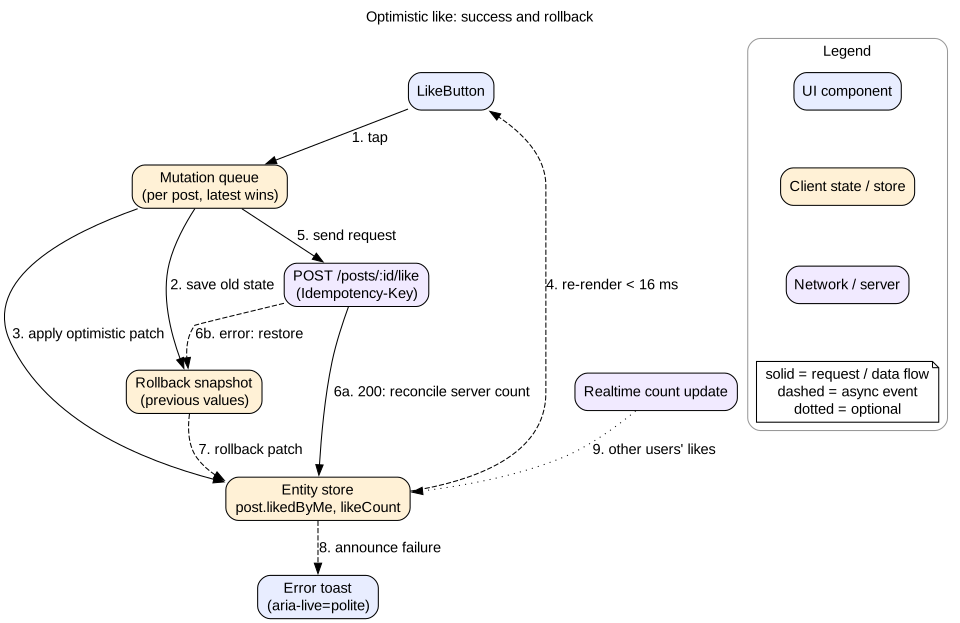
Figure 2. Optimistic like with snapshot and rollback.
On tap, save the old likedByMe and likeCount.
Patch the store: flip likedByMe and add or subtract 1.
Send the request with an Idempotency-Key header. A retry after a timeout will not double count.
On success, accept the server count. It may differ because other users liked too.
On failure, restore the snapshot and show a short toast in an aria-live="polite" region.
Rapid taps are a classic bug. A user taps like, unlike, like in one second. Three requests race. The responses can arrive out of order. Fix it by keeping only the desired final state per post. Send at most one request at a time per post. When it returns, compare server state with desired state. Send one more request only if they differ. This "latest intent wins" queue makes the final state correct whatever the order.
Optimistic comment
Create a temporary comment with a clientId such as a UUID. Show it with a "Sending" style. The server echoes the clientId with the real id. The client swaps the temporary record for the real one. If it fails, keep the text and show "Retry", because losing typed text is the worst outcome.
Cache policy
Keep feed pages in memory for the session. Back navigation is then instant.
Treat the cache as stale after about 5 to 10 minutes away. On return, show the cached feed and the banner, not a blank refresh.
Optionally persist the first page to IndexedDB. A cold start can then paint old posts at once while the new page loads. Mark them as cached so a stale like count does not confuse anyone.
Evict entities no longer referenced by any feed or open view. Use reference counting or a periodic sweep. This keeps memory bounded in long sessions.
10. Deep dive: impression logging and prefetching
Measuring visibility
Create one IntersectionObserver with threshold: [0, 0.5]. When a post crosses 50 percent, record the start time. When it drops below 50 percent, compute the visible duration. If it is at least 1,000 ms, emit an impression. Pause the timers when document.visibilityState becomes "hidden". A post on screen in a background tab was not seen.
Very tall posts break the 50 percent rule. A long text post 2,000 pixels tall can never be 50 percent visible on a 700 pixel screen. Use a rule like "50 percent of the post or 50 percent of the viewport, whichever is smaller". The intersectionRect.height and rootBounds.height fields give you both values.
Sending events
Batch events in memory. Flush every 10 seconds or every 20 events.
Flush on visibilitychange to hidden with navigator.sendBeacon. The beacon survives page unload. Do not rely on unload or beforeunload, which are unreliable on mobile and break the back forward cache.
Include a client event id so the server can dedupe retries.
Log each post at most once per session per feed position. Scrolling back up should not count again.
Prefetching
Next page. The large rootMargin on the sentinel is a form of prefetch.
Images of the next page. After a page arrives, let the browser start the first images early with loading="lazy" plus the virtual list overscan. Avoid prefetching all images. On a metered phone that wastes data.
Post detail. On hover (desktop) or after 300 ms of a press (mobile), prefetch the detail route chunk and the comment thread. The detail page then opens in under 100 ms.
Respect constraints. Check navigator.connection.saveData where supported, and skip speculative work when it is set.
Interview
Interviewers love the impression question because it mixes product, browser APIs, and data quality. Mention the 50 percent and 1 second rule, tab visibility, tall posts, beacon on hide, and server side dedupe.
11. Deep dive: accessibility and server rendering
The feed pattern
WAI-ARIA defines a feed role for exactly this case. The container gets role="feed" and an accessible name. Each post is an <article> with aria-posinset and aria-setsize. If the total is unknown, set aria-setsize="-1". While a page loads, set aria-busy="true" on the feed. Screen readers then wait instead of reading a half built list.
Each article has aria-labelledby pointing to the author name and aria-describedby pointing to the text.
Support Page Down and Page Up to move focus between articles, as the pattern suggests.
Give users a way out. Infinite scroll can trap keyboard users who want to reach the footer. Offer a "Skip feed" link, or put footer links in a side column.
Keep focus stable. When a focused post is virtualized away, focus is lost. Keep the focused row mounted even if it is outside the window.
Announce new content with care. Do not make a live region read every new post. Announce "3 new posts available" once.
Buttons need real labels. A heart icon needs aria-label="Like" and aria-pressed to say if it is on.
Server rendering the first page
Server side rendering (SSR) of the first page sends HTML with the first 5 to 10 posts. The user sees content before the JavaScript loads. This usually improves LCP by hundreds of milliseconds on slow phones.
Embed the first page data as JSON in the HTML. The client store hydrates from it and does not fetch again.
Stream the HTML. Send the shell and the header first, then the posts as they are ready. React 18 streaming with Suspense supports this.
Do not server render the virtual list window logic. Render the first page as plain articles. The virtual list takes over after hydration.
Avoid hydration mismatches. Relative times such as "5 min ago" differ between server and client. Render an absolute time on the server, or render the relative time only after mount.
Set Cache-Control: private, no-store on the personalized HTML. A shared cache must never serve one user's feed to another.
12. Failure modes
Page fetch fails. Show an inline "Could not load more. Retry" row at the bottom. Keep what is already shown. Retry with exponential backoff and jitter, at most 3 automatic attempts.
First page fails. If an IndexedDB snapshot exists, show it with an "Offline, showing saved posts" banner. If not, show an error state with a retry button. Never a blank white screen.
Duplicate posts across pages. Dedupe by id in the client. Log a metric so the backend team can see how often ranking drift happens.
Like request times out. The request may have succeeded. Retry with the same idempotency key. Roll back only after a clear failure.
Real-time channel drops.EventSource reconnects on its own. On reconnect, send Last-Event-ID or simply ask "anything new since top id X". Missing a new post signal is low impact.
Layout jumps from late media. Caused by missing dimensions. Enforce in code review and in a lint rule that every media element gets an aspect ratio.
Memory crash on mobile. Caused by unbounded DOM and decoded images. Window the list and evict old entities.
One broken post type. An error boundary per card contains it. Report the error with the post id.
13. Trade-offs
Virtualization versus full DOM
Windowing keeps the DOM at about 2,000 nodes and memory flat. It breaks find in page and needs care for focus and screen readers.
Full DOM with content-visibility keeps native behavior. Memory grows with session length.
Choose windowing for mobile and very long sessions. Choose content-visibility for desktop and shorter lists.
Banner versus live insert
Banner protects reading position and fits ranked feeds. Fresh content is one tap away.
Live insert feels real time. It risks jumps and is noisy for screen readers.
SSE versus WebSocket versus polling
SSE is simple, one way, works over HTTP/2, and reconnects on its own.
WebSocket is needed only if the feed also sends client to server real-time messages.
Polling every 60 seconds is acceptable for "new posts" signals and costs almost nothing to build. Many large feeds poll.
Normalized store versus query cache by key
A normalized store keeps one copy of each post, so updates are consistent everywhere. It costs more code and CPU.
A key based cache, such as TanStack Query, is simpler. The same post in two queries can go out of sync unless you update both.
SSR versus client only
SSR gives faster first paint and better LCP. It adds server cost and hydration complexity.
Client only with a cached app shell is simpler. It shows skeletons first.
14. 45-minute interview walkthrough
Minutes 0 to 5. Clarify post types, ranked or chronological, freshness, actions, platforms, and SEO. Write the functional and non-functional lists.
Minutes 5 to 10. State budgets: 16 ms frame, LCP 2.5 s, CLS 0.1, 150 KB JS, DOM under 2,000 nodes. Do the decoded image math.
Minutes 10 to 18. Draw the architecture: view, data, platform, network layers. Explain one way data flow.
Minutes 18 to 23. Show the normalized store and the feed API with cursor and side loaded entities.
Minutes 23 to 38. Deep dives. Pick three based on the interviewer's interest: cursor pagination and dedupe, virtualization with variable heights, optimistic likes with a latest intent queue, impression logging.
Minutes 38 to 42. Accessibility with role="feed" and SSR of the first page.
Minutes 42 to 45. Failure modes and trade-offs. Close with what you would measure in production: LCP, INP, CLS, scroll jank, and impression loss rate.
15. Summary
Use cursor pagination so inserts and deletes never cause duplicates or gaps. Dedupe by id anyway.
Trigger the next page early with an IntersectionObserver sentinel and a large root margin.
Virtualize long feeds. Measure real heights and keep scroll anchored when heights change.
Reserve space for all media using known dimensions. Use srcset, lazy loading, and placeholders.
Keep one normalized store. Apply likes optimistically with snapshots, idempotency keys, and a latest intent queue.
Show new posts behind a banner unless the user is at the top.
Log impressions with visibility ratio, duration, tab visibility, and sendBeacon.
Use role="feed", stable focus, and SSR for the first page.
16. Common mistakes
Using offset pagination and then wondering why posts repeat.
Rendering every post forever and crashing mobile Safari after 20 minutes.
Images without dimensions, causing the feed to jump as they load.
Counting a post as seen the moment it renders.
Inserting new posts above the reader without compensating scroll.
Letting rapid like taps race so the final state is wrong.
Nesting full user objects in every post, so a name change updates only some views.
Forgetting keyboard users who can never reach the footer.
Caching personalized SSR HTML in a shared CDN cache.
Mistake
Spending 20 minutes on ranking algorithms. That is a backend question. In a frontend round, say "the server ranks" and move on to rendering, data flow, and user experience.
Worked example: one scroll session
Follow one user through a short session on a mid range phone.
The user opens the app. The server streams HTML with the header and 8 posts. The first image has fetchpriority="high". LCP happens at 1.9 s.
JavaScript loads. The store hydrates from the embedded JSON. ids has 8 entries, and endCursor is "c_a1". No second fetch happens.
The virtual list takes over. It measures the 8 rendered posts with ResizeObserver and stores heights by id.
The user scrolls. The sentinel enters the 1,500 pixel root margin when post 4 is on screen. The client calls GET /feed?after=c_a1.
The response arrives in 280 ms with 10 posts. One of them, p_77, is already in seen. It is dropped. 9 ids are appended. endCursor becomes "c_b2".
Posts 1 and 2 scroll far above the viewport. The list unmounts them. Their images are released. Spacer height grows to keep the scrollbar right.
Post 6 is a photo. It was 52 percent visible for 1.4 s. The impression logger queues { postId: "p_60", visibleMs: 1400 }.
The user taps like on post 9. The heart fills in the same frame. The count shows 42. The request returns 200 with a count of 44. The store accepts 44.
An SSE message says 2 new posts exist. The user is scrolled down, so the banner shows "2 new posts". Nothing moves.
The user switches to another app. visibilitychange fires. The logger sends 6 queued impressions with sendBeacon.
The user returns 3 minutes later. The feed is still in memory. The same post sits at the same offset. The user taps the banner. Two posts are prepended and focus moves to the first one.
Code lab: a cursor feed with dedupe
This model shows the core paging logic without a browser. It simulates a server whose ranking inserts new posts at the top and sometimes repeats an item. It shows that cursor paging plus a seen set keeps the list clean, and that concurrent loadMore calls share one request. Save it as feed.mjs and run node feed.mjs with Node 18 or newer.
// Fake server: ranked list, cursor is the index after the last item sent.
const db = Array.from({ length: 35 }, (_, i) => ({ id: "p" + (100 - i) }))
let calls = 0
async function fetchPage(after, limit) {
  calls++
  await new Promise((r) => setTimeout(r, 50))
  const start = after ?? 0
  const items = db.slice(start, start + limit)
  if (start > 0) items.unshift(db[start - 1])     // ranking drift: repeat one item
  const next = start + limit
  return { items, endCursor: next, hasMore: next < db.length }
}

function createFeed(limit = 10) {
  const state = { ids: [], seen: new Set(), cursor: null, hasMore: true }
  let inflight = null
  async function loadMore() {
    if (!state.hasMore) return
    if (inflight) return inflight                 // share one request
    const requested = state.cursor
    inflight = fetchPage(requested, limit).then((page) => {
      if (requested !== state.cursor) return      // stale after a reset
      for (const item of page.items) {
        if (state.seen.has(item.id)) continue     // dedupe
        state.seen.add(item.id)
        state.ids.push(item.id)
      }
      state.cursor = page.endCursor
      state.hasMore = page.hasMore
    }).finally(() => { inflight = null })
    return inflight
  }
  return { state, loadMore }
}

const feed = createFeed()
await Promise.all([feed.loadMore(), feed.loadMore()])   // double trigger
db.unshift({ id: "p999" })                               // new post at top
while (feed.state.hasMore) await feed.loadMore()

const unique = new Set(feed.state.ids).size
console.log("items:", feed.state.ids.length, "unique:", unique, "calls:", calls)
console.log(unique === feed.state.ids.length ? "PASS no duplicates" : "FAIL")
Expected output: the item count equals the unique count, and the two first calls share one request. The new post p999 does not appear in the middle of the list. In a real app it would wait behind the banner. Now remove the seen check and run again. You will see the repeated items that ranking drift creates.
Check yourself
Why does offset pagination cause duplicates in a live feed, and how does a cursor fix it?Answer
Offsets count from the top. A new post at the top shifts every item down by one, so the next page repeats the last item. A cursor names a position after a specific item, so inserts above it do not change what comes next.
A photo post loads its image 400 ms after the text. The feed jumps. What is the root cause and fix?Answer
The image box had no reserved size. Send intrinsic width and height from the server and set width, height, or aspect-ratio on the element. The browser reserves space before load, so CLS stays near zero.
The user taps like three times fast. How do you guarantee the final state is correct?Answer
Track only the desired final state per post. Keep at most one request in flight per post. When it returns, compare server state with desired state and send one more request only if they differ. Use idempotency keys so retries do not double count.
When should a new post be inserted live instead of behind a banner?Answer
When the user is already at the top of the feed, or the product is a live event or chronological stream. If the user is reading further down, use a banner so content does not move.
Why is a post that rendered not always an impression?Answer
It may have been rendered in overscan, flung past in milliseconds, or shown in a background tab. A real impression needs a visibility ratio, a minimum duration, and a visible tab.
What does content-visibility: auto give you that windowing does not, and what does it cost?Answer
It keeps all nodes in the DOM, so find in page, anchors, and screen readers work. It still skips layout and paint off screen. It costs memory, because nodes and JavaScript state for every post remain alive.
Name two accessibility attributes for the feed pattern and what they do.Answer
role="feed" on the container tells assistive tech it is a scrolling list of articles. aria-busy="true" during loading tells the screen reader to wait. Also aria-posinset and aria-setsize give position.
Key terms
Cursor
An opaque token that marks a position in a list, used to fetch the next page.
Sentinel
An invisible element near the end of the list that triggers loading when observed.
Virtualization
Rendering only the rows near the viewport, with spacers for the rest.
Overscan
Extra rows rendered just outside the viewport to avoid blank space during fast scroll.
Scroll anchoring
Keeping visible content in place when content above it changes size.
Normalized store
A cache where each entity is stored once by id and lists hold ids.
Optimistic update
Applying the expected result before the server confirms, with rollback on failure.
Idempotency key
A unique request id that lets the server ignore repeats of the same action.
Impression
A logged event meaning the user really saw an item, by ratio, time, and tab visibility.
sendBeacon
A browser API that queues a small POST that survives page unload.
LCP
Largest Contentful Paint, the time when the largest visible element finishes rendering.
CLS
Cumulative Layout Shift, a score of how much visible content moves unexpectedly.
role="feed"
The WAI-ARIA role for a dynamic, scrollable list of articles.
Hydration
Attaching client side behavior and state to HTML that the server rendered.