A frontend system design walkthrough for a web mail client. The focus is a local-first cache, incremental sync, an offline send queue, and safe rendering of HTML that strangers wrote.
Frontend system design · Design problem
Design a mail client that opens the inbox from local data in under a second. It stays correct across tabs and devices, keeps working offline, and never lets an email run code in the app.
Correctness contract: A message the user sends is never lost and never sent twice. The local view always converges to the server state after sync. No email body can run script, read app data, or submit forms in the app's origin.
You know HTML, JavaScript, HTTP, and basic React. IndexedDB, Service Workers, and iframe sandboxing are explained below. Numbers are teaching estimates, not measurements of any real product.
An email client looks like a list and a reading pane. The hard parts are hidden. A heavy user has 100,000 messages, but the screen shows 15 rows. People open the app many times a day and expect it to be instant, even on a train with no signal. They act on mail from a phone and a laptop at once, so two devices change the same thread. And every message body is HTML written by someone you do not trust, including attackers. This guide shows how a local-first design handles all of this. The client keeps a copy of recent mail in IndexedDB, shows it at once, and syncs changes in the background with a history cursor.
The UI reads from a local database first and shows that data at once. The network only updates the local data. The UI never waits on the network to show something it already has.
Example. The user opens the app. The inbox renders from IndexedDB in 300 ms. A sync request then brings 4 new messages, which slide in at the top.
Limit. Local data can be stale. Show a quiet "updating" state, and never show stale data as final for actions that matter, such as "message sent".
History id (sync cursor)
The server gives every mailbox change an increasing number. The client stores the last number it applied. Next time it asks "what changed after number N?" and gets only the changes.
Example. The client stored historyId 5120. It calls GET /history?startHistoryId=5120 and gets records 5121 to 5130: two new messages, one label change, one delete.
Limit. The server keeps history only for a while, such as one week. If the cursor is too old, the server says so and the client must do a full resync.
Outbox with idempotency keys
Every user action that changes the server is first written to a durable local queue. Each entry has a unique key. The server remembers keys it has seen, so a retry with the same key does nothing new.
Example. Send times out after the server got it. The client retries with the same Idempotency-Key: op-7f3. The server returns the first result and does not send a second copy.
Limit. The server must store keys long enough to cover all retries, such as 24 hours. Keys must be made on the client before the first attempt.
Sandboxed iframe
An <iframe sandbox> turns off scripts, forms, popups, and more inside the frame. You turn features back on one by one. Styles inside the frame cannot leak out to the app.
Example. An email has <style>body{display:none}</style>. In a sandboxed frame it hides only its own body, not the app.
Limit. Never set both allow-scripts and allow-same-origin. Together they let the frame remove its own sandbox.
List virtualization
Only the rows near the viewport exist in the DOM. Spacers above and below keep the scrollbar the right size. Rows are created and reused as the user scrolls.
Example. A label with 20,000 threads renders about 35 rows at a time, not 20,000. The DOM stays under 1,500 nodes.
Limit. Browser find (Ctrl+F) cannot see rows that are not rendered. Screen readers need aria-setsize and aria-posinset to know the real size.
1. Clarifying questions and requirements
Ask questions that change the design:
Do we own the backend API? Assume yes, with a history endpoint. With plain IMAP the sync design would be different.
How offline? Read recent mail, archive and label, write and queue sends. Search offline covers only cached mail.
Threads or messages? Threads (conversations) are the main unit in the list.
Multiple accounts? Yes, up to 5 signed-in accounts, switchable without reload.
Rich compose? Yes, a rich text editor with inline images and attachments up to 25 MB.
Functional requirements
List threads by label with unread state, sender, subject, snippet, and date.
Open a thread and read each message, with HTML bodies, images, and attachments.
Archive, delete, mark read, star, snooze, and apply labels, single or in bulk.
Compose, reply, and forward, with autosaved drafts and "undo send".
Search with operators such as from:, has:attachment, and label:.
Keyboard shortcuts for all common actions.
Non-functional requirements
Warm start: inbox visible in under 1 second from local data. Cold start under 2.5 seconds on 4G.
Actions feel instant: under 100 ms from key press to visible change.
Correct sync across tabs and devices. No lost sends, no double sends.
Security: no script from mail runs. No tracking pixel reaches the sender with the user's IP.
Accessible list, reader, and compose, with screen reader support.
Privacy: one account's data is never visible in another account's view.
2. Scope and budgets
Data size
Heavy user: 100,000 messages in 40,000 threads.
Thread metadata (subject, senders, snippet, labels, date): about 1 KB. All 40,000 threads take 40 MB. Too much for the first sync, fine over days.
Message bodies average 30 KB of HTML. Caching 90 days, about 4,000 messages, is about 120 MB.
Plan: cache metadata for the newest 5,000 threads (5 MB) right away. Cache bodies for the newest 500 threads. Fill the rest in the background when idle and on Wi-Fi.
Storage quota
Browsers give an origin a share of free disk, often many gigabytes on desktop and less on phones. Read the real numbers with navigator.storage.estimate(). Ask for navigator.storage.persist() so the browser does not evict the mail cache under pressure. Keep a self-imposed cap, such as 500 MB, and evict old bodies first. Metadata is small, so keep it longer.
DOM and frame budget
A row is 40 px in compact density, 56 px in default. A 900 px list pane shows 16 to 22 rows.
With 10 rows of overscan on each side, about 40 rows exist. At about 30 nodes per row, that is 1,200 nodes.
Scrolling must hold 60 fps, so each frame has 16 ms. Row render must be cheap: no layout reads, no heavy date formatting per frame. Precompute display strings when data arrives.
Bundle budget
Shell, list, and reader: 150 KB gzipped on the critical path.
Rich text editor: about 80 KB. Load it when the user presses "c" or hovers Compose.
HTML sanitizer: about 20 KB. Needed for the reader, so load it with the reader chunk.
Search worker, attachment viewer, settings: separate chunks on demand.
Tip
Cache the app shell in a Service Worker with precaching. A warm start then needs zero network for code. Combined with IndexedDB data, the inbox renders while the network is still waking up.
3. High-level architecture
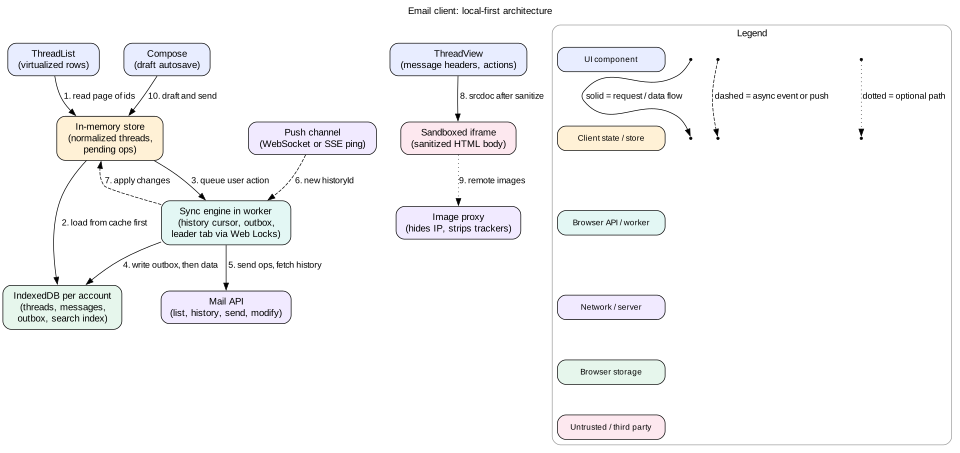
Figure 1. The UI talks only to the in-memory store. The sync engine is the only part that talks to the server. Email HTML lives in its own sandboxed frame.
Layers
UI layer.AppShell, LabelNav, ThreadList, ThreadView, Compose, SearchBox, and AccountSwitcher. Components subscribe to small slices of the store.
Store layer. An in-memory normalized store of threads, messages, and labels. It merges server data with pending local edits to produce the view.
Sync layer. A sync engine that owns the history cursor, the outbox, and the push connection. It runs in a worker, so JSON parsing and IndexedDB writes do not block scrolling.
Storage layer. One IndexedDB database per account, plus Cache Storage for the app shell.
Many tabs, one sync engine
Users open mail in several tabs. If each tab ran its own sync, they would fetch the same history three times and race on writes. Use the Web Locks API to elect a leader. Each tab calls navigator.locks.request("sync-acct-1", ...). Only one holds the lock and runs sync. When that tab closes, the lock passes to another tab automatically. The leader posts changes on a BroadcastChannel, and other tabs refresh their store from IndexedDB. A SharedWorker is another option, but it is not supported in every mobile browser.
Intuition
The local database is the source of truth for the UI. The server is the source of truth for the database. The UI never asks the server directly. This one rule removes most loading spinners and most race conditions.
A thread can carry many labels. IndexedDB compound indexes cannot index each element of an array with another field. So keep a small threadLabels store with one row per pair, keyed by [labelId, lastMessageAt, threadId]. Listing a label is then one fast range scan in date order.
Sanitize once when the body arrives, then store sanitizedHtml. Re-sanitize if the sanitizer version changes.
Pending edits stay separate from server data. The view is server data plus pending edits. This makes rollback trivial: delete the pending op.
5. Interface and API
Server API
GET /threads?label=INBOX&pageSize=50&pageToken=... returns thread metadata and the current historyId.
GET /threads/{id}?format=full returns all messages with bodies.
GET /history?startHistoryId=5120&pageToken=... returns change records in order. Returns 404 with historyExpired when the cursor is too old.
POST /threads/modify with { threadIds, addLabelIds, removeLabelIds } and an Idempotency-Key header.
POST /messages/send with the MIME message or a draft id, plus Idempotency-Key.
POST /uploads starts a resumable attachment upload. The client then sends chunks with Content-Range.
GET /search?q=from:ana has:attachment&pageToken=... for full mailbox search.
Real-time channel
A WebSocket or EventSource carries only small pings: { "historyId": 5131 }. The client does not trust the ping for data. It just calls the history endpoint. This keeps one code path for changes, whether they came from a ping, a focus event, or a timer. If the push channel drops, poll history every 60 seconds and on visibilitychange to visible.
Mail rows have a fixed height per density setting. This is a big gift. The visible range is simple math: first = floor(scrollTop / rowHeight) and count = ceil(viewportHeight / rowHeight). No measuring is needed. The scroll container gets a spacer of total * rowHeight pixels, and rows are absolutely positioned with transform: translateY(index * rowHeight).
Reading scroll without jank
Listen to scroll with { passive: true }. Store scrollTop and schedule one update in requestAnimationFrame.
Reuse row components by key. React reconciles a stable set of about 40 rows.
Memoize rows and pass only the thread id. A row subscribes to its own thread record, so one label change re-renders one row.
Paging and unknown totals
The label count tells us the total, such as 20,000. The client may have only the first 500 ids. Rows past the loaded range render as grey skeletons. An IntersectionObserver on a sentinel near the end of loaded rows triggers the next page from IndexedDB first, then the server.
Stable scroll when new mail arrives
New mail is inserted at the top. If the user is scrolled down, inserting rows above pushes everything down and the row under the cursor jumps. Two fixes:
If the user is at the top, insert and animate.
If the user is scrolled down, show a "3 new messages" pill instead. Or insert and add 3 * rowHeight to scrollTop in the same frame, so the visible rows stay put.
Selection and bulk actions
Selection is a set of thread ids, not DOM checkboxes. Shift+click selects a range by index. "Select all 20,000" is a flag plus the list key, not 20,000 ids. The server applies it as a query-based batch job.
Accessibility
The list has an accessible name. Each row exposes aria-posinset and aria-setsize, so a screen reader says "thread 41 of 20,000".
Use one tab stop for the list with roving focus. Arrow keys or j and k move focus. The focused row must stay rendered, even when it scrolls out of the overscan window.
Each row's accessible name reads in a sensible order: unread state, sender, subject, date.
Mistake
Letting the focused row be recycled. When the user scrolls with the wheel, the focused row leaves the window, React removes it, and focus jumps to body. Always keep the focused row mounted.
7. Deep dive: local-first cache and history sync
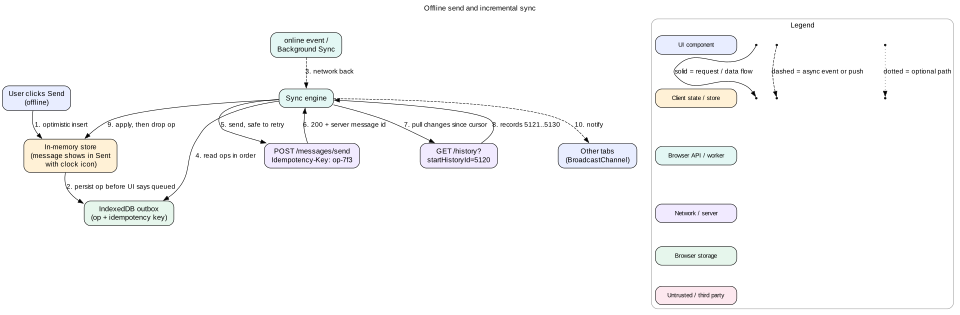
Figure 2. The outbox write happens before the UI says "queued". The pending op is dropped only after the server's version is applied.
First sync
Fetch the first 50 threads of the inbox and render them. Save the response's historyId as the cursor right away, before any more paging.
In the background, page through more threads for the inbox and other labels. Store each page in one IndexedDB transaction.
Any change that happens during this backfill shows up in history after the cursor, so nothing is missed.
The order matters. Saving the cursor first means "everything after this point will come through history". If you saved the cursor at the end of a long backfill, changes made during the backfill could be lost.
Incremental sync
A trigger fires: a push ping, the tab becoming visible, the online event, or a 60 second timer.
The leader tab calls GET /history?startHistoryId=cursor and pages until done.
It applies records in order in one IndexedDB transaction: add messages, delete messages, add and remove labels.
In the same transaction, it advances the cursor to the last applied record. Data and cursor commit together or not at all.
It broadcasts "changed thread ids" to all tabs, which re-read those threads.
Why apply must be idempotent
A crash can happen after the server responded but before the transaction committed. Next time, the client asks again from the old cursor and receives the same records. Applying "add label X" twice must give the same result as once. Using sets for labels and ids for messages makes every record idempotent. Skip any record with an id at or below the cursor.
Optimistic edits and rebasing
When the user archives a thread, the change must show in under 100 ms. The client records a pending op and the view applies it on top of server data. Then sync runs:
Server data updates from history, for example another device marked the thread read.
The view is recomputed as new server data plus still-pending ops. The archive stays visible and the read state from the other device also appears.
When the server confirms the op and its effect arrives through history, drop the op. Drop it after applying the history record, not before, or the thread flickers back into the inbox for a moment.
If the server rejects the op, for example because the thread was deleted, drop it and show a short toast.
Expired cursor
After a week offline, the server returns historyExpired. Do a full resync of metadata for recent threads. Keep cached bodies whose message ids still exist, because bodies never change. Keep the outbox. It is replayed after the resync, and idempotency keys make that safe.
Interview
Interviewers often ask "what if the user changes something on two devices?". Answer with the model: server order wins for server state, and local pending ops are re-applied on top until confirmed. Label changes commute, so there are few real conflicts. The hard case is drafts, covered next.
8. Deep dive: offline compose and the send queue
Drafts
Autosave the draft to IndexedDB on every change, debounced by about 500 ms. This protects against a crash or a closed tab.
Sync the draft to the server every few seconds while online, so it appears on other devices.
Each draft has a version number. The server rejects a save whose base version is old. If the same draft was edited on two devices, keep both and show "this draft was edited elsewhere". Merging free text silently is risky.
Send
The user clicks Send. The client creates opId, a random id from crypto.randomUUID().
It writes the outbox entry to IndexedDB and waits for the transaction to complete. Only then does the UI say "Sending" or "Queued".
The message appears in Sent with a clock icon, and the compose window closes.
"Undo send" holds the request for a short delay, such as 5 to 30 seconds. Undo deletes the outbox entry and reopens the draft. The delay lives in the outbox entry as nextAttemptAt, so it also survives a reload.
When the delay ends and the network is up, the sync engine posts the message with the Idempotency-Key header.
On success, the server returns the real message id. The client maps the temporary id to the real id in one transaction.
Retries
Network error or 5xx: retry with exponential backoff and jitter: 2 s, 4 s, 8 s, up to 5 minutes.
4xx such as "recipient invalid": do not retry. Move the message back to Drafts with an error banner.
Process sends in order per account. A reply should not leave before the message it replies to.
When the tab is closed
The Background Sync API lets the Service Worker run the outbox after connectivity returns, even if the tab is closed. Register with registration.sync.register("outbox"). It is supported in Chromium-based browsers only. Elsewhere, the outbox runs the next time any tab opens. The UI should say "will send when you are back online" so the user is not surprised.
Mistake
Showing "Sent" when the request starts. If the tab closes before the response, the user believes the mail left. The honest states are Queued, Sending, Sent, and Failed. Only a server response moves a message to Sent.
9. Deep dive: rendering HTML email safely
An email body is untrusted HTML. It can contain scripts, event handlers, forms that phish for passwords, CSS that covers the whole app, and tracking pixels. Defense comes in layers. If one layer fails, the next one still holds.
Layer 1: sanitize with an allowlist
Parse the HTML with DOMParser into an inert document. Scripts do not run in a parsed document.
Walk the tree and keep only allowed tags such as p, a, img, table, and span. Drop script, iframe, object, form, and base.
Keep only allowed attributes. Drop every on* handler. Allow href only with http:, https:, and mailto:. This blocks javascript: URLs.
Filter inline CSS. Drop position: fixed, url() values pointing to non-proxied hosts, and expression().
Use a well-tested library such as DOMPurify rather than your own regex. Sanitize on the server too, so mobile and web share one policy.
Layer 2: a sandboxed frame
Render the sanitized HTML in <iframe sandbox="allow-same-origin allow-popups allow-popups-to-escape-sandbox" srcdoc="...">.
No allow-scripts, so even if a script slips past the sanitizer, it cannot run.
No allow-forms, so a fake login form cannot submit.
allow-same-origin lets the parent read the frame's height to size it. This is safe only because scripts are off. Never add both.
allow-popups plus allow-popups-to-escape-sandbox let links open in a normal new tab. Rewrite every link to target="_blank" rel="noopener noreferrer".
Styles in the email cannot reach the app, and app styles do not break the email layout.
Layer 3: Content Security Policy
Put a strict CSP inside the srcdoc with a meta tag: script-src 'none', img-src limited to the image proxy and data:. The app itself also uses a strict CSP with nonces and Trusted Types. Then a bug that writes email HTML into the main DOM fails loudly.
Remote images and tracking
A 1 by 1 pixel image tells the sender when you opened the mail and from which IP. Rewrite every remote image URL to the image proxy, for example /proxy?url=...&sig=.... The proxy fetches the image from its own servers, so the sender sees the proxy's IP. It can also cache the image, which defeats per-open timing. For unknown senders, block images until the user clicks "show images".
Sizing and performance
Size the frame to its content with a ResizeObserver on the frame document's body. Fonts and images change height after load.
Add loading="lazy" to images inside the body.
Clip very large bodies, for example above 100 KB, with a "view entire message" link. Huge newsletters can freeze rendering.
In a long thread, render only the last message expanded and the rest as one-line summaries. Create frames on expand.
Dark mode
Many emails hard-code black text on white. Forcing dark colors breaks their design. A safe default is to render the email on a light card even in dark mode. Offer an optional color inversion with a CSS filter as a user setting.
Tip
Test the sanitizer with a corpus of known attack strings, such as SVG with onload, nested <noscript> tricks, and mixed-case JaVaScRiPt: URLs. Run it in CI on every sanitizer upgrade.
10. Deep dive: search, local and server
Two engines
Local search runs on cached mail in a worker. It answers in under 50 ms and works offline. It covers only what is cached.
Server search covers the whole mailbox and full bodies. It takes 200 ms to 1 second and needs the network.
Local index
Tokenize subject, sender, and snippet into lowercase words. Store an inverted index in IndexedDB: each token maps to a list of message ids. Add prefix entries for the first 3 to 5 letters, so "inv" finds "invoice". Update the index in the same sync transaction that adds messages. For 5,000 threads the index is a few megabytes.
Merging results
As the user types, debounce 150 ms and show local suggestions: contacts, labels, and top matching threads.
On Enter, show local results at once with a note: "Showing results from this device."
Send the server query in parallel with an AbortController. Cancel it if the query changes.
When server results arrive, merge by message id and keep the server order. Do not reorder rows the user is looking at. Append new ones or replace in one swap.
Operators
Parse operators on the client into a small query object: { from: "ana", hasAttachment: true, label: "work", text: "invoice" }. Local search can evaluate it directly. Server search receives the raw string so both sides agree on syntax.
11. Deep dive: labels, shortcuts, attachments, accounts
Labels
Labels are many-to-many tags, not folders. "Archive" means remove the INBOX label. Unread counts per label live on the label record. Update them optimistically with pending ops, then correct them from the server, which owns the true count. The label nav shows counts only for labels the user chooses, because computing all counts is costly.
Keyboard shortcuts
Common keys: j and k next and previous, e archive, r reply, c compose, / search, g then i go to inbox, ? help.
One global keydown listener with a keymap. Ignore keys when focus is in an input, a textarea, or a contenteditable editor.
Two-key sequences use a short timer, such as 1 second, after the first key.
Single-letter shortcuts can clash with speech input and screen reader keys. WCAG 2.1 success criterion 2.1.4 requires a way to turn them off or remap them. Ship a setting.
Show shortcuts in tooltips and in the ? dialog, which uses role="dialog" and traps focus.
Attachments
Upload as soon as the user attaches, not on send. Use resumable uploads in 5 MB chunks with a progress bar. Send then only references upload ids.
Above the size limit, such as 25 MB, offer a cloud link instead.
Serve downloads from a separate origin, such as usercontent.example.com, with Content-Disposition: attachment. An HTML file opened from the main origin could run script as the app.
Inline images use cid: references. Resolve them to proxy URLs or blob URLs during sanitizing.
Offline, show cached attachments only. Do not cache large attachments by default.
Multiple accounts
Each account has its own IndexedDB database, named by account id, and its own sync leader lock.
URLs include the account index, such as /mail/u/1/inbox, so links and tabs keep their account.
Each account has its own token. Never send account A's token with account B's request. Keep the active account id in every store key.
On sign-out, close and delete that account's database and its Cache Storage entries.
Background sync only for the active account plus light polling of unread counts for others.
12. Failure modes
Send times out after the server accepted it. The retry carries the same idempotency key, so the server returns the first result. No double send.
Tab crashes mid-sync. Data and cursor commit in one transaction, so the database is at the old or new state, never half. The next sync replays records idempotently.
History cursor expired. Full resync of recent metadata. Keep bodies and the outbox.
Two tabs both think they are leader. Web Locks prevents this. As a fallback, writes use per-record history ids, so a stale write cannot overwrite newer data.
Quota exceeded. Catch QuotaExceededError. Evict the oldest bodies and the search index first. Never evict the outbox.
IndexedDB schema upgrade blocked. An old tab holds the database open. Handle onblocked by asking old tabs to close via BroadcastChannel, and handle versionchange in each tab by closing its connection.
Sanitizer bypass found. The sandbox and CSP still block script. Ship the fix and bump the sanitizer version to re-sanitize cached bodies.
Push channel silently dead. Poll history on focus and every 60 seconds, so staleness is bounded.
13. Trade-offs
Local-first vs network-first
Local-first: instant warm start, offline support, fewer spinners. Costs: sync complexity, schema migrations, and more storage on the device.
Network-first: simple and always fresh. Every open waits on the network, and offline does not work.
Ping plus history vs full data push
Ping: one code path for all changes, tiny messages, easy to recover after a gap. Costs one extra round trip per change.
Full push: lower latency. But every push path must handle ordering, gaps, and duplicates, which history already solves.
Sandboxed iframe vs Shadow DOM
Iframe: true isolation of styles and script. Costs one document per message and height syncing.
Shadow DOM: lighter. But it isolates styles only, not script, so it relies entirely on the sanitizer.
How much to cache
More cache: better offline and local search. Costs storage, first-sync bandwidth, and higher risk on shared computers.
Less cache: cheaper and safer. Offline is limited to recent mail.
Choice: 5,000 threads of metadata and 500 of bodies by default, with a setting for more.
14. 45-minute interview walkthrough
Minutes 0 to 5: clarify. Offline scope, accounts, compose features, API shape. List functional and non-functional requirements.
Minutes 35 to 40: one more dive. Virtualized list with stable scroll, or offline send with undo, or search merging.
Minutes 40 to 45: failures, trade-offs, metrics. Measure warm start time, sync lag, outbox age, and send failure rate.
15. Summary
The UI reads only from a local store backed by IndexedDB. The sync engine is the only part that talks to the server.
A history cursor gives incremental sync. Data and cursor commit in one transaction, and records apply idempotently.
User actions become durable outbox ops with idempotency keys. They show optimistically and are dropped only after the server's version arrives.
Email HTML is sanitized with an allowlist, rendered in a sandboxed iframe without scripts, and limited by CSP. Images go through a proxy.
The thread list is virtualized with fixed rows, stable scroll, and correct ARIA counts.
Local search answers instantly. Server search completes it.
16. Common mistakes
Rendering email HTML with innerHTML in the app's DOM.
Adding both allow-scripts and allow-same-origin to the sandbox.
Saving the sync cursor after the backfill instead of before it.
Retrying send without an idempotency key, which causes double sends.
Running sync in every tab at once.
One shared database for all accounts.
Single-key shortcuts with no way to turn them off.
Serving attachments from the app origin.
Worked example: send on a train, then sync
Ana has two tabs open on her laptop. Her phone is also signed in. The cursor is historyId 5120. Her train enters a tunnel.
The offline event fires. The app shows a small "Offline" banner. Tab A holds the Web Lock and is the sync leader.
Ana archives 3 threads with e. Each creates a pending op in the store and an outbox entry. The rows disappear from the inbox in one frame.
She replies to Ben. Drafts autosave to IndexedDB every 500 ms. She clicks Send.
The client creates opId op-7f3 and writes the outbox entry with nextAttemptAt = now + 10 s for undo send. After the transaction completes, the message shows in Sent with a clock icon.
Meanwhile on her phone, which has signal, she stars one of the threads she just archived. The server records this as 5121.
The train leaves the tunnel. The online event fires in Tab A. The sync engine reads the outbox in seq order.
It posts the 3 modify ops and the send, each with its idempotency key. The send's first attempt times out after the server accepted it.
The engine retries the send after 2 seconds with the same key op-7f3. The server returns the stored result: message id m_9001. Ben gets one copy.
The engine calls GET /history?startHistoryId=5120. It gets 5121 (star from the phone), 5122 to 5124 (her archives), 5125 (her sent message), and 5126 (a new mail from Chen).
In one IndexedDB transaction, it applies all records, maps the temp id to m_9001, deletes the 4 outbox entries, and sets the cursor to 5126.
It drops the pending ops from the store and broadcasts the changed thread ids. Tab B re-reads them. Both tabs show the star, the archives, the sent reply, and Chen's new mail.
Chen's message has a tracking pixel. The sanitizer rewrote it to the image proxy, and the frame blocks it until Ana clicks "show images".
Code lab: history sync with pending edits
This script models the core sync loop. It applies history records idempotently, keeps optimistic edits separate, and shows the view as server data plus pending ops. Save it as sync.mjs and run node sync.mjs with Node 18 or later.
function createStore() { return { historyId: 0, msgs: new Map(), pending: [] }; }

function applyHistory(store, resp) {
  if (resp.expired) return "FULL_RESYNC"; // server no longer keeps history this old
  for (const h of resp.history) {
    if (h.id <= store.historyId) continue; // replayed record: skip, so it stays idempotent
    for (const m of h.added ?? []) store.msgs.set(m.id, { ...m, labels: new Set(m.labels) });
    for (const id of h.deleted ?? []) store.msgs.delete(id);
    for (const c of h.labelChanges ?? []) {
      const m = store.msgs.get(c.id);
      if (!m) continue;
      c.add?.forEach((l) => m.labels.add(l));
      c.remove?.forEach((l) => m.labels.delete(l));
    }
    store.historyId = h.id;
  }
  return "OK";
}

function view(store) { // server truth, then local pending edits on top
  const out = new Map();
  for (const [id, m] of store.msgs) out.set(id, { ...m, labels: new Set(m.labels) });
  for (const op of store.pending) {
    const m = out.get(op.id);
    if (!m) continue;
    op.add?.forEach((l) => m.labels.add(l));
    op.remove?.forEach((l) => m.labels.delete(l));
  }
  return out;
}

const show = (st) => [...view(st).values()].map((m) => `${m.id}:${[...m.labels].join("+")}`).join("  ");
const s = createStore();
applyHistory(s, { history: [{ id: 1, added: [
  { id: "m1", subject: "Lunch?", labels: ["INBOX", "UNREAD"] },
  { id: "m2", subject: "Invoice", labels: ["INBOX"] }] }] });
console.log("start:     ", show(s));

s.pending.push({ opId: "op-1", id: "m1", remove: ["INBOX"] }); // archive while offline
console.log("optimistic:", show(s));

// Another device marked m1 read. The page also replays old record 1.
applyHistory(s, { history: [{ id: 1, added: [] }, { id: 2, labelChanges: [{ id: "m1", remove: ["UNREAD"] }] }] });
console.log("synced:    ", show(s));

// Back online: server applies op-1 and reports it as record 3. Apply first, then drop the op.
applyHistory(s, { history: [{ id: 3, labelChanges: [{ id: "m1", remove: ["INBOX"] }] }] });
s.pending = s.pending.filter((op) => op.opId !== "op-1");
console.log("acked:     ", show(s), " historyId", s.historyId);
console.log("old cursor:", applyHistory(s, { expired: true }));
Expected output: first m1:INBOX+UNREAD, then m1:UNREAD (archived locally). Next comes m1: with no labels, because it is archived locally and read on the other device. The ack line is the same, with historyId 3. The last line is FULL_RESYNC. Try swapping the last two steps, so the op is dropped before record 3 is applied. Print the view between them and you will see m1 briefly back in the inbox. That is the flicker the design avoids.
Check yourself
Why must the client save the history cursor before it starts the long backfill of old threads?Answer
Changes that happen during the backfill get history ids after the saved cursor, so the next incremental sync picks them up. If the cursor were saved at the end, changes made during the backfill could fall before it and be lost.
A send request times out. Is it safe to retry? What makes it safe?Answer
Yes, if the retry carries the same idempotency key made before the first attempt. The server stores the key with the result and returns that result for a repeat, without sending a second email.
Why is sandbox="allow-scripts allow-same-origin" dangerous for email bodies?Answer
With both, a script in the frame runs with the parent's origin. It can reach into the parent, or remove the sandbox attribute from its own frame and reload. The sandbox then gives no protection.
The user archives a thread offline. Another device marks it read. What does the user see after sync, before the archive is confirmed?Answer
The view is new server data plus pending ops. The thread stays out of the inbox because the pending archive is applied on top. It shows as read because the server data now says so.
Why use Web Locks in a multi-tab mail client?Answer
To make sure only one tab per account runs sync and the outbox. Without it, tabs fetch the same history several times and race on IndexedDB writes. The lock moves to another tab when the leader closes.
Why serve attachments from a different origin than the app?Answer
An attached HTML or SVG file can contain script. Opened from the app's origin, that script could read cookies, storage, and mail. A separate origin with Content-Disposition: attachment keeps it away from app data.
Key terms
Local-first
A design where the UI reads from local storage first and the network only updates that storage.
History id
An increasing number for each mailbox change, used as a cursor for incremental sync.
Full resync
Re-downloading recent state when the cursor is too old for the server's history.
Outbox
A durable local queue of user actions waiting to reach the server.
Idempotency key
A unique id sent with a request so the server can ignore repeats.
Optimistic update
Showing the result of an action before the server confirms it.
Sanitizer
Code that removes dangerous tags, attributes, and URLs from HTML using an allowlist.
Sandboxed iframe
A frame with the sandbox attribute, which turns off scripts, forms, and other features by default.
srcdoc
An iframe attribute that holds the frame's HTML inline instead of loading a URL.
Image proxy
A server that fetches remote images for the user, hiding the user's IP and open time.
Web Locks API
A browser API that lets tabs of one origin share a named lock, used for leader election.
Background Sync
A Service Worker API that runs a task when connectivity returns, even with the tab closed.