A frontend system design guide for the two pages that make an online store money. You will learn how to make the product page fast and searchable, and how to build a checkout that never charges twice.
Frontend system design · Commerce and forms
Design a product page that loads fast and ranks well. Then design a cart and checkout that stay correct across tabs, devices, retries, and payment failures.
Correctness contract: The user never pays for an order twice because of a retry or a double click. The price and stock shown at the final step match what the server will charge. Raw card numbers never touch our own JavaScript. Every cart change the UI confirmed is saved on the server.
You know HTML, React or a similar framework, and HTTP. You do not need to know payments in depth. Amazon and Shopify stores are used only to frame the problem. This is a teaching design. Numbers are rough estimates for reasoning.
E-commerce is a frontend interview favourite because every decision has a visible business cost. A slow product page loses sales. Retailers have reported that each 100 ms of extra load time costs a measurable share of conversion. A product page that search engines cannot read loses free traffic. A buggy cart loses trust. A checkout that double charges creates support tickets and chargebacks. The design must balance three forces: static speed for the parts that rarely change, live accuracy for price and stock, and strict correctness for money. This guide covers the product page first, then the cart, then the checkout, and ends with performance budgets, experiments, and analytics.
Server-side rendering (SSR) builds HTML per request. Static site generation (SSG) builds HTML once at deploy time. Incremental static regeneration (ISR) serves cached static HTML and rebuilds it in the background after a set time or on demand.
Example. A product page is built with ISR and a 5 minute revalidate time. The CDN serves it in 30 ms. Price and stock load as a small live request after.
Limit. Static HTML can be stale. Never trust it for the final price or stock. Personal data, like a logged-in user's cart, cannot go into shared cached HTML.
Hydration and islands
Hydration attaches JavaScript event handlers to server HTML. Islands architecture hydrates only the interactive parts, like the variant picker and Add to cart button, and leaves static text as plain HTML.
Example. The description and reviews are static. Only 3 islands hydrate: gallery, variant picker, and cart button. JavaScript drops from 400 KB to 120 KB.
Limit. Islands need a way to share state, such as the selected variant between the picker and the gallery.
Idempotency key
An idempotency key is a unique ID the client sends with a request that must not run twice. The server stores the key with the result. A repeat with the same key returns the stored result instead of running again.
Example. The client sends POST /orders with Idempotency-Key: 7d1e.... The response is lost. The client retries with the same key and gets the same order ID back.
Limit. The key must be created once per checkout attempt, not once per click. The server must also check that the repeat has the same body.
PCI DSS scope
PCI DSS is the security standard for systems that handle card data. If card numbers pass through your page's JavaScript, your whole frontend is in scope. Hosted payment fields in an iframe from the payment provider keep the card data out of your code.
Example. Stripe Elements or Adyen hosted fields render the card input inside an iframe from their domain. Your page only receives a token.
Limit. The page that hosts the iframe still matters. A malicious script on it can fake the form. PCI DSS 4.0 asks you to control and monitor scripts on payment pages.
Core Web Vitals
Core Web Vitals are Google's user-centred speed metrics. Largest Contentful Paint (LCP) measures loading. Interaction to Next Paint (INP) measures responsiveness. Cumulative Layout Shift (CLS) measures visual stability.
Example. Good targets at p75 are LCP under 2.5 s, INP under 200 ms, and CLS under 0.1.
Limit. Lab tests on a fast laptop hide real pain. Use field data from real users, split by device class.
Product, variant, and SKU
A product is the thing you browse, like "Trail Running Shoe". A variant is one buyable combination of options, like size 42 and colour blue. Each variant has a SKU (stock keeping unit), its own price, and its own stock.
Example. 3 colours and 10 sizes make 30 variants. Only 22 exist in the catalogue, and 5 of those are out of stock.
Limit. Not every option combination exists. The picker must show which choices lead to a real, in-stock variant.
1. Clarifying questions and requirements
One store or a marketplace? A marketplace has many sellers per product, each with its own price and shipping.
How big is the catalogue? 10,000 products can be pre-built. 50 million products need on-demand rendering.
Guest checkout? Most stores allow it. It changes how the cart is identified.
Which countries and currencies? This drives tax, address formats, payment methods, and i18n.
How spiky is traffic? Flash sales can bring 50 times normal traffic and fast stock changes.
Which payment methods? Cards, Apple Pay, Google Pay, PayPal, and local methods each change the checkout UI.
Functional requirements
Product page with gallery, title, price, variant picker, stock status, description, and reviews.
Add to cart, edit quantity, and remove items, with a cart drawer and a full cart page.
Cart persists across reloads, tabs, and, for signed-in users, devices.
Card payments through a payment provider, plus wallets like Apple Pay and Google Pay.
Order confirmation page and email.
Non-functional requirements
Product page LCP under 2.5 s at p75 on a mid-range phone over 4G. INP under 200 ms. CLS under 0.1.
Product pages fully crawlable with structured data.
No double orders and no double charges, even with retries and double clicks.
Card data never enters our JavaScript, to keep PCI scope small.
Accessible forms that meet WCAG 2.2 AA, including clear error messages.
Handle 50 times traffic spikes during sales without the page falling over.
2. Scope and budgets
Traffic and caching
Assume 5 million product page views per day. That is about 60 per second on average and 3,000 per second at a sale peak.
With a 95 percent CDN hit rate, origin SSR sees 150 requests per second at peak. With pure SSR and no cache it would see 3,000. That is why cached HTML matters.
The live price and stock call is small, about 1 KB of JSON. It can be cached at the edge for 10 to 30 seconds, which cuts origin load by a large factor during spikes.
Page weight budget
HTML: about 40 KB compressed, including JSON-LD and the critical CSS.
Hero image: about 80 to 150 KB in AVIF or WebP at the right size. This is usually the LCP element.
JavaScript on the product page: under 150 KB compressed. On a mid-range phone, 150 KB of JavaScript costs about 1 to 1.5 seconds of parse and execute time.
Third-party scripts: under 50 KB, loaded after the page is interactive. Tag managers often add 300 KB if no one watches.
LCP budget on 4G
DNS, TCP, and TLS: about 300 ms on a cold mobile connection.
HTML from the CDN edge: about 150 ms time to first byte.
Hero image discovered in the HTML with fetchpriority="high": 120 KB at 1.6 MB per second of real 4G throughput is about 600 ms.
Render: about 200 ms.
Total: about 1.25 seconds. That leaves headroom for slower networks and keeps p75 under 2.5 seconds.
Frame budget
Selecting a variant must update price, image, and stock within one interaction. Aim to paint the new selection within 100 ms. Keep the variant computation under 5 ms and avoid re-rendering the whole page. Only the price block, the gallery, and the picker should update.
3. High-level architecture
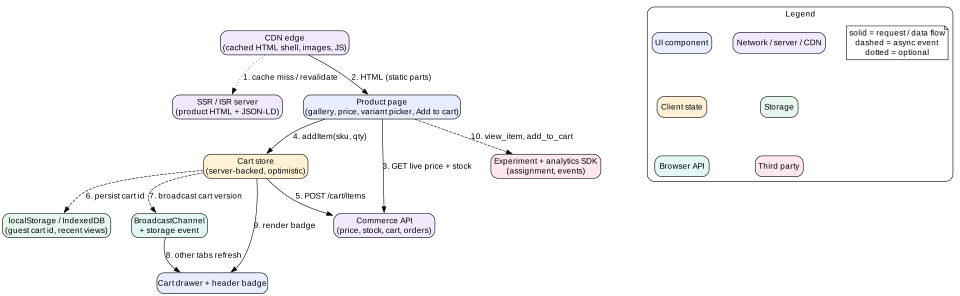
Figure 1. Product page and cart. Static HTML comes from the CDN. Live data and cart writes go to the commerce API.
Layers
Edge and rendering. The CDN caches product HTML. An SSR or ISR server builds it from the catalogue. The CDN uses stale-while-revalidate so users never wait for a rebuild.
Product page. Mostly static HTML. Islands hydrate for the gallery, variant picker, price and stock block, and Add to cart.
Cart store. A small client store backed by the server cart. Writes are optimistic and confirmed by the server.
Tab sync.BroadcastChannel tells other tabs when the cart changed. They refetch the cart.
Checkout app. A separate route, often a separate bundle. It is rendered on demand, never cached publicly, and has a strict Content Security Policy.
Payment iframe. Hosted fields from the payment provider. They return a token through postMessage or the provider SDK.
Experiment and analytics. An SDK that assigns variants and sends events. It loads early for assignment but sends events lazily.
Intuition
Split the page by how fast each piece of data changes. Description and images change weekly, so cache them hard. Price changes hourly, so cache it briefly. Stock changes by the second, so fetch it live. Your cart is personal, so never put it in shared cache.
4. Data model
type Product = {
  id: string; slug: string; title: string; brand: string
  descriptionHtml: string                 // sanitized on the server
  options: { name: 'color' | 'size' | string; values: string[] }[]
  variantIds: string[]
  mediaByColor: Record<string, string[]>  // image ids per colour
  rating: { avg: number; count: number }
}

type Variant = {
  id: string; sku: string; productId: string
  options: Record<string, string>         // { color: 'blue', size: '42' }
}

type Offer = {                            // live data, short TTL
  variantId: string
  price: { amount: number; currency: string }   // amount in minor units, e.g. cents
  compareAt?: { amount: number; currency: string }
  stock: 'in_stock' | 'low' | 'out_of_stock' | 'preorder'
  fetchedAt: number
}

type CartLine = { lineId: string; variantId: string; qty: number
                  unitPrice: { amount: number; currency: string } }

type Cart = {
  id: string; version: number             // server increments on each change
  lines: CartLine[]
  subtotal: { amount: number; currency: string }
  warnings: { lineId: string; code: 'PRICE_CHANGED' | 'OUT_OF_STOCK' | 'QTY_REDUCED' }[]
}

type CheckoutDraft = {
  id: string; cartVersion: number
  step: 'contact' | 'shipping' | 'method' | 'payment' | 'review'
  email?: string
  address?: Address
  shippingMethodId?: string
  totals?: { subtotal: number; shipping: number; tax: number; total: number; currency: string }
  idempotencyKey: string                  // made once per order attempt
}

type ClientState = {
  products: Record<string, Product>
  variants: Record<string, Variant>
  offers: Record<string, Offer>          // keyed by variantId
  selection: Record<string, string>      // current picker choice
  cart: Cart | null
  checkout: CheckoutDraft | null
}
Store money as integers in minor units. Floating point sums like 0.1 plus 0.2 give 0.30000000000000004. Format money only at render time with Intl.NumberFormat and the right currency. The cart has a version so tabs and devices can tell whether their copy is current.
5. Interface and API
Catalogue and offers
GET /p/trail-shoe-123 returns HTML. Headers: Cache-Control: public, s-maxage=300, stale-while-revalidate=86400. Purge by tag when the product changes.
GET /api/offers?product=123 returns live price and stock for all variants. Headers: Cache-Control: public, s-maxage=15. Prices differ by country, so add the country to the cache key.
Cart
GET /api/cart returns the cart for the session cookie or the signed-in user.
POST /api/cart/lines with { variantId, qty } adds a line. It returns the full cart with a new version.
PATCH /api/cart/lines/:lineId changes quantity. It takes If-Match: "v17" and returns 412 if the cart changed meanwhile.
POST /api/cart/merge merges a guest cart into the user cart at sign in.
Checkout and orders
POST /api/checkout creates a draft from the cart and freezes its version.
PATCH /api/checkout/:id saves a step and returns recalculated totals, tax, and shipping options.
POST /api/orders with header Idempotency-Key and body { checkoutId, paymentToken, expectedTotal }. It returns 201 with a new order or 200 with the same order on replay. It returns 409 if the key comes with a different body, and 422 if the total changed.
Pure client rendering sends an empty shell and builds everything with JavaScript. Crawlers that render JavaScript can index it, but rendering is delayed and less reliable. LCP is slow because the image is found late. Avoid it for product pages.
SSG builds every product at deploy time. It is perfect for 5,000 products. For 5 million products the build takes hours, so it does not scale alone.
ISR or SSR with CDN caching builds pages on the first request and caches them. Popular pages are always warm. Long-tail pages pay one SSR cost, then stay cached. This is the usual answer.
Streaming SSR sends the page head and above-the-fold HTML first, then streams slower parts like reviews and recommendations. React Server Components with Suspense boundaries do this.
SEO details that matter
Put title, price, availability, and the main image in the server HTML. Crawlers should not need to run JavaScript to find them.
Add Product structured data as JSON-LD with offers, price, priceCurrency, and availability. This enables rich results with price and rating.
Set a <link rel="canonical"> for each product. Variant URLs like ?color=blue should point to the main product or be their own canonical if they are distinct pages.
Give every image meaningful alt text and use real <a href> links for categories and related products.
Return a real 404 or 410 for removed products, and a 301 redirect when a slug changes.
Loading the hero image fast
The hero image is almost always the LCP element. Put it in the HTML as a plain <img> with srcset and sizes so the browser picks the right width. Add fetchpriority="high" and never loading="lazy" on it. Set width and height or aspect-ratio so the layout does not shift. Lazy load the other gallery images and everything below the fold. Serve AVIF with a WebP fallback through an image CDN.
Mistake
Rendering the hero image from a JavaScript carousel that mounts after hydration. The browser cannot discover it until the bundle runs, and LCP moves from 1.2 seconds to 3 or 4 seconds.
Hydration cost
Hydrating a full product page can block the main thread for 300 ms or more on a mid-range phone. A tap on Add to cart during that time feels dead, and INP suffers. Use islands or partial hydration. Hydrate the Add to cart button and picker first. Hydrate reviews and recommendations when they scroll into view with an IntersectionObserver, or when the browser is idle.
7. Deep dive: variants, inventory freshness, and price
Variant picker state
The selection is a map from option name to value. The selected variant is derived, never stored separately. Find the variant whose options match the selection exactly. If none matches, there is no buyable variant yet.
The picker must also show which values are still possible. For each option value, ask: if the user picked this value while keeping the other choices, would a real in-stock variant exist? Values that lead to no variant are disabled. Values that lead only to sold-out variants are shown crossed out but still selectable, so users can see "notify me". With 30 variants this is a few hundred checks, well under 1 ms. Precompute an index from option pairs to variants if the product has thousands of variants.
Sync the selection to the URL with history.replaceState, for example ?color=blue&size=42. Shared links then open the same variant, and the back button does not fill with every click.
Switch the gallery to the selected colour's images. Preload the first image of each colour on hover or focus of the swatch.
Render the picker as radio groups: role="radiogroup" with an accessible name like "Size", and each choice as a radio. Sold-out sizes get text like "42, sold out", not just a grey colour.
Inventory freshness
Stock in cached HTML can be minutes old. During a sale, a size can sell out in seconds. The design uses three levels of freshness.
Page load. The HTML shows stock from build time as a hint. The live offers call replaces it within about 200 ms.
While browsing. Refetch offers when the tab becomes visible again after more than 60 seconds. During flash sales, poll every 15 to 30 seconds or subscribe through Server-Sent Events with EventSource for hot items.
At commit. The server checks stock again on add to cart, at checkout start, and when placing the order. Only this check is the truth.
Show "Only 3 left" only when the number is fresh, for example fetched in the last 30 seconds. A stale scarcity message is both wrong and a trust problem.
Price display
Format with new Intl.NumberFormat(locale, { style: 'currency', currency }). Never build currency strings by hand.
Show the sale price and the compare-at price with clear text for screen readers, like "Now 79 dollars, was 99 dollars".
Reserve space for the price block so a late live price does not shift the layout.
If the live price differs from the cached HTML price, update it quietly. If it changes after the item is in the cart, show a warning in the cart.
8. Deep dive: cart state across tabs and devices
Server cart as the source of truth
Keep the cart on the server, keyed by a cart ID. Guest users get the ID in an HttpOnly cookie. Signed-in users have a cart tied to their account. The client holds a cached copy with its version. This gives devices a shared cart and makes the server's stock and price checks possible.
Optimistic add to cart
The user taps Add to cart. The button shows a pending state and is disabled to stop double adds.
The client adds a temporary line to the local cart and opens the cart drawer at once.
It sends POST /api/cart/lines. The server checks stock and price and returns the full cart with a new version.
The client replaces its local cart with the server cart. If the server reduced the quantity or rejected the item, the drawer shows a clear message.
On network failure, roll back the temporary line and show a retry button.
Syncing tabs
A user may have the product page open in one tab and the cart in another. After each confirmed change, post { type: 'cart-changed', version } on a BroadcastChannel('cart'). Other tabs compare versions and refetch if theirs is older. As a fallback for older browsers, write the version to localStorage and listen for the storage event, which fires in other tabs. Also refetch on visibilitychange when a tab becomes visible, which covers changes made on other devices.
Guest to signed-in merge
A guest adds 2 items, then signs in. Their account already has 1 item from last week on another device. Call POST /api/cart/merge. The server combines lines by variant, caps quantities by stock and per-customer limits, and returns warnings. The UI shows a short note like "We added 1 item from your last visit". Never silently drop items.
Concurrent edits
Two tabs change the quantity of the same line at the same time. Each PATCH sends If-Match with its version. The second one gets 412. The client refetches the cart and reapplies the user's intent if it still makes sense. For a quantity stepper, the latest user action wins.
Tip
Debounce rapid quantity clicks. Five clicks on the plus button should send one request with quantity 6, not five requests that race each other.
9. Deep dive: checkout form, payments, and idempotent submit
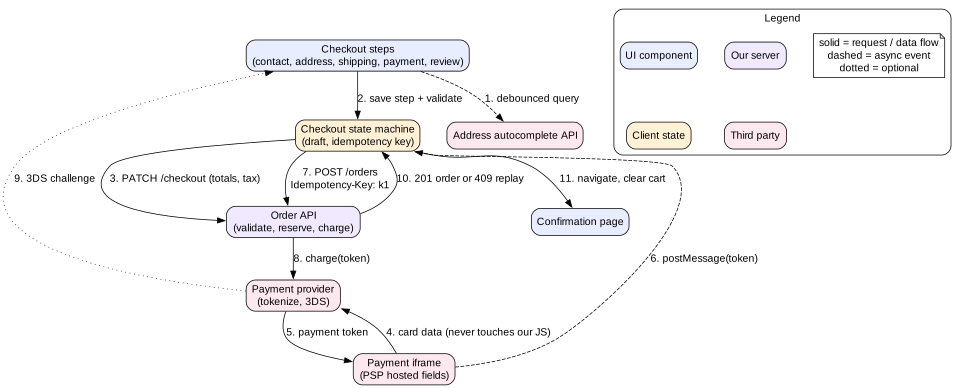
Figure 2. Checkout. Card data goes from the iframe straight to the payment provider. Our code only sees a token and submits the order with an idempotency key.
A multi-step form as a state machine
Model checkout as explicit states: contact, shipping address, shipping method, payment, review, submitting, done, and failed. Each step has its own validation. Moving forward saves the step to the server, which returns new totals. This keeps tax and shipping correct and lets the user resume on another device.
Use one route per step, like /checkout/shipping, so back and forward buttons work and analytics can see drop-off per step.
Guard routes. If the user opens /checkout/payment without an address, redirect to the address step.
Many stores use a single page with collapsible sections. It reduces navigation but needs the same state machine inside.
Validation that helps
Use native attributes first, like type="email", required, and inputmode="numeric". Add correct autocomplete tokens such as email, given-name, address-line1, postal-code, and tel. Browser autofill can then fill the whole form in one tap.
Validate on blur, not on every keystroke. Show errors next to the field, link them with aria-describedby, and set aria-invalid="true".
On submit with errors, show a summary at the top with links to each field and move focus to it.
Validate again on the server. Client validation is for user experience only.
Postal code and phone rules differ by country. Load per-country rules and labels, like "ZIP code" or "Postcode", based on the selected country.
Address autocomplete
Call an address API after the user types 3 or more characters, debounced by 200 to 300 ms. Cancel the previous request with AbortController so late answers do not overwrite new ones. Use a session token so the provider bills one session, not every keystroke. Render the suggestions with the combobox pattern: role="combobox" on the input, aria-expanded, aria-controls pointing to a role="listbox", and aria-activedescendant for the highlighted option. When the user picks a suggestion, fill the structured fields and let them edit. Never force the suggestion. Real addresses are sometimes missing from the database.
Payment iframes and PCI scope
Never render your own card number input. Use the payment provider's hosted fields. Each field is an iframe from the provider's origin. The card number goes straight from the iframe to the provider and comes back as a token or payment method ID. Because of the same-origin policy, your JavaScript cannot read the iframe's content. This keeps you in the smallest PCI self-assessment scope.
Lock down the checkout page with a strict Content Security Policy. Allow scripts only from your origin and the provider. Use frame-src for the provider's iframe origin.
Load as few third-party scripts as possible on checkout. Remove chat widgets and ad tags. Each one is a possible skimming vector.
Use Subresource Integrity on any static third-party script you host a reference to.
Handle 3-D Secure. The provider may need to show a bank challenge in a modal or redirect. Your state machine needs a "requires action" state.
Offer wallets through the Payment Request API or the provider's wallet buttons. Apple Pay and Google Pay skip most of the form.
Idempotent order submit
Placing the order is the one action that must happen exactly once. Many things can go wrong. The user can double click, or click again after a slow response. The network can drop after the server charged the card. The page can reload during submit. The design handles all of them.
When the user reaches the review step, create an idempotency key with crypto.randomUUID(). Store it in the checkout draft and in sessionStorage.
On click, move the state machine to submitting. Disable the button and show progress. A second click does nothing because the state is not review.
Send POST /api/orders with the key, the checkout ID, the payment token, and the expected total.
On timeout or network error, retry with the same key, with backoff like 1, 2, and 4 seconds. The server returns the original result if the first attempt succeeded.
If the page reloads during submit, read the key from sessionStorage. Ask the server for the order status by key before allowing a new attempt.
Create a new key only when the user changes something that changes the order, such as the cart, the address, or the payment method.
Interview
Say clearly that disabling the button is not enough. It stops double clicks but not retries after timeouts, reloads, or two tabs. Only a server-side idempotency key with a stored result gives the exactly-once effect.
Price and stock at the final step
The client sends expectedTotal. If the server computes a different total, because a price changed or a coupon expired, it returns 422 with the new totals. The review page shows the change and asks the user to confirm again. Never charge a different amount than the user saw.
10. Deep dive: performance budgets, experiments, and analytics
Performance budgets for conversion
Set budgets and enforce them in CI. Fail the build when product page JavaScript grows above 150 KB compressed. Also fail it when a lab LCP test on a throttled mobile profile goes above 2.5 seconds. Track field data from real users with the web-vitals library and report LCP, INP, and CLS by page type and device class.
Preconnect to the image CDN and the API origin.
Prefetch the cart and checkout bundles when the user adds to cart. They are likely to go there next.
Use the Speculation Rules API to prerender the product page when a user hovers a product link on a listing page.
Defer third-party tags until after the page is interactive. Load them through a single controlled loader.
Keep the back-forward cache working: no unload handlers and no Cache-Control: no-store on product pages. Going back from a product to a listing then feels instant.
Experimentation
Stores run many A/B tests on price display, button text, and layout. The frontend must avoid two problems: flicker and bias.
Flicker. Client-side tests that change the page after load cause the original to flash, and they add CLS. Assign variants at the edge or on the server instead. Render the right variant into the HTML.
Caching. Server-side variants split the CDN cache. Put the experiment bucket in the cache key, for example through a cookie that the edge reads. Keep the number of live experiments on cached pages small.
Bias. Log an exposure event only when the user actually sees the changed element. Use an IntersectionObserver for below-the-fold changes.
Guardrails. Every experiment also tracks LCP, errors, and checkout completion. A test that wins on clicks but slows the page should not ship.
Analytics events
Use a standard event list so marketing, product, and data teams speak the same language. Common names are view_item, select_item, add_to_cart, remove_from_cart, begin_checkout, add_shipping_info, add_payment_info, and purchase.
Queue events in memory and flush in batches with navigator.sendBeacon on visibilitychange.
Send purchase from the server after the order is created, not from the confirmation page. Users close the tab, and ad blockers drop client events.
Give each event an ID so the server can dedupe retries.
Respect consent. Load marketing tags only after the user agrees, where the law requires it.
Never send personal data like email or address in analytics payloads.
11. Failure modes
Live offers API down. Show the cached price with "Price confirmed at checkout". Keep Add to cart working, since the cart call re-checks.
Item sells out between page view and add. The cart API returns an error. Update the picker to show sold out and offer "Notify me".
Price changes after add to cart. The cart shows a PRICE_CHANGED warning on the line with old and new prices.
Order submit times out. Retry with the same idempotency key. Show "Still placing your order, do not close this page".
Payment declined. Return to the payment step with the provider's message mapped to plain text. Keep the address and other fields filled.
3-D Secure abandoned. Time out the challenge, return to payment, and keep the same order attempt key until the user changes the payment method.
Third-party script breaks the page. Load tags in isolation with error boundaries. A broken tag must never block checkout.
Flash sale spike. Serve product pages from cache with long stale-while-revalidate. Use a waiting room for checkout if the order service is the bottleneck.
12. Trade-offs
Static HTML versus SSR per request
Static or ISR: fast and cheap, but possibly stale.
Per-request SSR: always fresh, but slower and costly at peak.
Choice: ISR for the page plus a live call for price and stock.
Server cart versus local cart
Server cart: works across devices, enables stock checks, needs a network call per change.
Local cart: instant and offline, but no cross-device sync and no stock truth.
Choice: server cart with optimistic local updates.
Minutes 35 to 41. Checkout: state machine, validation, autocomplete, payment iframe, idempotent submit.
Minutes 41 to 45. Performance budgets, experiments without flicker, analytics, and failure modes.
14. Summary
Split data by freshness: cached HTML for content, short-lived live calls for price and stock, personal server calls for the cart.
Use ISR or cached SSR with JSON-LD for SEO. Make the hero image discoverable with fetchpriority="high".
Derive the selected variant from the selection map. Disable impossible values and mark sold-out ones.
Keep the cart on the server with a version. Sync tabs with BroadcastChannel. Merge guest carts on sign in.
Model checkout as a state machine with per-step server saves and good native form attributes.
Use hosted payment fields to keep card data out of your code and PCI scope small.
Submit orders with an idempotency key and a stored result. Disabled buttons are not enough.
Enforce budgets in CI, run experiments at the edge, and send purchase events from the server.
15. Common mistakes
Rendering the product page only on the client.
Trusting cached HTML for the final price or stock.
Storing money as floating point numbers.
Building your own card input field.
Relying on a disabled button to prevent double orders.
Creating a new idempotency key on every retry.
Lazy loading the hero image.
Client-side A/B tests that flash the old design.
Sending the purchase event only from the confirmation page.
Worked example: a double click on Place order
A shopper on a slow 3G connection reaches the review step with a total of 129 dollars.
The review step mounts. The client creates key k1 with crypto.randomUUID() and stores it in the draft and sessionStorage.
The shopper clicks Place order. The state machine moves from review to submitting. The button shows a spinner and is disabled.
The client sends POST /api/orders with Idempotency-Key: k1, the payment token, and expectedTotal: 12900.
The shopper clicks again 300 ms later. The state is submitting, so the handler returns without a request.
The server records k1 as in progress, creates the order, charges the card through the provider, and stores the result with the key.
The response is lost when the train enters a tunnel. After 10 seconds the client's request times out.
The client shows "Still placing your order". It retries after 1 second with the same key and the same body.
The server finds k1 with a stored result. It returns 200 with the same order ID. It does not charge again.
The client moves to done, clears sessionStorage, posts cart-changed on the BroadcastChannel, and navigates to the confirmation page.
A second tab with the cart open receives the broadcast, refetches, and shows an empty cart.
The server, not the browser, sends the purchase analytics event once, keyed by order ID.
Code lab: idempotent order submit with retries
This snippet simulates a flaky order API. The server sometimes commits the order and then loses the response. The client retries with the same key. Save it as orders.mjs and run node orders.mjs with Node 19 or newer. It should report one order and one charge for every checkout.
const stored = new Map()                     // idempotencyKey -> { body, result }
let charges = 0

async function serverPlaceOrder(key, body) {
  const prev = stored.get(key)
  if (prev) {
    if (JSON.stringify(prev.body) !== JSON.stringify(body)) return { status: 409 }
    return { status: 200, order: prev.result }
  }
  charges++
  const order = { id: `ord_${stored.size + 1}`, total: body.expectedTotal }
  stored.set(key, { body, result: order })
  if (Math.random() < 0.4) throw new Error('response lost')   // committed, but client never hears
  return { status: 201, order }
}

const sleep = (ms) => new Promise((r) => setTimeout(r, ms))

async function submitOrder(draft, { maxAttempts = 5 } = {}) {
  const body = { checkoutId: draft.id, token: draft.token, expectedTotal: draft.total }
  for (let attempt = 1; attempt <= maxAttempts; attempt++) {
    try {
      const res = await serverPlaceOrder(draft.idempotencyKey, body)
      if (res.status === 409) throw new Error('key reused with a different body')
      return res.order
    } catch (err) {
      if (err.message.startsWith('key reused') || attempt === maxAttempts) throw err
      await sleep(10 * 2 ** attempt)             // backoff, same key every time
    }
  }
}

let ok = 0
for (let i = 0; i < 200; i++) {
  const draft = { id: `co_${i}`, token: 'tok_visa', total: 12900, idempotencyKey: crypto.randomUUID() }
  try { await submitOrder(draft); ok++ } catch { /* gave up after max attempts */ }
}
console.log({ checkouts: 200, confirmed: ok, ordersStored: stored.size, charges })
console.log(charges === stored.size ? 'exactly one charge per order' : 'DOUBLE CHARGE')
Now change submitOrder to create a new key inside the loop. Run it again. The number of charges will be higher than the number of checkouts. That is the double charge bug in a few lines.
Check yourself
Why not put live stock levels into the cached product HTML?Answer
Cached HTML can be minutes old, and stock can change in seconds during a sale. Show build-time stock only as a hint, then replace it with a short-lived live call. The server re-checks stock at add to cart and at order time.
What three things must a server do with an idempotency key?Answer
Store the key with the request body and the result. Return the stored result for a repeat with the same key and body. Reject a repeat with the same key but a different body, usually with 409.
How do hosted payment fields reduce PCI scope?Answer
The card inputs live in iframes from the provider's origin. The same-origin policy stops your JavaScript from reading them. Card data goes straight to the provider, and your page only receives a token.
How does a second open tab learn that the cart changed?Answer
The tab that made the change posts a message with the new cart version on a BroadcastChannel. Other tabs compare versions and refetch if theirs is older. The storage event and a refetch on visibilitychange act as fallbacks.
Why should the selected variant be derived rather than stored as separate state?Answer
Storing it separately creates two sources of truth that can disagree, for example after a URL change. Deriving it from the selection map and the variant list keeps the picker, price, and gallery consistent.
Name two reasons client-side A/B tests can hurt a product page.Answer
They cause flicker when the original renders before the change, which also adds CLS. They add JavaScript that delays interactivity. Server or edge assignment avoids both.
Why send the purchase event from the server?Answer
Client events are lost when the user closes the tab early or uses an ad blocker. The server knows for sure that the order was created and can send exactly one event per order ID.
Key terms
ISR
Incremental static regeneration, cached static pages rebuilt in the background.
Hydration
Attaching JavaScript behaviour to HTML rendered on the server.
Islands architecture
Hydrating only interactive parts of a mostly static page.
JSON-LD
Structured data in a script tag that describes the page for search engines.
SKU
Stock keeping unit, the ID of one buyable variant.
Minor units
The smallest unit of a currency, like cents, stored as an integer.
Idempotency key
A client-generated ID that makes a repeated request return the first result.
PCI DSS
The security standard for systems that store, process, or send card data.
Hosted fields
Payment inputs served in iframes from the payment provider.
3-D Secure
An extra bank authentication step for card payments.
LCP
Largest Contentful Paint, the time the main content element renders.
INP
Interaction to Next Paint, how fast the page responds to user input.
stale-while-revalidate
A cache directive that serves a stale copy while fetching a fresh one.