A frontend system design guide for a real-time collaborative text editor. You will learn how to model a document and how many users can edit it at once without losing work. You will also see how the UI stays fast on large documents.
Frontend system design · Real-time collaboration
Design an editor where several people type in the same document at once. Every client must end with the same text, and each user keeps a smooth local typing experience.
Correctness contract: All clients that have seen the same set of operations show the same document. A keystroke that the UI accepted is never silently lost, even across offline periods. Undo only reverts the user's own changes. A user never sees edit controls for a document they cannot edit.
You know HTML, the DOM, JavaScript, and what a WebSocket is. You do not need prior knowledge of OT or CRDTs. Google Docs, Notion, and Figma are used only to frame the problem. This is a teaching design, not a claim about their internals. Numbers are rough estimates.
A collaborative editor has three hard problems stacked on top of each other. The first is editing itself. Browsers give you contentEditable, which is powerful but inconsistent, so serious editors keep their own document model and treat the DOM as a view. The second is concurrency. Two people can type at the same position in the same millisecond, and both must end up with the same text. Operational Transformation (OT) and Conflict-free Replicated Data Types (CRDTs) are the two families of answers. The third is scale on the client. A 200 page document can hold 100,000 words and thousands of comments, and the editor must still respond to a keystroke within one frame. This guide builds the design layer by layer and shows the trade-offs an interviewer expects you to name.
The document model is a structured tree or list that your code owns, for example paragraphs that contain text runs with marks like bold. The DOM is only a rendering of it. Every edit becomes a model operation first. The view then patches the DOM to match.
Example. Pressing Ctrl+B produces the operation "add mark bold to range 10 to 15". The view turns that into a <strong> element.
Limit. The browser still edits the DOM itself during IME composition and spellcheck. The editor must read those changes back and map them to model operations.
Operational Transformation (OT)
OT sends operations like "insert X at 5". When two operations were made at the same base version, a transform function adjusts one so it still means the same thing after the other. A central server usually picks one global order.
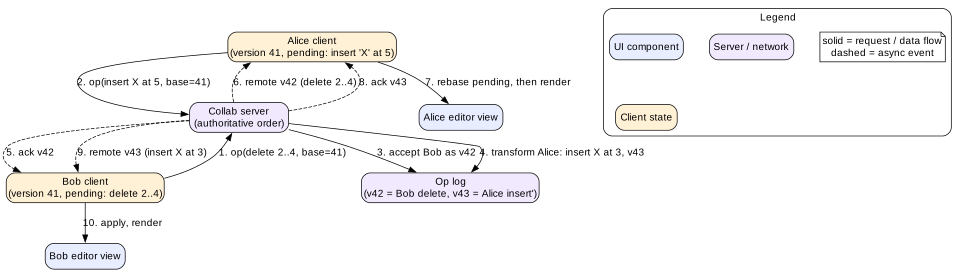
Example. Bob deletes 2 characters at position 2. Alice inserts at position 5 at the same time. The server transforms Alice's insert to position 3.
Limit. Transform functions are hard to get right for rich text and tree structures. Peer-to-peer OT without a server is much harder still.
CRDT
A CRDT gives every character or element a unique, stable ID and an ordering rule. Replicas can apply operations in any order and still converge. No central transform step is needed. Yjs and Automerge are popular libraries.
Example. Alice inserts "X" with ID (alice, 17) after the character (bob, 3). Every replica places it there, no matter when it arrives.
Limit. CRDTs keep metadata and tombstones for deleted items. Memory and load time grow unless the library compacts well.
Versions and acknowledgements
With a central server, each accepted operation gets a version number. A client sends its operation with the base version it was made on. The server acknowledges with the new version, and broadcasts it to others.
Example. Alice is at version 41 and sends an op with base=41. The server already has 42 from Bob, so it transforms Alice's op and stores it as 43.
Limit. Version numbers only work with one ordering authority per document. Sharding a single document across servers breaks this.
Presence (awareness)
Presence is short-lived state about who is in the document: name, colour, cursor, and selection. It is not part of the document and is never stored in history.
Example. Bob's caret appears as a blue line with his name, 3 lines below yours.
Limit. Cursor positions must be expressed in a form that survives edits, or the remote caret jumps to the wrong place.
Relative positions and anchors
An absolute offset like 120 becomes wrong as soon as someone types before it. A relative position points at a stable item ID plus a side. Cursors, selections, and comment ranges all use relative positions.
Example. A comment anchored "after item (alice, 40) until before item (alice, 52)" stays on the same words after others edit the paragraph above.
Limit. If all anchored text is deleted, the anchor collapses. The UI must decide whether to keep the comment as orphaned or resolve it.
1. Clarifying questions and requirements
Plain text, rich text, or blocks? Rich text with headings, lists, tables, and images is the usual scope. Block editors like Notion change the model shape.
How many concurrent editors? Typical documents have 1 to 5. Popular ones may hit 100 editors and 1,000 viewers.
Is offline editing required? This decides whether you need durable local storage and a merge story.
Do we need version history? Named versions and a timeline of changes need a stored op log or snapshots.
Comments and suggestions? Comments anchored to text, and "suggest mode" edits that others can accept.
Which platforms? Desktop web first. Mobile web brings virtual keyboards and harder IME behaviour.
Functional requirements
Edit rich text with headings, lists, links, images, and simple tables.
See other users' edits in real time, usually within 200 ms.
See other users' cursors and selections with names and colours.
Undo and redo your own changes only.
Keep editing while offline and merge on reconnect.
Add comments anchored to a range of text, with replies and resolve.
Respect roles: owner, editor, commenter, and viewer.
Non-functional requirements
Local keystroke to paint under 16 ms. Remote edit visible under 200 ms at p95 on good networks.
Strong eventual consistency. All clients that received the same ops show the same document.
No lost keystrokes across reloads, crashes, or offline periods.
Open a 100 page document to an interactive state in under 2 seconds.
Accessible to screen readers and keyboard users, with correct IME support for Chinese, Japanese, and Korean input.
Editor bundle under 250 KB compressed, with collaboration code loaded in parallel.
2. Scope and budgets
Document size
A 100 page document has about 50,000 words, or about 300,000 characters.
As plain text that is 300 KB. A CRDT that stores per-character metadata can be 5 to 20 times bigger before compaction. Yjs merges adjacent characters typed by the same user into one item, so real overhead is often 1.5 to 3 times.
Rendering all 300,000 characters into the DOM makes about 5,000 paragraphs and maybe 20,000 nodes. That is near the limit where style recalculation starts to cost several milliseconds per keystroke.
Operation rate
A fast typist makes about 8 keystrokes per second. With 5 active editors that is 40 ops per second into the document.
Batch local keystrokes into one message every 50 to 100 ms. That turns 8 messages per second per user into about 10, but each carries several characters. Under heavy load, batch up to 250 ms.
Each op message is about 50 to 200 bytes. Even 100 editors produce well under 100 KB per second of fan-out.
Frame budget
A keystroke has 16 ms from beforeinput to paint. Spend under 2 ms applying the op to the model, under 4 ms patching the DOM, and leave the rest for browser layout and paint. Sending to the network happens after paint, never before it. Remote ops are applied in batches inside one requestAnimationFrame callback so 20 remote ops cause one layout, not twenty.
Startup budget
Serve the latest snapshot, not the full op history. A snapshot of 300 KB compresses to about 80 KB.
Render the first screen of content from the snapshot right away. Hydrate the sync core and open the WebSocket in parallel.
If IndexedDB has a cached copy, render that first, then apply the delta from the server. That makes a reload feel instant.
3. High-level architecture
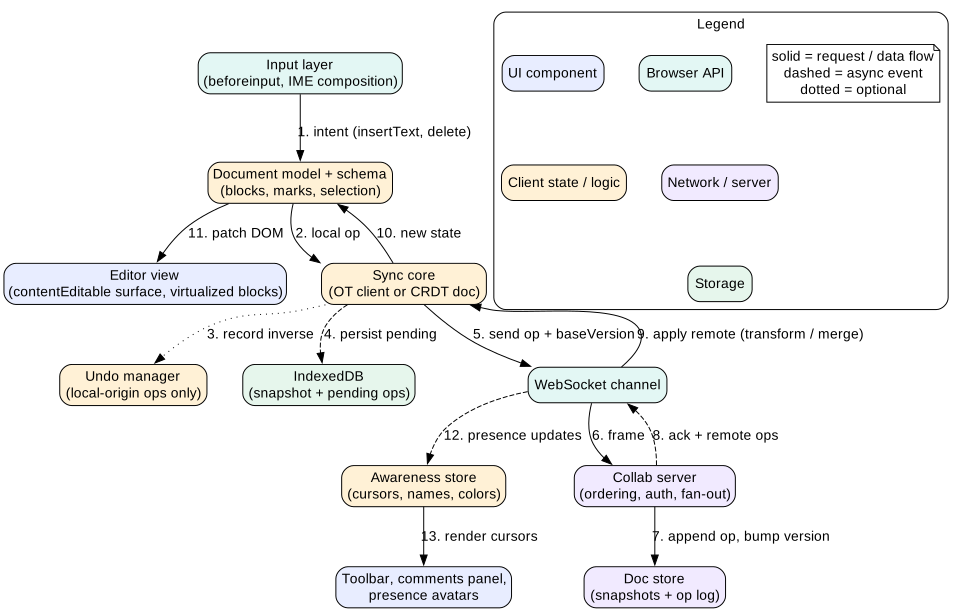
Figure 1. Client layers of a collaborative editor. Local edits flow down to the network. Remote edits flow back up into the same model.
Layers
Input layer. Listens to beforeinput, compositionstart, compositionend, paste, drop, and keyboard shortcuts. It turns them into intents such as insertText or toggleMark.
Document model. A schema-checked tree. It enforces rules like "a list item contains paragraphs" so invalid states cannot exist. Libraries like ProseMirror, Lexical, and Slate provide this layer.
Sync core. Either an OT client with a pending queue, or a CRDT document. It turns local changes into ops and merges remote ops.
Undo manager. Tracks only local-origin changes and stores how to reverse them.
Awareness store. Holds presence for every connected user, with a short timeout.
Persistence. IndexedDB keeps the last snapshot and all ops not yet acknowledged.
Transport. One WebSocket per document, with reconnect and backoff.
View. Renders the model into a contentEditable root. Panels for comments, outline, and presence avatars sit next to it.
Intuition
Treat the editor like a tiny database. The model is the table. Ops are the write-ahead log. The view is a query result that you refresh after every write.
4. Data model
Use a block list with inline runs. Each block has a stable ID. Comments and presence point at relative positions, not offsets.
type BlockId = string                      // stable, e.g. "b_7f3a"
type Mark = { type: 'bold' | 'italic' | 'link' | 'code'; attrs?: Record<string, string> }

type Block =
  | { id: BlockId; type: 'paragraph' | 'heading'; level?: 1 | 2 | 3; runs: TextRun[] }
  | { id: BlockId; type: 'listItem'; listId: string; depth: number; runs: TextRun[] }
  | { id: BlockId; type: 'image'; src: string; alt: string }

type TextRun = { text: string; marks: Mark[] }

// Relative position: survives concurrent edits
type RelPos = { itemId: string; assoc: -1 | 1 }

type DocState = {
  docId: string
  version: number                          // last server-acked version (OT)
  blocks: Record<BlockId, Block>
  order: BlockId[]                         // or a CRDT sequence in CRDT mode
  pending: Op[]                            // sent, not yet acked
  buffer: Op[]                             // local, not yet sent
}

type Presence = {
  clientId: string; userId: string; name: string; color: string
  anchor: RelPos | null; head: RelPos | null
  lastSeen: number
}

type CommentThread = {
  id: string; start: RelPos; end: RelPos
  quotedText: string                       // for orphan display
  messages: { authorId: string; body: string; at: string }[]
  resolved: boolean
}

type Permission = 'owner' | 'editor' | 'commenter' | 'viewer'
The two queues, pending and buffer, are the core of the OT client. At most one batch is in flight. New local edits go into buffer until the in-flight batch is acknowledged. This is the classic "one outstanding op" rule from Jupiter and Google Wave. It keeps transforms simple because the client only ever rebases against one server stream.
5. Interface and API
HTTP endpoints
GET /api/docs/:id returns metadata, the caller's permission, the latest snapshot, and its version.
GET /api/docs/:id/ops?since=1200 returns ops after a version, for catch-up when the gap is small.
GET /api/docs/:id/comments returns comment threads with their anchors.
POST /api/docs/:id/comments creates a thread. It needs an idempotency key so retries do not duplicate it.
Every op batch has a clientSeq. If the connection drops after send, the client resends the same batch with the same sequence. The server dedupes by client ID and sequence. This makes sends idempotent.
On join, the client sends its last known version. The server replies with missed ops, or tells the client to reload a snapshot if the gap is too large.
Presence is fire-and-forget and throttled to about 10 updates per second. It never blocks document ops.
The server checks the role on every op, not only on join. A role can change while the socket is open.
In CRDT mode, the protocol is simpler. Yjs uses a state vector, which is a map from client ID to the highest clock seen. On connect, each side sends its state vector. The other side replies with only the missing updates. There is no transform and no global version, although the server may still number updates for storage.
6. Deep dive: the editing surface and contentEditable
Why not just use contentEditable
Setting contenteditable="true" on a div gives you a caret, selection, IME, spellcheck, and accessibility for free. It also gives you problems.
Different browsers produce different HTML for the same action. Pressing Enter may create a <div>, a <p>, or a <br>.
Pasted HTML from Word or web pages contains styles, scripts, and nested junk.
document.execCommand is deprecated and inconsistent.
The browser can mutate the DOM at any time through autocorrect, spellcheck, or extensions like Grammarly.
The model-first approach
Modern editors keep contentEditable for the caret and input, but never trust the DOM as the source of truth. The flow is as follows.
Listen to beforeinput. Its inputType tells you the intent, like insertText, deleteContentBackward, or insertParagraph.
Call preventDefault() for intents you handle. Apply the change to the model.
Re-render the affected blocks. Restore the selection from the model with the Selection API.
For IME composition, do not prevent default. Let the browser show the composition. On compositionend, read the text and convert it into one model op.
Use a MutationObserver as a safety net. If something else changed the DOM, read it back or re-render the block from the model.
Mistake
Re-rendering a block in the middle of an IME composition. The composition breaks and the user sees doubled or lost characters. Defer remote changes to the composing block until compositionend, then apply them.
Paste and security
Never insert pasted HTML into the DOM. Parse it with DOMParser into a detached document, walk it, and map allowed elements to model nodes. Drop scripts, event handlers, styles, and unknown tags. Links must use http, https, or mailto schemes. Remote ops from other users get the same treatment. Validate them against the schema before applying, because a malicious client can send anything over the socket.
Accessibility of the surface
Give the root role="textbox", aria-multiline="true", and an accessible name like the document title.
Render headings as real h1 to h3 and lists as real ul and ol, so screen reader navigation works.
Do not move focus when remote edits arrive. Keep the local caret where it is.
Announce major collaboration events, like "Bob joined", in a polite live region. Never announce every remote keystroke.
7. Deep dive: OT versus CRDT
Figure 2. Server-ordered OT. The server assigns versions and transforms late ops. Clients rebase their pending ops on top of remote ones.
How the OT client works
The client keeps three states: the server-acked document, the in-flight batch, and the local buffer.
A local edit applies to the view at once and goes into buffer.
If nothing is in flight, the buffer moves to pending and is sent with base = version.
When a remote op arrives, the client transforms it against pending and buffer, then applies the transformed op to the view. It also transforms pending and buffer against the remote op so they stay valid.
When the ack arrives, version moves forward, pending is cleared, and the buffer is sent next.
The server does the same transform against every op accepted since the client's base. With one server order, the transform only needs a property called TP1. Applying A then B' gives the same result as B then A'. Peer-to-peer OT needs a stronger property, TP2, which most practical transform functions do not satisfy. That is why OT products almost always use a central server.
How a sequence CRDT works
Each inserted character gets an ID made of a client ID and a counter. It also records the ID of its left neighbour at insert time, and in some designs the right neighbour too. When two clients insert at the same place, a fixed tie-break rule, such as comparing client IDs, decides the order. Deletes do not remove items. They mark them as tombstones so later inserts that reference them still find their place.
Yjs uses the YATA algorithm. It stores runs of characters as single items, keeps a compact binary encoding, and has good garbage collection of deleted content. It has bindings for ProseMirror, CodeMirror, Monaco, and Quill.
Automerge models a JSON document with full history. It is good for app state and offline-first apps. Its newer Rust core made it much faster.
Choosing between them
Choose OT when you already have a central server and need a strict global order for audits or permissions. It also keeps client memory small. Google Docs is the famous example.
Choose a CRDT when you need serious offline editing, peer-to-peer sync, or multiple servers. Merge works without a central transform.
Both need a server for auth, storage, and fan-out in a real product. A CRDT does not remove the server. It removes the need for the server to understand every op.
Interview
Do not say CRDTs are strictly better. Say what each costs. OT costs complex transform code and needs a central order. CRDTs cost metadata memory, tombstones, and a harder story for rich text intent, such as two users applying bold and a link to overlapping ranges.
Rich text intent
Convergence is not the same as preserving intent. If Alice bolds "quick brown" while Bob types "very " inside it, should the new word be bold? Most users expect yes. Marks need rules about whether they expand at their edges. Libraries like Peritext research this carefully. In an interview, mention that you define mark expansion rules per mark type: bold expands, links do not.
8. Deep dive: presence, cursors, and multi-user undo
Presence
Each client publishes its selection as a pair of relative positions plus user info. Send it on selection change, throttled to about 100 ms. The server or the awareness protocol relays it to others. Each entry has a lastSeen time. If a client sends nothing for 30 seconds, others remove its cursor. On tab close, send a null state so the cursor disappears at once.
Drawing remote cursors
Convert each remote RelPos to an absolute model position.
Map the model position to a DOM range.
Call range.getClientRects() to get pixel boxes. Draw the caret and selection highlights in an overlay layer with absolute positioning.
Recompute on every document change, resize, and scroll. Batch the work in one requestAnimationFrame.
Never insert cursor elements inside the editable DOM. They would break selection, IME, and the model mapping. Use an overlay, or the CSS Custom Highlight API, which can paint ranges without changing the DOM.
Tip
Above about 20 visible collaborators, show avatars and a count instead of every cursor. Hundreds of carets help no one and cost layout time.
Multi-user undo
A global undo would revert Bob's latest change when Alice presses Ctrl+Z. That is wrong. Each user undoes only their own changes. The steps are as follows.
Track the origin of each change. Only local-origin changes go onto the undo stack.
Group changes into undo steps. A pause of 500 ms or a change in action type closes the group.
To undo, build the inverse op and transform it through all ops applied since. In a CRDT like Yjs, the UndoManager does this by deleting the items you inserted and restoring the items you deleted.
Store the selection with each undo step. After undo, restore the caret to where the change happened.
If others deleted the text you are trying to restore around, the undo may only partly apply. That is acceptable. It must never revert their work.
9. Deep dive: offline edits and merge
Durable local state
Save every local change to IndexedDB before you consider it safe. Write the pending ops in a small transaction after each batch. Every few hundred ops, write a fresh snapshot and drop the old ops. On reload, read the snapshot, replay the pending ops, render, then connect.
Show a save state badge: "Saving", "Saved", or "Offline, changes saved on this device".
Use navigator.storage.persist() to ask the browser not to evict your data under storage pressure.
Coordinate tabs. Two tabs open on the same document share one IndexedDB. Use a BroadcastChannel or Web Locks to elect one tab as the writer, or let each tab have its own client ID.
Reconnect and merge
With a CRDT, reconnect is simple. Exchange state vectors and send the missing updates both ways. The merge is automatic and order independent.
With OT, the client may hold hundreds of ops on a base version that is now far behind. The server transforms them against everything that happened in between. That works, but the cost grows with both sides of the gap. Many OT systems cap offline editing, or compress the offline ops into one composed op before sending.
When merge is surprising
Both methods converge, but the result can still surprise people. If Alice rewrote a paragraph offline while Bob deleted it online, the CRDT keeps Alice's new text, maybe without its surroundings. Good products surface this. After a long offline period, show a short notice like "Your offline changes were merged. Review changes" with a link to version history.
Mistake
Storing offline edits only in memory or in localStorage. Memory dies with the tab. localStorage is synchronous, blocks the main thread, and is limited to about 5 MB.
10. Deep dive: large documents, comments, and permissions
Rendering large documents
Block-level rendering. Re-render only the blocks touched by an op. A stable block ID makes this a keyed update.
CSS containment. Apply content-visibility: auto with contain-intrinsic-size to each block. The browser skips layout and paint for off-screen blocks but keeps them in the DOM, so find-in-page and accessibility still work.
Virtualization. For very large documents, render only blocks near the viewport. This breaks native find and selection across unrendered parts, so you must build your own search and handle Ctrl+A in the model.
Canvas rendering. Google Docs moved its main view to canvas to get precise layout and pagination. It then needs a hidden accessible DOM or similar layer for screen readers. That is a large investment.
Off-main-thread work. Run CRDT decoding, search indexing, and word count in a Web Worker.
Comments anchored to ranges
Store each comment with a start and end relative position and a copy of the quoted text. To render, resolve both anchors to model positions, then draw highlights with the overlay or the Custom Highlight API. Place the comment cards in a side column aligned to the highlight's top. If cards overlap, push later ones down. When the selected comment changes, slide the column so its card sits next to its text.
If both anchors resolve to the same point, the text was deleted. Show the comment as "Original text deleted" with the quoted text, so the conversation is not lost.
Permissions in the UI
The server returns the role with the document. The UI hides or disables edit controls for viewers and commenters. Viewers get a read-only surface with contenteditable="false".
The server still checks every op and rejects edits from viewers. UI hiding is only for user experience, never for security.
If the role is downgraded while the socket is open, the server sends a role change event. The client switches to read-only and keeps unsent local edits as a suggestion or a private copy, so the user does not lose work silently.
Commenters can create comment threads but cannot send document ops. Suggest mode is a special op type that marks inserted and deleted text as suggestions.
11. Failure modes
Socket drops mid-send. Resend the same batch with the same clientSeq. The server dedupes.
Server rejects an op with STALE_BASE or a schema error. Fetch missed ops and rebase. If it fails twice, reload the snapshot and replay local pending ops on top.
Divergence bug. Send a checksum of the document with acks every N versions. If the client's checksum differs, report it and resync from the server snapshot. Keep the local copy for recovery.
IndexedDB quota exceeded or blocked. Warn the user that offline safety is off. Keep syncing online.
Hot document with 100 editors. Increase the batching window, throttle presence harder, and show avatars instead of cursors.
Huge paste. A 5 MB paste would block the main thread and the socket. Parse in chunks, show progress, and split the ops into several messages.
Malicious client. Validate every remote op against the schema and the role, on server and client.
Two tabs with the same client ID. Their sequence numbers collide. Give each tab a fresh client ID from crypto.randomUUID().
12. Trade-offs
OT versus CRDT
OT: small client state and a central order, but complex transforms and weak offline.
CRDT: strong offline and peer sync, but metadata cost and tombstones.
DOM rendering versus canvas rendering
DOM: native selection, IME, accessibility, and find.
Canvas: exact layout and pagination at scale, but you rebuild text input and accessibility yourself.
Small batches versus large batches
Small batches of 50 ms: others see typing almost live.
Large batches of 250 ms: fewer messages and fewer transforms under load.
Full virtualization versus content-visibility
Virtualization: lowest DOM size, but breaks find and cross-page selection.
content-visibility: keeps the DOM complete and browser features working, with less saving.
13. 45-minute interview walkthrough
Minutes 0 to 5. Ask about rich text, concurrency level, offline, history, and comments. List requirements.
Minutes 5 to 9. Work out document size, op rate, and the 16 ms keystroke budget.
Minutes 9 to 15. Draw the layers: input, model, sync core, undo, awareness, persistence, transport, view.
Minutes 15 to 20. Show the data model and the WebSocket protocol with versions and clientSeq.
Minutes 20 to 28. Deep dive on OT versus CRDT. Walk through one concurrent edit example.
Minutes 28 to 33. contentEditable pitfalls, beforeinput, IME, and paste sanitizing.
Minutes 33 to 38. Presence and multi-user undo. Offline with IndexedDB.
Minutes 38 to 42. Large documents, comments with relative anchors, and permissions.
Minutes 42 to 45. Failure modes, the checksum safety net, and trade-offs.
14. Summary
Own a schema-checked document model. The DOM is a view, and beforeinput turns input into model ops.
OT needs a central order and transform functions. CRDTs need stable IDs and tombstones. Both converge.
Use versions, one in-flight batch, and idempotent clientSeq resends for a reliable protocol.
Presence is ephemeral and uses relative positions drawn in an overlay.
Undo only local-origin changes, transformed through later ops.
Persist pending ops to IndexedDB for offline safety and fast reload.
Scale rendering with block-level updates, content-visibility, and workers.
Anchor comments with relative positions. Enforce permissions on the server, reflect them in the UI.
15. Common mistakes
Treating the DOM inside contentEditable as the source of truth.
Sending absolute offsets for cursors and comments.
Implementing a global undo stack that reverts other users' work.
Re-rendering during IME composition.
Inserting pasted HTML directly.
Assuming a CRDT means no server is needed.
Hiding the edit button and calling it permission control.
Keeping unsent edits only in memory.
Worked example: two users edit the same sentence
The document holds "The cat sat." at version 41. Positions count from 0, so "c" is at 4.
Alice clicks after "The " and types "black ". Her client inserts "black " at position 4 into the view at once. The op goes into buffer.
Nothing is in flight, so the client moves it to pending and sends { base: 41, clientSeq: 9, ops: [insert(4, "black ")] }.
At the same moment Bob selects "cat" and types "dog". His client sends { base: 41, ops: [delete(4, 3), insert(4, "dog")] }.
Bob's message arrives first. The server stores it as version 42. Its document is now "The dog sat."
Alice's message arrives with base 41. The server transforms it against version 42. Both inserts are at position 4. The tie-break rule orders by client ID, and "alice" sorts before "bob", so Alice's insert stays at 4. The server stores it as version 43. Its document is "The black dog sat."
The server acks Bob with version 42 and sends him remote op 43, insert(4, "black "). Bob's client has nothing pending, so it applies it. Bob sees "The black dog sat."
The server sends Alice remote op 42. Alice's pending op is still unacked. Her client transforms op 42 against her pending insert. Bob's delete at 4 now targets position 10, after "black ". Alice's view becomes "The black dog sat."
The ack for version 43 arrives. Alice clears pending. Both clients now show the same text at version 43.
Bob's caret was a relative position after the item "g". It stays after "dog" on Alice's screen even though offsets changed.
Alice presses Ctrl+Z. Her undo manager only knows her insert. It deletes "black " and leaves Bob's "dog" alone. The result is "The dog sat." on both screens at version 44.
Code lab: OT transform for text
This snippet implements insert and delete ops on a string and a transform function with a tie-break. It then checks the TP1 property on random concurrent pairs. Save it as ot.mjs and run node ot.mjs. It should print "all converged".
function apply(doc, op) {
  if (op.type === 'ins') return doc.slice(0, op.pos) + op.text + doc.slice(op.pos)
  return doc.slice(0, op.pos) + doc.slice(op.pos + op.len)
}

// Transform a against b, where both were made on the same base
function transform(a, b) {
  if (a.type === 'ins' && b.type === 'ins') {
    const bFirst = b.pos < a.pos || (b.pos === a.pos && b.site < a.site)
    return bFirst ? { ...a, pos: a.pos + b.text.length } : a
  }
  if (a.type === 'ins' && b.type === 'del') {
    if (a.pos <= b.pos) return a
    if (a.pos >= b.pos + b.len) return { ...a, pos: a.pos - b.len }
    return { ...a, pos: b.pos, text: '' }               // inside a deleted range: drop it
  }
  if (a.type === 'del' && b.type === 'ins') {
    if (b.pos <= a.pos) return { ...a, pos: a.pos + b.text.length }
    if (b.pos >= a.pos + a.len) return a
    return { ...a, len: a.len + b.text.length }         // simple choice: delete grows over the insert
  }
  const aEnd = a.pos + a.len, bEnd = b.pos + b.len     // del vs del
  if (aEnd <= b.pos) return a
  if (a.pos >= bEnd) return { ...a, pos: a.pos - b.len }
  const start = Math.min(a.pos, b.pos)
  const overlap = Math.min(aEnd, bEnd) - Math.max(a.pos, b.pos)
  return { ...a, pos: start, len: a.len - overlap }
}

function randomOp(doc, site) {
  const pos = Math.floor(Math.random() * (doc.length + 1))
  if (Math.random() < 0.5 || doc.length === pos) return { type: 'ins', pos, text: site.repeat(2), site }
  return { type: 'del', pos, len: 1 + Math.floor(Math.random() * (doc.length - pos)), site }
}

let failures = 0
for (let i = 0; i < 10000; i++) {
  const base = 'collaborative'
  const a = randomOp(base, 'A')
  const b = randomOp(base, 'B')
  const left = apply(apply(base, a), transform(b, a))
  const right = apply(apply(base, b), transform(a, b))
  if (left !== right) { failures++; if (failures < 4) console.log('diverged', a, b, left, right) }
}
console.log(failures === 0 ? 'all converged' : `${failures} failures`)
Change the tie-break so both sides think they go first. Run it again and watch the convergence check fail. That shows why a deterministic tie-break is required.
Check yourself
Why do serious editors handle beforeinput instead of reading the DOM after each change?Answer
beforeinput tells you the intent before the browser changes the DOM. You can apply it to your own model and render a consistent result. Reading the DOM afterwards means parsing whatever HTML that browser produced, which differs across browsers.
Why do OT products almost always use a central server?Answer
With one server order, transforms only need TP1. Peer-to-peer OT needs TP2, which is very hard to satisfy with practical transform functions. The server also gives a natural place for versions, auth, and storage.
What is a tombstone in a sequence CRDT and why is it kept?Answer
A tombstone is a deleted item that stays in the structure, marked as deleted. Other replicas may still send inserts that reference it as a neighbour. Without it they could not find the right position.
Alice presses undo right after Bob typed a word. What should happen and why?Answer
Only Alice's last change is reverted. Bob's word stays. Undo stacks track local-origin changes only, and the inverse op is transformed through later ops so it still targets Alice's text.
Why should remote cursors be drawn in an overlay rather than inserted into the editable DOM?Answer
Extra elements inside the editable root break the mapping between DOM and model, confuse the browser selection, and can break IME composition. An overlay or the Custom Highlight API paints without touching the editable content.
What makes a resend after a dropped connection safe?Answer
Each batch carries a client ID and a clientSeq. The server remembers the last sequence applied per client and ignores duplicates. So the client can resend after any failure without double-applying.
A viewer's role is upgraded to editor while the document is open. What must the client do?Answer
The server sends a role change event. The client makes the surface editable, enables toolbars, and starts sending ops. The server's own permission check already uses the new role.
Key terms
contentEditable
An HTML attribute that makes an element editable by the user.
beforeinput
An input event that fires before the browser changes editable content and exposes an inputType.
IME composition
Multi-key input of a character, used for Chinese, Japanese, Korean, and others.
Operational Transformation
A method that adjusts concurrent operations so they apply cleanly after each other.
CRDT
A data type whose replicas converge when they apply the same updates in any order.
Tombstone
A deleted item kept in a CRDT so later references still resolve.
State vector
A map from client ID to the latest clock seen, used to compute missing updates.
Relative position
A position that points at a stable item ID instead of a numeric offset.
Presence
Ephemeral state about connected users, such as cursor and colour.
TP1
The transform property that two concurrent ops give the same result in either order.
Snapshot
A full serialized document state at a given version.
Custom Highlight API
A CSS API that styles arbitrary ranges without adding DOM elements.