A frontend system design walkthrough for a real-time chat client. You will learn how to keep a WebSocket healthy, order messages correctly, send instantly with an offline outbox, and keep many tabs in sync.
Frontend system design · Classic design question
After this page you can design the web client of a chat product end to end. You can explain the connection lifecycle, the message state machine, the store and IndexedDB layout, and how unread counts and receipts stay correct.
Correctness contract: a message the user sends is never lost and never shown twice. Messages in a thread always appear in server order. Unread counts and receipts match the server after any reconnect.
Assumptions: a backend that assigns a per conversation sequence number to each message, a WebSocket gateway, and a REST API for history. Users keep the app open in several tabs and lose network often on mobile.
Chat is the classic real-time frontend problem. The UI must feel instant, but the network is slow and unreliable. Two users can send at the same moment. A laptop sleeps and wakes up with a dead socket. A user opens three tabs, and each one wants its own connection. A phone goes through a tunnel with five unsent messages. The client must handle all of this and still show one clean, ordered thread. This page builds the client as a small distributed system with a local database, a sync engine, and a view.
A long lived, two way connection over a single TCP connection. It starts as an HTTP request with an Upgrade header. After that, client and server can both send frames at any time with very small overhead.
Example.new WebSocket("wss://chat.example.com/ws") opens a socket. The server pushes new messages as they happen.
Limit. The browser does not tell you quickly when a socket silently dies. You need your own heartbeat. It also has no built in backpressure in the classic API.
Client generated id
The client creates a unique id for each message before sending, usually with crypto.randomUUID(). The server stores it and echoes it back. It links the optimistic bubble to the server copy and lets the server drop duplicate sends.
Example. The client sends clientId: "c-7f1e" twice after a timeout. The server stores one message and acks both.
Limit. It is not an order. Two client ids say nothing about which message came first.
Server sequence number
The server gives each message in a conversation an increasing number: 1, 2, 3. This number defines the one true order. Clients sort by it. A jump from 41 to 44 tells the client it missed 42 and 43.
Example. Alice and Bob send at the same millisecond. The server accepts Bob first, so Bob gets 88 and Alice gets 89. Everyone sees the same order.
Limit. It needs one ordering point per conversation on the server. Very large channels must shard that carefully.
Outbox
A durable queue of messages the user wrote but the server has not acked. It lives in IndexedDB, so it survives reloads, crashes, and offline periods. The sync engine drains it when the socket is open.
Example. The user sends 3 messages in airplane mode, then closes the tab. On next open, the outbox still has 3 items and sends them in order.
Limit. Old outbox items may no longer make sense. A reply to a deleted message, sent 2 days later, needs a product decision.
BroadcastChannel
A browser API that lets tabs of the same origin send messages to each other. It is the simplest way to share events between tabs without a server round trip.
Example. Tab A receives a new message on its socket. It posts it on new BroadcastChannel("chat"). Tab B updates its thread at once.
Limit. It is fire and forget. A tab that is closed or frozen misses messages, so each tab must also read from IndexedDB.
Reverse scroll list
A chat thread is anchored to the bottom. New messages appear at the bottom, and older history loads at the top as the user scrolls up. The list must keep the user's place when content is added above.
Example. The user scrolls up and 50 older messages load. Without adjustment, the view would jump by 3,000 pixels.
Limit. Most virtual list libraries assume top anchoring. Bottom anchoring with variable heights needs extra work.
1. Clarifying questions and requirements
One to one, groups, or channels? A 1,000 person channel changes receipts and typing indicators a lot.
Which receipts? Sent, delivered, read. Per user or only "seen by 12"?
Offline support? Read history offline, write offline, or neither.
End to end encryption? It moves search and previews to the client and changes the whole design.
Platforms? Desktop web, mobile web, and an Electron desktop app that shares code.
Functional requirements
List conversations with last message preview, time, and unread count.
Open a thread, see recent messages, and scroll up for history.
Send text instantly, with sending, sent, delivered, and read states.
Send images and files with progress and cancel.
Show typing indicators and online presence.
Write messages while offline and send them on reconnect.
Show desktop notifications for new messages when the tab is not focused.
Non-functional requirements
Own message appears in the thread within one frame of pressing Enter.
Messages from others appear within 300 ms of send at p95 on a good network.
No lost messages and no duplicates, across reloads and reconnects.
Scrolling a 10,000 message thread stays at 60 fps.
One socket per browser, not per tab, to save server connections.
Screen reader users hear new messages without being flooded.
Interview
State early that the server owns order through a sequence number, and the client owns instant feedback through client ids and an outbox. This one sentence frames the whole design.
2. Scope and budgets
Devices and network
Desktop is the main platform for Slack style apps. Mobile web is the main one for Messenger style apps. Design for a mid range phone.
Mobile networks switch between Wi-Fi and cellular. Expect a socket drop every few minutes on a moving phone.
Message volume
A busy user: 50 conversations, 200 incoming messages per hour, bursts of 20 per second in an active channel.
One message: about 300 bytes of JSON with metadata. 10,000 cached messages is 3 MB in IndexedDB. Fine.
Typing events: one every 3 seconds per typing user. Presence: a change every few minutes per user.
Frame budget
A burst of 20 messages per second must not re-render the whole thread 20 times. Batch incoming messages per animation frame with requestAnimationFrame. That turns 20 renders into at most about 1 per frame, each well under 10 ms. Each message bubble should cost under 1 ms to render.
DOM size
A message bubble has 10 to 30 nodes. A 5,000 message thread without virtualization would be 100,000 nodes. That breaks scroll on any device. Window the thread to about 50 visible bubbles plus overscan.
Bundle budget
Core chat route: 200 KB compressed or less.
Emoji picker (often 100 KB or more of data), rich text editor, image editor, and call UI load on demand.
Connection budget
If 10 million users each keep 3 tabs open, one socket per tab means 30 million connections. One socket per browser means 10 million. That is a real server cost, and it is a client design choice.
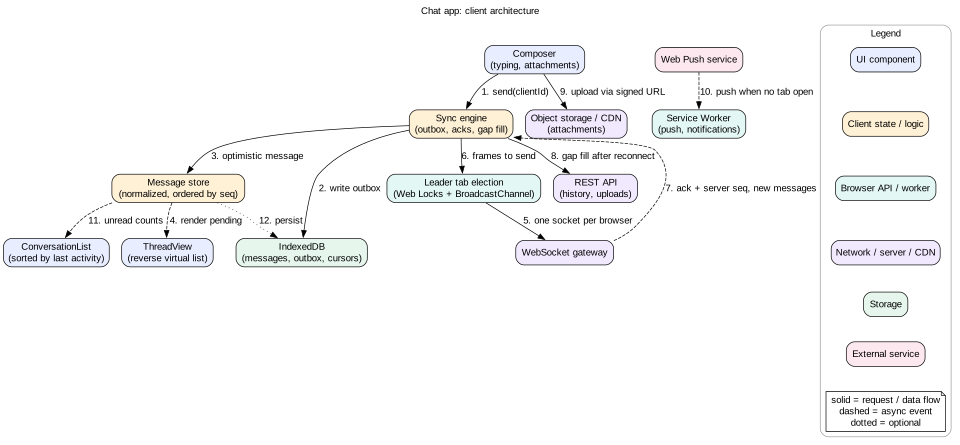
3. High-level architecture
View layer.ConversationList, ThreadView with a reverse virtual list, MessageBubble, Composer, and TypingIndicator.
State layer. A normalized message store per conversation, ordered by seq. A conversations store with unread counts and last read markers.
Sync engine. Owns the outbox, acks, retries, gap detection, and reconnect catch up. It is the only part that talks to the network.
Persistence. IndexedDB holds messages, the outbox, and per conversation cursors.
Platform. A leader tab that owns the WebSocket, BroadcastChannel to share events, a Service Worker for Web Push and notifications.
Network. WebSocket gateway for real-time events, REST for history and upload URLs, object storage and CDN for attachments.
Figure 1. Client architecture. The sync engine is the only network owner. IndexedDB is the local source of truth.
The key idea is local first. The UI reads from the local store, which mirrors IndexedDB. The sync engine moves data between the local database and the server in the background. The view never waits for the network to show something the user did.
Intuition
Think of a post office counter. You hand over a letter and get a receipt at once. The letter sits in the outgoing tray. A courier picks up the tray when the road is open. If the road is closed, the tray waits. Your receipt is never thrown away.
4. Data model
type MsgStatus = "pending" | "sending" | "sent" | "delivered" | "read" | "failed"

interface Message {
  clientId: string          // created on the client, stable forever
  id?: string               // server id, set after ack
  conversationId: string
  seq?: number              // server order, set after ack
  senderId: string
  body: { kind: "text"; text: string } | { kind: "file"; attachmentId: string }
  createdAt: number         // client clock, display only
  serverTime?: number       // server clock, after ack
  status: MsgStatus
  replyToId?: string
}

interface Conversation {
  id: string
  title: string
  memberIds: string[]
  lastSeq: number           // newest seq the client has
  lastReadSeq: number       // my read marker
  unreadCount: number       // derived: messages from others with seq > lastReadSeq
  lastMessagePreview: string
  lastActivityAt: number
  oldestLoadedSeq: number   // for loading history upward
}

interface ClientState {
  conversations: Record<string, Conversation>
  messages: Record<string, Message>          // key = clientId or id
  threadOrder: Record<string, string[]>      // conversationId -> keys sorted by seq, pending last
  typing: Record<string, Record<string, number>>  // convId -> userId -> expiresAt
  connection: "connecting" | "open" | "reconnecting" | "offline"
}

// IndexedDB object stores
// messages:  keyPath "clientId", index ["conversationId", "seq"]
// outbox:    keyPath "clientId", index "createdAt"
// meta:      key "cursor:<conversationId>" -> lastSeq
Notice that pending messages have no seq. They sort after all acked messages, in the order the user wrote them. After the ack, they get their real seq and may move up if someone else's message got an earlier number. This is correct. The server order is the truth.
The compound index ["conversationId", "seq"] makes "give me 50 messages before seq 900 in conversation X" a single fast range query with IDBKeyRange.bound.
GET  /api/conversations?after=<cursor>
GET  /api/conversations/:id/messages?beforeSeq=900&limit=50     // history
GET  /api/conversations/:id/messages?afterSeq=912&limit=200     // gap fill
POST /api/uploads   { name, size, mime }  ->  { attachmentId, uploadUrl }
The hello frame carries the client's latest seq per conversation. The server can then replay what the client missed, or say "too far behind, use REST". This makes reconnect cheap and correct.
Model the connection as a small state machine: connecting, open, reconnecting, offline. Show the state in the UI with a quiet banner such as "Reconnecting". Users then know why messages are not arriving.
Open and authenticate
Open wss://. Never plain ws:// in production.
Send hello with a short lived token and cursors. Avoid putting long lived tokens in the URL, because URLs end up in logs.
Wait for a welcome frame. Only then mark the socket open and drain the outbox.
Heartbeat
A socket can die silently. A NAT box drops it, or the laptop sleeps. The browser may not fire close for minutes. Send an application level ping every 25 seconds. If no pong arrives within 10 seconds, close the socket and reconnect. 25 seconds also keeps most proxies from timing out idle connections, which often happens at 30 to 60 seconds.
Reconnect with backoff and jitter
Reconnect after 0.5 s, then 1 s, 2 s, 4 s, up to 30 s. Add random jitter of up to 50 percent. Without jitter, a server restart makes millions of clients reconnect at the same instant, which can knock the server down again. That is the thundering herd problem.
Also listen to browser signals:
online and offline events: reconnect at once on online, skip retries while offline.
visibilitychange: when a hidden tab becomes visible, check the socket at once with a ping.
freeze and resume from the Page Lifecycle API: a frozen tab cannot answer pings, so expect a reconnect on resume.
Catch up after reconnect
On reconnect, the hello frame sends the latest seq per conversation. The server replays missing messages. For conversations far behind, the client calls the REST gap fill endpoint. Only after catch up should unread counts be trusted again.
Mistake
Relying on the close event to detect a dead socket. On a sleeping laptop or a phone that changed networks, it may not fire for a long time. Messages pile up on the server while the user sees "connected".
7. Deep dive: ordering, optimistic send, and the outbox
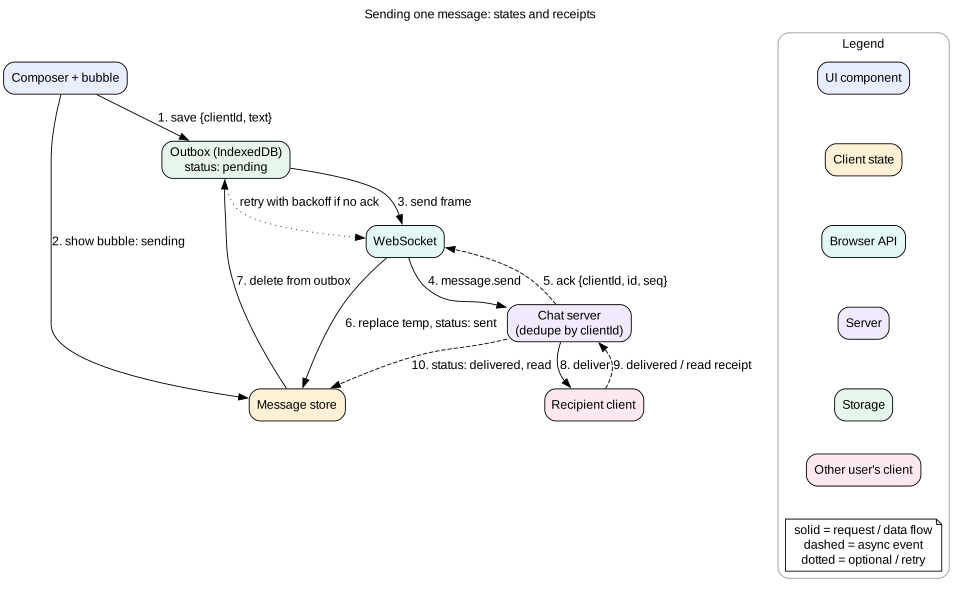
Figure 2. Message send lifecycle. The outbox makes the send durable. The ack makes it ordered.
The send path
The user presses Enter. Create clientId with crypto.randomUUID().
Write the message to the outbox in IndexedDB. Only after this write is the message durable.
Add it to the store with status pending. The bubble shows a clock icon or a faded style.
If the socket is open, send the frame and set status sending.
On ack, set id, seq, and serverTime. Set status sent. Delete it from the outbox. Re-sort the thread.
If no ack arrives within about 10 seconds, resend with the same clientId. The server dedupes, so this is safe.
After about 5 failed attempts or a hard error such as "not a member", set status failed. Show "Not sent. Tap to retry". Keep the text.
Order within the outbox
Send outbox items one at a time per conversation, in creation order. Wait for each ack before the next send. If two messages are in flight together and the first is retried, the server could order them backward. A simpler alternative is to send in parallel with a client sequence number per sender, and let the server keep per sender order.
Merging incoming messages
If a message.new carries a clientId that is already in the store, it is your own message echoed back. Merge it. Do not add it again.
Insert by seq. Use binary search into the sorted array, not a full sort, because bursts are common.
If the new seq is more than lastSeq + 1, there is a gap. Request the missing range through REST. Show the new message right away, but mark the gap so a "Loading" row can appear if the user scrolls there.
If the seq is already known, drop it. Replays after reconnect often overlap.
Timestamps
Never order by the client clock. Device clocks can be minutes off. Show createdAt for pending messages so the bubble has a time. After ack, show serverTime. Group bubbles by sender and by gaps of more than about 5 minutes, using server time.
Edits, deletes, and reactions
Treat them as events on a message id, with their own version number. Apply an edit only if its version is newer than the one you have. This makes late or repeated events harmless. Reactions are a set per emoji. Apply them optimistically, with the same snapshot and rollback approach as a like button.
8. Deep dive: receipts, typing, and unread counts
Delivered and read receipts
Sent. The server acked. One check mark.
Delivered. At least one of the recipient's devices received it. Two check marks.
Read. The recipient saw it. Colored check marks or an avatar.
Use a read marker, not per message flags. The recipient's client sends read with the highest seq it has shown. Every message with a lower seq is read too. This turns 50 receipts into one. In a group, keep the read seq per member. A message is "seen by N" when N members have a read marker at or above its seq.
When is a message read? When the thread is open, the tab is visible, the window has focus, and the message is in the viewport. Use IntersectionObserver on the newest bubbles. Debounce read updates to about once per second, so a fast scroll does not send 30 frames.
Typing indicators
Send typing at most once every 3 seconds while the user types. Throttle, do not debounce, because the indicator must appear quickly.
On the receiving side, show the indicator and expire it after about 5 seconds without a new event.
Clear it at once when a message from that user arrives.
Do not store typing events in IndexedDB or retry them. They are ephemeral and losing one is harmless.
In large channels, show "Several people are typing" and stop listing names.
Unread counts
Derive the count, do not increment a counter. unreadCount is the number of messages from others with seq greater than lastReadSeq. Incrementing on each event breaks with duplicates and replays. Deriving from seq is always right after catch up. For conversations with many unread messages, the server sends the count, because the client may not have all messages.
Show a total badge in the tab title, such as (3) Chat, and with the Badging API (navigator.setAppBadge) for installed apps.
Show a "New messages" divider in the thread at lastReadSeq when the user opens it.
Sync the read marker across devices. Reading on the phone should clear the badge on the laptop.
Tip
The read marker is a single integer per user per conversation. It is the cheapest correct way to do receipts, unread counts, and cross device sync at once.
9. Deep dive: conversation list, thread view, and reverse scroll
Conversation list
Sort by lastActivityAt. Move a conversation to the top when a message arrives.
Animate moves with the FLIP technique, or skip animation when many updates come at once.
Virtualize when the user has hundreds of conversations. Rows have a fixed height, so this is easy.
On mobile, the list and the thread are two screens. On desktop, they are two panes side by side. Use one component tree with a responsive layout, and keep both in the URL, such as /c/conv_1.
Thread view and reverse virtualization
Open a thread at the bottom, or at the first unread message if there are many. The list is anchored to the bottom.
New message arrives. If the user is within about 100 pixels of the bottom, stick to the bottom and scroll to show it. If the user has scrolled up, do not move. Show a "3 new messages" pill instead.
History loads at the top. Before inserting, record scrollHeight and scrollTop. After render, set scrollTop to the old value plus the height added. Do it in a useLayoutEffect or before paint, so the user sees no jump.
Images load late. Reserve size from attachment metadata, exactly as in a feed.
A common trick is display: flex with flex-direction: column-reverse on the scroll container. The browser then anchors to the bottom for free, and content added at the top does not shift the view. It has quirks with scrollTop signs across browsers, so test it. Native CSS scroll anchoring through overflow-anchor also helps for history inserts in normal flow.
For virtualization, keep heights by message key, estimate before measuring, and render from the bottom. Prefetch older history when the user is within about one screen of the top, using an IntersectionObserver sentinel.
Jump to a message
Search results and reply links need "jump to seq 1,204". Load a window around that seq through REST, render it as a separate segment, and scroll to the message. The thread now has a gap between this segment and the newest messages. Track loaded ranges as a list of [fromSeq, toSeq] intervals, and fill gaps as the user scrolls.
Accessibility
Use role="log" on the thread container. It is a live region meant for chat, with polite announcements of additions.
Announce incoming messages only for the open conversation. Include the sender name, for example "Bob: see you at 5".
Do not announce your own sent messages again.
Each message is focusable with arrow keys, and actions like reply and react are reachable without a mouse.
Respect prefers-reduced-motion for scroll animations.
10. Deep dive: attachments upload
The user picks a file. Show a local preview at once with URL.createObjectURL(file). Revoke the URL later to free memory.
Check size and type on the client for fast feedback. The server must check again.
For images, resize to a sensible maximum, such as 2,048 pixels, in a Web Worker with OffscreenCanvas. This can turn a 6 MB photo into 500 KB.
Ask the server for an upload URL. Upload directly to object storage with a signed URL, so the chat server does not carry the bytes.
Show progress. fetch has no upload progress event in most browsers, so use XMLHttpRequest with upload.onprogress. Allow cancel with xhr.abort().
For files over about 10 MB, use a resumable or chunked protocol, so a dropped connection only resends the last chunk.
After upload, send the chat message with the attachmentId through the normal outbox path.
Store the pending file as a Blob in IndexedDB with the outbox item. Then an upload interrupted by a reload can resume. Without this, an offline image message is lost on reload.
11. Deep dive: multi-tab sync and notifications
One socket per browser
Elect one leader tab to own the WebSocket. The Web Locks API makes this clean. Each tab calls navigator.locks.request("chat-leader", ...). Only one tab holds the lock. When that tab closes, the browser releases the lock and the next tab gets it.
The leader writes incoming messages to IndexedDB and posts them on a BroadcastChannel.
Follower tabs listen to the channel and update their stores.
Followers send outgoing frames to the leader over the channel. Or simpler: every tab writes to the shared outbox in IndexedDB, and only the leader drains it.
A SharedWorker is another option. It can own the socket for all tabs. Support was historically missing on some mobile browsers, so check your target browsers.
Keeping tabs consistent
The read marker updates in one tab must reach the others. Post it on the channel.
Drafts per conversation can sync too, so a draft started in one tab is not lost in another.
When a hidden tab becomes visible, reload state from IndexedDB in case it missed broadcasts while frozen.
Notifications
Ask for permission with Notification.requestPermission() only after a clear user action, such as a button. Asking on page load trains users to click Block.
When a tab is open but hidden, the leader shows a notification for new messages in muted or unfocused conversations.
Only one tab should notify. The leader owns this, or you get 3 identical pop ups.
When no tab is open, the server sends Web Push. The Service Worker's push handler calls registration.showNotification(). Clicking it focuses an existing tab with clients.matchAll() or opens a new one.
Use the tag option so new messages in the same conversation replace the previous notification instead of stacking.
Hide message text in notifications if the user turned on privacy mode.
Interview
Multi-tab is where many candidates stop. Mention leader election with Web Locks, BroadcastChannel for fan out, IndexedDB as shared truth, and one notifier. It shows staff level depth.
12. Failure modes
Silent socket death. Heartbeat every 25 seconds, reconnect after 10 seconds without pong.
Reconnect storm after a server deploy. Exponential backoff with jitter. The server can also send a "reconnect after N seconds" hint before shutting down.
Ack lost. The message was stored but the ack never came. The client resends with the same clientId. The server dedupes and acks again.
Duplicate bubble. Own message echoed by message.new and also acked. Merge by clientId.
Gap in sequence. A dropped frame. Detect seq jumps and fill with REST.
IndexedDB quota or failure. Some private browsing modes limit storage. Fall back to memory and warn that offline send is not available. Use navigator.storage.persist() to ask for durable storage.
Two leader tabs. Can happen with a homemade election. Web Locks prevents it.
Stale outbox. A message queued 3 days ago. Ask the user before sending items older than a set age, or show them as failed.
Token expires on a long socket. The server closes with a specific code. The client refreshes the token and reconnects, without dropping the outbox.
13. Trade-offs
WebSocket versus SSE plus POST versus long polling
WebSocket gives two way, low overhead messaging. It needs sticky connections and custom heartbeats.
SSE for incoming plus HTTP POST for outgoing works over plain HTTP/2 and reconnects on its own. It is a valid choice for simpler chat.
Long polling works everywhere but adds latency and server load. Keep it only as a fallback.
Serial versus parallel outbox
Serial sends keep order simply. A slow message delays the ones behind it.
Parallel sends are faster but need a per sender sequence for the server to restore order.
Local first versus server only
IndexedDB storage gives offline reading, instant thread open, and durable sends. It adds schema migrations and storage limits.
Server only is simpler. Every thread open needs a network call, and offline send is impossible.
Leader tab versus socket per tab
A leader saves server connections and gives one notifier. It adds election and messaging code.
A socket per tab is simple and robust. It multiplies connections and duplicates notifications.
Read receipts per message versus read marker
A read marker is one integer and cheap. It assumes reading is in order.
Per message receipts are precise but expensive in big groups.
14. 45-minute interview walkthrough
Minutes 0 to 5. Clarify group size, receipts, message types, offline, encryption, platforms.
Minutes 5 to 9. Requirements and budgets: own message in one frame, 300 ms delivery, no loss, burst batching, connection count math.
Minutes 9 to 15. Architecture: view, store, sync engine, IndexedDB, leader tab, network. Draw it.
Minutes 15 to 20. Data model and protocol: clientId, seq, read marker, hello with cursors, ack frame.
Minutes 20 to 30. Deep dive on send: outbox, optimistic bubble, ack, dedupe, retries, gap fill.
Minutes 30 to 35. Connection lifecycle: heartbeat, backoff with jitter, catch up.
Minutes 35 to 40. Receipts, typing, unread counts derived from seq. Reverse scroll thread.
Minutes 40 to 45. Multi-tab, notifications, failure modes, and metrics: send success rate, time to delivered, reconnect rate, duplicate rate.
15. Summary
The server orders messages with a per conversation seq. The client never orders by its own clock.
Each message gets a clientId. It links the optimistic bubble to the ack and makes retries safe.
Write to an IndexedDB outbox before sending. Drain it when the socket is open.
Keep the socket healthy with heartbeats, jittered backoff, and catch up from cursors.
Use a read marker for receipts and derive unread counts from it.
Anchor the thread to the bottom and keep position when history loads above.
Use one socket per browser with Web Locks and BroadcastChannel, and one notifier.
16. Common mistakes
Ordering messages by client timestamps.
Showing a message twice after the server echoes it.
Keeping unsent messages only in memory, so a reload loses them.
Reconnecting all clients at fixed intervals with no jitter.
Incrementing unread counters on each event instead of deriving them.
Opening a socket per tab and showing a notification per tab.
Jumping the scroll when older history loads.
Persisting and retrying typing events.
Asking for notification permission on page load.
Worked example: sending through a tunnel
Alice is on a train. She has one tab open on her phone and one on her laptop at home.
Alice types "Running late" and presses Enter. The client creates clientId c-1, writes it to the outbox, and shows a faded bubble. Time to bubble: 4 ms.
The socket sends the frame. The server stores it with seq 501 and acks. The bubble becomes solid with one check mark. The outbox entry is deleted.
The train enters a tunnel. Alice sends "Maybe 10 min" (c-2) and "Sorry!" (c-3). Both go to the outbox. The heartbeat gets no pong for 10 seconds. The client closes the socket and shows "Reconnecting".
Meanwhile Bob sends "No problem" with seq 502. Alice's phone does not receive it.
The client retries after 0.5 s, 1 s, 2 s, and 4 s, each with jitter. All fail.
The train leaves the tunnel. The online event fires. The client reconnects and sends hello with cursor conv_1: 501.
The server replays seq 502 from Bob. The client inserts it after 501. The thread shows Bob's message above Alice's two pending bubbles.
The outbox drains in order. c-2 gets seq 503, c-3 gets seq 504. Both bubbles turn solid.
Bob's phone receives 503 and 504 and sends a read marker of 504. Alice sees both messages marked read.
Alice's laptop tab at home was leader there. It received 501 to 504 on its own socket, wrote them to IndexedDB, and showed one notification with tag: "conv_1", updated in place each time.
Later Alice opens the laptop. The tab reads the read marker from the server, sees 504 is read on her phone, and clears the badge.
Code lab: ordering and reconciling messages
This model shows the core of the sync engine without a socket. It applies optimistic sends, acks, echoes, replays, and out of order arrivals. It then checks that the thread has no duplicates and is in server order with pending messages last. Save as chat.mjs and run node chat.mjs with Node 18 or newer.
import { randomUUID } from "node:crypto"

function createThread() {
  const byKey = new Map()            // clientId or id -> message
  const seqs = new Set()
  const keyOf = (m) => m.clientId ?? m.id

  function sendLocal(text) {
    const m = { clientId: randomUUID(), text, status: "pending" }
    byKey.set(m.clientId, m)
    return m.clientId
  }
  function onAck({ clientId, id, seq }) {
    const m = byKey.get(clientId)
    if (!m || m.seq) return          // unknown or already acked
    Object.assign(m, { id, seq, status: "sent" })
    noteSeq(seq)
  }
  function onIncoming(msg) {
    const key = keyOf(msg)
    const existing = byKey.get(key)
    if (existing && existing.seq) return   // replay or echo already merged
    byKey.set(key, { ...existing, ...msg, status: msg.status ?? "sent" })
    noteSeq(msg.seq)
  }
  function noteSeq(seq) { seqs.add(seq) }
  function gaps() {                  // ranges of seq we never received
    const out = []
    const max = Math.max(0, ...seqs)
    for (let s = 1; s <= max; s++) {
      if (seqs.has(s)) continue
      const last = out.at(-1)
      if (last && last[1] === s - 1) last[1] = s
      else out.push([s, s])
    }
    return out
  }
  function view() {
    const all = [...byKey.values()]
    const acked = all.filter((m) => m.seq).sort((a, b) => a.seq - b.seq)
    return [...acked, ...all.filter((m) => !m.seq)]
  }
  return { sendLocal, onAck, onIncoming, view, gaps }
}

const t = createThread()
t.onIncoming({ id: "m1", seq: 1, text: "hi from Bob" })
const a = t.sendLocal("hi Bob")
const b = t.sendLocal("are you there?")
t.onIncoming({ id: "m3", seq: 3, text: "Bob again" })      // arrives before acks
t.onAck({ clientId: a, id: "m2", seq: 2 })
t.onIncoming({ clientId: a, id: "m2", seq: 2, text: "hi Bob" })   // echo of own message
t.onIncoming({ id: "m3", seq: 3, text: "Bob again" })      // replay after reconnect
t.onIncoming({ id: "m6", seq: 6, text: "Bob later" })      // gap: 4 and 5 missing

for (const m of t.view()) console.log(m.seq ?? "-", m.status, m.text)
console.log("gaps to fill:", JSON.stringify(t.gaps()))
const texts = t.view().map((m) => m.text)
console.log(new Set(texts).size === texts.length ? "PASS no duplicates" : "FAIL")
Expected output: messages 1, 2, 3, and 6 in order, then "are you there?" as pending at the end. The gap list shows [[4,5]]. Your own message appears only once even though it was acked and echoed. Try calling onAck for b with seq 4 and see it move into place.
Check yourself
Why should the client never order messages by its own timestamp?Answer
Device clocks drift and can be minutes off. Two users would see different orders. The server sequence number gives one order that every client agrees on.
What two problems does a client generated id solve?Answer
It links the optimistic bubble to the server ack and echo, so the message is shown once. It also lets the server dedupe retries, so a resend after a lost ack does not create a duplicate.
Why write to IndexedDB before sending over the socket?Answer
So the message survives a reload, crash, or long offline period. Memory alone loses it. The outbox makes the send durable before the network is involved.
How does the client detect it missed messages?Answer
A new message arrives with a seq greater than lastSeq + 1. The client records the gap and fetches that range through the REST gap fill endpoint.
Why derive unread counts instead of incrementing a counter?Answer
Events can be duplicated or replayed after reconnect. Counting messages from others with seq greater than lastReadSeq is always correct, no matter how many times an event arrives.
How do you keep only one WebSocket for many tabs?Answer
Elect a leader with the Web Locks API. The leader owns the socket, writes to IndexedDB, and broadcasts events on a BroadcastChannel. When it closes, the lock passes to another tab, which opens a new socket.
Older history loads at the top and the view jumps. How do you fix it?Answer
Record scrollHeight and scrollTop before the insert. After render and before paint, set scrollTop to the old value plus the added height. A column-reverse container or native scroll anchoring can also help.
Key terms
WebSocket
A long lived, two way connection between browser and server.
Heartbeat
Periodic ping and pong frames that prove a connection is alive.
Exponential backoff with jitter
Retry delays that double each time, plus randomness to spread out clients.
Client id
A unique id created on the client for each message, used for dedupe and reconciliation.
Sequence number
A server assigned, increasing number that defines message order in a conversation.
Ack
A server frame confirming it stored a message, with its id and sequence number.
Outbox
A durable queue of messages waiting for an ack.
Gap fill
Fetching a missing range of sequence numbers after a jump is detected.
Read marker
The highest sequence number a user has read in a conversation.
BroadcastChannel
Browser API for messaging between same origin tabs.
Web Locks API
Browser API that grants a named lock to one context at a time, useful for leader election.
Web Push
A standard for servers to send messages to a Service Worker even when no tab is open.
role="log"
An ARIA live region role for chat logs and similar growing content.