A frontend system design walkthrough for a search box that suggests results as you type. You will learn to limit requests, block stale results, and reuse cached prefixes. You will also build a combobox that works with a keyboard and a screen reader.
Frontend system design · Classic design question
After this page you can design a production typeahead, like the search box on Google, Amazon, or Slack. You can defend each choice with numbers and name the exact browser APIs and ARIA attributes.
Correctness contract: the list always matches the text that is in the box right now. Older responses never overwrite newer ones. The keyboard and screen reader always know which option is active.
Assumptions: a web client with a remote suggest API. Some suggestions can also come from local data such as recent searches. Users type on desktop keyboards and on phone soft keyboards.
Autocomplete is a small component with a lot of hidden logic. Each keystroke is a possible network request. Responses arrive out of order. Users type faster than the server answers. The list must be navigable with arrow keys, and screen readers must announce the active option. On a phone, the soft keyboard covers half the screen. This page treats autocomplete as a full system: input, timing, network, cache, ranking, rendering, and accessibility.
Debounce waits until input has been quiet for a set time, then runs once. Each new keystroke resets the timer. It turns a burst of events into one call at the end.
Example. With a 150 ms debounce, typing "react" at 80 ms per key sends one request, 150 ms after the "t".
Limit. A user who types without pausing sees nothing until they stop. Long debounces feel slow.
Throttle
Throttle runs at most once per interval, no matter how many events arrive. It gives steady updates during a burst.
Example. With a 300 ms throttle, typing for 2 seconds sends about 7 requests, one every 300 ms.
Limit. It sends more requests than debounce. Without a trailing call, the last keystroke may be missed.
AbortController
A browser API that cancels a fetch. You pass controller.signal into the request. Calling controller.abort() rejects the promise with an AbortError and closes the connection if it is still open.
Example. The user types "rea" then "reac". The client aborts the "rea" request before it returns.
Limit. Abort stops the client from waiting. The server may still do the work. It does not save server CPU unless the server watches for closed connections.
LRU cache
A least recently used cache keeps a fixed number of entries. When full, it drops the entry that was used longest ago. A JavaScript Map keeps insertion order, so it makes a simple LRU.
Example. A 100 entry LRU holds results for the last 100 distinct queries. Backspacing from "reac" to "rea" is instant.
Limit. Cached results go stale. Trending or inventory data needs a time to live.
Combobox pattern
A WAI-ARIA pattern for an input with a popup list. The input keeps DOM focus. Arrow keys move a virtual focus through options. The input points to the active option with aria-activedescendant.
Example. Pressing Down sets aria-activedescendant="opt-2". The screen reader reads "React hooks, 2 of 8".
Limit. Screen reader support differs across browsers. You must test with real tools such as VoiceOver and NVDA.
Prefix reuse
Results for a longer query are often a subset of results for a shorter one. If "rea" returned a complete list, the client can filter it locally for "reac" without a request.
Example. A contact picker loads all 40 contacts that match "an". Typing "ann" filters those 40 on the client.
Limit. It only works when the server says the list is complete. A ranked top 10 list for "rea" may not contain the best match for "reac".
1. Clarifying questions and requirements
Ask questions first. The answers change the design a lot.
What is being searched? Web queries, products, people, files, or commands. The data size decides between server, client, or both.
What happens on select? Fill the input, navigate to a page, or add a chip (as in an email "To" field).
How large is the dataset? 500 contacts fit on the client. 100 million products do not.
Is there personalization? Recent searches and user history change ranking and caching.
Must it work offline? Then local data is required.
Which languages? Accents, case, and scripts like Chinese or Japanese change matching and input handling.
Functional requirements
Show up to 8 suggestions as the user types, after a minimum of 1 or 2 characters.
Highlight the part of each suggestion that matches the query.
Support mouse, touch, and full keyboard use: Up, Down, Enter, Escape, Home, End, Tab.
Blend recent searches, local matches, and remote results.
Show clear loading, empty, and error states.
Submit free text if the user does not pick a suggestion.
Non-functional requirements
Suggestions appear within 100 to 200 ms of the last keystroke at p75. Above about 300 ms the feature feels laggy.
Typing never stutters. Input to paint stays under 50 ms, so the main thread must stay free.
No stale results ever replace fresh ones.
Request volume stays affordable. Target at most 1 to 2 requests per word typed, not one per key.
Meets WCAG 2.2 AA. Works with VoiceOver, NVDA, and JAWS.
The component is reusable with different data sources.
Interview
Ask "is this a generic component or a specific search box?" A generic component needs a pluggable data source and render props. A specific box can hard code ranking and layout. Interviewers often want the generic component.
2. Scope and budgets
Typing speed and request math
An average typist types about 40 words per minute. That is about 200 characters per minute, or one key every 300 ms. Fast typists hit one key every 80 to 120 ms. Take a 10 character query.
No debounce: 10 requests per query. With 1 million searches per day, that is 10 million requests.
Debounce at 150 ms: fast typists send 1 to 3 requests per query. Slow typists may still send one per key, because their gaps exceed 150 ms. Average about 4.
Debounce plus cache plus a 2 character minimum: about 2 to 3 network requests per query.
Latency budget
Target 200 ms from the last keystroke to visible suggestions. Split it like this:
Debounce wait: 100 to 150 ms.
Network: 30 to 80 ms if the edge caches popular prefixes, 100 ms or more to origin.
Render: under 10 ms for 8 options.
The numbers show a tension. A long debounce eats most of the budget. So pick a short debounce and lean on cache and edge caching for speed.
Frame budget
Each keystroke must paint the new character in the same frame. That means the input handler must take under about 10 ms. Do not filter 50,000 local items in the input handler. Move heavy matching to a Web Worker, or use a precomputed trie.
Data and bundle size
One response of 8 suggestions: about 1 KB of JSON.
An LRU of 100 queries: about 100 KB in memory. That is cheap.
A local index of 5,000 contacts: about 500 KB raw, 100 KB gzipped. Fine for a worker. 1 million items is not fine on the client.
Component JavaScript: under 10 KB compressed. Fuzzy matching libraries can add 5 to 20 KB, so load them only where needed.
DOM size
Show 8 to 10 options. Rendering 500 matches hurts performance and helps nobody. If the product truly needs a long list, such as a country picker, virtualize the listbox.
3. High-level architecture
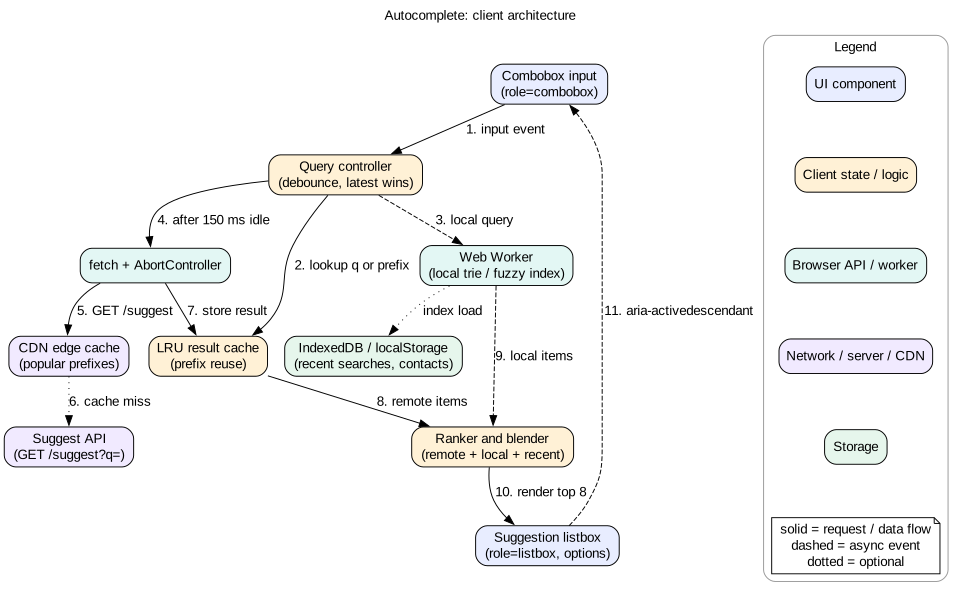
The component has five parts.
Combobox input. Owns the text, focus, and keyboard events.
Query controller. Debounces input, decides whether to fetch, tracks the latest query, and cancels old requests.
Result cache. An LRU keyed by normalized query. It can also answer by filtering a cached shorter prefix.
Sources and blender. Remote API, local index in a worker, and recent searches. The blender merges and ranks them.
Listbox. Renders options, highlights matches, and reports the active option.
Figure 1. Client architecture. The controller is the brain. Cache and worker answer fast. The network answers last.
Keep the controller free of UI code. It takes a query and emits a state: idle, loading, results, empty, or error. Then you can unit test all the timing and race logic without a DOM. It also lets you reuse the same controller in a command palette, a mention picker, and a search page.
Intuition
Think of a librarian with a short memory of recent questions. If you ask something she just answered, she replies at once. If you change the question before she comes back, she drops the old one and walks off for the new one.
4. Data model
interface Suggestion {
  id: string
  label: string                 // text shown
  kind: "query" | "product" | "person" | "recent"
  url?: string                  // navigate on select
  score: number                 // server or local score
  matches?: [number, number][]  // highlight ranges, optional from server
  source: "remote" | "local" | "recent"
}

interface CacheEntry {
  items: Suggestion[]
  complete: boolean             // true if server sent all matches
  fetchedAt: number             // for TTL
}

interface ComboboxState {
  inputValue: string
  normalizedQuery: string       // trimmed, lowercased, NFC
  status: "idle" | "loading" | "results" | "empty" | "error"
  items: Suggestion[]
  activeIndex: number           // -1 means no active option
  open: boolean
  latestSeq: number             // increases with every request
}

type LRU = Map<string, CacheEntry>  // key = normalized query
Two fields carry most of the correctness. latestSeq lets the controller ignore old responses. complete tells the cache when prefix filtering is safe. The normalized query is the cache key. Normalize with trim(), toLowerCase(), and normalize("NFC"), so that "Café" and "café " share an entry. For accent folding, also strip combining marks after normalize("NFD").
Echo q in the response. The client can then check that the response matches the request, as a second guard against races.
Keep personalized and public results apart. Public suggestions for "rea" can be cached at the CDN for minutes. Personal ones must use Cache-Control: private.
Use GET, not POST. GET can be cached by the browser and the CDN.
Enable HTTP/2 or HTTP/3 so many small requests share one connection.
The fetchSuggestions prop takes an AbortSignal. Any data source can then support cancellation. The component never knows if the source is REST, GraphQL, or a local array.
6. Deep dive: debounce, throttle, and request timing
Which one for autocomplete
Debounce is the common default. It cuts request count the most. But a pure debounce shows nothing during a long burst. Some products want results to update while the user types, as Google does.
Debounce 100 to 200 ms. Good for most search boxes. Few requests. Results appear soon after the user pauses.
Throttle 200 to 300 ms with a trailing call. Results refresh during typing. More requests. The trailing call makes sure the final text is searched.
Leading plus debounce. Fire on the first keystroke for instant feedback, then debounce the rest.
Adaptive debounce. Measure recent response times. If the network is slow, debounce longer, because fast requests will not arrive in time anyway.
Skip the network when you can
Below minChars, show recent searches only.
If the normalized query did not change, do nothing. Trailing spaces and case changes do not count.
If the cache has the query, render at once with no debounce. Cached results should feel instant.
If a cached shorter prefix is complete, filter it locally.
Input method editors
Languages like Chinese and Japanese use an input method editor (IME). The user types several keys to build one character. During this, compositionstart fires, then many input events, then compositionend. Do not query on partial composition. Check event.isComposing and wait for compositionend. Also do not treat Enter as select while composing, because Enter confirms the IME candidate.
Tip
Put the debounce in the controller, not in the input onChange. The input must always update at once, so the user sees each character. Only the fetch is delayed.
7. Deep dive: cancellation and race handling
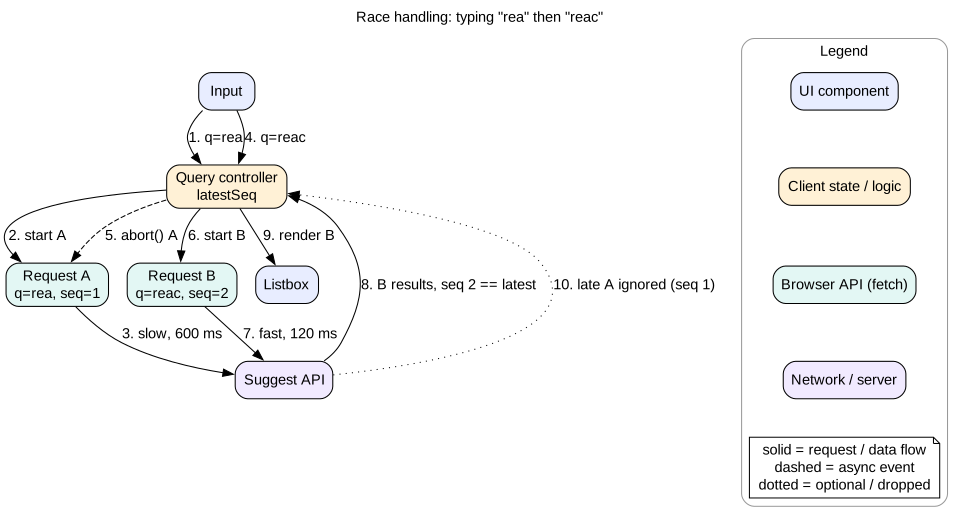
This is the most common bug in autocomplete. The user types "rea", then "reac". The request for "rea" is slow, 600 ms. The request for "reac" is fast, 120 ms. The "reac" results render first. Then the old "rea" results arrive and overwrite them. The list no longer matches the box.
Figure 2. Latest wins. Abort the old request, and check the sequence number anyway.
Two guards, not one
Abort. Keep one AbortController per in flight request. When a new request starts, abort the previous one. This frees the connection and the browser drops the response.
Sequence check. Give every request an increasing number. When a response arrives, render it only if its number equals latestSeq. This guard still works when the source cannot be aborted, such as a worker message or a third party SDK.
Treat AbortError as normal, not as an error. Do not show the error state for it. Do not log it as a failure.
Should you always abort?
Not always. If the user types "rea" then "reac", the "rea" response would still be useful in the cache. Backspacing to "rea" would then be instant. One option is to let the old request finish but not render it, and only store it in the cache. The cost is a little bandwidth. A middle path: abort only if more than 2 requests are in flight. On HTTP/1.1 there are only 6 connections per origin, so piling up requests blocks other work. On HTTP/2 this matters less.
Loading state without flicker
Do not clear the list when a new request starts. Keep showing the old results with a subtle loading hint until new ones arrive. Only show a spinner if loading takes more than about 300 ms. Clearing and refilling the list on every key makes it flicker and makes screen readers chatter.
Mistake
Using only debounce and assuming it prevents races. Debounce reduces requests. It does not order responses. Two requests 200 ms apart can still return in reverse order.
8. Deep dive: client cache and prefix reuse
An LRU on a Map
A Map iterates in insertion order. On every read, delete the key and set it again. It moves to the end. When the size passes the limit, delete the first key from map.keys().next().value. Both operations are O(1). The code lab below uses this.
Time to live
Public query suggestions: 5 to 15 minutes.
Product suggestions with stock or price: 30 to 60 seconds, or show price only after selection.
People search in an enterprise tool: a session long cache is fine.
Prefix reuse rules
Reuse a shorter prefix only when the server marked the result complete. For a ranked top 8, the best results for "reac" may not be in the top 8 for "rea". But you can still show the filtered prefix results as a placeholder while the real request runs. The user sees something useful at once, and the list then updates in place.
Layers of cache
Memory LRU. Fastest. Lost on reload.
HTTP cache. The browser can reuse a GET with max-age. Free, but you cannot list or filter its entries.
CDN edge. The top 10,000 prefixes cover a large share of traffic. Caching them at the edge cuts latency to 20 to 50 ms.
IndexedDB. For recent searches and local datasets that should survive reload.
Preloading
Some products preload the most common one and two letter prefixes when the input gets focus. A single request returns all 26 one letter results in about 10 KB. The first keystroke then answers from cache. Do this only on focus, not on page load, to avoid wasted data.
9. Deep dive: keyboard navigation and the combobox pattern
The input keeps DOM focus the whole time. Typing never stops.
aria-activedescendant names the active option. The screen reader reads it as if it were focused.
aria-selected="true" marks the active option for assistive tech. Style it with a visible highlight too.
autocomplete="off" stops the browser's own history popup from covering yours.
A polite live region announces the count, such as "8 suggestions" or "No results". Update it after the debounce, not on every key.
Key handling
Down. Open the list if closed. Otherwise move to the next option, wrapping or stopping at the end.
Up. Move to the previous option. From the first option, return to the input text with no active option.
Enter. Select the active option. With no active option, submit the free text.
Escape. Close the list. A second Escape clears the input.
Home and End. Move the text cursor in the input, not the list. Users expect normal text editing.
Tab. Close the list and move focus on. Some designs accept the active option on Tab. Pick one and be consistent.
Call event.preventDefault() on Up and Down. Otherwise the text cursor jumps to the start or end of the input. Keep the active option visible in a scrolling list with element.scrollIntoView({ block: "nearest" }).
Mouse and focus
Clicking an option fires blur on the input before click on the option. If blur closes the list, the click hits nothing. Fix it with mousedown plus preventDefault() on options, or use pointerdown. Hover should move the active index, so mouse and keyboard stay in sync.
When results change
If new results arrive while an option is active, reset activeIndex to -1, or keep the same item by id if it still exists. Never leave the index pointing to a different item than the user chose. Pressing Enter on a shifted item selects the wrong thing.
Interview
Name role="combobox", aria-expanded, aria-controls, aria-activedescendant, role="listbox", role="option", and aria-selected. Then explain the blur before click problem. This shows real experience.
10. Deep dive: highlighting, states, local results, and ranking
Highlighting matches
Highlight safely. Never build HTML strings with user text and set innerHTML. That opens a cross site scripting hole, because suggestions may contain user generated text. Instead, split the label into ranges and render text nodes with <mark> elements.
For prefix matches, highlight the typed part, or highlight the completion, as Google does. Both are common. Highlighting the completion helps users scan what is new.
For mid word or fuzzy matches, let the server return matches ranges. Client side regex on raw user input must escape special characters first.
Compare on normalized text but highlight on the original. Map indexes carefully if normalization changes string length.
Empty, loading, and error states
Idle. On focus with an empty box, show recent searches or popular items. This is where many users click.
Loading. Keep old results. Show a small spinner only after 300 ms.
Empty. Say "No results for 'xyz'" and offer the free text search. Announce it in the live region.
Error. Show local and recent results if any, plus a quiet "Could not load suggestions" line. The input must keep working. Free text submit must still work.
Offline and local results
Local sources make the box useful with no network and make it feel instant.
Recent searches in localStorage or IndexedDB. Cap at 20 to 50 entries. Let users delete them, for privacy.
A local index for small datasets, such as contacts, channels, or commands. Build a trie or a sorted array in a Web Worker. Query it with postMessage. The main thread stays free.
When navigator.onLine is false, skip the remote call and label results as local.
Ranking blend
Results from several sources need one order. A simple, explainable formula works well.
Normalize each source score to 0 to 1.
Add boosts: exact prefix match plus 0.3, recent use plus 0.2, starred item plus 0.1.
Dedupe by id or normalized label. Keep the best score and merge sources.
Cap each source, for example at most 3 recent items, so one source cannot fill the list.
Keep positions stable. When remote results arrive after local ones, do not reshuffle items the user may be about to click. Append new items below, or only reorder when the user has not moved the mouse or keys.
11. Deep dive: mobile behavior
Soft keyboard. It covers 40 to 50 percent of the screen. Show fewer suggestions, about 5. Use the visualViewport API to size the list to the space above the keyboard.
Full screen mode. Many mobile apps open a full screen search view on focus. It gives room for results and recent searches.
Input attributes. Use type="search" and enterkeyhint="search" so the keyboard shows a Search key. Set autocapitalize="off" and autocorrect="off" for code or usernames. Use inputmode for numeric fields.
Touch targets. Each option at least 44 by 44 CSS pixels.
Scroll and dismiss. Scrolling the list should not close it. Tapping outside should close it.
Slow networks. Raise the debounce to 250 to 300 ms when navigator.connection.effectiveType reports slow links. Favor local results.
Font size. Keep input text at 16 px or more. Mobile Safari zooms the page on focus if it is smaller.
12. Failure modes
Stale results overwrite fresh ones. Fixed by abort plus sequence check plus echoing q.
Request storm. A missing debounce or a bug that refetches on every render. Add a client side rate limit as a safety net, and alert on request rate per session.
Server slow or down. Use a timeout of about 2 seconds with AbortSignal.timeout(2000). Fall back to local results. Do not retry suggest calls aggressively, because a new keystroke will make a new request anyway.
Wrong item selected. Active index pointed to a shifted list. Reset or track by id.
Click does nothing. Blur closed the list before click. Use mousedown with preventDefault().
XSS through highlighting. Never inject labels as HTML.
Privacy leak. Personal suggestions cached at a shared CDN. Mark them private and keep the cache key per user.
Janky typing. Heavy local filtering on the main thread. Move it to a worker or index ahead of time.
13. Trade-offs
Debounce length
100 ms: snappy, more requests.
300 ms: fewer requests, feels slow for fast typists.
150 ms with caching is a good default.
Abort versus let finish
Abort frees connections and bandwidth.
Let finish fills the cache for backspace. Costs a bit of data.
Server versus client search
Client search is instant and works offline. It needs the full dataset, so it only fits under about 10,000 small items.
Server search scales to any size and ranks with global signals. It needs the network.
A hybrid gives the best feel: local first, remote when it arrives.
aria-activedescendant versus moving DOM focus
aria-activedescendant keeps focus in the input, so typing continues. This is the standard choice.
Moving real focus into the list is simpler to make work in some screen readers. But the user must move back to type.
Stable order versus best order
Reordering when better results arrive gives the best ranking.
Keeping order avoids mis clicks. Users hate a list that moves under their finger.
14. 45-minute interview walkthrough
Minutes 0 to 5. Clarify what is searched, dataset size, select behavior, personalization, and platforms. Decide generic component or specific box.
Minutes 5 to 10. Requirements and budgets: 200 ms to suggestions, 16 ms frames while typing, request math with and without debounce.
Minutes 10 to 16. Architecture: input, controller, cache, sources, blender, listbox. Draw the diagram.
Minutes 16 to 20. Data model and API: latestSeq, complete, echoed q, GET with cache headers.
Minutes 20 to 30. Deep dive on timing and races: debounce versus throttle, AbortController, sequence numbers, no flicker loading.
Minutes 30 to 37. Deep dive on accessibility: combobox roles, keys, live region, blur before click.
Minutes 41 to 45. Mobile, failure modes, and what you would measure: time to suggestions, requests per query, selection rate, error rate.
15. Summary
Update the input at once. Delay only the fetch, with a short debounce of about 150 ms.
Abort old requests and check a sequence number. Never let an old response win.
Cache results in an LRU keyed by normalized query. Reuse complete prefixes.
Blend local, recent, and remote results with a simple formula and stable order.
Use the ARIA combobox pattern with aria-activedescendant and a polite live region.
Highlight with text nodes and <mark>, never with innerHTML.
Design for IME, soft keyboards, slow networks, and offline.
16. Common mistakes
Sending a request on every keystroke.
Believing debounce alone prevents out of order results.
Showing an error state for AbortError.
Clearing the list on every key, causing flicker.
Moving DOM focus into the list so the user cannot keep typing.
Closing the list on blur and losing the option click.
Building highlight HTML with string concatenation.
Caching personalized suggestions in a shared cache.
Querying in the middle of IME composition.
Worked example: typing "react h"
A fast typist types "react h" at about 90 ms per key. Debounce is 150 ms. Minimum is 2 characters.
The user focuses the box. The list opens with 5 recent searches from IndexedDB. The live region says "5 recent searches".
"r" is typed. It is below minChars. The recent list filters to items starting with "r". No request.
"re" is typed. The debounce timer starts. "a" arrives 90 ms later and resets it. "c" and "t" do the same.
The user pauses 200 ms after "react". The timer fires at 150 ms. The cache has no "react". Request 1 starts with seq=1.
Request 1 returns in 60 ms from the CDN edge. Its seq equals latestSeq. Results are stored in the LRU and rendered. The live region says "8 suggestions".
The user types a space. The normalized query "react" does not change after trim. Nothing happens.
The user types "h". The query is "react h". The cache for "react" is not complete, but the client filters it to show 2 matching items at once as placeholders.
150 ms later, request 2 starts with seq=2. It is personalized and goes to origin. It returns in 140 ms.
The blender merges 1 recent item "react hooks tutorial" with 7 remote items. It dedupes "react hooks". The 2 placeholder items keep their positions at the top.
The user presses Down twice. aria-activedescendant moves to option 2. The screen reader reads "react hooks, 2 of 8".
The user presses Enter. The app navigates. "react hooks" is saved to recent searches. Total requests: 2 for 7 characters.
Code lab: debounced, cancellable, cached suggest
This model shows the controller logic with no DOM. A fake server answers with random latency, so responses can arrive out of order. The controller debounces, aborts old requests, checks sequence numbers, and caches results in an LRU. Save as suggest.mjs and run node suggest.mjs with Node 18 or newer.
const WORDS = ["react", "react hooks", "react router", "redux", "rust", "ruby"]
let serverCalls = 0
function fakeServer(q, signal) {
  serverCalls++
  return new Promise((resolve, reject) => {
    const t = setTimeout(() => resolve({ q, items: WORDS.filter((w) => w.startsWith(q)) }),
      20 + Math.random() * 200)
    signal.addEventListener("abort", () => { clearTimeout(t); reject(new DOMException("aborted", "AbortError")) })
  })
}

class LRU {
  constructor(max) { this.max = max; this.map = new Map() }
  get(k) { if (!this.map.has(k)) return undefined; const v = this.map.get(k); this.map.delete(k); this.map.set(k, v); return v }
  set(k, v) { this.map.delete(k); this.map.set(k, v); if (this.map.size > this.max) this.map.delete(this.map.keys().next().value) }
}

function createController({ debounceMs = 150, onResults }) {
  const cache = new LRU(50)
  let timer = null, seq = 0, controller = null
  return function onInput(raw) {
    const q = raw.trim().toLowerCase()
    clearTimeout(timer)
    const hit = cache.get(q)
    if (hit) { seq++; controller?.abort(); return onResults(q, hit, "cache") }
    timer = setTimeout(async () => {
      const mySeq = ++seq
      controller?.abort()
      controller = new AbortController()
      try {
        const res = await fakeServer(q, controller.signal)
        cache.set(res.q, res.items)
        if (mySeq === seq) onResults(q, res.items, "network")
      } catch (err) {
        if (err.name !== "AbortError") throw err
      }
    }, debounceMs)
  }
}

const shown = []
const onInput = createController({ onResults: (q, items, src) => shown.push({ q, items, src }) })
const sleep = (ms) => new Promise((r) => setTimeout(r, ms))
for (const text of ["r", "re", "rea", "reac", "react"]) { onInput(text); await sleep(60) }
await sleep(400)
onInput("rea"); await sleep(400); onInput("react"); await sleep(50)
console.log(shown.map((s) => `${s.q} via ${s.src}: ${s.items.length} items`).join("\n"))
console.log("server calls:", serverCalls)
console.log(shown.at(-1).q === "react" ? "PASS last result matches input" : "FAIL")
Expected output: the burst of 5 keystrokes makes a single server call. Typing "rea" later makes one more call. Typing "react" again answers from the cache. The last shown result always matches the last input. Change debounceMs to 0 and run again to see the request count grow.
Check yourself
What is the difference between debounce and throttle, and which suits autocomplete?Answer
Debounce runs once after input stops for a set time. Throttle runs at most once per interval during input. Debounce of about 150 ms is the usual default because it sends the fewest requests. Throttle with a trailing call fits products that want results to update while typing.
Why is AbortController alone not enough to prevent stale results?Answer
Some sources cannot be aborted, such as worker messages or third party SDKs. A response can also resolve in the same tick as the abort. A sequence number check before render guarantees only the latest request wins.
When is it safe to answer "reac" by filtering cached results for "rea"?Answer
Only when the server marked the "rea" result as complete, meaning it contains every match. For a ranked top N list, filtered results are only a placeholder until the real response arrives.
Why does the input keep DOM focus in the combobox pattern?Answer
So the user can keep typing while moving through options. aria-activedescendant tells assistive tech which option is active without moving real focus.
Clicking an option does nothing on some browsers. What is the likely cause?Answer
The input blur handler closes the list before the click event reaches the option. Use mousedown or pointerdown with preventDefault() on options so focus stays in the input.
How do you highlight matches without creating an XSS risk?Answer
Split the label into matched and unmatched ranges, then render them as text nodes and <mark> elements. Never concatenate user text into an HTML string for innerHTML.
What changes for users typing Japanese with an IME?Answer
Input events fire during composition for partial text. Skip queries while event.isComposing is true, wait for compositionend, and do not treat Enter as select during composition.
Key terms
Debounce
Run once after events stop for a set time.
Throttle
Run at most once per fixed interval.
AbortController
Browser API that cancels a fetch or other abortable work through a signal.
Sequence number
An increasing id per request, used to ignore older responses.
LRU cache
A fixed size cache that evicts the least recently used entry.
Prefix reuse
Answering a longer query by filtering complete results for a shorter one.
Combobox
An ARIA pattern for an input with a popup of options.
Listbox
The ARIA role for the popup list of selectable options.
aria-activedescendant
Attribute on the focused input that names the active option by id.
Live region
An element whose updates screen readers announce, set with aria-live.
IME
Input method editor, used to compose characters in languages such as Chinese and Japanese.
Trie
A prefix tree that finds all words with a given prefix quickly.
Blending
Merging and ranking results from several sources into one list.